0:56
Explore
Frame.io - It's here. The all-new Version 4. Now in beta.
Frame.io · Apr 2024 · 1:39 · AI-annotated
- Length
- 1:39
- Scenes
- 59 · 1.7 s avg
- Product on screen
- 0:12
- Features shown
- 7
- Voiceover
- No
00:00:00 / 01:39:23
Frame.io’s 1:39 launch film runs 59 scenes, about 1.7 s each. The product shows up at 0:12 and 7 features are revealed. There is no explicit call to action. The video is built as a chaptered product tour: an abstract neon hook, a named product intro, then repeated feature blocks that pair large white titles, live-action user shots, and push-in interface demos. Its signature style is dark, cinematic, and precise, with continuous 3D zooms through the UI, neon accents, and clean sans-serif typography.
Footage neededEstimated needs: 7 capture groups — your screens or recordings · 1 official logo — reused across the film · 21 filmed passages — shoot, supply or replace · 3 graphic passages — draw or supply · 7 3D passages — build or supply
Is this your launch? to your site or press kit.
More like this


Frame.io - It's here. The all-new Version 4. Now in beta., scene by scene
· 59 scenes as text
01 · Hook · 0:00–0:00
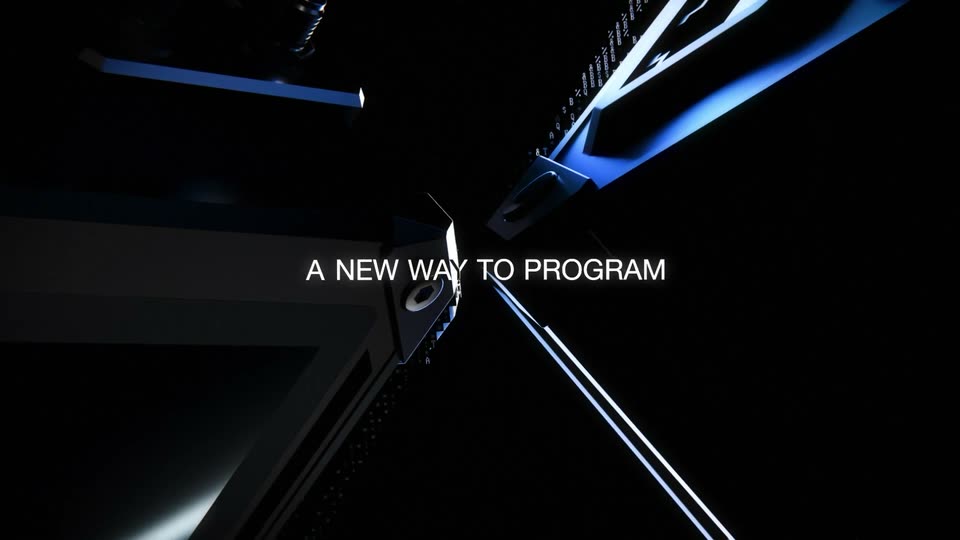
A dark void holds a single glowing slab set at an angle. The panel grows from the right, its face a bright magenta fading to warm white at a rounded leading edge, the bloom bleeding softly into the black.
Camera: Static
02 · Hook · 0:00–0:02
A thin vertical beam, magenta at the top and orange at the bottom, grows downward over a dark purple glow. The bright tip travels from mid-frame to the bottom edge as the line fills the frame.
Camera: Static
03 · Hook · 0:02–0:05
Locked-off close-up of a dark panel corner with white selection handles and 4 px guides. A teal pill counts Radius 0 to 6 as the corner rounds from sharp to rounded, and a bright pulse travels along the glowing purple neon tube at left.
Techniques: 3D mockup, Morph, Light sweep
Camera: Static
04 · Hook · 0:05–0:07
A 3D file card tilts toward camera as the title Tears in the Rain types itself into a text box, a glowing edge lighting its left side. The view then pulls back to a row of three angled cards, each with a thumbnail and a cloud size.
Techniques: UI zoom, 3D mockup
Camera: Static
05 · Hook · 0:07–0:12
A neon border highlights a project card in a dark thumbnail grid as a cursor hovers. The camera pulls back through the grid and app header, then out to the monitor on a desk in a dim room.
Techniques: UI zoom, Cursor demo, 3D mockup
Camera: Pull out
06 · Product intro · 0:12–0:13
A 3D-rendered desk holds a monitor showing the Frame.io thumbnail grid against a dark wall, lit by a lamp beside a blue clock. A large white headline scales in across the top as the camera pulls back to reveal the full setup.
On-screen text: “Introducing Frame.io Version 4”
Techniques: 3D mockup, Kinetic type
Camera: Pull out
07 · Product intro · 0:13–0:14
A desktop monitor on a wooden desk displays a grid of video thumbnails, set against a dark wall with diagonal light rays. A white headline scales above the screen as the camera pulls back to reveal the lamp and clock on the desk.
On-screen text: “Introducing Frame.io Version 4”
Techniques: Kinetic type, 3D mockup
Camera: Pull out
08 · Product intro · 0:14–0:15
A woman in a beige sweater walks to a wooden desk in a dim home office and sits before an iMac. A headline scales in over the shot.
On-screen text: “Introducing Frame.io Version 4”, “日”
Techniques: Kinetic type
Camera: Static
09 · Product intro · 0:15–0:16
A woman with long curly hair in a beige sweater sits at a wooden desk in a dim room, facing a large all-in-one monitor. The camera tracks her in profile as she reaches toward the keyboard, warm window light rimming her hair.
Camera: Push in
10 · Feature reveal · 0:16–0:20
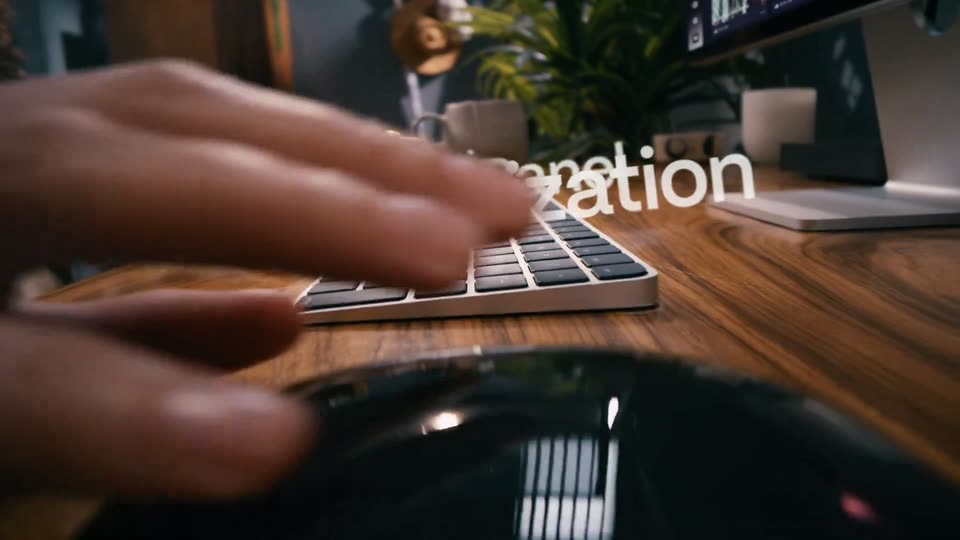
A low-angle shot follows a hand at a wooden desk: it sets down a ceramic cup, types on a white-framed keyboard, then rests on a mouse. Large white words “MultiPanel” and “Customization” scale in over the keys. A monitor and plants sit blurred in the background.
On-screen text: “Multi”, “Panel”, “Customization”
Techniques: Kinetic type
Camera: Pull out
11 · Feature reveal · 0:20–0:23
A dark asset-manager window fills the frame after a magnified crop of the file grid and video player scales back out. The view then zooms into the top toolbar, enlarging the Appearance settings panel with its Card Size and Aspect Ratio controls.
Techniques: UI zoom
Camera: Pull out
12 · Feature reveal · 0:23–0:26
A dark asset-management interface opens zoomed on an Appearance settings popover, then pulls back to the full grid of film-still thumbnails. A cursor clicks the portrait aspect-ratio option and the cards reflow from landscape to vertical.
Techniques: UI zoom, Cursor demo
Camera: Pull out
13 · Feature reveal · 0:26–0:27
A woman with long curly hair is filmed from behind, seated at a wooden desk facing a monitor showing a dark media library grid. The white headline Metadata Tagging floats in the upper right against a dark textured wall. A white lamp glows on the right edge.
On-screen text: “Metadata Tagging”
Camera: Static
14 · Feature reveal · 0:27–0:28
Close-up of a person's hands typing on a laptop and resting on a black mouse at a wooden desk, warm low light, shallow focus. The caption Metadata Tagging holds still on screen.
On-screen text: “Metadata Tagging”
Camera: Static
15 · Feature reveal · 0:28–0:32
A dark media-management UI opens on a field-settings panel over a grid of graded video thumbnails. The frame tightens onto one asset card; a cursor opens the Status dropdown and the Assignee search field. The clip ends on a black screen with a partial caption.
On-screen text: “olve contrast issues, slow down to...”
Techniques: UI zoom, Cursor demo
Camera: Push in
16 · Feature reveal · 0:32–0:34
A dark details panel fills the frame on a rating row. A circular cursor slides to the fifth star, which fills yellow, then the camera zooms out to a grid of media cards showing thumbnails, filenames and metadata.
Techniques: Cursor demo, UI zoom
Camera: Static
17 · Feature reveal · 0:34–0:35
A dark media-browser grid of video cards scrolls upward, revealing film-still thumbnails, filenames and Take fields. A circular touch indicator glides across the screen and taps the Select Take checkboxes, filling them purple.
Techniques: Cursor demo
Camera: Static
18 · Feature reveal · 0:35–0:37
A long-haired man in a green shirt types at an iMac in a bright café while the camera slowly tracks right. Large white text 'Unlimited Workflows' scales up across his torso.
On-screen text: “Unlimited Workflows”
Techniques: Kinetic type
Camera: Pull out
19 · Feature reveal · 0:37–0:38
Extreme close-up of a man's eye in profile, gazing off-screen left. A shallow depth of field melts the background into soft neutral bokeh. The frame holds steady on the eye and brow, with only subtle natural movement and a faint glint in the iris.
Camera: Static
20 · Feature reveal · 0:38–0:41
A dark asset-management screen titled Casting Selects scrolls to the toolbar as a circular cursor taps the Filter button. A dropdown opens, the value Considering is selected, and the panel closes to reveal a four-column grid of tagged portrait thumbnails.
Techniques: Cursor demo, UI zoom
Camera: Pull out
21 · Feature reveal · 0:41–0:42
A dark file-manager interface displays the Casting Selects collection header with a sandy banner and a five-column grid of actor headshots, each with a colored name tag and star rating. An open filter panel shows Casting Status set to Considering.
Camera: Pull out
22 · Feature reveal · 0:42–0:43
A long-haired man in a sage shirt sits in a shallow-focus cafe, looking off camera and shifting his expression as he speaks. A blurred figure in black moves behind him near hanging pendant lights.
Camera: Static
23 · Feature reveal · 0:43–0:44
A hand rests on a black mouse on a light wooden desk, fingers tapping the buttons. A black keyboard sits at the left edge, and blurred office items fill the background. The hand shifts the mouse slightly.
Camera: Static
24 · Feature reveal · 0:44–0:46
A dark collaboration interface fills the frame: a left panel lists the Wardrobe Selects collection with model thumbnails, a center panel previews a model in cream clothing, and a right panel shows comments. The view then zooms into the center image as the comments update.
Techniques: UI zoom
Camera: Push in
25 · Feature reveal · 0:46–0:47
A fashion clip of a woman in a cream cardigan against a beige wall and blue sky scales down to reveal it playing inside a dark video editor, with a tool rail on the left and a timeline below.
Techniques: UI zoom
Camera: Pull out
26 · Feature reveal · 0:47–0:49
Top-down view of hands typing on a silver keyboard and holding a mouse on a light wood desk, a monitor with a video editor above. The white headline scales up across the keyboard as the camera pushes in.
On-screen text: “Enhanced Performance”
Techniques: Kinetic type
Camera: Push in
27 · Feature reveal · 0:49–0:53
A dark asset-management interface zooms in continuously, from the full project grid with progress rings, through the upload list and an open context menu, until one portrait thumbnail fills the frame. A large headline scales in over the view.
On-screen text: “Enhanced Performance”
Techniques: UI zoom
Camera: Push in
28 · Feature reveal · 0:53–0:55
A dark asset-management UI shows a grid of file thumbnails. Three selected video and audio files lift off the grid as a floating stack and are dragged left into the Media folder in the sidebar, then the grid reflows to show the remaining seven items.
Techniques: Cursor demo
Camera: Static
29 · Feature reveal · 0:55–0:56
A woman in a cream ribbed top types on a laptop at a cafe table, a coffee cup and phone in front of her, while other patrons and record shelves fill the warm dim background; the camera holds a static medium shot.
On-screen text: “08 Appearance”, “Client Delivery”
Camera: Static
30 · Feature reveal · 0:56–0:57
A person's hands rest on a laptop trackpad at a wooden cafe table, the screen showing a photo sharing interface with a masked figure and a film strip of thumbnails. A large white headline reads Beautiful Sharing on the right, held static in a locked-off frame.
On-screen text: “Beautiful”, “Sharing”
Camera: Static
31 · Feature reveal · 0:57–1:00
A dark asset-management grid of sci-fi film stills fills the frame, ten thumbnails gain purple selection borders, then the view pushes in on the bottom bar so Move to, Download and Share buttons enlarge over a blurred laptop screen.
Techniques: UI zoom
Camera: Push in
32 · Feature reveal · 1:00–1:00
A dark asset-management interface fills the frame, a left folder tree, a center panel titled Hero Imagery for Review over a space banner, and a right share-settings panel. A grid of sci-fi astronaut thumbnails sits below. A small Move to label slides in.
Camera: Static
33 · Feature reveal · 1:00–1:01
A dark asset-management interface holds a static frame: a left folder tree, a center preview of a helmeted figure against a pale sky, a strip of thumbnails below, and a right panel of share and permission toggles.
Camera: Static
34 · Feature reveal · 1:01–1:03
Locked-off shot of a woman in a cream turtleneck seated at a cafe table behind a MacBook; patrons move past in the warm, dim background while she stays still.
On-screen text: “Passphrase”, “Hero Imagery for Review”, “曲”
Camera: Static
35 · Feature reveal · 1:03–1:04
A product interface fills the screen, its header holding the logo, the title Chill Nebula Chronicles and a Download button. The main viewer shows two astronauts in white suits inside a tent facing snowy peaks, with seven thumbnails and arrow buttons below. The frame stays locked and still.
Camera: Static
36 · Feature reveal · 1:04–1:05
A dark product interface shows a centered video player with an astronaut in a glowing visor and a play button, above a filmstrip of thumbnails. The header reads 'Chill Nebula Chronicles' with toolbar icons at the right.
Camera: Static
37 · Feature reveal · 1:05–1:06
A dark asset-library page holds a locked-off frame: a blue planet banner above a grid of sci-fi video thumbnails, each tagged with a filename, HDR badge and runtime. The project title and a short description sit between the banner and the grid.
Camera: Static
38 · Feature reveal · 1:06–1:08
A person's hands type on a MacBook at a wooden café table, a white cup with a gold lid in the left foreground and warm bokeh lights behind. The white headline Richer Feedback holds static across the lower third in a locked-off frame.
On-screen text: “Richer Feedback”
Camera: Static
39 · Feature reveal · 1:08–1:09
A dark review interface frames a video of two suited figures inside a tent facing snow-covered peaks. The sidebars and panels drop away as the view pushes into the footage, filling the screen. A bold headline reads Richer Feedback over the locked frame.
On-screen text: “Richer Feedback”
Techniques: UI zoom
Camera: Push in
40 · Feature reveal · 1:09–1:10
Two suited figures stand with their backs to camera under a peaked tent, snowy peaks and a weather mast beyond. A thin yellow line draws itself, looping around the left backpack with a node, then redraws across the right one.
Techniques: Particles
Camera: Static
41 · Feature reveal · 1:10–1:11
Two suited figures, seen from behind, stand under a tent roof facing snowy peaks; yellow line circles draw themselves around their backpacks. The shot cuts to a long 3D corridor where a suited figure walks away, a yellow circle marking the pack.
Techniques: 3D mockup
Camera: Pan
42 · Feature reveal · 1:11–1:12
A dark video editor screen splits into a left preview of a blue-tinted tent with a wind vane below and a right comments panel. A comment from Mia Ricci fades in under the Comments tab.
Camera: Static
43 · Feature reveal · 1:12–1:12
A video review screen shows a tented set with a wind vane; the comments panel slides off the right edge, widening the frame to two astronauts in white suits, each marked with a yellow circle.
Camera: Pan
44 · Feature reveal · 1:12–1:14
Two suited figures stand inside a tent facing snowy peaks, marked by a yellow hand-drawn circle and a location pin. A dark comment card slides in from the right carrying a reviewer's note and a file chip.
Camera: Static
45 · Feature reveal · 1:14–1:15
A 3D review viewport shows two suited figures from behind inside a tent, marked with yellow annotation circles and a floating comment card. The frame pulls back to reveal the full app, with a comments panel listing two notes on the right.
Techniques: UI zoom
Camera: Pull out
46 · Feature reveal · 1:15–1:15
A design review interface holds on an astronaut photo in the center, with a comments panel on the right and file controls above. The view stays still, then blurs into a full-frame desert shot as the scene ends.
Camera: Push in
47 · Feature reveal · 1:15–1:17
A dark form card fills in: the Status field resolves from a search box into a yellow Notes Addressed tag, then the Assignee and Date Uploaded rows settle into place. The view is a close-up zoomed onto one card in a row of identical cards.
Techniques: UI zoom
Camera: Pull out
48 · Feature reveal · 1:17–1:18
A dim wood-paneled bar holds a woman in a cream top standing center with hands on hips; a seated woman drinks at left and a bartender serves a customer at right. The white headline 'Fluid Mobile Experience' is fixed on the left.
On-screen text: “Fluid Mobile Experience”
Camera: Static
49 · Feature reveal · 1:18–1:20
A blonde woman in a cream ribbed top walks forward in a dim cafe, then lowers her gaze to tap a phone in her hand. A barista and bookshelves sit in the warm background while the white title holds on the left.
On-screen text: “Fluid Mobile Experience”
Camera: Push in
50 · Feature reveal · 1:20–1:22
A hand holds a phone at an angle over a warm blurred room, its screen showing a video review app with a space-suit clip, a purple timeline and a comments list. A finger taps the screen while a static headline sits beside the device.
On-screen text: “Fluid Mobile”, “Experience”
Camera: Static
51 · Feature reveal · 1:22–1:25
A front-facing phone on a dark background plays an astronaut clip while the review app's comment list scrolls up. New timestamped notes and like counts slide in from the bottom as the timecode advances.
Camera: Static
52 · Feature reveal · 1:25–1:26
A phone mockup sits centered on a near-black background, its screen showing a dark file manager titled All Assets with two folder cards and a grid of sci-fi video thumbnails. The list scrolls a few pixels and the header text settles into place over the first second.
Camera: Static
53 · Other · 1:26–1:27
A woman with long curly hair in a beige V-neck sweater sits in a dim room and looks at an off-screen monitor. The blurred background shows a window, framed art and a wooden cabinet. The word Creative holds in white on the left as the camera drifts.
On-screen text: “Creative”
Camera: Push in
54 · Other · 1:27–1:28
A long-haired man in an olive shirt stands in a sunlit office, speaking toward the camera as blurred coworkers move behind him. A white bold title, Workflows, is fixed across his chest for the whole shot.
On-screen text: “Workflows”
Camera: Pan
55 · Other · 1:28–1:29
A woman in a cream ribbed turtleneck sits in a warmly lit café, glancing to the side as the camera drifts slightly. White text holds on the right of the frame.
On-screen text: “For All”
Camera: Pan
56 · Demo · 1:29–1:32
A tilted wall of dark app screens fills the frame in 3D perspective, showing timelines, file lists, photo grids and chat panels. The camera drifts across the grid, tilting and panning so different panels come into focus while the edges stay blurred.
Techniques: 3D mockup
Camera: Pan
57 · Outro · 1:32–1:35
A neon tube in magenta and cyan draws itself into the numeral 4 against a black wall, then the whole sign scales up and holds with a soft glow. The frame stays locked off.
On-screen text: “4”
Techniques: Masking
Camera: Static
58 · Outro · 1:35–1:37
A neon-stroked number four in cyan and magenta glows at the center of a black frame. It holds, then scales down and fades until only a faint curved arc remains. The camera stays locked off.
On-screen text: “4”
Techniques: Kinetic type
Camera: Static
59 · Outro · 1:37–1:39
A small white logo, three curved strokes and a dot, sits centered on a plain black background. It stays still and locked off for the whole shot, with no other elements or motion.
Camera: Static