1:58

Meet Craft Assistant: Your Thinking Partner in Craft
Craft · Productivity · Nov 2025
Microsoft · Nov 2025 · 0:16 · Full motion · AI-annotated
Microsoft’s 0:16 launch film runs 4 scenes, about 4.0 s each. The product is on screen from the first frame and 3 features are revealed. There is no explicit call to action. The video is built as a continuous cursor-driven UI walkthrough, moving from a flat agent table to a tilted 3D product card. Its pacing is steady, with smooth crossfades and a final perspective rotation that presents the attack-path graph.
Is this your launch? to your site or press kit.
Craft · Productivity · Nov 2025
Magnitude · B2B · Sep 2026
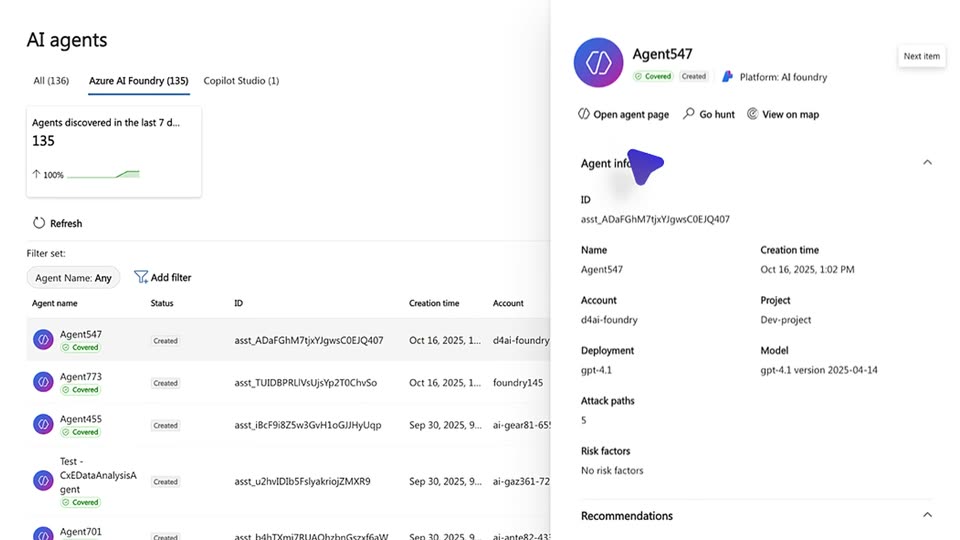
The AI agents table of a light security console fills the frame. A purple cursor selects the Agent547 row, a detail panel with ID, model and risk fields slides in from the right, then the cursor clicks Open agent page and the screen crossfades to a blank agent view.
Techniques: Cursor demo
Camera: Push in
A security dashboard shows an agent overview with a left navigation sidebar. A blue cursor glides across the Overview, Security recommendations and Attack paths tabs. The screen then opens a side-by-side detail pane listing the recommendation description and risk level.
Techniques: Cursor demo
Camera: Pull out
A tilted 3D mockup of a Microsoft Defender window floats on a plain gray backdrop. A cursor clicks the Attack paths tab, and a detail panel opens on the right as the view pulls back from a close-up.
Techniques: Cursor demo, 3D mockup, UI zoom
Camera: Pull out
A Microsoft Defender interface card tilts in 3D perspective on a light gray backdrop, then rotates to face the viewer. The screen shows a Recommendations panel with an Agent547 card, a filter list, and a network graph of attack paths with risk factor chips.
Techniques: 3D mockup
Camera: Static