4:11

Rishab Jain - AI systems are already superhuman at playing games: Chess, Go, Starcr
Prescience, Inc. · Healthcare · Aug 2026
Merlin AI · Jul 2024 · 1:15 · Full motion · AI-annotated
Merlin AI’s 1:15 launch film runs 23 scenes, about 3.3 s each. The product shows up at 0:09 and 6 features are revealed. The call to action lands at 1:07 (90% in), over a voiceover. The video alternates flat kinetic-type cards, where scattered words slide and scale into place, with tilted 3D mockups of the interface that defocus and zoom between beats. Each feature gets a bold headline card followed by a short UI demo, all set on a single pale background with a pulsing blue logo mark as the only recurring color accent.
Is this your launch? to your site or press kit.
Prescience, Inc. · Healthcare · Aug 2026
Dalet Labs · Oct 2026
Microsoft · AI · Apr 2017
Films whose music sounds like this one, voice left out
Parsewise · Electronic
Runway · Modern electronic
On a plain light gray background, the headline assembles word by word. Each word slides and scales from a scattered position, then settles into two centered lines reading the full question.
On-screen text: “Stuck in the age-old construction management rut?”
Techniques: Kinetic type
Camera: Static
On a plain off-white background, the fading line “construction management rut?” dissolves out, then the words “Relying on clunky ERPs” drift in from scattered offsets and settle into one centered line.
On-screen text: “in the age-old”, “construction management rut?”, “Relying on clunky ERPs”
Techniques: Kinetic type
Camera: Static
On a plain light background, the phrase 'Relying on clunky ERPs' assembles word by word with scaling and sliding, then dissolves as the quote 'we've always done it this way' mindset? builds in the center, words fading through light gray.
On-screen text: “Relying on clunky ERPs”, “'we've always done it this way'”, “mindset?”
Techniques: Kinetic type
Camera: Static
A blurred blue blob pulses and reshapes above the bold black Merlin AI title on a flat pale background. Captions type and slide in beneath the title in sequence, and the final frame blurs the whole lockup.
On-screen text: “Merlin AI”, “vast datasets”, “extensive construction algorithms”, “simplifies everything.”
Techniques: Kinetic type, Morph
Camera: Static
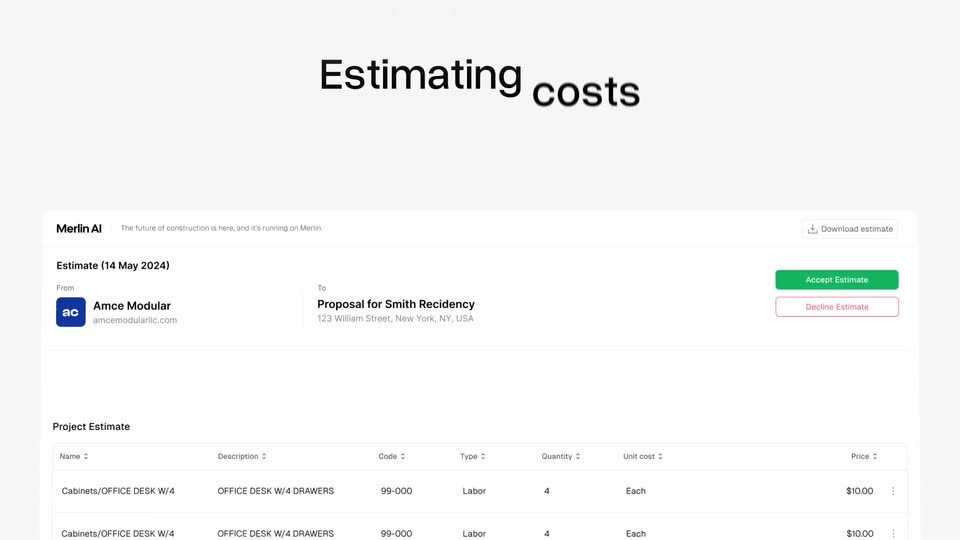
On a plain light background, the headline “Estimating costs” sharpens and scales into the top of the frame. A white estimate document slides up from below, revealing its header, sender and recipient blocks, action buttons, and a line-item table.
On-screen text: “Estimating costs”
Techniques: Kinetic type
Camera: Static
A large black headline reads Estimating costs above a flat estimate document. The headline scales and scrolls up to leave costs, while the document scrolls to reveal payment, attachments and approval rows.
On-screen text: “Estimating costs”, “costs”
Techniques: Kinetic type
Camera: Pan
A blurred project management interface sharpens as the camera zooms out, revealing a 3D laptop mockup displaying a Gantt chart dashboard. Above the device, the text 'Winning projects' appears, with the second word fading in with a motion blur effect.
On-screen text: “Winning projects”
Techniques: 3D mockup, Kinetic type
Camera: Pan
A blurred product table with colored status pills slides up out of frame, leaving the word Procurement to fade in centered on a light gray field.
On-screen text: “Procurement”
Camera: Pan
The “Procurement” headline holds centered above a dark Merlin AI window listing a Bids table. The window eases up into place, then the frame zooms into the table rows and defocuses to exit.
On-screen text: “Procurement”
Techniques: UI zoom
Camera: Pan
A white data table slides down out of frame as the headline 'Factory management' assembles above it, then a tilted 3D product screen with a live-view card grid rises into the lower half.
On-screen text: “Factory management”
Techniques: Kinetic type, 3D mockup
Camera: Pan
A black headline reads above a tilted 3D product screen. The live-view grid of colored machine cards holds still while a white detail panel slides in from the right, filling with status and task rows for SA-5.
On-screen text: “Factory management”
Techniques: 3D mockup
Camera: Static
A centered black headline sits above a 3D laptop mockup on a pale background. The screen shows a dashboard of colored status cards with a white detail panel open on the right. The frame then defocuses and zooms in as a transition.
On-screen text: “Factory management”
Techniques: 3D mockup
Camera: Pan
A bold black headline builds word by word on a white field, then a tilted 3D finance dashboard slides up beneath it, showing balance cards, line graphs and transaction rows.
On-screen text: “View your entire financial landscape”
Techniques: Kinetic type, 3D mockup
Camera: Pan
A tilted 3D mockup of the Merlin AI finance report fills the lower frame, its Sankey diagram building up colored flow bands left to right. Above it, the black headline drifts upward and fades out.
On-screen text: “View your entire financial landscape”
Techniques: 3D mockup
Camera: Pan
On a plain light background, the headline builds up word by word in a staggered layout, 'Ready' in dark bold and the rest in gray, after a blurred colored board interface fades out.
On-screen text: “Ready for the best part?”
Techniques: Kinetic type
Camera: Pan
On a flat light gray field, the black sans-serif line assembles as the words 'best part?' slide up into line with 'Ready for the', hold still, then slide away to the upper right with motion blur.
On-screen text: “Ready for the best part?”
Techniques: Kinetic type
Camera: Static
A large dark headline builds word by word over a light background as the Merlin.AI projects dashboard slides up from the bottom. The headline clears and the flat interface, with a dark Ask AI panel on the right, settles centered.
On-screen text: “Ready for the best part?”
Techniques: Kinetic type
Camera: Pan
The Merlin AI projects table sits on a dark screen with an empty blue Ask AI panel on the right. The view zooms into the panel as the question about the Wilson project is typed and an AI reply with a sparkle icon fills in.
Techniques: UI zoom
Camera: Push in
The clip opens on a close-up of the Merlin AI chat panel, zooms out to the full project dashboard with Gantt chart, then the black headline real-time updates appears word by word above the screen as it tilts in 3D, and finally zooms back into the chat as a new question bubble slides in.
On-screen text: “real-time updates”
Techniques: UI zoom, Kinetic type
Camera: Pull out
A white task board with avatar labels sits at left while a blue chat panel fades in at right. Two message bubbles appear in turn, the second typing out a reply about samples arriving Friday.
Camera: Pull out
A flat Merlin AI screen pairs a materials table with an AI chat. The view zooms into the chat as a reply types out and the user confirms, then zooms out as the left table switches to a projects list, before a white panel wipes in from the left.
Techniques: UI zoom
Camera: Pull out
A blurred product screen, a data table beside a blue detail panel, exits the frame, leaving a plain light gray field. A faint shape hints at the next element rising from the bottom edge.
Camera: Pan
On a plain light gray field, the words Connect, at, MerlinAI and .co slide into place, assembling the centered line Connect at MerlinAI.co, which then holds still.
On-screen text: “Connect at MerlinAI.co”
Techniques: Kinetic type
Camera: Static