1:35


Introducing Sila
Sila · B2B · Aug 2026
ManimGX’s 3:33 launch film runs 82 scenes, about 2.6 s each. The product shows up at 1:53 and 1 feature is revealed. There is no explicit call to action; a voiceover carries the film. Dark, near-black stage with a single lit desk and floating UI; captions in white sans with gold highlights, serif titles for the 3D math beats. Pacing is a steady 12 cuts per minute: long held 3D renders punctuated by fast scroll-throughs of feeds and code, with year-counter rewinds and fast-forwards as the signature transitions. The story is a two-part argument (GUIs were always code, so give agents the code) that builds from a social-feed hook to a product launch, then hands the final minute a
Is this your launch? to your site or press kit.
A dim home-office desk holds a monitor showing a social feed, a standing phone, a keyboard and a lamp. The room brightens and the camera pushes in as a white caption fades in along the bottom edge.
On-screen text: “When Claude Opus 5.5 came out,”
Techniques: 3D mockup
Camera: Push in
A dark 3D desk holds a laptop, keyboard and a monitor showing a social feed with a Claude post. Large white “OPUS 5.5” and a yellow date line sit on the left, a white caption runs along the bottom. The frame stays locked off.
On-screen text: “OPUS 5.5”, “the new model, Sept 22, 2026”, “When Claude Opus 5.5 came out,”
Techniques: 3D mockup
Camera: Static
A monitor on a dark desk shows the X feed in 3D, then the view zooms into the screen and scrolls down the timeline of posts. A lower-third caption sits at the bottom throughout.
On-screen text: “X exploded with motion graphics.”
Techniques: 3D mockup, UI zoom
Camera: Push in
A social media post shows a video player where the word WAITING in large dark blue type glitches as a blue scanline sweeps across it. A yellow caption Launch films. sits centered below the player on a dark pill.
On-screen text: “Launch films.”
Camera: Push in
A vertical feed of X posts scrolls up, each pairing a tweet about Claude Opus 5.5 with an embedded explainer video of a red character and a server rack. A black pill at the bottom swaps yellow captions from Launch films. to Explainers.
On-screen text: “Launch films.”, “Explainers.”
Camera: Pan
A video player UI on a dark feed shows a motion reel: a red panel with the word EASE in heavy black type, then a black panel with white IN and a red dot. A yellow caption Kinetic type. sits at the bottom.
On-screen text: “Kinetic type.”
Techniques: Kinetic type
Camera: Static
A video player mockup on a dark feed plays a kinetic type demo. Bold blue EASE blurs across a light card, then the card inverts to blue as white OUT. slides in from the left with a red dot. A yellow caption reads Kinetic type.
On-screen text: “Kinetic type.”
Techniques: Kinetic type
Camera: Static
A lime-green video player card sits on black, framed by a timecode, mute icon and a row of engagement stats. Inside, the word NEVER assembles from blurred, scattered letters into a sharp dark-green bold line, while a gold caption reads Kinetic type. below.
On-screen text: “Kinetic type.”
Techniques: Kinetic type
Camera: Static
Heavy white sans text on black cycles through LINEAR., Motion designer. and 0 keyframes, then a dark Twitter feed fades in and scrolls as the words sit inside a video thumbnail. A gold-highlighted caption reads Over a thousand videos in a week.
On-screen text: “LINEAR.”, “Motion designer.”, “0 keyframes”, “Over a thousand videos in a week.”, “claudevideo.org (an independent index): 1128 videos, Sep 22–28”
Techniques: Kinetic type
Camera: Pull out
A dark X feed scrolls upward past a video card reading Opus 5.5, Motion designer, 0 keyframes, with a red zero. A centered caption sits at the bottom of the frame while the list moves.
On-screen text: “Over a thousand videos in a week.”
Camera: Pan
A dark social media feed scrolls slowly downward, a video player at the top sliding out of frame as two tweets about Claude Opus 5.5 come into view. A bold caption with a yellow highlight stays fixed at the bottom.
On-screen text: “But Opus can't draw a single frame.”
Camera: Static
A dimmed X feed showing a cartoon monitor illustration brightens on the left as a code editor panel appears on the right, forming a side-by-side split. A lower-third caption swaps from a full sentence to a short line.
On-screen text: “But Opus can't draw a single frame.”, “It writes code,”
Techniques: Split screen
Camera: Pull out
A split screen holds a social post with a pixel-art monitor on the left and a JavaScript file in a code editor on the right. Overlaid, the words THE CODE and the real animator sit over the post while a caption reads and the code draws the video.
On-screen text: “THE CODE”, “the real animator”, “and the code draws the video.”
Techniques: Split screen
Camera: Static
A split screen pairs a social post playing a cartoon on the left with a scrolling code editor on the right. The cartoon cuts from a robot on a retro monitor to a wide-eyed scientist beside glowing circuits, while white subtitles roll across the bottom.
On-screen text: “and the code draws the video”, “Making videos from code?”, “Who would have thought?”, “How did we get here?”
Techniques: Split screen
Camera: Pull out
A social media post with a cartoon robot video plays on the left beside a code editor on the right. The bottom caption switches from “How did we get here?” to “To answer that, let's go back.”
On-screen text: “How did we get here?”, “To answer that, let's go back.”
Techniques: Split screen
Camera: Static
A split screen shows a social post on the left with a looping pixel-art video of a blocky character sliding on a red board along a wavy line, and a JavaScript code editor on the right. A white caption reads 'To answer that, let's go back.'
On-screen text: “To answer that, let's go back.”
Techniques: Split screen
Camera: Static
A black screen with horizontal scanlines shows a white REW rewind icon top left and the year 2026 in large white serif digits with red-blue chromatic aberration. The digits glitch and decay to nothing as the caption To answer that, let's go back. holds at the bottom.
On-screen text: “REW”, “2026”, “To answer that, let's go back.”
Camera: Static
A dark desk with monitor, keyboard, mouse and phone sits under a large glitching year counter that rewinds to 1984, and the monitor morphs into a vintage Macintosh with a coiled-cable mouse. A yellow caption reads “Way back.” at the bottom, with a REW indicator top left.
On-screen text: “REW”, “Way back.”, “1984”
Techniques: Morph
Camera: Pull out
A beige 1984 Macintosh sits on a desk in a dark room, “1984” locked above it. The camera pushes in as the screen lights up, then zooms into the display where a hand cursor picks the oval tool and drags a circle onto a blank canvas.
On-screen text: “1984”, “1984.”, “This.. is the Macintosh.”, “You point, you click,”, “and the computer does the rest.”, “Want a circle?”, “Pick a tool, drag...”, “there it is.”, “But what actually happens when you click?”
Techniques: 3D mockup, UI zoom, Cursor demo
Camera: Push in
A 3D-rendered vintage Macintosh in a dark room shows QuickDraw; the circle on its canvas clears, then a crosshair drags a new one. A dark panel slides in at right with FrameOval(r) and counting coordinates, while captions line the bottom.
On-screen text: “Someone already wrote the code that draws a circle.”, “QuickDraw - by Bill Atkinson - in the Mac's ROM”, “FrameOval(r)”, “It sits there, waiting.”, “Your click runs it.”, “That's what a GUI is:”, “buttons that run code.”, “Soon, we animated that way too. Fast”
Techniques: 3D mockup, Cursor demo
Camera: Push in
A vintage Macintosh window, tilted in 3D perspective against a dark vignetted backdrop, displays a canvas of code button labels such as FrameRect(r) and PaintOval(r). The camera pushes in slowly. A yellow caption sits at the bottom edge.
On-screen text: “buttons that run code.”
Techniques: 3D mockup
Camera: Push in
A vintage beige monitor shows a retro drawing interface. A shaded gray sphere appears on the blank canvas and drifts diagonally down and right as the arrow cursor tracks it. A white caption in a dark rounded pill stays fixed at the top.
On-screen text: “Soon, we animated that way too.”
Techniques: Cursor demo
Camera: Static
A grayscale retro interface with a bouncing ball plays on a CRT monitor under the caption “Soon, we animated that way too.” It cuts to a black scanline field with a large “1985”, a fast-forward icon, the small window, and “Fast-forward to 2022:”.
On-screen text: “Soon, we animated that way too.”, “FF”, “1985”, “Fast-forward to 2022:”
Techniques: Cursor demo
Camera: Static
A gray retro Mac animation window (Stage, Cast, Score panels) sits centered on a black VHS-tracked background. A white FF icon and a large year counter roll fast-forward across the top while a caption anchors the bottom, the last digit of the year blurring as it spins.
On-screen text: “FF”, “1985”, “Fast-forward to 2022:”
Techniques: Kinetic type
Camera: Static
A retro teal desktop hosts an open animation editor with a bouncing ball in its black viewport. A large white year counter at the top ticks from 1996 to 1998, a fast-forward badge sits top-left, and a caption reads 'Fast-forward to 2022:' at the bottom.
On-screen text: “FF”, “1996”, “Fast-forward to 2022:”, “1998”
Camera: Static
A fast-forwarded screenshot of an old Mac OS animation app, with horizontal scan-line streaks and motion blur across the frame. A white year number sits at top, an FF glyph at top left, and a caption line at the bottom as the bouncing-ball preview plays quickly.
On-screen text: “FF”, “200”, “Fast-forward to 2022:”, “same idea, way more buttons.”
Camera: Static
A fast-forward icon sits top left over a large white year number with chromatic fringing that ticks from 200 to 201, a small white 3D figure striding beside it in a purple starfield. Below, the After Effects interface stays static while a caption reads at the bottom.
On-screen text: “FF”, “200”, “same idea, way more buttons.”
Techniques: Kinetic type
Camera: Static
A locked-off screen recording of a Mac desktop with After Effects open on a ball-and-trail composition. A cursor clicks through the panels while a large white year counter rolls to 2022 behind the window. A bottom caption reads, same idea, way more buttons.
On-screen text: “FF”, “2022”, “same idea, way more buttons.”
Techniques: Cursor demo
Camera: Static
A dark editing interface fills the frame under a large white 2022 headline. A white cursor moves up and opens a dropdown menu, ticking the CLICKS counter from 0 to 2. Bottom captions read same idea, way more buttons. then Click a menu.
On-screen text: “2022”, “same idea, way more buttons.”, “Click a menu.”
Techniques: Cursor demo
Camera: Push in
A dark After Effects workspace fills the frame, with toolbar, project panel and timeline stacked across it. A white cursor hops between the toolbar and the composition panel, clicking tools, while a CLICKS counter ticks up top right. The caption “Pick a tool.” holds at the bottom.
On-screen text: “Pick a tool.”, “CLICKS 4”, “CLICKS 5”
Techniques: Cursor demo
Camera: Static
A flat screen capture of an After Effects workspace where a cursor opens the Fill & Stroke color picker and hovers a swatch, a click counter badge ticks up in the corner, and a caption reads at the bottom. The view then pulls back to reveal the monitor on a desk with sticky notes.
On-screen text: “CLICKS 6”, “Pick a tool.”
Techniques: Cursor demo, UI zoom
Camera: Pull out
A dim 3D desk holds a monitor, keyboard, mouse and phone; the screen runs an animation app plotting a bouncing ball. The camera pushes in on the display while a cursor clicks menus and sets keyframes. Bottom captions and a top-right click counter update.
On-screen text: “Set a keyframe.”, “11”, “Another.”, “29”, “Add a trail.”
Techniques: 3D mockup, Cursor demo, UI zoom
Camera: Push in
In After Effects, a cursor drags the Decay slider from 2.96s to 0.50s while a blue dotted arc with a glowing ball plays in the composition panel. The view reframes onto the composition as a click counter ticks from 32 to 33.
On-screen text: “Drag a slider.”, “32 CLICKS”, “33 CLICKS”
Techniques: Cursor demo, UI zoom
Camera: Push in
On a dark editor screen, a tan ball bounces across the frame leaving a curved trail while a white cursor arrow hovers near the top right. A CLICKS 33 badge stays fixed in the corner, the bottom timecode counts up, and a caption reads 33 clicks later: done.
On-screen text: “33 clicks later: done.”
Techniques: Cursor demo
Camera: Static
A Mac desktop shows After Effects with a yellow ball on a curved path in the composition panel. The window slides left to reveal a Python editor reading from manimg import *. A yellow THE JOB sticky note with a checklist sits on the right. A cursor hovers in the panel. Caption Like the circle, holds at the bottom.
On-screen text: “Like the circle,”
Techniques: Cursor demo
Camera: Pull out
A desktop split screen: left, a motion-graphics app with a bouncing-ball preview and timeline; right, a code editor where Python lines type in one by one. A yellow sticky note lists the job in the corner, and white captions with yellow highlights roll at the bottom.
On-screen text: “THE JOB”, “yellow ball”, “drop & bounces across”, “3 seconds”, “each bounce ¼ as high”, “fading ½ s trail”, “each of those clicks ran code.”, “Each could be written as one line.”, “It was always code.”, “AI didn't invent that. We just pressed the buttons, ones we never asked.”
Techniques: Split screen, Cursor demo
Camera: Push in
A screen recording of After Effects plays a black composition in which a yellow ball bounces along a curved path, leaving a fading trail. The cursor rests near the Render button. A white caption sits centered at the bottom.
On-screen text: “We just pressed the buttons, and never asked.”
Camera: Push in
A black frame holds a tilted white title PART TWO in the left half, with a smaller gold line remake it for AI beneath it. The type stays locked and still for the full shot.
On-screen text: “PART TWO”, “remake it for AI”
Camera: Static
A dark After Effects workspace fills the frame: project panel, black composition viewer, timeline with keyframes. A cursor hovers by the Render button. Bottom captions read 'But now, everything has to be', then 'remade for AI.' The UI blurs and scales down as a large 'PART TWO' title appears.
On-screen text: “But now, everything has to be”, “remade for AI.”, “PART TWO”
Camera: Pull out
A dark AI animation tool interface fills the frame, with a natural-language prompt box in the lower left and a generated code panel on the right. A bottom caption shifts from yellow to white as the line reads out.
On-screen text: “And doesn't use”, “Because AI doesn't use buttons.”
Camera: Pull out
A dark code editor on the right types Python lines for ball.py while a left panel holds an agent prompt and a dimmed video timeline. A yellow sticky note lists task checks in the corner. Bottom captions swap between three lines as the view eases toward the code.
On-screen text: “Because AI doesn't use buttons.”, “It writes code.”, “So we need APIs:”
Techniques: UI zoom
Camera: Static
A dark code editor in 3D perspective shows Python code for a bouncing-ball animation, with a left preview panel and a yellow sticky note. The camera pushes in on the code as pink callouts highlight lines. White bottom captions read 'So we need APIs:' then 'interfaces built for agents.'
On-screen text: “So we need APIs:”, “interfaces built for agents.”
Techniques: 3D mockup, UI zoom
Camera: Static
A dark X feed scrolls up past tweets while bottom captions explain the growth of Remotion and HyperFrames. An embedded video types a serif line about browsers rendering frames, then the frame splits to show HTML source code in an editor on the right.
On-screen text: “That's why Remotion and HyperFrames exploded:”, “video from animating web pages,”, “using HTML, CSS, and JavaScript.”
Techniques: Split screen
Camera: Push in
A dark split screen: left holds a webpage mockup with a video player switching from a DROP IN card to a record player, right shows a syntax-highlighted code editor. A bold white caption anchors the bottom.
On-screen text: “using HTML, CSS, and JavaScript.”
Techniques: Split screen
Camera: Static
A two-panel screen shows a social post with a golden starburst video on the left and an HTML code editor on the right. The starburst pulses and the words SOUND EFFECTS flash in and out. A white caption reading using HTML, CSS, and JavaScript. sits at the bottom.
On-screen text: “using HTML, CSS, and JavaScript.”
Techniques: Split screen
Camera: Static
A split layout pairs a social post with a playing video player on the left and an HTML code editor on the right. The footage of walking people switches frames as a small tag appears, while a bold white caption “using HTML, CSS, and JavaScript.” sits at the bottom.
On-screen text: “using HTML, CSS, and JavaScript.”
Techniques: Split screen
Camera: Static
A split screen shows a HeyGen social post with a playing video of a woman at a desk on the left and an HTML code editor on the right. A large caption reads 'Great for 2D motion graphics.' then swaps to 'Wait.'
On-screen text: “Great for 2D motion graphics.”, “Wait.”
Techniques: Split screen, Kinetic type
Camera: Static
A black screen holds the word “Wait.” in white bold sans-serif at lower center, timed to the voiceover's pause. The frame stays locked off for the full duration.
On-screen text: “Wait.”
Camera: Static
A dark app screen with a top navigation bar and a left icon rail sits behind a centered yellow caption reading What about 3D?. The caption and the interface fade to black over the shot.
On-screen text: “What about 3D?”
Camera: Static
A black screen holds still, with a faint dark red glow running along the top edge. No text, logo, or interface appears; the frame is a brief static pause.
Camera: Static
A dark 3D desk scene with a monitor, lamp, phone and keyboard holds a locked-off frame. The ManimGX wordmark fades in on the monitor screen while a caption bar keeps the launch line fixed at the bottom.
On-screen text: “Today, we're launching ManimGX:”
Techniques: 3D mockup
Camera: Static
The ManimGX logo, with a green sphere, blue cube and red pyramid, sits centered on black as a soft glow fades. A caption reads “Today, we're launching ManimGX:”, then is replaced by “the API to make 3D videos.” building word by word.
On-screen text: “Today, we're launching ManimGX:”, “the API to make 3D videos.”
Techniques: Kinetic type
Camera: Static
A dark field with a soft blue glow holds a rounded input box labeled your agent, its caret blinking. A white caption, Let me show you what it can do, sits still at the bottom of the locked-off frame.
On-screen text: “Let me show you what it can do.”
Camera: Static
A dark chat input labeled 'your agent' sits on a near-black field with a teal circular send button at its right. A prompt types itself out letter by letter behind a blinking cursor, then the frame flashes white.
On-screen text: “Follow https://manimgx.academa.ai/1lms.txt to make me a 3D video of a tokamak, a star in a magnetic bottle.”, “Let me show you what it can do.”
Techniques: Kinetic type
Camera: Static
A glowing purple plasma torus sits center on black, wrapped in copper coil loops and blue spiral field lines, white and orange trails winding through the core. The camera orbits slowly. A serif title holds top-left; a formula, a note and a four-item legend fade in at the edges.
On-screen text: “Holding a star in a magnetic bottle”, “a tokamak: coils, plasma, and the twist of the field”, “q = r Bφ / R Bθ”, “3 laps the long way”, “for 1 lap the short way”, “field line, q = 3”, “field line, q = 2”, “ion: turns left-handed about B”, “electron: right-handed”
Techniques: 3D mockup
Camera: Pan
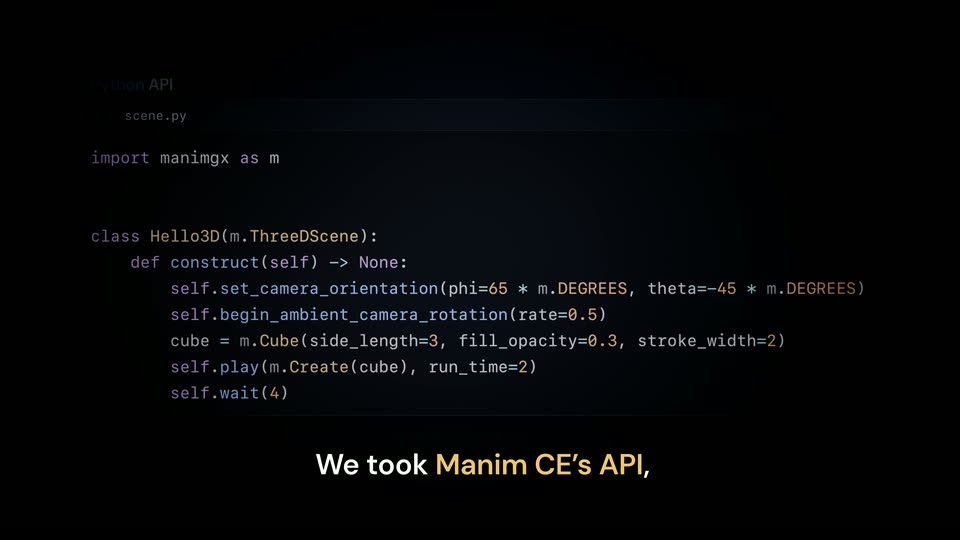
A dark code editor fades in on the left, showing a ManimGX Python script with syntax highlighting. Below it, a caption reads “We took Manim CE’s API,” with the product name in gold, held static for the short clip.
On-screen text: “Holding a star in a magnetic bottle”, “a tokamak: coils, plasma, and the twist of the field”, “We took Manim CE’s API,”
Camera: Static
A dark code editor shows a Python class with colored syntax. Teal outline boxes pop over the key API method names, hold, then fade, while three caption lines swap in sequence at the bottom.
On-screen text: “We took Manim CE’s API,”, “born from 3Blue1Brown’s videos,”, “and built a blazingly fast Rust and wgpu core under it.”
Camera: Static
Two code panels on black: a short Python snippet under a cyan “Python API” tag, and a longer Rust file under a “Rust + wgpu core” badge that scrolls upward line by line. A white caption with orange highlights sits at the bottom.
On-screen text: “Python API”, “Rust + wgpu core”, “and built a blazingly fast Rust and wgpu core under it.”
Camera: Static
On black, a teal ring of concentric circles in the upper left shrinks while a yellow radius line with a small r extends from its center. Below, thin green lines flatten from arcs into a descending histogram of bars, then the graphic fades out.
On-screen text: “O”, “r”
Techniques: Morph
Camera: Static
On black, thin blue wireframe loops form a butterfly-shaped Lorenz attractor. A glowing point traces the path, then thousands of colored trails in red, green, orange and cyan pile up along the curves, filling both wings. Equations stay fixed in the top left.
On-screen text: “x = σ(y − x)”, “y = x(ρ − z) − y”, “z = xy − βz”, “3,000 starts, 0.001 apart”
Techniques: Particles
Camera: Static
A black screen holds a code editor card with a 'your agent' badge, typing Python code line by line. A 3D preview fades in on the right: a rainbow surface with two peaks beside a math card, while bottom captions swap in time with the voiceover.
On-screen text: “So agents can make 3D videos,”, “with real math typesetting,”, “through Manim's elegant Python API.”
Techniques: Split screen
Camera: Static
A dark two-pane interface shows a Python code editor on the left and a 3D surface plot on the right, where a yellow curve grows around two peaks. A 'Python API' label appears top-left as bottom captions swap from 'with real math typesetting,' to 'through Manim's elegant Python API.'
On-screen text: “with real math typesetting,”, “through Manim's elegant Python API.”, “Python API”
Camera: Static
A red and white checkered cloth mesh falls in slow motion onto a blue sphere, draping and rippling over it in 3D. White serif text and a small spring diagram sit in the upper corners on a dark gray backdrop.
On-screen text: “An elastic sheet falls on a sphere”, “5,329 point masses · 31,246 springs · slow motion 0.4×”, “F = -k (|x| - L0) x̂”, “Hooke's law, on every spring”, “structural”, “shear”, “bend”
Camera: Static
A red-and-white checkered cloth drapes over a hidden sphere, then the frame cuts to a wireframe cube with an orange block passing through a hole in it. Static serif headlines and formulas sit in the corners on a dark gray ground.
On-screen text: “An elastic sheet falls on a sphere”, “5,329 point masses · 31,246 springs · slow motion 0.4×”, “F = −k (|x| − L0) x̂”, “Hooke's law, on every spring”, “structural”, “shear”, “bend”, “A cube through a hole in itself”, “Prince Rupert's problem (1693)”, “max square = √(2/3)(3 − √3) ≈ 1.065”
Techniques: 3D mockup
Camera: Static
A solid orange cube slides from the lower left into a translucent blue wireframe cube, passing through a square hole marked by orange edges, on a black field. Static white serif titles and a formula sit at the top.
On-screen text: “A cube through a hole in itself”, “Prince Rupert's problem (1693)”, “widest square = √(2/3)(3 − √3) ≈ 1.035 > 1”
Camera: Static
A split screen fades in on black: two dark 3D viewports side by side, labeled Blender Workbench and ManimGX with render-time counters counting up, while the caption Same scene: appears below. White captions name the subject, a cube through a hole in itself, Prince Rupert's problem (1693), and the widest square formula.
On-screen text: “Blender Workbench”, “ManimGX”, “Same scene:”, “A cube through a hole in itself”, “Prince Rupert's problem (1693)”, “widest square = √ 3 (3 − √3) ≈ 1.035 > 1”
Techniques: Split screen
Camera: Static
Split screen on black: a flat rainbow disc on the left, a two-sheet 3D Riemann surface on the right, each under a counting timer. Bottom captions change from “Same scene:” to “Blender, 25 seconds.” then “ManimGX, 3.” as both renders finish.
On-screen text: “Same scene:”, “Apple M4 Pro · same scene, launch → finished 1080p60 MP4”, “Blender Workbench, its fastest engine · measured Oct 9”, “Blender, 25 seconds.”, “ManimGX, 3.”
Techniques: Split screen
Camera: Static
Split screen shows the same rainbow helicoid 3D render: left, Blender Workbench still animating as its timer climbs from 2.81s to 10.58s; right, ManimGX finished at 3.02s with a white dot tracing the surface. Bottom caption reads: And when agents can render faster, they can iterate faster.
On-screen text: “Blender Workbench”, “ManimGX”, “finished MP4”, “Apple M4 Pro · same scene, launch → finished 1080p60 MP4”, “Blender Workbench, its fastest engine · measured Oct 9”, “ManimGX: 3.”, “And when agents can render faster,”, “they can iterate faster.”
Techniques: Split screen
Camera: Static
Three 3D spinning tops sit on dark discs, each tracing a colored loop (gold, pink, teal) plus a white circle as they tilt and spin. A serif headline sits top left; colored labels name each top below. A bottom caption fades in mid-clip.
On-screen text: “The dance of a spinning top”, “three identical tops, spun and tilted alike, let go three ways”, “cusps”, “let go at rest”, “loops”, “pushed back”, “waves”, “pushed forward”, “None of them falls: each tip stays between its two circles.”
Techniques: 3D mockup, Split screen
Camera: Static
Three labeled spinning tops sit side by side on black, each traced by a colored loop. The frame dissolves into a 3D surface plot of a wavy, heat-mapped landscape with contour rings and colored dots, as new captions fade in over the old.
On-screen text: “The dance of a spinning top”, “three identical tops, spun and tilted alike, let go three ways”, “cusps”, “let go at rest”, “loops”, “pushed back”, “waves”, “pushed forward”, “None of them falls: each tip stays between its two circles.”, “θ = (x; y) is the position; L(θ) the height”
Techniques: 3D mockup
Camera: Static
A 3D loss landscape in orange and purple with contour lines; five glowing balls roll down the surface leaving colored trails. Equations and a step counter sit at left, a value legend at right, a caption fades at the bottom.
On-screen text: “five starting points, one rule”
Techniques: 3D mockup
Camera: Static
A white serif quadratic formula on black morphs into the standard equation, then a gold rectangle strokes itself around it. Short captions appear at the bottom center.
On-screen text: “It’s free and open source.”, “Mac, Windows, Linux,”
Techniques: Morph, Kinetic type
Camera: Pull out
A 3D ray-tracing diagram on a dark field: a fan of rays from a glowing disc strikes a grid plane and a wireframe box over a checkered floor, while the traced-ray counter ticks up and a gold formula box fades out.
On-screen text: “Mac, Windows, Linux,”, “even your browser, with WebGPU.”
Camera: Static
A 3D ray-tracing demo: a transparent pixel grid hovers over a checkered floor with a sphere and glowing light disc, yellow and cyan rays fanning out from the grid. The camera rises as the rays-traced counter climbs from 1,388 to 4,580.
On-screen text: “even your browser, with WebGPU.”
Camera: Push in
A 3D ray tracing visualization orbits slowly around an eye point that fans colored rays onto a pixel grid, behind which spheres sit on a checkered floor. A counter in the top right ticks upward while the rays sweep and the grid tilts.
On-screen text: “How a ray tracer finds a pixel's colour”, “||o + td − c||² = r²”, “a ray o + t d meets a sphere (c, r)”, “rays traced 1,948”, “every pixel: one ray, and what it spawns”, “tubes: 0”, “rays traced 5,838”
Techniques: Parallax
Camera: Static
A rainbow spiral wave travels left to right through a translucent red barrier plane on a black stage, with a flat potential-energy graph below. Equations and reflected/tunnelled readouts sit in the corners, and the caption “Just imagine anything,” is centered at the bottom.
On-screen text: “A particle tunnels through a wall”, “Just imagine anything,”
Camera: Static
A black 3D scene shows a rainbow helix passing through a tilted dark-red wall plane, framed by white serif physics titles and formulas. The helix rotates gently. At the bottom, white caption lines with gold words swap in sequence over a flat wave plot.
On-screen text: “Just imagine anything,”, “and make a video of it”, “with your favorite coding agent.”
Camera: Static
A physics illustration of a colored wave tunneling through a translucent wall, with equations and probability labels, fades out to black, leaving only the bottom caption in white and gold.
On-screen text: “with your favorite coding agent.”
Camera: Static
A black frame holds the ManimGX serif wordmark, which scales in next to a green sphere, a blue cube and a red pyramid. A two-tone tagline appears beneath it.
On-screen text: “ManimGX, by Academa.”
Camera: Static
The ManimGX wordmark with 3D sphere, cube and pyramid sits centered on black above a gold-and-white tagline. The tagline fades out as the lockup scales down and re-centers, revealing a white script byline and a gray URL line beneath.
On-screen text: “ManimGX, by Academa.”, “by Academa”, “manimgx.academa.ai · github.com/academa-labs/manimgx”
Camera: Pull out
A close-up of a monitor showing the ManimGX wordmark and 3D geometric shapes pulls back to reveal a dark desk with a lamp, keyboard, mouse and speaker. The logo stays centered on the screen as the camera retreats.
On-screen text: “ManimGX”, “by Academa”, “manimgx.academa.ai · github.com/academa-labs/manimgx”
Techniques: 3D mockup, Parallax
Camera: Pull out
A dim 3D home office at night: a monitor on a wooden desk shows the ManimGX by Academa title card, beside a desk lamp, keyboard and mouse. The camera slowly pulls back as the whole scene fades to black.
On-screen text: “ManimGX by Academa”, “manimgx.com/academia”
Techniques: 3D mockup
Camera: Pull out