
3:33
Explore
00:00:00 / 01:35:11
- Length
- 1:35
- Scenes
- 48 · 2.0 s avg
- Product on screen
- 0:02
- Features shown
- 5
- Voiceover
- Yes
- Views
- 144 on YouTube
as of November 20, 2026
Sila’s 1:35 launch film runs 48 scenes, about 2.0 s each. The product shows up at 0:02 and 5 features are revealed. There is no explicit call to action; a voiceover carries the film. The video is built as a three-act narrative: a 'RIP Slack' cold open, a live-action problem of a designer buried in tools, and a 3D UI tour of sila that ends in a team celebration under the logo. Its signature moves are blur-to-focus interface cards drifting over soft colored orbs, hard cuts between live action and floating panels, and recurring set dressing like the flip clock and the red pen holder.
Footage neededEstimated needs: 6 capture groups — your screens or recordings · 1 official logo — reused across the film · 20 filmed passages — shoot, supply or replace · 2 graphic passages — draw or supply · 9 3D passages — build or supply
Is this your launch? to your site or press kit.
More like this

Similar soundtrack
Films whose music sounds like this one, voice left out
0:32
Pause - Introducing Claude Duet for Video Editing Just describe the edit an
Pause · Indie rock / Pop R&B
1:01

0:30

Aryan Sawhney - Today we’re launching Narrative: the AI video editor for the rest of
Narrative · Funk rock
Introducing Sila, scene by scene
· 48 scenes as text
01 · Hook · 0:00–0:02
A white caption RIP SLACK with a small gray gravestone icon and 2013-2026 holds centered on black, then a dim office of people at desks fades in behind it.
On-screen text: “RIP SLACK”, “2013-2026”
Camera: Static
02 · Product intro · 0:02–0:07
A wide studio office with people at desks and a round table. The frame opens dark under a white RIP SLACK, 2013-2026 overlay, then brightens as the overlay fades. A four-dot colored logo with the sila wordmark appears at center, holds, and fades out.
On-screen text: “RIP SLACK”, “2013-2026”, “sila”
Camera: Static
03 · Problem · 0:07–0:09
A woman wearing earbuds sits at a desk, chin resting on her hand, gazing at a laptop whose back faces the camera. A blue lamp and a leafy plant frame the left edge. The static label DESIGNER holds on screen.
On-screen text: “DESIGNER”
Camera: Static
04 · Problem · 0:09–0:10
High-angle shot of a white desk where a hand taps the laptop trackpad. The laptop screen shows a team chat with messages loading in the Marketing channel, and a phone beside it displays a 9:41 lock screen. A lamp, pens and a pink sticky note sit nearby.
Camera: Static
05 · Problem · 0:10–0:11
Extreme close-up of manicured fingers typing on a black laptop keyboard. The camera stays locked off with shallow focus on the keys as the hands press letters in a steady rhythm.
Camera: Static
06 · Problem · 0:11–0:12
A laptop screen at a slight angle fills the frame, showing the ChatGPT interface with a finished stand-up summary. At the bottom of the chat box the prompt text types out letter by letter, ending on the word summarize with a blinking caret.
Camera: Static
07 · Problem · 0:12–0:13
A black flip clock reads 9:16 AM on a desk, held in a locked-off close-up. A hand moves blurred across the foreground, working on objects. A red pen holder shaped like a cartoon character stands in sharp focus to the right against a warm, soft-focus background.
Camera: Static
08 · Problem · 0:13–0:14
An angled close-up of a monitor displays the Gmail inbox. The unread count ticks up from 8936 to 9073 while the open Quantara Updates email stays in view.
Techniques: 3D mockup
Camera: Static
09 · Problem · 0:14–0:15
A close-up of a laptop screen shows an email client with an inbox list on the left and a compose window on the right. The reply body types out 'Thanks!! I've reviewed' while the keyboard stays blurred in the foreground.
Camera: Static
10 · Problem · 0:15–0:16
A close-up of a woman wearing white wired earbuds and a dark jacket. She looks downward, then lifts her gaze slightly, with soft daylight and a shallow depth of field keeping the focus on her face.
Camera: Static
11 · Problem · 0:16–0:17
A tight close-up of a laptop screen showing a chat app with a notification dropdown, framed against a soft-focus office where two people sit at a table. The locked-off shot holds as a new notification line slides into the top of the dropdown, pushing the others down.
Camera: Static
12 · Problem · 0:17–0:18
A tablet mockup angles against a dark, blurred backdrop, its screen showing a messaging app with a notification panel on the right. The panel lists alerts from Slack, Claude, Cursor, Figma and GitHub, each with a Cancel button, while the list refreshes and the background app stays soft.
Techniques: 3D mockup
Camera: Static
13 · Problem · 0:18–0:18
Extreme close-up of a woman's face in soft daylight, white wired earphones in her ear. She looks down and blinks slowly. Shallow depth of field keeps the background a pale blur.
Camera: Static
14 · Problem · 0:18–0:19
A locked-off low shot frames a person's feet in white sneakers with black laces and ribbed white socks, standing on a glossy wooden floor beside a chair and a table leg. The numeral 111 slides across the frame.
On-screen text: “111”
Camera: Static
15 · Problem · 0:19–0:20
A laptop screen shows a Figma canvas with several website mockups and numbered avatar badges. A Slack thread panel sits top right, and a comment bubble from Krystal McKelvey pops in beside a frame, then a reply box with a blue send button slides open below it.
On-screen text: “111”
Techniques: Cursor demo
Camera: Static
16 · Problem · 0:20–0:21
A dark comment card floats over a grid of product screens. Krystal McKinney's note asks @lisa for feedback, and a reply types out letter by letter in the field below while a cursor hovers on an avatar at left.
Techniques: Cursor demo
Camera: Static
17 · Problem · 0:21–0:21
Extreme close-up of a person's blue eyes on a locked-off camera. The gaze and head shift subtly between frames, skin texture, lashes and brows filling the frame against a pale background.
Camera: Static
18 · Problem · 0:21–0:22
A black flip desk clock sits on a metal stand against a warm, blurred cafe background. The right minute card flips down from 27 to 26 while a hand sweeps across the soft-focus foreground. A blue mug rests at left. The frame stays locked off.
Camera: Static
19 · Problem · 0:22–0:26
A woman in a navy zip hoodie and white earbuds sits at a bright desk, leaning forward with eyes closed, then settles back and looks at an open laptop. A locked-off frame holds the scene, with posters and a plant in the sunlit background.
Camera: Pull out
20 · Demo · 0:26–0:28
A laptop on a cluttered office desk shows a desktop crowded with overlapping app windows. The camera zooms into the screen, which now displays four colored circles and a small window with a color wheel.
On-screen text: “NO”, “IDEA”
Techniques: UI zoom
Camera: Push in
21 · Demo · 0:28–0:29
A blurred chat screen zooms in and sharpens onto the Public channel, where a welcome message sits centered. A left sidebar with menu items fades in as the view settles on the message area.
Techniques: UI zoom
Camera: Static
22 · Demo · 0:29–0:30
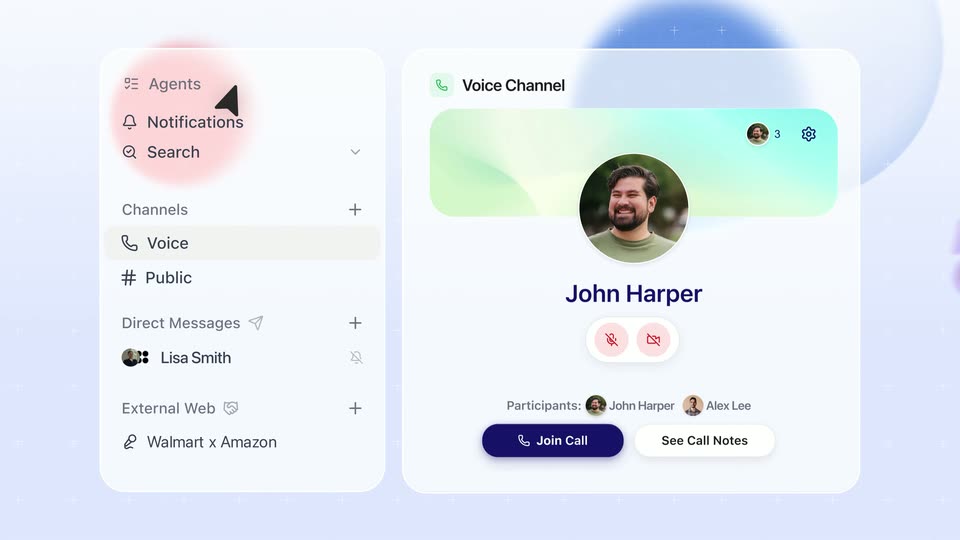
A light messaging app shows a channel sidebar left and a content panel right. The right panel crossfades from a Public channel welcome message to a voice call view with a round avatar and Join Call button, while sidebar labels settle from a doubled ghost state.
Techniques: Morph
Camera: Static
23 · Feature reveal · 0:30–0:31
Two flat UI cards on a light blue background: a left sidebar menu and a right Voice Channel panel with John Harper's profile and call buttons. A cursor moves from Voice to Agents, a Create button appears, and the right panel crossfades into a refreshed view.
Techniques: Cursor demo
Camera: Static
24 · Feature reveal · 0:31–0:34
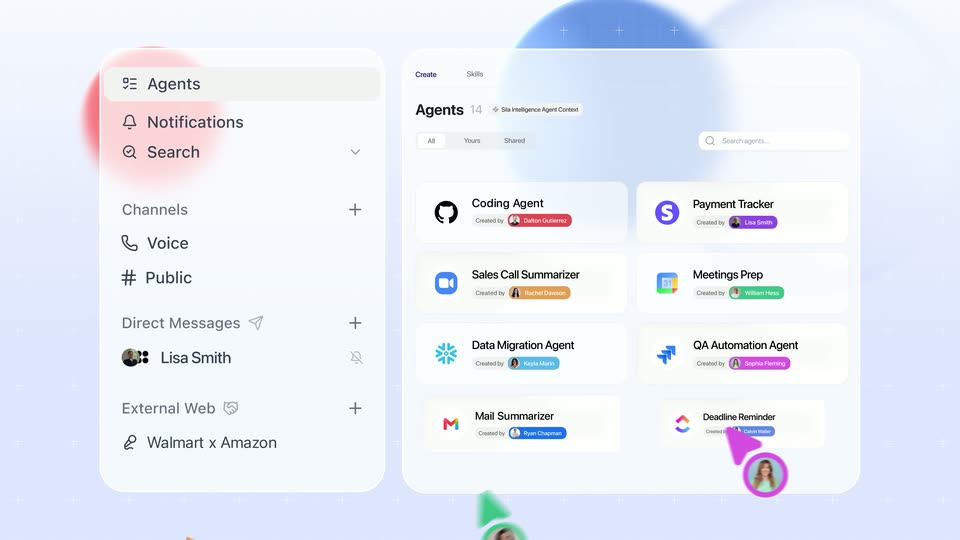
A blurred pair of UI panels sharpens into focus: a left sidebar and a right Agents view. The right panel fills from an empty state to a grid of agent cards while colored avatar chips and triangle shapes drift around and fade out.
Techniques: Split screen, Particles, Morph
Camera: Static
25 · Feature reveal · 0:34–0:35
Floating interface cards, a sidebar, agent tiles and channel cards sit in 3D perspective and drift past the camera as it moves through the layout. Blurred red and blue orbs float on a pale grid background.
Techniques: 3D mockup, Parallax
Camera: Static
26 · Feature reveal · 0:35–0:36
Floating white channel and agent cards drift over blurred coral and blue spheres on a faint grid. The view zooms into the # Developers card, which fills the frame and resolves into the full channel view with a creation banner, a message, and an input bar.
Techniques: UI zoom
Camera: Static
27 · Feature reveal · 0:36–0:39
A chat interface mockup in 3D perspective floats over a pale gradient with blurred red and blue orbs and a plus grid. The card drifts up; its header slides off the top and blurs while the message list and input hold steady.
Techniques: 3D mockup, Parallax
Camera: Pan
28 · Feature reveal · 0:39–0:46
A chat window in 3D perspective tilts and scrolls as a Coding Agent cycles through status lines, its timer and token count climbing, before a Linear Agent confirms a ticket. Blurred red and blue blobs sit behind it.
Techniques: 3D mockup
Camera: Pull out
29 · Feature reveal · 0:46–0:49
Two flat UI cards on a pale gradient background with plus marks: a Custom Notifications settings card on the left and a team chat card on the right. The frame sharpens from a blur, then a black cursor glides in and presses the Save button.
Techniques: Cursor demo
Camera: Pull out
30 · Feature reveal · 0:49–0:50
A glossy 3D envelope with a red bell badge floats at the center of a light blue grid, ringed by notification cards with avatars and messages. The camera drifts forward, sliding the cards past in parallax.
Techniques: 3D mockup, Parallax
Camera: Pull out
31 · Feature reveal · 0:50–0:51
Floating chat cards with avatars and red badges drift at varied depths over a pale blue gradient dotted with blurred pink and blue blobs. A red bell icon hovers top right and a cursor arrow rests on the central card.
Techniques: Parallax, Cursor demo
Camera: Pull out
32 · Feature reveal · 0:51–0:53
A white notifications card with three message rows and a red count badge holds center on a soft blue gradient dotted with blurred circles. The card snaps from a blurred zoom into sharp focus, then stays still while a black cursor drifts at the right edge.
Techniques: UI zoom
Camera: Static
33 · Feature reveal · 0:53–0:57
On a lavender grid with blurred red and blue circles, a search card types the query, a cursor clicks the send button, three result rows with channel tags and High priority pills blur in, then a green Done status appears.
Techniques: Cursor demo
Camera: Static
34 · Feature reveal · 0:57–0:58
A light list of support tickets with red priority pills sits on a lavender plus-grid. The title Agentic Search slides in at the top above a green Done check, while a black cursor travels across the rows and the list shifts down to reveal a new ticket.
On-screen text: “Agentic Search”
Techniques: Cursor demo
Camera: Static
35 · Feature reveal · 0:58–1:00
A white chat card sits centered on a pale lavender grid with two blurred orbs. Small brand pills blur and slide into place along the top. Inside, a man's avatar with an Amazon badge, the gray name Chris, and a three-dot typing indicator sit above a bold two-line message.
Camera: Static
36 · Feature reveal · 1:00–1:01
A chat card from Chris with an Amazon badge slides out to the left, and the blurred message list on the right comes into focus, showing messages from John, Lisa, and an Amazon Agent card.
Techniques: Parallax, UI zoom
Camera: Pan
37 · Feature reveal · 1:01–1:04
A tilted 3D panel of a team chat, soft at first, sharpens against a pale blue gradient. A white card on the left slides off frame. The Amazon and Walmart agent rows swap 'Searching' lines for completed results, and small Walmart and Amazon tags pop in beside them.
Techniques: 3D mockup
Camera: Pan
38 · Feature reveal · 1:04–1:06
A calendar icon labeled “Meeting Prep Learning...” holds the center of a pale blue plus-grid, while name pills, Gmail marks and soft color orbs circle it on a tilted ring at a steady pace.
Techniques: Parallax
Camera: Pull out
39 · Feature reveal · 1:06–1:09
A pale blue grid field holds a central cat logo badge, surrounded by orbiting chat bubbles, app icons, and soft colored spheres. The elements spiral inward, condense into a tight ring around the badge, then burst outward, leaving the logo alone. The caption below scales and fades.
On-screen text: “Coding Agent Learning...”
Techniques: Parallax, Kinetic type, Particles
Camera: Pull out
40 · Feature reveal · 1:09–1:12
A central white rounded square holding four colored dots sharpens out of a soft blur, ringed by floating circular app icons and two large blurred spheres on a pale plus-grid background.
On-screen text: “Coding Agent Learning.”
Camera: Static
41 · Other · 1:12–1:13
A laptop screen fills the frame showing a light interface with a central four-dot grid and floating circular icons. The camera pulls back to reveal a woman in a blue top seated behind the laptop on a desk, the screen content blurring as the frame widens.
Camera: Pull out
42 · Other · 1:13–1:14
A woman with long curly hair sits at a desk, reaching toward a laptop in the foreground. She then laughs, throwing her head back and raising one arm as her hair flies. Medium close-up, warm home-office background with a red pen cup and notebooks.
Camera: Pull out
43 · Other · 1:14–1:17
A woman in a navy zip sweater spins with arms outstretched in a sunlit office, then a second woman in a tan jacket joins her in playful dancing. A man seated at a desk in the background watches and laughs. The camera follows the motion with soft blur.
Camera: Pull out
44 · Other · 1:17–1:22
A woman in a navy sweater walks through a sunlit office, the camera tracking her as she hands a white sheet of paper to a curly-haired man in a blue shirt. Other people dance and gesture in the background.
Camera: Pull out
45 · Other · 1:22–1:24
A wide shot of a bright studio shows a team celebrating and tossing papers into the air. The camera cuts to a locked close-up of a MacBook Pro on a desk, its screen showing open apps, while blurred figures cheer behind it.
Camera: Pull out
46 · Other · 1:24–1:25
Locked-off shot of a bright office: an open MacBook Pro sits on a desk in the right foreground, its screen showing a chat app where a channel card scales in and a sidebar menu appears. Blurred coworkers pass papers behind.
Camera: Static
47 · Outro · 1:25–1:30
People stand and chat in a bright office with wooden floors, posters and scattered papers. A four-dot mark and the word sila fade in at center as the background pulls out of focus.
On-screen text: “sila”
Camera: Pull out
48 · Outro · 1:30–1:35
The sila logo, a 2x2 grid of red, yellow, blue and green dots beside the white wordmark, holds centered and static over a defocused office where people move about.
On-screen text: “sila”
Camera: Static