2:42

Introducing GPT-6 Astra: the most intelligent and aligned model in the world.
OpenAI · AI · Sep 2026
Narrative · Sep 2026 · 0:30 · AI-annotated
Narrative’s 0:30 launch film runs 19 scenes, about 1.6 s each. The product shows up at 0:04. The call to action lands at 0:25 (83% in). The story runs as a simulated chat that reveals the product, then a tight UI demo and a 3D fan of example clips, bookended by device shots and a black URL card. Pacing is slow and clean, alternating plain white chat fields, black type cards and the dark editor, with scale-in text and fanned 3D cards as the signature moves.
Is this your launch? to your site or press kit.
OpenAI · AI · Sep 2026
The Browser Company · Productivity · Jul 2023
Tana · Productivity · Nov 2026
A hand holds a dark foldable phone against a plain white backdrop, its screen playing a night clip of a rider in a blue jacket and helmet on a motorcycle over snow.
Camera: Static
A hand holds a foldable phone against a white backdrop and tilts it from portrait to landscape. The screen plays a 3D animation: a dark corridor, then a blue and orange logo, then a glowing ring.
Camera: Static
Two hands hold a tablet in landscape against a plain white background. The screen plays a snowboarder in teal and orange riding down a snowy slope, with the hands shifting slightly.
Camera: Static
Two hands hold a landscape tablet against a white studio background. The screen plays a snowy mountain clip with blue 3D letters reading FOR YOU, then the picture shrinks into a white frame as the tablet slides out to the right.
Camera: Pull out
A simulated message chat on a white background. A blue bubble with a game video thumbnail sits top right, gray reply bubbles pop in one by one on the left, and a blue bubble with a browser window mockup slides up from the bottom.
On-screen text: “yo, check out this edit I made”, “WoooooooooooW”, “wait...”, “you made this yourself?”, “how did you make that??”, “oh I went to usernarrative.ai”
Techniques: Kinetic type
Camera: Pan
A messaging chat on white shows gray reply bubbles asking how an edit was made, while a blue bubble points to usernarrative.ai above a link card previewing the dark AI video editor. The view zooms in on the editor card.
On-screen text: “yo, check out this edit made”, “Wooooooooooow”, “wait...”, “you made this yourself?”, “how did you make that??”, “oh I went to usernarrative.ai”, “AI Video Editor”, “useNarrative.ai”
Techniques: UI zoom
Camera: Push in
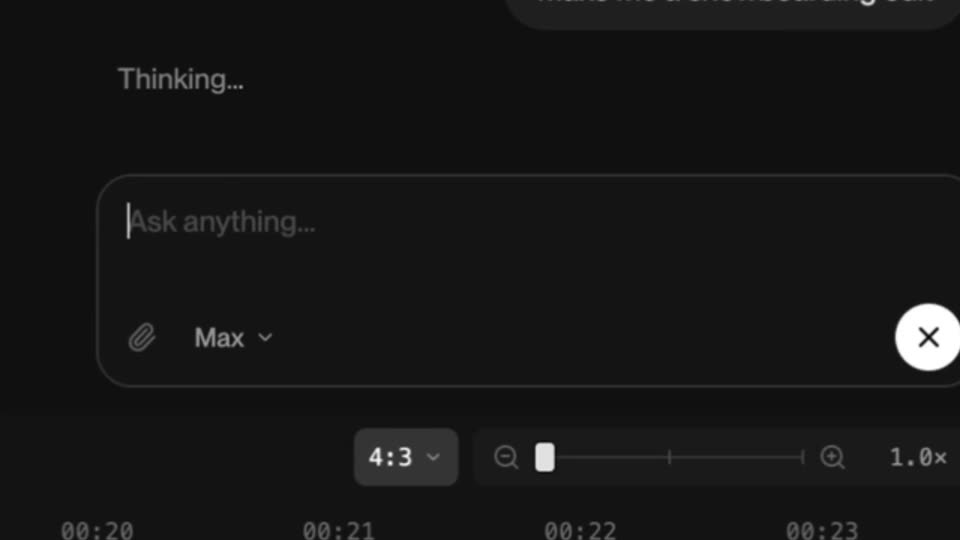
A dark editor is framed tight on a prompt field typing 'make me a snowboarding edit', then pulls back to the full interface: left thumbnail rail, center video of a snowboarder, right chat panel with the prompt and a Thinking status.
Techniques: UI zoom
Camera: Pull out
A dark video editor fills the frame: a media grid on the left, a center preview showing a snowboarding clip with a leaderboard and 3D COLD title, and a multi-track timeline below. The preview scrubs forward as the playhead advances and a cursor moves over the timeline.
Techniques: Cursor demo
Camera: Push in
A black frame holds, then the word WOAH cuts in centered, filling most of the frame height, and stays static for the remainder of the clip.
On-screen text: “WOAH”
Camera: Static
On a black field, the word WOAH in huge white capitals holds center, then the frame switches to the smaller lowercase line that was super easy, which builds up word by word.
On-screen text: “WOAH”, “that was super easy”
Techniques: Kinetic type
Camera: Static
A black field holds centered white lowercase text. The line reads 'that was super' as the final word 'easy' fades in to complete the phrase. The frame stays locked off and the type remains static once assembled.
On-screen text: “that was super easy”
Techniques: Kinetic type
Camera: Static
A white letterform clears off a black field to reveal a chat thread on white. A blue bubble with a link preview card drops in at the top right, then four gray question bubbles fade in one by one down the left side.
On-screen text: “oh I went to usenarrative.ai”, “but what about UGC?”, “what about podcast clips?”, “what about a sports montage from our latest event?”, “product launch videos?”
Techniques: Kinetic type
Camera: Static
A white chat screen fills the frame. A column of gray question bubbles scrolls upward past a blue opener and an AI Video Editor card, then a blue reply bubble slides in at the bottom right.
On-screen text: “oh I went to usenarrative.ai”, “but what about UGC?”, “what about podcast clips?”, “what about a sports montage from our latest event?”, “product launch videos?”, “travel vlogs?”, “wedding highlights?”, “mini documentaries?”, “app demos?”, “restaurant promos?', 'course trailers?', 'recruitment videos?', 'literally any video??', 'behind-the-scenes videos?', 'YouTube shorts?', 'tutorials?', 'Narrat”
Techniques: UI zoom, Kinetic type
Camera: Pan
A gray and blue chat on white ends on the blue reply bubble, then three tilted video thumbnails scale in as 3D cards: a racing game, a man eating, and a sleep tip infographic.
Techniques: 3D mockup
Camera: Static
A blue speech bubble with white text sits at the top of a white background. Below, six vertical video clips fan out in 3D perspective, each tilted at a slight angle, showing people in various settings. The cards drift apart slowly to reveal the rightmost clip.
On-screen text: “Narrative can help make them all”
Techniques: 3D mockup
Camera: Static
On a white background, a fanned stack of tilted video thumbnails holds the right side while a grey Export button sits centered. The thumbnails exit, leaving the button alone as a cursor moves in and clicks it.
Techniques: 3D mockup, Cursor demo
Camera: Static
A white card centered over the dark editor timeline. The gray Narrative logo and wordmark scale up and turn black beneath the caption Edited with, then the URL usenarrative.ai scales in below.
On-screen text: “Edited with”, “usenarrative.ai”
Camera: Pull out
A dark video-editor interface fills the frame, its timeline, media bin and chat panel held static. In the central black preview panel the white URL usenarrative.ai scales up from the middle while a small Edited with caption fades in above it.
On-screen text: “usenarrative.ai”, “Edited with”
Techniques: Kinetic type
Camera: Push in
A black end card holds the white URL centered, slowly scaling up over the scene.
On-screen text: “usenarrative.ai”
Techniques: Kinetic type
Camera: Static