2:10

LandAtlas: demo
LandAtlas · Aug 2026
Make’s 0:59 launch film runs 26 scenes, about 2.3 s each. The product shows up at 0:11 and 2 features are revealed. The call to action lands at 0:53 (89% in). Opens on black with floating 3D prompt chips, then settles into a violet gradient stage where a hexagon badge and tilted UI mockups carry each beat. Pacing is steady at 120 bpm with short scenes linked by blur-in/blur-out and 3D-tilt transitions, and big bold headlines that scale from blur into focus.
Is this your launch? to your site or press kit.
LandAtlas · Aug 2026
Watch.fun · Jun 2026
A dark rounded card, tilted diagonally on black, scales up as its white two-line text sharpens from blur, a small white four-point sparkle sits at the right edge.
On-screen text: “Analyze this PDF.”, “Don't make mistakes!”
Techniques: Kinetic type
Camera: Static
A tilted dark chip with white prompt text and a sparkle icon floats in 3D on black, then recedes and blurs to the upper right as a second tilted chip with the word Summarize slides in from the left.
On-screen text: “Analyze this PDF.”, “Don't make mistakes!”, “Summarize this”
Techniques: 3D mockup, Parallax
Camera: Static
Dark rounded prompt chips with white text and sparkle icons float in 3D space on a black background. The camera drifts through the field as chips at different depths scale and pass by, one glowing purple behind the letters.
Techniques: 3D mockup, Parallax
Camera: Pull out
Tilted pill-shaped chips with white prompt text and sparkle icons float in 3D on a black background, a purple light streak crossing the center. The chips shrink and drift right as a large white headline scales in on the left.
On-screen text: “Al is everywhere”
Techniques: 3D mockup, Light sweep, Kinetic type
Camera: Pull out
Centered white bold sans-serif on black: “AI is everywhere” scales in above a still “right now...”, then the line swaps to “But if you can't see how it” and holds, before the text fades to black.
On-screen text: “AI is everywhere”, “right now...”, “But if you can't see how it”
Techniques: Kinetic type
Camera: Static
White sans-serif text on a black background assembles word by word into two lines, then blurs and fades out as the frame racks into a dark, out-of-focus interface.
On-screen text: “But if you can't see how it works, it's hard to trust”
Techniques: Kinetic type
Camera: Static
A dark rounded rectangle is centered on a black field with the white headline held still in its middle. A soft purple glow drifts across the shape from right to left over the duration.
On-screen text: “AI shouldn't be a black box”
Techniques: Light sweep
Camera: Static
A dark glassy hexagon icon with a white four-point star sits centered on a black field lit by a magenta glow from the right. A thin ring draws itself around the star as the white headline builds word by word at the lower left.
On-screen text: “Meet the new Make AI Agents”
Techniques: Kinetic type, Morph
Camera: Static
A purple hexagon badge holding a white four-point star and a thin ring sits centered on black, tilting slowly as the ring spins. The white headline rests below, settling from a soft blur into a locked frame.
On-screen text: “Meet the new Make AI Agents”
Camera: Static
A white gridded canvas mockup sits tilted in 3D perspective on a purple gradient background. A purple hexagon badge with a white star holds center while a top-left toolbar and a bottom toolbar with a purple button frame it; the tagline fades in beneath the badge.
On-screen text: “Full visibility and control,”, “directly on one canvas”
Techniques: 3D mockup, Kinetic type
Camera: Pull out
A tilted white dot-grid tablet canvas floats on a purple gradient background. A purple hexagon icon with a white sparkle sits centered above two lines of dark gray text, with a toolbar of a purple pill and dots at the bottom. The frame blurs out at the end.
On-screen text: “Full visibility and control,”, “directly on one canvas”
Techniques: 3D mockup
Camera: Static
On a purple gradient, a violet hexagon with a white sparkle sits at left while Build appears in large white type at right. A purple cursor arrow sweeps the lower left as three circular icons with white glyphs pop in along a curved arc, then the frame blurs out.
On-screen text: “Build”
Techniques: Kinetic type
Camera: Static
A purple gradient field holds a large white “Run” headline on the left and a “Run once” button under a white cursor. The cursor clicks the button, which flips to “Running,” while a hexagon hub and three circular icons link up with glowing pink beams that pulse outward.
On-screen text: “Run”
Techniques: Cursor demo
Camera: Static
On a deep purple gradient, the word Refine forms at the top above a centered purple hexagon badge. Below, small circular icons settle into a curved arc, a thin line linking the hexagon to the first icon, while a cursor arrow points at the rightmost one.
On-screen text: “Refine”
Techniques: Kinetic type
Camera: Static
A purple hexagon with a sparkle icon and four small feature badges sit beneath the word Refine on a dark purple field. The cluster blurs and scales down as a product screen with a left sidebar and a text panel resolves into focus.
On-screen text: “Refine”
Camera: Pull out
On a purple gradient, the headline “Right where you automate” finishes revealing above a ring of circular integration icons around a central purple hexagon. The icon cluster blurs and drifts left while “You set the goal,” slides in beside the hexagon.
On-screen text: “Right where you automate”, “You set the goal,”
Techniques: Kinetic type
Camera: Push in
Purple gradient field with blurred app icon badges drifting on the left in shallow depth of field. The two-line headline sits on the right, sliding into place while the icons parallax past.
On-screen text: “Right where you automate”, “You set the goal,”, “the Agent finds the way”
Techniques: Kinetic type, Parallax
Camera: Push in
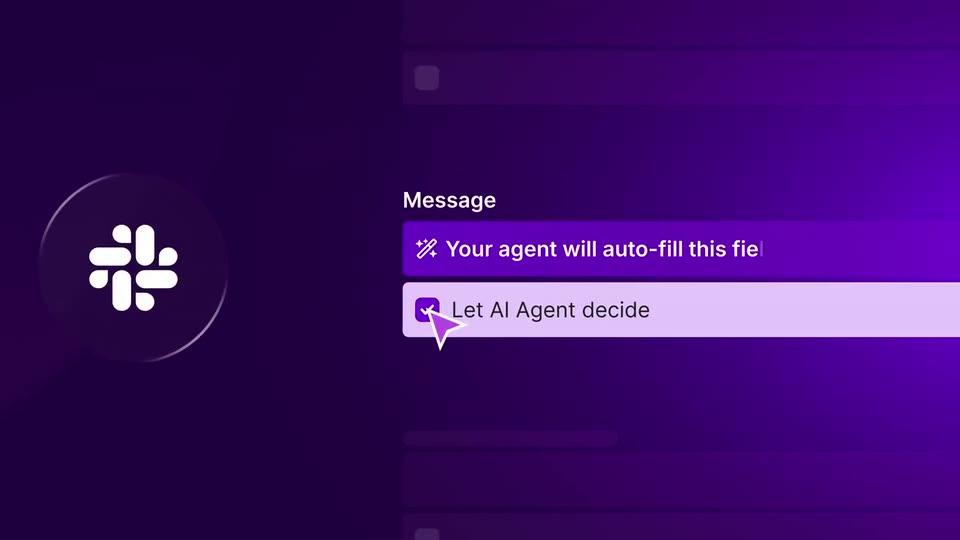
A purple form panel with a Message field; Hello Make! fills the input, then a Let AI Agent decide chip appears and a purple cursor hovers it, revealing a banner Your agent will auto-fill this field. The camera pushes in and the frame blurs out.
Techniques: Cursor demo, UI zoom
Camera: Push in
A purple gradient background fills the frame. White text enters with horizontal blur, then sharpens, scales, and settles into order nr. 7823? with a thin caret at the end.
On-screen text: “order nr. 7823?”
Techniques: Kinetic type
Camera: Static
A purple gradient stage. A chat bubble zooms out from a close-up to reveal the input bar, while 'Chat to see it in action' fades in below. Agent steps stack up, then 'Understand every move' scales in above a scrolling step list beside stacked 'Step by Step' text.
On-screen text: “Chat to see it in action”, “Understand every move”, “Step by Step”
Techniques: UI zoom, Kinetic type
Camera: Pull out
A defocused product window, showing a node graph and an agent activity panel, pulls into sharp focus against a purple gradient. A white caption at the bottom completes the phrase as the word result fades in.
On-screen text: “So you can trust the result”
Techniques: Kinetic type
Camera: Pull out
A tilted browser mockup on a purple gradient shows an agent node graph beside a workflow panel. The panel fades out as the window flattens to a front view, and the caption 'So you can trust the result' dissolves into 'Build once'.
On-screen text: “So you can trust the result”, “Build once”
Techniques: 3D mockup
Camera: Pull out
A white browser window mockup, holding a purple hub icon linked to four app icons, sits on a purple gradient. It tilts and blurs in 3D as paper airplanes scatter around it, while the centered headline below swaps from “Build once” to “Share across teams”.
On-screen text: “Build once”, “Share across teams”
Techniques: 3D mockup, Particles
Camera: Static
A grid of white app windows on a purple background shows a small node graph in the highlighted center window, then the same graph replicates into every window as the caption below fades in. The windows blur with a horizontal streak as the diagram syncs across the grid.
On-screen text: “Build once”, “Share across teams”, “and workflows”
Camera: Static
On a purple gradient, white bold text reading Make AI Agents resolves from blur into focus, a faint rounded outline fading behind it. The two lines then swap to read Build AI Agents you can trust, holding still on a locked-off frame.
On-screen text: “Make AI”, “Agents”, “Build AI Agents”, “you can trust”, “Share across teams”, “and workflows”
Techniques: Kinetic type
Camera: Static
A deep purple gradient holds the bold white headline Available now, which scales up from a soft blur into focus. The URL make.com/ai-agents and the make logo then fade in below it.
On-screen text: “Build AI Agents”, “you can trust”, “Available now”, “make.com/ai-agents”
Techniques: Kinetic type
Camera: Static