1:00

Introducing Canvas in Gemini
Google · AI · Mar 2025
Kimi · Nov 2025 · 0:40 · AI-annotated
Kimi’s 0:40 launch film runs 25 scenes, about 1.6 s each. The product is on screen from the first frame and 6 features are revealed. The call to action lands at 0:38 (97% in). A dark, cinematic launch film built on a black void where 3D objects (the banana, the cratered moon) and floating tilted slide cards carry the eye between crisp white type and frosted-glass UI panels. It alternates slow 3D drifts with fast UI state changes, using scale-in titles, blur-to-focus reveals and 3D grid tilts as its signature moves, then closes on a static space card with the URL.
Is this your launch? to your site or press kit.
Google · AI · Mar 2025
Higgsfield AI · Sep 2026
A title card fades out to reveal a 3D space scene. A glowing crescent moon drifts from right to left above a cratered gray planet surface.
On-screen text: “Kimi Agentic Slides”, “Now with”, “Nano Banana Pro”, “KIMI”
Techniques: Parallax
Camera: Static
A dark slide canvas floats in a black void, ringed by tilted infographic thumbnails in 3D perspective. The title “Kimi Agentic Slides” scales up from gray to white as a banana photo and a cursor arrow pop onto the canvas, then the outer thumbnails drift outward.
On-screen text: “Kimi Agentic Slides”
Techniques: 3D mockup, Kinetic type, Parallax
Camera: Push in
A dark slide canvas on black, ringed by floating thumbnails, shows the white title “Kimi Agentic Slides” with a yellow banana and cursor arrow. It blurs into “Powered by Kimi K2. Now with Nano Banana Pro”, the last phrase in gold, as the camera zooms in on the centered text.
On-screen text: “Kimi Agentic Slides”, “Powered by Kimi K2.”, “Now with Nano Banana Pro”
Techniques: Kinetic type, Morph, UI zoom
Camera: Push in
A wide shot of the Forbidden City's central hall resolves from a soft focus as white dashed lines and arrows trace the imperial path. A dark caption box scales in at lower left, then small uppercase labels and a wireframe plan fade in to annotate the layout.
On-screen text: “Introduces the design concept of the Forbidden City”, “THREE-TIERED MARBLE BASE”, “IMPERIAL PATH & CENTRAL AXIS”, “INNER COURT LAYOUT (RESIDENTIAL)”, “SYMMETRICAL HARMONY”
Camera: Pull out
A wide shot of the Forbidden City courtyard carries white blueprint line drawings and callout labels over the photo, with a lower-third caption scaling in at the bottom left. The view then pulls back to reveal the scene as one tile in a grid of six infographic cards.
On-screen text: “Introduces the design concept of the Forbidden City”
Techniques: Split screen
Camera: Pull out
A two-by-three grid of annotated cards on a black background shows Forbidden City photos overlaid with white line diagrams and labels. The grid tilts in 3D perspective, the columns shifting to create depth as it slowly rotates.
Techniques: 3D mockup
Camera: Pull out
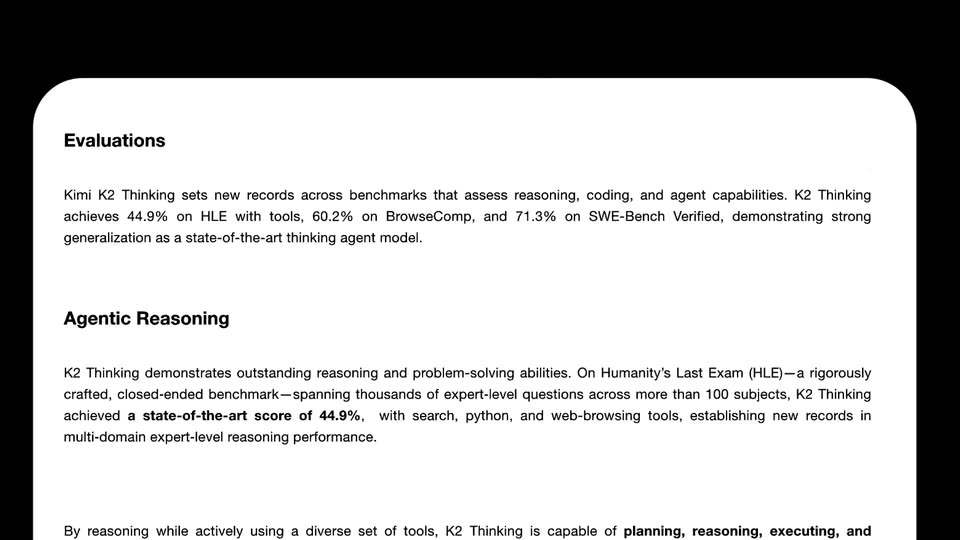
On a dark background, a white rounded card displays the Kimi logo, the headline Introducing Kimi K2 Thinking, and paragraphs of announcement copy. The card scrolls upward, the logo and title exit the top edge, and lower body text plus the Evaluations heading rise into view.
Camera: Pan
A white article card on black scrolls upward, body copy, a heading and a gray math block sliding up through the rounded frame. A small floating card with an up-arrow button drifts up at the right edge.
Camera: Pan
A tilted white PDF thumbnail settles into the top-left of a dark input box holding a two-line prompt about turning a Kimi paper into slides. A white cursor glides from the lower right to the scaling send button on black.
Techniques: Cursor demo
Camera: Static
A frosted glass panel on the left cycles through states: a research card, a node flowchart, an outline list, then a slides card, over a blurred live-action desk. A right-side label reads Agentic Research and shifts to Visual as the panel advances.
On-screen text: “Turn “Kimi K2 Thinking” PDF paper to Slides,”, “with rich charts”, “Agentic Research”, “Visual”
Techniques: Masking, Parallax
Camera: Pull out
A blurred nature backdrop sits behind a translucent UI panel listing Research, Outline Generation and Visual Slides Generation, the last row holding a soft yellow thumbnail. On the right, the white caption Visual Tool Call fades in word by word.
On-screen text: “Visual Tool Call”
Techniques: Kinetic type
Camera: Push in
A white rounded card floats over a blurred dark-green background, holding a serif headline, a blue wireframe network shape on the right, a bold quote, and three icon captions. The card slides up to reveal a second card carrying a coding-benchmark table.
On-screen text: “Introducing Kimi K2 Thinking”, “Our Best Open-Source Thinking Model”, “Built as a thinking agent, it reasons step by step while using tools, achieving state-of-the-art performance.”, “State-of-the-Art Performance: HLE, BrowseComp, SWE-Bench Verified”, “Unprecedented Scale: Executes up to 200-300 sequential tool calls without human interference.”, “Now Available: Live on kimi.com and via the Kimi K2 Thinking API.”, “Full Evaluation: Coding Tasks”
Techniques: Kinetic type
Camera: Pan
A white report panel scrolls upward over a blurred dark backdrop, moving a benchmark table out of frame and bringing a serif headline, two body paragraphs and a bar chart into view.
On-screen text: “Translating Ideas into Fully Functional Products with Agentic Coding”
Camera: Pan
A white report card scrolls upward over a blurred dark background, its serif headline and a bar chart of model benchmark scores sliding out of frame. A second card with a reasoning-cycle diagram and a line chart then scrolls into view.
Camera: Pan
A white rounded infographic card sits centered on a dark blurred surface. Its header title and subtitle begin as overlapping duplicate lines, then settle into a single clean block while the three-column diagram, data table and line chart stay static.
On-screen text: “K2 Thinking's Agentic Reasoning Architecture: Transforming Problem-Solving through Interleaved Cognitive Processes”, “Seamless integration of reasoning, tool execution, and dynamic adaptation for complex analytical tasks.”
Camera: Pan
A horizontal carousel of infographic mockups sits on black, the central blue blueprint card in sharp focus while the side cards blur into depth. The white headline fades in at the top and a dark pill caption holds at the bottom as the row drifts slowly.
On-screen text: “Unlimited Creative Infographic”, “Concept infographic”
Techniques: Parallax
Camera: Pan
A black stage holds a row of infographic template cards: a blue technical diagram, a climate-report photo-infographic with a red area chart, and a white bar-chart card. A white headline sits above and a dark pill label reads below. The cards drift slowly left at offset speeds.
On-screen text: “Unlimited Creative Infographic”, “Photo-infographic”
Techniques: Parallax
Camera: Pan
A row of infographic cards slides horizontally across a black field, a french-fry bar chart with a red trend line held in the center. A white headline sits above and a dark caption pill labels the chart below.
On-screen text: “Unlimited Creative Infographic”, “Object–mapped chart”
Camera: Pan
Two white infographic cards, one a yellow bar chart and one a durian flavor profile with flags, tilt in 3D on black. A white headline sits above and a dark pill caption marks the lower left as the cards rotate and their text settles.
On-screen text: “Unlimited Creative Infographic”, “Global Assortment Infographic”
Techniques: 3D mockup
Camera: Push in
A document editor displays a durian article: a blue-highlighted headline, a left list of varieties with icons, a central photo of durians topped with national flags, and a right-hand market-share bar chart. The view zooms in gently on the page.
Techniques: UI zoom
Camera: Push in
A close-up of the font dropdown over a durian slide quickly pulls back to the full editor under the headline 'Edit Online', then slowly zooms to the top-right toolbar. A cursor clicks the black Download button and a red PowerPoint badge pops up above it.
On-screen text: “Edit Online”
Techniques: UI zoom, Cursor demo
Camera: Pull out
A white rounded download card carrying a red icon and file details slides in from the right on a pale gray field, while the bold black headline Export Locally scales in centered below it.
On-screen text: “Export Locally”
Techniques: Kinetic type
Camera: Static
On a black background, six tilted presentation slide cards float around the edges, sliding in gently, while the centered headline Unlimited Visual Style resolves from a soft blur to sharp focus.
On-screen text: “Unlimited Visual Style”
Techniques: 3D mockup
Camera: Pull out
A photorealistic banana drops and settles at center of a black void as a cratered moon rises from the bottom right. The headline “Enjoy 2-day Unlimited” scales in around the fruit, “Unlimited” in gold, with a small caption below; all text fades out, leaving the KIMI logo sign-off.
On-screen text: “Enjoy 2-day”, “Unlimited”, “Nano Banana Pro Usage”, “*Free Until: Nov 30, EST 8:00 AM”
Techniques: Kinetic type, Parallax
Camera: Pull out
A gray cratered moon sits at the bottom right of a black space background. Centered text reads Register now at kimi.com/slides, the URL in white, the rest in gray. The KIMI logo and mark rest below the line. The frame is static.
On-screen text: “Register now at kimi.com/slides”
Camera: Static