2:18
Explore
Cognition - Introducing Devin 2.0: a new agent-native IDE experience. Generally
Devin · Apr 2025 · 0:57 · AI-annotated
- Length
- 0:57
- Scenes
- 29 · 2.0 s avg
- Product on screen
- 0:00
- Features shown
- 2
- Call to action
- 0:50 · 89%
- Voiceover
- Yes
00:00:00 / 00:57:04
Devin’s 0:57 launch film runs 29 scenes, about 2.0 s each. The product is on screen from the first frame and 2 features are revealed. The call to action lands at 0:50 (89% in), over a voiceover. The video alternates a calm talking-head in a sunlit room with fast UI fly-throughs, using slide-down title cards and zoom-ins on the IDE to move between announcements. Signature moves: the headline sliding into a lower band to reveal the speaker, the split-screen wipe from a Slack thread into the IDE, and the 3D fan of parallel Devin windows.
Footage neededEstimated needs: 3 capture groups — your screens or recordings · 6 filmed passages — shoot, supply or replace · 4 3D passages — build or supply
Is this your launch? to your site or press kit.
More like this

Cognition - Introducing Devin 2.0: a new agent-native IDE experience. Generally, scene by scene
· 29 scenes as text
01 · Product intro · 0:00–0:01
A dark navy field with faint hexagon outlines holds a small Cognition logo and wordmark above a large white headline. The headline slides in from the left to settle center frame.
On-screen text: “COGNITION”, “Announcing two major changes to Devin”
Techniques: Kinetic type
Camera: Static
02 · Product intro · 0:01–0:01
A dark title card with the Cognition wordmark and the headline “Announcing two major changes to Devin” slides down into a lower band, revealing a man in a black hoodie seated in front of a sunlit window. The headline stays on the dark band at the bottom.
On-screen text: “COGNITION”, “Announcing two major changes to Devin”
Techniques: Kinetic type, Masking
Camera: Pan
03 · Product intro · 0:01–0:05
A man in a black hoodie with a white hexagon logo sits at a desk, speaking to camera in a sunlit room. A white name caption sits lower-left. On the right, large white words 'Agent', 'Native' and 'IDE' fade in one line at a time.
On-screen text: “Scott Wu”, “CEO, Cognition”, “Agent”, “Native”, “IDE”
Techniques: Kinetic type
Camera: Static
04 · Pricing · 0:05–0:06
A man in a black hoodie sits in a bright room and speaks, framed at chest height. A name caption sits left, while a large three-line headline occupies the right. A dark lower band with faint text appears near the end.
On-screen text: “Scott Wu”, “CEO, Cognition”, “Agent”, “Native”, “IDE”, “Product Updates”
Camera: Static
05 · Pricing · 0:06–0:10
A dark panel slides up over a man and the headline 'Agent', leaving 'Plan Updates' at the top. Two pricing cards slide in, Teams from the right and Core with a NEW badge from the left, settling side by side.
On-screen text: “Agent”, “Plan Updates”, “Teams”, “$500/Month”, “Core”, “NEW”, “$20 Minimum”, “Pay as you go”
Techniques: Masking
Camera: Static
06 · Demo · 0:10–0:13
A man in a black hoodie with a white geometric logo sits in a sunlit room and speaks to camera. Large windows behind him show blurred green foliage; a white bottle, a potted plant and a laptop rest on the desk. The frame is locked off at medium close-up.
Camera: Static
07 · Demo · 0:13–0:14
A white panel wipes up from the bottom of a dark navy field, revealing a comment thread: a user question with a red monospace code error, then a second reply with a thinking emoji.
Techniques: Masking
Camera: Static
08 · Demo · 0:14–0:15
A chat interface on a white background displays a thread where a user reports an error, another user tags @Devin to fix it, and the app confirms it created a new session.
Camera: Static
09 · Feature reveal · 0:15–0:16
A white Slack thread card fills the left of a dark frame, showing a red error line and a Devin reply. A dark task panel with a checklist then appears on the right, splitting the screen into two side-by-side views.
Techniques: Split screen
Camera: Static
10 · Feature reveal · 0:16–0:17
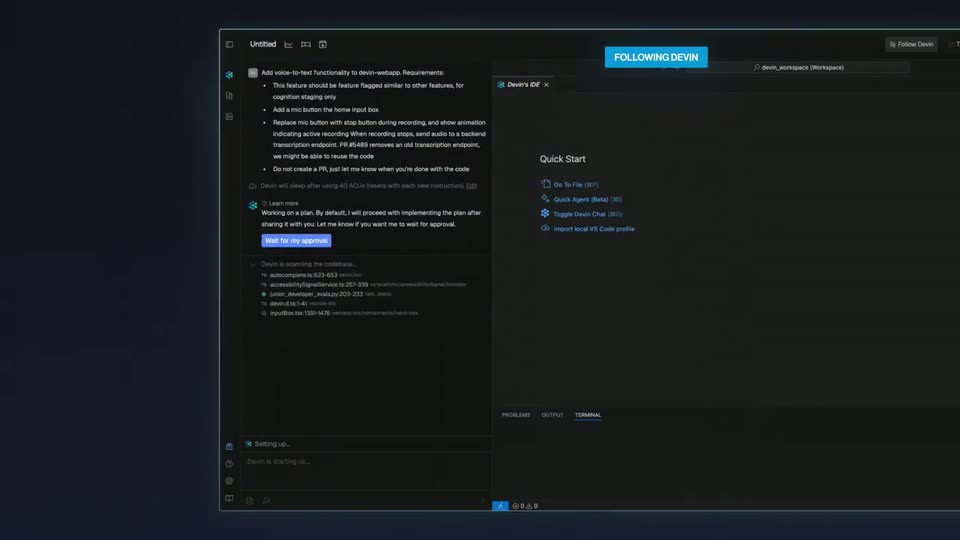
A dark VS Code window (Devin's IDE) fills the frame, showing a task checklist on the left and a Quick Start panel on the right. A cyan FOLLOWING DEVIN badge sits at the top right as the view eases out to reveal the right sidebar.
On-screen text: “FOLLOWING DEVIN”
Techniques: UI zoom
Camera: Pan
11 · Feature reveal · 0:17–0:19
A dark IDE window shows a task chat on the left and a Quick Start menu on the right. The camera zooms into the left panel, revealing Key Steps and Open Questions, while a blue FOLLOWING DEVIN tag hovers at the top.
On-screen text: “FOLLOWING DEVIN”
Techniques: UI zoom
Camera: Push in
12 · Feature reveal · 0:19–0:21
A dark IDE document pane fills the frame, listing Key Steps and Open Questions with monospace file references. The view then zooms out to reveal the full Devin workspace window, with a Quick Start panel on the right and a terminal strip along the bottom.
Techniques: UI zoom
Camera: Pull out
13 · Feature reveal · 0:21–0:22
A dark code editor fills the frame, split into a planning document on the left and a TypeScript file on the right, with a terminal strip along the bottom. A mouse cursor hovers over a file reference in the left pane while a line of code highlights on the right.
Techniques: Cursor demo
Camera: Static
14 · Feature reveal · 0:22–0:25
A dark code editor interface is shown, then the view zooms in on the left panel, focusing on a list of open questions and a terminal command line.
Techniques: UI zoom
Camera: Push in
15 · Feature reveal · 0:25–0:28
A close-up of a dark chat panel shows a status line typing out, then the frame zooms out to reveal the full IDE workspace with a blue FOLLOWING DEVIN badge at the top.
On-screen text: “FOLLOWING DEVIN”
Techniques: UI zoom
Camera: Pull out
16 · Feature reveal · 0:28–0:29
A dark code editor fills the frame, a chat plan on the left and two code panes on the right. A blue tag reading Following Devin sits at the top center while the code in the right pane reflows as it is edited.
On-screen text: “FOLLOWING DEVIN”
Camera: Static
17 · Feature reveal · 0:29–0:29
A dark code editor fills the frame, split into a left chat feed, two panes of TypeScript code, and a bottom terminal. Lines of code flicker and rewrite in fast succession. A blue pill tag reading FOLLOWING DEVIN sits at the top center.
On-screen text: “FOLLOWING DEVIN”
Camera: Static
18 · Feature reveal · 0:29–0:30
A dark code editor fills the frame, a chat sidebar on the left lists actions and a terminal strip runs along the bottom. A blue pill caption reading FOLLOWING DEVIN sits at top center while the locked-off view shows the IDE at rest.
On-screen text: “FOLLOWING DEVIN”
Camera: Static
19 · Feature reveal · 0:30–0:34
A dark IDE window fills the frame with a file list on the left, a code diff in the center and a terminal below, a blue FOLLOWING DEVIN chip floating at the top. The view then zooms into the diff, tightening on a green-highlighted block of added code lines.
On-screen text: “FOLLOWING DEVIN”
Techniques: UI zoom
Camera: Push in
20 · Feature reveal · 0:34–0:36
A dark code editor fills the frame, showing syntax-highlighted JSX with line numbers on the left. A terminal panel docked at the bottom streams build output line by line as a command runs, while small badges for review mode and uncommitted changes sit at the panel's edge.
Camera: Static
21 · Feature reveal · 0:36–0:39
A man with glasses and a black hoodie with a white logo sits before bright windows, speaking to camera. A white bottle, a leafy plant and a laptop sit to his right. The locked-off medium shot holds as his expression shifts from a smile to neutral.
On-screen text: “心”
Camera: Static
22 · Feature reveal · 0:39–0:40
A dark code editor fills the frame in a locked-off shot. A chat panel on the left lists task steps with a highlighted approval button, two JSON code panes sit side by side in the center with one line marked, and a terminal panel shows file listings below.
Camera: Static
23 · Feature reveal · 0:40–0:41
The Devin IDE opens flat on screen, showing a wiki markdown file and a chat sidebar. The view then tilts into 3D perspective as a cascade of identical windows fans out and blurs into the dark background.
Techniques: 3D mockup, Parallax
Camera: Pull out
24 · Feature reveal · 0:41–0:42
A stack of dark code-editor windows fans out in 3D perspective, the nearest panel sharp with markdown text and line numbers while the rear panels blur into depth of field. The whole stack drifts slowly against a dark blue background.
Techniques: 3D mockup, Parallax
Camera: Static
25 · Feature reveal · 0:42–0:49
A cascade of dark code-editor and chat windows floats in 3D perspective on a deep blue field, stacked diagonally and receding into a soft blur. The camera dollies along the stack, rack-focusing from the front panels to the rear, then pushes in on a single window.
Techniques: 3D mockup, UI zoom
Camera: Push in
26 · Feature reveal · 0:49–0:50
Multiple dark code editor windows float in 3D perspective against a deep blue background, the central IDE in sharp focus showing a chat panel and code, while surrounding windows blur into the depth as the camera holds a slow push-in.
Techniques: 3D mockup
Camera: Static
27 · CTA · 0:50–0:53
A man in a black hoodie with a white hexagon logo sits at a desk in a sunlit room with windows and plants, speaking to camera and smiling; the shot fades to black on a centered Cognition wordmark and the line Hire Devin at app.devin.ai.
On-screen text: “COGNITION”, “Hire Devin at app.devin.ai”
Camera: Static
28 · CTA · 0:53–0:55
On a dark navy field with faint hexagon outlines, the Cognition logo and the line Hire Devin at app.devin.ai fade in at center, then hold on a locked-off frame as the sign-off.
On-screen text: “Hire Devin at app.devin.ai”
Camera: Static
29 · CTA · 0:55–0:57
A black end card holds two static lines of text: a small uppercase COGNITION above the larger line Hire Devin at app.devin.ai. The frame stays locked off with no motion for the full duration.
On-screen text: “COGNITION”, “Hire Devin at app.devin.ai”
Camera: Static