1:32

Introducing Source by Webflow
Webflow · Design · Sep 2026
Google AI · Jan 2026 · 2:18 · AI-annotated
Google AI’s 2:18 launch film runs 64 scenes, about 2.2 s each. The product shows up at 0:16 and 4 features are revealed. The call to action lands at 2:12 (95% in). The video is built as a black void that the product's generated worlds float into: a text cold open, a circular-mask reveal, a named title card, then four headline-led feature blocks and a closing orb grid that hands off to a single URL. Its signature moves are the expanding and collapsing circular lens, the drifting grid of round world thumbnails, and centered white headlines that fade over slow 3D fly-throughs, all cut at a steady mid-tempo against a near-black field.
Is this your launch? to your site or press kit.
Webflow · Design · Sep 2026
Apple · Hardware · Mar 2026
A black screen reveals two small video thumbnails in the top right and bottom left corners. A line of white text fades in at the center, introducing a 2025 Google announcement.
On-screen text: “In 2025, Google announced Genie 3”
Techniques: Kinetic type
Camera: Static
Rounded video clips of generated worlds, like a desert, jellyfish and a volcano, drift across a black background. Centered white text states the Genie 3 announcement, then 'And now...' fades in below before both fade out.
On-screen text: “In 2025, Google announced Genie 3,”, “a foundational model for creating and”, “exploring any world imaginable”, “And now...”
Techniques: Parallax
Camera: Push in
Faint rounded-rectangle thumbnails of game worlds fade out at the corners, then a white two-line headline fades in centered on black, holds, and fades out as a dim circular planet shape fades in below.
On-screen text: “You can create”, “your own worlds”
Techniques: Kinetic type
Camera: Static
A glowing circular cutout on black holds a blurred, pale green plant. The footage inside spins with radial blur as the circle widens, filling the frame.
Techniques: Masking
Camera: Push in
A white paper airplane glides through a sunlit 3D waterfall canyon as the camera tracks it forward. The shot opens through a circular mask that expands to full frame, with translucent keyboard control icons fixed in the corners.
Techniques: Masking, 3D mockup
Camera: Push in
A white paper airplane glides forward through a sunlit canyon of green cliffs and rushing water, keyboard key hints in the corners. A black circular vignette closes in around the frame near the end.
Techniques: Masking
Camera: Pull out
A circular window frames a 3D landscape with a white angular structure and green hills. The view pulls back to reveal a grid of smaller circular 3D scenes on black, with the word held centered.
On-screen text: “Introducing”
Techniques: Masking, Kinetic type
Camera: Pull out
A dark field of circular image thumbnails surrounds a central circle showing a white structure and green trees. White title text and an outlined EXPERIMENT pill sit over the center; Introducing slides in while the rest holds still.
On-screen text: “Introducing”, “Project Genie”, “EXPERIMENT”
Techniques: Kinetic type
Camera: Pan
A black field holds a ring of circular 3D scene previews around a larger central lens showing a generated landscape. White title text overlays the center: 'Introducing' slides in above a large still 'Project Genie', with a small 'EXPERIMENT' pill below.
On-screen text: “Introducing”, “Project Genie”, “EXPERIMENT”
Techniques: Kinetic type
Camera: Static
A blurred “Introducing Project Genie” title defocuses into a grid of circular video thumbnails on black, which brightens to full view. A white headline “Google's research prototype for playable worlds” sits centered, then is replaced by “Create your own” over a wireframe sphere, with a cursor.
On-screen text: “Introducing”, “Project Genie”, “EXPERIMENT”, “Google's research prototype”, “for playable worlds”, “Create your own”
Techniques: UI zoom, Cursor demo
Camera: Pull out
A black grid of circular scene thumbnails surrounds a central wireframe globe labeled Create your own, with a mouse pointer hovering below it. The view zooms into the center, blurring the outer circles.
Techniques: UI zoom
Camera: Push in
A dark wireframe grid fills the screen behind a centered headline and a bottom input panel. A cursor hovers over the form as the camera pushes in, the panel tilts into 3D perspective, and a prompt is typed into the ENVIRONMENT field.
Techniques: Cursor demo, UI zoom, 3D mockup
Camera: Push in
The clip opens tight on a dark CHARACTER card as its prompt text types out word by word. A cursor appears, then the frame pulls back to reveal the full panel: environment and character cards above a toolbar, set against a 3D wireframe grid.
Techniques: UI zoom
Camera: Pull out
A 3D meadow with a cat and a mountain cabin begins blurred, then pulls into focus as the bottom control panel fades out. A white Create world pill scales in at the center, framed by a curved wireframe grid on black.
Techniques: 3D mockup
Camera: Static
A 3D mountain meadow with a log cabin, pines and wildflowers; a small orange-and-white animal sits on a path in the foreground. A white pill button reading 'Create world' with a cursor scales up in the center as the camera pulls back.
Techniques: Cursor demo
Camera: Pull out
A 3D mountain valley with snow-capped peaks, pines and a wooden cabin starts out of focus, then resolves to sharp as a small white-and-orange dog trots away on a dirt path. Keyboard control icons sit in the bottom corners while the camera dollies forward through the field of purple and yellow flowers.
On-screen text: “Create world”
Camera: Static
A 3D rendered alpine meadow with a log cabin and snow-capped peaks. An orange and white dog trots away down a flower-lined path as the view pushes forward. Flat keyboard control hints sit in the bottom corners.
Techniques: Parallax
Camera: Push in
Over the shoulder of a woman with long dark hair, a large monitor on a white stand plays a 3D game scene: a fox walks across a sunlit meadow toward a wooden cabin, with pine trees and snow-capped mountains behind.
Camera: Static
A close-up of two hands in gray knit sleeves types on a white keyboard laid on a light wooden desk. Fingers press and release the keys in a steady rhythm, the shallow focus softening the background.
Camera: Static
A corgi runs away from the camera across a sunlit meadow toward twin snow-capped peaks, the view tracking behind it past a wooden fence and pine trees; small keyboard control icons sit in the lower corners.
Camera: Push in
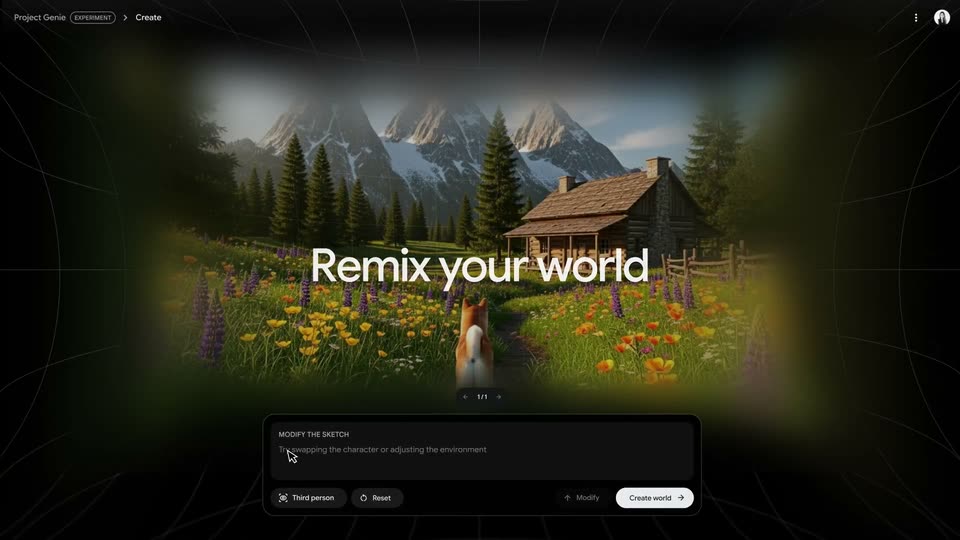
A 3D-rendered alpine meadow with a log cabin and a fox seen from behind fills the center of a dark interface, framed by faint wireframe grid lines. The white headline “Remix your world” fades in at center above a dark control panel with buttons.
On-screen text: “Remix your world”
Camera: Push in
A close-up of a dark input panel shows a prompt typing out under the MODIFY THE SKETCH label, then the frame pans right to settle on the Modify and Create world buttons as a cursor hovers over the latter.
Techniques: UI zoom, Cursor demo
Camera: Push in
A 3D alpine meadow with a wooden cabin and snow-capped peaks holds a pink balloon rabbit on a path. A search pill reading pink balloon animal rabbit sits at top; WASD and arrow controls frame the corners. The frame sharpens from motion blur as the camera settles.
Camera: Pull out
A pink balloon rabbit stands on the blue floor of a 3D bouncy house; a gray caption pill and WASD/SPACE control keys overlay the view as the camera dollies in. The view then shifts to a treehouse interior, the caption updates, and the rabbit stands beside a white dog.
Camera: Push in
A pink balloon rabbit stands in the center of a wooden treehouse interior, bobbing up and down as the camera holds a steady wide shot. A rounded prompt bubble at the top cycles through typed phrases while control-key hints sit in the lower corners.
Techniques: 3D mockup
Camera: Push in
A watercolor landscape with a winding road, green hills and a yellow bus. A pink balloon rabbit stands on the road with its back to us as the view pushes in slowly. Gray control hints sit in the bottom corners.
On-screen text: “yle to a watercolor drawing”
Camera: Push in
A red-suited mountaineer climbs a narrow snow ridge above a cloud sea, tracked from behind in 3D. The white headline 'Be any character' fades in at center and out as the camera swings to a side view of the climber cresting the ridge. Keycap overlays sit in the bottom corners.
On-screen text: “yle to a watercolor drawing”, “Be any character”
Camera: Pan
Macro shot of a red ant crawling along the edge of a fuzzy green leaf beside a brown stem. The ant walks left toward the stem as the frame drifts gently to follow it; small WASD and arrow key icons sit in the lower corners.
Camera: Push in
A macro shot of a green leafy stem with a small reddish insect at the node fills the frame against a soft blurred green background. A keyboard control overlay sits in the lower corners, with the W key lighting up white.
Camera: Static
A red ant walks along a brown plant stem in a tight macro view, framed by green leaves with a soft blurred background. Round control buttons for WASD, space and arrows are overlaid in the bottom corners.
Camera: Static
A sepia-toned 3D view tracks a rider seated on the back of a large dark bird with a white tail fan as it banks over misty mountains. Keyboard keys and camera arrows sit in the corners while the camera follows the bird's turn.
Camera: Pan
A dark bird with a white tail soars over gray, faceted mountains, the camera tracking it as it banks left. A lone figure stands on a rock at the right in the opening frame. Keyboard hints for W, A, S, D, Space and arrows sit in the lower corners.
Techniques: Parallax
Camera: Pan
A small astronaut with a large pale board on its back runs across a green pool table dotted with colored balls, then stops to nudge a yellow ball. The camera tracks from behind. A white caption fades in at center; key hints sit in the lower corners.
On-screen text: “Interact with your environment”
Camera: Static
A close-up of a dark interface panel shows a CHARACTER field as its body copy types out word by word, describing a blue rolling ball. A Reset button and a white Create sketch button with an arrow sit at the bottom edge.
Techniques: Kinetic type
Camera: Static
A glossy blue sphere bounces across a white, furry 3D terrain, leaving a streak of blue behind it. The camera tracks the ball over rolling hills while small WASD and arrow control hints sit in the corners.
Techniques: 3D mockup, Parallax
Camera: Push in
A 3D-rendered wingsuiter in a blue quilted suit and yellow helmet glides through a snowy mountain pass, banking toward glowing blue rings. The camera tracks from behind. Corner key hints for W, A, S, D, Space and arrow keys stay fixed.
Techniques: Parallax
Camera: Push in
A first-person night view shows a gloved hand holding a lit flashlight, its beam lighting a red fox on dark grass with a second blurred fox at right. Keyboard key icons and arrow buttons sit in the corners. The camera tilts down as the fox lowers its head.
Camera: Static
Close-up of two hands folding small cardboard pieces into tiny box shapes on a worn wooden table, shallow depth of field. The white headline stays centered and still over the action.
On-screen text: “Play worlds from your images”
Camera: Static
Two hands work on a wooden table, stacking a larger cardboard box onto a smaller folded one. A centered white caption stays locked over the action as the boxes are assembled.
On-screen text: “Play worlds from your images”
Camera: Static
Over-the-shoulder shot of a person holding a phone horizontally over a wooden table. The phone's camera view frames a small cardboard box with a targeting reticle locked on it, while a finger rests near the shutter button. The office background stays softly blurred.
Camera: Static
A workshop workbench with small props, a cardboard stand and a toy car, sits inside a rounded card on black. A white arrow cursor with a fist icon hovers over the table, then the whole frame blurs and tilts away in a fast exit.
Techniques: Cursor demo, Speed ramp
Camera: Pan
A dark settings panel fills the frame while a motion-blurred 3D cardboard robot streaks across it from left to right. The view then reframes onto a white 'Create world' pill button, where a white cursor hovers over the label.
Techniques: UI zoom, Cursor demo
Camera: Pan
A dark UI panel shows descriptive body copy beside a white pill button labeled Create world. A white cursor rests on the button while a warm amber light sweeps the right edge and the whole panel softens into blur.
Techniques: Cursor demo, Light sweep
Camera: Pull out
A 3D-rendered workshop with a long wooden workbench; toy objects, a teal sculpture, and a small cardboard robot sit on the table as the camera pans left from a blurred start, revealing a tool wall and window. Keyboard control hints sit in the lower corners.
Techniques: Speed ramp, Parallax
Camera: Pull out
A low shot of a workshop table backed by a tool wall. A cardboard robot with six legs walks across the tabletop past balls, cones and a white toy car as the camera tracks it right. Keyboard control hints sit in the lower corners.
Camera: Static
A wide, tilted shot of a workshop with a pegboard tool wall; a wooden bat swings across a table of small props, blurred by motion, while rounded keycap hints (WASD, SPACE, arrows) sit in the corners. It cuts to two hands holding a phone that records the same workshop.
Camera: Push in
A woman holds a phone horizontally in a bright living room, filming a cream cat on a light rug. The over-the-shoulder frame places her head and hands at left, the cat at right. The phone screen shows the camera app with a street view and controls along the right edge.
Camera: Static
A rounded card holds a dim living room with a seated cat, then brightens and expands to full screen. The view becomes a first-person 3D shot behind the cat as it climbs the sofa and walks to the window, with WASD and arrow-key controls in the lower corners.
Techniques: Masking, 3D mockup
Camera: Push in
A cream Siamese cat sits on a cushioned windowsill in a high-rise room, gazing at a hazy skyline. The camera pans left past a beige cat tree as the cat stretches toward the glass. Small key hints, WASD, SPACE and arrow icons, sit in the lower corners.
Camera: Push in
A dark rounded chat card sits centered on black. A small photo of a woman in a yellow striped shirt, held by a white cursor, slides in from the left into the card's top-left corner. Below it, a prompt types out word by word in white sans-serif, filling three lines.
Techniques: Cursor demo
Camera: Static
A dark rounded card is centered on a black field. A sparkle icon and a Generating image status line sit at its top, then a low-poly 3D render of a woman in a yellow shirt within a teal forest fades in to fill the card.
Camera: Push in
A pixel-art portrait of a woman in a yellow striped shirt, set in a glowing green jungle, sits in a rounded card on black. The image then blurs and darkens, fading to near black.
Camera: Static
A 3D woman in a yellow striped shirt walks through a dark cave lined with glowing blue and green plants. The camera orbits and tilts up around her while WASD and arrow key controls sit in the corners.
Techniques: Parallax
Camera: Pull out
A 3D woman with a black bob and yellow striped shirt walks toward the camera through a dark cave, glowing teal plants and pixelated rock walls behind her.
Camera: Pull out
A mosaic of 3D clips fills the frame, the center panel showing a woman in a yellow striped shirt walking through a dark cave lit by glowing blue plants. Surrounding panels show a desert, a pink shirt, a tiled wall and palm trees as the grid pans to reveal more.
Techniques: Split screen
Camera: Pull out
A 3x3 grid of 3D character clips fades up from black, each panel showing a different avatar walking through a separate environment, a cave, a beach path, a snow slope, a desert, and a fairground, the center panel holding a woman in a yellow striped shirt.
Techniques: Split screen
Camera: Pull out
A first-person view from a snowmobile's handlebars races down a snow-covered street lined with glowing, wireframe buildings and frosted trees under an orange dusk sky. White text holds centered over the fast forward motion while the sides blur past.
On-screen text: “Imagine worlds”
Techniques: Parallax
Camera: Static
An isometric 3D playground with tiny figures and a scoreboard sits on a purple field, then cuts to a 3D car on a snowy mountain road beneath a large moon. A centered white headline swaps from Create worlds to Imagine worlds.
On-screen text: “Create worlds”, “Imagine worlds”
Camera: Static
A red car drives away across a rocky moon surface toward a large striped planet and a ring of asteroids in a 3D space scene. Centered white headline text reads “Play worlds” and scales up while the camera stays locked off.
On-screen text: “Create worlds”, “Play worlds”
Techniques: Kinetic type
Camera: Static
A red car drives across a cratered surface beneath a striped gas planet, framed in a circular cutout. The view pulls back so the cutout becomes one of several floating circular lenses on a black field.
Techniques: Masking
Camera: Pull out
A black field of circular vignettes, each masking a different photo, drifts and zooms out to reveal more orbs at the edges. The largest central circle holds a red car on a moon surface beneath a striped planet.
Camera: Static
A grid of circular glass orbs, each playing a different clip (a cat in a car, a red car on a desert, a paper boat), drifts and zooms out on black, then fades to black as a white word types in.
On-screen text: “Sta”
Camera: Pull out
A grid of circular world thumbnails on a black background dims and fades out as centered white text reveals word by word in the middle of the frame.
On-screen text: “Start creating worlds of your own at”, “labs.google/ProjectGenie”
Techniques: Kinetic type
Camera: Static
A two-line white caption sits centered on a black background, reading “Start creating worlds of your own at labs.google/ProjectGenie.” The text fades in, holds steady for a few seconds, then fades out to full black.
On-screen text: “Start creating worlds of your own at”, “labs.google/ProjectGenie”
Camera: Static