
2:45
Explore
LandAtlas: demo
LandAtlas · Aug 2026 · 2:10 · AI-annotated
- Length
- 2:10
- Scenes
- 67 · 1.9 s avg
- Product on screen
- 0:14
- Features shown
- 16
- Call to action
- 2:03 · 94%
- Voiceover
- No
00:00:00 / 02:10:09
- Length
- 2:10
- Scenes
- 67 · 1.9 s avg
- Product on screen
- 0:14
- Features shown
- 16
- Call to action
- 2:03 · 94%
- Voiceover
- No
LandAtlas’s 2:10 launch film runs 67 scenes, about 1.9 s each. The product shows up at 0:14 and 16 features are revealed. The call to action lands at 2:03 (94% in). Dark, near-black stage with a single mint-teal accent and white grotesque type; the video is built as a rapid montage where each beat is a kinetic word-by-word headline that hands off to a 3D-tilted dashboard mockup rotating to flat, punctuated by rolling stat counters and a pixel hand cursor clicking the UI. Pacing is fast and even (about 12 cuts a minute on a 150 bpm pulse), with the dotted 3D terrain, the four-pointed star, and the notched arrow returning as the signature moves that tie the 2
Footage neededEstimated needs: 15 capture groups — your screens or recordings · 1 official logo — reused across the film · 1 filmed passage — shoot, supply or replace · 5 graphic passages — draw or supply · 12 3D passages — build or supply
Is this your launch? to your site or press kit.
More like this


LandAtlas: demo, scene by scene
· 67 scenes as text
01 · Hook · 0:00–0:03
A bold white headline slides in and settles center over a dark background, then a smaller gray subline fades in beneath it. A teal dotted 3D terrain undulates along the bottom edge, and both lines dim out at the end.
On-screen text: “EVERY LAND DEAL”, “lives or dies by one thing”
Techniques: Kinetic type, Particles
Camera: Pull out
02 · Problem · 0:03–0:06
A dark 3D landscape of dotted ridges sits on black while teal map pins drop onto the hills, each tagged Buyer. The white headline builds word by word above the terrain as the camera holds a locked-off wide view.
On-screen text: “Finding the right buyer”
Techniques: Kinetic type
Camera: Pull out
03 · Problem · 0:06–0:10
On a black background, the white phrase “Most investors waste” slides in word by word, then a teal arrow pops in. At the right, a column of gray day labels (Mon, Tue, Wed, Thu) scrolls upward while the active day brightens to white.
On-screen text: “Most investors waste”, “Mon”, “Tue”, “Wed”, “Thu”, “Finding the right buyer”
Techniques: Kinetic type
Camera: Static
04 · Problem · 0:10–0:11
On a static black background, centered white and gray words slide horizontally past a teal arrow. The phrase 'Most investors waste' and the date 'Thu' exit, 'arc.net' holds between two arrows, then 'Searching' stacks above 'Calling'.
On-screen text: “Most investors waste”, “Thu”, “arc.net”, “Searching”, “Calling”
Techniques: Kinetic type
Camera: Static
05 · Problem · 0:11–0:14
On a black background, the word Searching appears centered between two teal arrow marks, then slides up and dims as Calling slides into center, followed by Emailing. A small teal four-pointed star pops in below the last word.
On-screen text: “Searching”, “Calling”, “Emailing”
Techniques: Kinetic type
Camera: Static
06 · Product intro · 0:14–0:14
A dark teal gradient fills the frame as the large white word Introduci fades into the lower center, static and cropped at the right edge.
On-screen text: “Introduci”
Camera: Static
07 · Product intro · 0:14–0:16
Large white sans-serif text slides left across a black background, spelling “Introducing” followed by a teal plus symbol. The frame stays locked off as the letters drift past.
On-screen text: “Introducing”
Techniques: Kinetic type
Camera: Pan
08 · Product intro · 0:16–0:19
A huge white word ending in “cing” slides off left over a black field of faint contour lines. A teal location pin holds center, then morphs into the LandAtlas app icon as the white and teal wordmark slides in beside it.
On-screen text: “cing”, “LandAtlas”
Techniques: Kinetic type, Morph
Camera: Static
09 · Demo · 0:19–0:20
A white headline on the left reads The Operating System over black, while the LandAtlas dashboard, angled in 3D perspective, fills the right side. Both layers drift slowly upward, revealing the dashboard header and performance chart.
On-screen text: “The Operating System”
Techniques: 3D mockup
Camera: Static
10 · Demo · 0:20–0:21
A white headline types out word by word above a dark analytics dashboard that sits low in frame. The dashboard shows metric cards and charts while the tagline completes to read for modern land investors.
On-screen text: “for modern land investors”
Techniques: Kinetic type
Camera: Static
11 · Demo · 0:21–0:21
A LandAtlas dashboard mockup floats in 3D perspective on a black field, tilted and slowly rotating upright as it scales up. A faint dark headline, 'modern land investors,' fades out across the top.
On-screen text: “modern land investors”
Techniques: 3D mockup
Camera: Pull out
12 · Demo · 0:21–0:23
A white analytics dashboard mockup floats on a black background, rotating from a tilted 3D angle toward a flat frontal view. The screen shows a left sidebar, four stat cards with green bar charts, and two larger panels below.
Techniques: 3D mockup
Camera: Pull out
13 · Feature reveal · 0:23–0:24
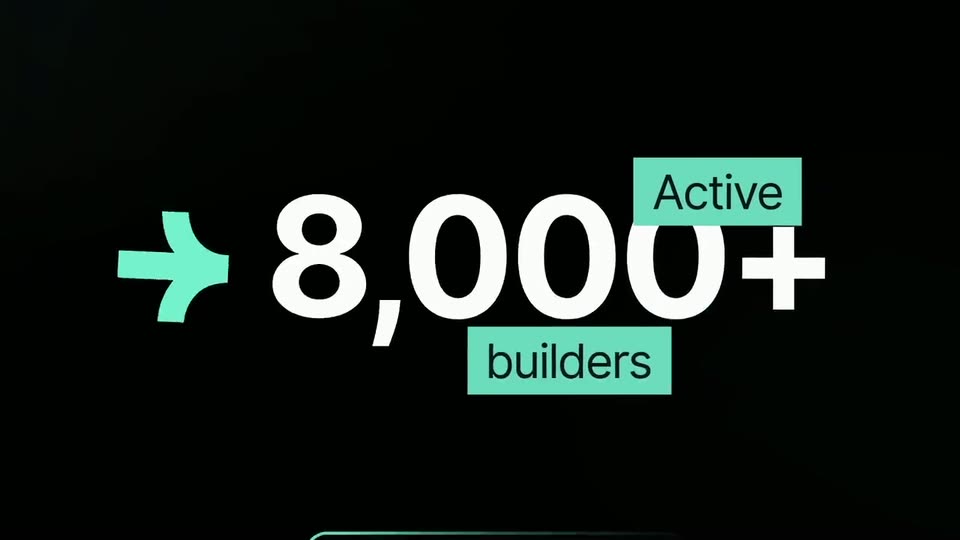
A large white number rolls rapidly on a black background, cycling through values, while two teal highlight boxes labeled Active and builders sit to the right. The number is the dominant element, counting fast.
On-screen text: “Active”, “builders”
Techniques: Kinetic type
Camera: Pull out
14 · Feature reveal · 0:24–0:25
A large white stat reads 8000+ with teal boxes for Active and builders on black. A list of company cards slides up from below and sharpens into focus while the stat dims and drifts back, creating depth.
On-screen text: “8000+”, “Active”, “builders”
Techniques: Parallax
Camera: Static
15 · Feature reveal · 0:25–0:26
A vertical list of company lead cards scrolls upward through the center of a black frame. A teal right arrow and a teal block reading “builders” sit at left; a teal block reading “active” sits at right, both held static while the list moves.
On-screen text: “builders”, “active”
Camera: Pan
16 · Feature reveal · 0:26–0:27
The dark UI list fades to black as green highlight boxes carrying the words Builder, Active and boxes slide in from the edges. A small green arrow icon sits above the Builder box, and the words drift across the frame.
On-screen text: “Active”, “builders”, “Builder”, “boxes”
Techniques: Kinetic type
Camera: Static
17 · Feature reveal · 0:27–0:29
On a black background, a large gray number rolls up from 246 to a white 800+ while a teal arrow slides left. Three teal highlight chips reading Builder, buy and boxes drift into place around the digits.
On-screen text: “Builder”, “246”, “buy”, “boxes”, “800+”
Techniques: Kinetic type
Camera: Static
18 · Feature reveal · 0:29–0:31
A dimmed 3D dashboard recedes into black as mint label blocks reading Builder, buy and boxes slide and scale. The set cuts to new blocks reading Title and companies, a large gray 224+ and a logo tile.
On-screen text: “Builder”, “buy”, “boxes”, “Title”, “companies”, “224+”
Techniques: 3D mockup, Kinetic type
Camera: Pull out
19 · Feature reveal · 0:31–0:34
On a black field, a teal arrow and a large white counter tick from 300+ to 600+ while teal highlight tags reading Title and companies slide outward and a small logo tile drifts down. The number then fades and a dark LandAtlas Buyers dashboard slides in behind the tags.
On-screen text: “Title”, “companies”, “300+”, “600+”
Techniques: Kinetic type
Camera: Pan
20 · Feature reveal · 0:34–0:35
On a black field, white lowercase words slide horizontally: “companies” exits left, “your deal” with a teal left-pointing arrow shifts, and “AI matches” joins to lock the line “AI matches your deal” centered.
On-screen text: “companies”, “AI matches your deal”
Techniques: Kinetic type
Camera: Static
21 · Feature reveal · 0:35–0:36
On a near-black background, a white headline flanked by teal sparkle icons reads on one line, then the words slide into two offset lines while a teal globe with faint continents fades in at the center.
On-screen text: “AI matches your deal”
Techniques: Kinetic type
Camera: Static
22 · Feature reveal · 0:36–0:36
A teal globe spins at center on black as 'AI matches' slides in from the left with a plus icon and 'your deal' from the right with an arrow. The globe then fades into a thin-line US map outline.
On-screen text: “AI matches”, “your deal”
Techniques: Kinetic type, Morph
Camera: Push in
23 · Feature reveal · 0:36–0:39
A dark line-art map of the United States shows teal home-icon pins with orange count badges and soft teal glows. The view zooms in toward Texas, leaving a gray state label and one pin centered.
Techniques: UI zoom
Camera: Push in
24 · Feature reveal · 0:39–0:40
A teal rounded-square app icon, showing a white location pin above white map roads, fades in at the center of a black background. A soft teal glow spreads beneath it as the icon settles into place.
Camera: Pull out
25 · Feature reveal · 0:40–0:41
A teal and white rounded app icon with a map pin and road lines sits on a black background, then slides left and shrinks while a thin teal line with two small dots trails off to its right.
Camera: Static
26 · Feature reveal · 0:41–0:42
A teal map-pin app icon sits left of center on a black field. A line draws from it to a four-pointed star, then three branches extend right to listing cards that fade in with company names and contact links.
Camera: Static
27 · Feature reveal · 0:42–0:45
A dark lead detail interface fades in on the right, showing seller information, address fields and an activity panel. On the left, a teal arrow and the white headline “Submit your deal” appear line by line, then the whole frame drifts slowly to the right.
On-screen text: “Submit your deal”
Techniques: Kinetic type
Camera: Pull out
28 · Feature reveal · 0:45–0:48
A dark Lead Detail card tilts in 3D, settling flat as a white cursor hand taps the green Submit button. The card fades to black and the title AI recommendations with a teal plus icon fades in at center.
On-screen text: “AI recommendations”
Techniques: 3D mockup, Cursor demo, Kinetic type
Camera: Pan
29 · Feature reveal · 0:48–0:49
On a dark green gradient, a teal four-pointed star spins in beside the centered headline “AI recommendations”, which resolves from a brief overlapping blur. A dark contact card for Road Ram LLC, with a Platinum badge and masked fields, slides up from the bottom edge.
On-screen text: “AI recommendations”
Techniques: Kinetic type
Camera: Static
30 · Feature reveal · 0:49–0:51
A dark AI recommendations list scrolls upward, cycling through company cards with contact rows and a buybox button, teal plus accents drifting at the edges. The interface fades to black, then the tagline Close faster holds centered.
On-screen text: “Close faster”
Camera: Pan
31 · Feature reveal · 0:51–0:52
The phrase “Close faster” in white sans-serif type sits centered on a plain black background. The frame is locked-off and the text remains static for the full duration.
On-screen text: “Close faster”
Camera: Static
32 · Feature reveal · 0:52–0:53
A dark LandAtlas buyers dashboard sits on the right while a teal chevron mark and the white headline 800+ active buy boxes hold the left. The interface slides left and a second buyers panel with stats and a Road Ram LLC card slides in from the right, the headline drifting off frame.
On-screen text: “800+ active buy boxes”, “Close faster”
Techniques: Split screen
Camera: Pan
33 · Feature reveal · 0:53–0:55
A dark real-estate dashboard is shown as a tilted 3D panel on a black background. The view starts soft and sharpens as the panel rotates from a steep side angle toward a flat frontal view, a buyer card resting in the lower right.
Techniques: 3D mockup
Camera: Pan
34 · Feature reveal · 0:55–0:55
A dark buyers dashboard tilts in 3D perspective on black. A buyer card scales into the foreground as the name slides in, then a white hand cursor rises from the bottom and taps the Add notes/buybox button.
Techniques: 3D mockup, Cursor demo
Camera: Static
35 · Feature reveal · 0:55–0:56
A dark buyer-details panel scales up from a tight crop, the header growing as the view pushes in to expose contact and market fields.
On-screen text: “Buyers”
Techniques: UI zoom
Camera: Pull out
36 · Feature reveal · 0:56–0:57
A dark Buyer Details modal sits centered on black, listing contact fields and market rows above a Buy Box strip. The panel eases in scale and sharpens, a faint motion blur trailing its left edge at the start.
Camera: Pull out
37 · Feature reveal · 0:57–0:58
A black frame holds a centered white line that slides in to read Updated daily by our team, finished by a teal plus icon at the right edge. The camera stays locked off as the text settles.
On-screen text: “Updated daily by our team”
Techniques: Kinetic type
Camera: Static
38 · Feature reveal · 0:58–1:01
A dark Live Builder Feed card sits beneath a centered white headline. A horizontal ticker of builder names scrolls left across the card while the panel scrolls vertically to reveal owner details. A green chat button floats at the lower right.
On-screen text: “Live in your feed the moment they change”
Techniques: UI zoom
Camera: Pan
39 · Feature reveal · 1:01–1:04
On a black field, the word Every appears, then builds into the two-line headline Every deal / One workspace. Below it the LandAtlas dashboard fades from dim to full brightness and rises to center, settling on the complete interface with sidebar, stat cards and charts.
On-screen text: “Every deal”, “One workspace”
Techniques: Kinetic type
Camera: Pan
40 · Feature reveal · 1:04–1:10
A dark Property Data filter panel sits centered on black. A satellite map of Florida opens from a thin strip on the right and zooms into a street grid of Lehigh Acres. The panel scales down as a white headline appears above it, then scales back up to fill the frame.
On-screen text: “Pull lists based on Wetlands, slope, flood zone”
Techniques: Masking, UI zoom
Camera: Pull out
41 · Feature reveal · 1:10–1:11
On a near-black background, the word Results appears in white, then in seconds joins it with seconds tinted mint green as the line scales up, while a soft teal glow rises from the bottom edge.
On-screen text: “Results in seconds”
Techniques: Kinetic type
Camera: Static
42 · Feature reveal · 1:11–1:13
Two teal right-pointing arrows sit left of a white headline that builds word by word, while a Deals Management interface panel zooms in and sharpens on the right against a dark teal-glow background.
On-screen text: “Save it to your pipeline”
Techniques: Kinetic type, UI zoom
Camera: Push in
43 · Feature reveal · 1:13–1:14
A dark deals-management dashboard slides in from the left over a black background, its ghosted duplicate image snapping into a crisp table of addresses, sellers and color-coded status tags. A green Add Deal button and a round icon anchor the corners.
Camera: Static
44 · Feature reveal · 1:14–1:17
On a blurred teal background, a dark Exports panel in 3D tilt rotates to a flat front view on the right. On the left, a teal arrow and the white headline Skip trace your leads slide leftward and exit the frame.
On-screen text: “Skip trace your leads”
Techniques: 3D mockup, Kinetic type
Camera: Push in
45 · Feature reveal · 1:17–1:18
A dark data table fills the frame. A white hand cursor glides to the green Download button on the second row and clicks, and a Download results modal fades in over the table, presenting the CSV format option.
Techniques: Cursor demo
Camera: Pan
46 · Feature reveal · 1:18–1:20
A dark download dialog with CSV and Excel format cards sits under the headline. A hand cursor slides across and presses the Download CSV button, which lights up green as the cursor holds on it.
On-screen text: “Export instantly”
Techniques: Cursor demo
Camera: Pull out
47 · Feature reveal · 1:20–1:21
On a black background, the phrase types out character by character in white sans-serif, a small teal dot trailing the last letter as it builds toward the full line.
On-screen text: “Unlock more opportunities”
Techniques: Kinetic type
Camera: Static
48 · Feature reveal · 1:21–1:25
Black background. White sans-serif line “Unlock more opportunities” is revealed letter by letter as a teal dot travels along it. Then “through Joint Ventures” appears and the dot moves across the line, covering its first letters.
On-screen text: “Unlock more opportunities”, “through Joint Ventures”
Techniques: Kinetic type
Camera: Static
49 · Feature reveal · 1:25–1:26
A teal circle slides left on a black background, masking live-action footage of a man's face. A small blue shape sits at its base and a white curved mark on its right edge.
Techniques: Masking
Camera: Static
50 · Feature reveal · 1:26–1:29
On a black background, circular photo avatars with teal rings pop in one by one, forming a centered row of overlapping rings that grows from three to six.
Camera: Static
51 · Feature reveal · 1:29–1:31
A dark Messages screen from the JV Portal app floats in 3D, tilted with motion blur, then rotates to a flat frontal view at center. The panel holds a sidebar of menu items and a Conversations panel with a search field and one blurred entry, on a teal gradient.
Techniques: 3D mockup
Camera: Pull out
52 · Feature reveal · 1:31–1:33
A white Unlimited Contracts headline with a teal arrow icon holds left of a dark Contract Templates panel. The headline slides out as the panel splits into two cards side by side, listing Seller Purchase Agreement and Assignment Contract.
On-screen text: “Unlimited Contracts”
Techniques: Split screen
Camera: Push in
53 · Feature reveal · 1:33–1:35
A dark interface titled Contract Templates with three cards, each showing field counts, a Published tag and a mint Send a Contract button, scales down into frame while ghosted duplicate labels fade out.
Techniques: UI zoom
Camera: Pull out
54 · Feature reveal · 1:35–1:36
On a black field, a mint pill button reading Send a contract scales up, then a thin bordered card draws around it, filling in 8 fields, a Published badge and the date 30/06/2026, while a hand cursor slides up from the bottom edge.
Techniques: Cursor demo
Camera: Static
55 · Feature reveal · 1:36–1:37
A dark rounded card holds a contract summary: title, field count, date, a green Published badge, and a mint action button. A white hand cursor points at the button as a bright band sweeps across it and the card drifts right.
Techniques: Cursor demo, Light sweep
Camera: Static
56 · Feature reveal · 1:37–1:39
A dark frame holds a large white headline with a teal arrow on the left while a Deals Management panel with a contact list slides in from the right. The whole composition drifts slowly left, keeping the headline and the interface in a side by side layout.
On-screen text: “Track every deal”
Techniques: Parallax
Camera: Push in
57 · Feature reveal · 1:39–1:42
A dark Deals Management dashboard slides left into center as a large white headline exits to the left. A white hand cursor glides from the Beach City card across the deal grid to the Starkville card.
Techniques: Cursor demo
Camera: Pan
58 · Feature reveal · 1:42–1:44
A dark team card with a green Owner badge sits centered on black; a white hand cursor taps the date then slides to the right chevron as the card drifts right, while the headline Add your team fades in above.
On-screen text: “Add your team”
Techniques: Cursor demo
Camera: Static
59 · Feature reveal · 1:44–1:48
A dark Add Team Member modal with an email field and feature list sits right, a white headline Control what they see left. The camera zooms and pans right, pushing the headline off frame and centering the modal, a hand cursor on the teal Add member button.
On-screen text: “Control what they see”
Techniques: UI zoom
Camera: Pan
60 · Other · 1:48–1:51
On a black background, the words of “From first click” fade in one by one, a teal arrow and a hand cursor icon sit by “click”. The line then crossfades to “to final Signature”, with “Signature” in a white handwritten script.
On-screen text: “From first click”, “to final Signature”
Techniques: Kinetic type
Camera: Static
61 · Other · 1:51–1:54
On a black background, three red 3D dots appear one by one, each followed by a white line that scales up in place: No guessing, then No outdated lists, then No scattered tools, settling into a left-aligned list.
On-screen text: “No guessing”, “No outdated lists”, “No scattered tools”
Techniques: Kinetic type
Camera: Static
62 · Other · 1:54–1:58
On black, three words stack in a column: Submit, Match, Close. A highlight steps down the list, each word brightening and scaling as it activates (Match slides in), while teal chevron arrows slide in to frame it and a teal plus sits below.
On-screen text: “Submit”, “Match”, “Close”
Techniques: Kinetic type
Camera: Static
63 · Other · 1:58–1:59
A dark menu lists three options, Submit and Match in dim gray, Close in white with teal arrows pointing inward on each side. The list shifts right and the highlighted row scales up slightly while a teal plus icon stays at the bottom.
Techniques: Kinetic type
Camera: Static
64 · Demo · 1:59–2:00
A dark 3D space holds the Atlas dashboard panel on the right while the white headline “Find better deals” builds in on the left. Glossy teal four-pointed stars drift and rotate around the panel as the interface settles into frame.
On-screen text: “Find better deals”
Techniques: Kinetic type, 3D mockup
Camera: Static
65 · Demo · 2:00–2:01
A tilted 3D dashboard mockup sits on a dark background as two mint-green 3D star shapes drift in front of it. The large white headline on the left slides out of frame to the left.
On-screen text: “Find better deals”
Techniques: 3D mockup
Camera: Pan
66 · Demo · 2:01–2:03
A dark CRM dashboard sits tilted in 3D perspective, framed by two floating mint-green 3D blob stars at its left and right edges. A white headline holds above the interface while the whole composition drifts slightly.
On-screen text: “Reach better buyers, close faster.”
Techniques: 3D mockup
Camera: Static
67 · CTA · 2:03–2:10
A teal app icon with a map pin hovers over dark teal particle dunes on black. The icon slides left as the LandAtlas wordmark assembles beside it, then a tagline and a teal Sign Up Today button fade in below.
On-screen text: “Built for people actually doing land deals”, “Sign Up Today”
Techniques: Kinetic type, Particles
Camera: Pull out