2:45
Explore
Ivan Novikov - I've built a new AI model that is not allowed to generate text. Inste
XERJ · Nov 2026 · 2:04 · AI-annotated
- Length
- 2:04
- Scenes
- 48 · 2.6 s avg
- Product on screen
- 0:00
- Features shown
- 3
- Call to action
- 1:59 · 96%
- Voiceover
- Yes
00:00:00 / 02:04:54
XERJ’s 2:04 launch film runs 48 scenes, about 2.6 s each. The product is on screen from the first frame and 3 features are revealed. The call to action lands at 1:59 (96% in), over a voiceover. Dark 3D document field with a marker-yellow highlight system, bold condensed sans headlines and a fast 129 bpm cut rhythm. Structure runs announcement, problem, feature demos and a side-by-side comparison into a waitlist close, with the yellow highlight and floating papers as the signature moves.
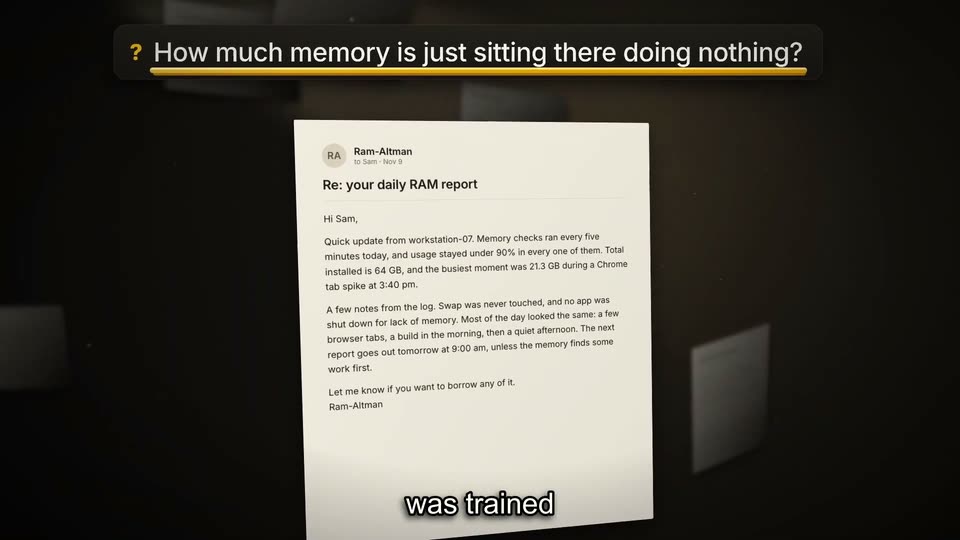
No filming indicatedEstimated needs: 4 capture groups — your screens or recordings · 7 graphic passages — draw or supply · 24 3D passages — build or supply
Is this your launch? to your site or press kit.
More like this

Ivan Novikov - I've built a new AI model that is not allowed to generate text. Inste, scene by scene
· 48 scenes as text
01 · Product intro · 0:00–0:01
A dark 3D field of floating document pages drifts behind a bold white XERJ title with Reader in black on a yellow highlight. A white tagline sits below while a caption changes at the bottom.
On-screen text: “XERJ Reader”, “A neurosymbolic model for real work with data.”, “Today”, “we're announcing”
Techniques: 3D mockup, Parallax
Camera: Push in
02 · Product intro · 0:01–0:03
Document pages float in 3D perspective around a bold white title, with 'Reader' in black on a yellow highlight and a white tagline below. Small white words appear one by one at the bottom center, matching the voiceover.
On-screen text: “XERJ Reader”, “A neurosymbolic model for real work with data.”, “our first”, “neurosymbolic”
Techniques: 3D mockup, Kinetic type
Camera: Static
03 · Product intro · 0:03–0:04
Blurred email and document cards float tilted in a dark 3D space. Large white XERJ and black Reader on a yellow box sit left, with the tagline A neurosymbolic model for real work with data. below. A yellow highlight sweeps behind Reader as a subtitle runs at the bottom.
On-screen text: “XERJ Reader”, “A neurosymbolic model for real work with data.”, “model that can”, “actually”, “handle”
Techniques: 3D mockup
Camera: Static
04 · Product intro · 0:04–0:06
A close-up of an email shows lines of body copy highlighting in yellow in sequence. The email card then lifts and tilts into 3D perspective, sliding left to expose a pricing table behind it. A caption, handles real work, sits at the bottom.
On-screen text: “handles real work”
Techniques: 3D mockup
Camera: Push in
05 · Product intro · 0:06–0:15
A monitor screen floats in 3D perspective, tilting as the camera orbits it, showing a price-comparison table. Yellow marker highlights sweep across the XERJ Reader column, the 26x and ~1,050x values, and the closing line, while white subtitles track the voiceover at the bottom.
On-screen text: “specialty”, “Xerj Reader”, “is tens of times”, “cheaper than”, “even the most”, “budget-friendly”, “LLMs with”, “performance”, “closing in”
Techniques: 3D mockup
Camera: Static
06 · Other · 0:15–0:16
A tilted white pricing table in 3D sits over floating dark panels. The table slides left as a bold white headline slams across the frame. Yellow highlight bars mark the multiplier row and the performance line.
On-screen text: “on frontier”, “IT ISN'T JUST BETTER.”, “models”
Techniques: 3D mockup, Kinetic type, Parallax
Camera: Push in
07 · Other · 0:16–0:18
A bold white headline holds center over a dark field of blurred floating gray slabs. A yellow highlight bar wipes in behind BETTER. and the word flips to black, while a small caption updates below.
On-screen text: “IT ISN'T JUST BETTER.”, “It isn't just”, “better, it is”
Camera: Static
08 · Other · 0:18–0:21
Over a dark 3D scene of drifting papers, a bold white headline reads IT ISN'T JUST BETTER. with BETTER. in a yellow box. It cuts to A DIFFERENT TYPE OF AI MODEL. as the yellow box slides across the words, then shrinks.
On-screen text: “IT ISN'T JUST BETTER.”, “better, it is”, “A DIFFERENT TYPE OF AI MODEL.”, “a different type”, “Here's”
Techniques: Kinetic type, 3D mockup
Camera: Push in
09 · Other · 0:21–0:22
Over a dark blurred backdrop of paper documents, a yellow highlight bar drops from the top and locks behind the words as the title HERE'S HOW IT WORKS. scales up to center, HERE'S in white, the rest in black on the bar. Caption how it works holds at the bottom.
On-screen text: “HERE'S HOW IT WORKS.”, “how it works”
Techniques: Kinetic type
Camera: Pan
10 · Problem · 0:22–0:24
A dark “LLM chat” panel floats in 3D perspective over a blurred room of gray blocks, sliding up into place. A yellow bubble expands and types a question word by word while white captions swap at the bottom of the panel.
On-screen text: “Frontier LLMs”, “were trained”
Techniques: 3D mockup, Kinetic type
Camera: Push in
11 · Problem · 0:24–0:24
A dark chat window titled LLM chat floats at a 3D tilt over a blurred background. A yellow message bubble scales in with the question, and a small ring icon rests below it. The subtitle to chat stays locked at the bottom of the frame.
On-screen text: “to chat”
Techniques: 3D mockup
Camera: Static
12 · Problem · 0:24–0:25
A dark chat panel titled LLM chat with a yellow question bubble sits in 3D perspective. A second panel showing an email report slides in from the right while a white caption reads Ask one about along the bottom edge.
On-screen text: “Ask one about”
Techniques: 3D mockup
Camera: Pull out
13 · Problem · 0:25–0:26
In a dark 3D space, a chat panel and a white email float side by side. The yellow question bubble scales up on the left while the email on the right snaps from blur into focus. A white caption builds word by word along the bottom edge.
On-screen text: “Ask one about”, “your data”
Techniques: 3D mockup, Kinetic type
Camera: Push in
14 · Problem · 0:26–0:28
A dark chat screen sits in 3D perspective with a blurred email panel to the right. The camera pushes in on a yellow question bubble and a ram_report.eml chip while an answer types out below. A bottom caption reads an answer that sounds right.
On-screen text: “an answer that”, “sounds right”
Techniques: 3D mockup, UI zoom
Camera: Push in
15 · Problem · 0:28–0:28
A dark chat screen sits tilted in 3D perspective against a black background. A yellow highlighted question holds at the top while the answer 64 GB types out below a blinking caret. A white caption sounds right appears at the bottom edge.
On-screen text: “sounds right”
Techniques: 3D mockup
Camera: Static
16 · Problem · 0:28–0:30
A zoomed view of a dark chat panel shows a yellow-highlighted question above a 64 GB answer box, then the camera pulls back to reveal the full email document on the right.
On-screen text: “whether”, “it's in the data”
Techniques: UI zoom
Camera: Push in
17 · Problem · 0:30–0:33
A white email sits in a dark 3D space with blurred cards on the left. A yellow 'Human check' button scales up while a cursor hovers on it, and a dark callout shows '64 GB'. Subtitles roll across the bottom.
On-screen text: “or not”, “64 GB”, “So a human check still”, “That's the total installed”, “has to check it”
Techniques: Parallax, 3D mockup, Cursor demo
Camera: Pull out
18 · Feature reveal · 0:33–0:34
A white email card floats in a dark 3D space with blurred cards behind it. A top pill poses a question in white over a yellow underline, while a bottom caption types out word by word.
On-screen text: “How much memory is just sitting there doing nothing?”, “Reader was trained for exact answers”
Techniques: Kinetic type, 3D mockup, Parallax
Camera: Static
19 · Feature reveal · 0:34–0:36
A tilted email card titled Re: your daily RAM report floats in 3D against a dark backdrop, a blurred copy trailing behind. A top banner poses a memory question, and the camera pushes in as figures in the body get highlighted yellow. Subtitles caption the voiceover at the bottom.
On-screen text: “How much memory is just sitting there doing nothing?”, “was trained”, “answers”
Techniques: 3D mockup, UI zoom
Camera: Push in
20 · Feature reveal · 0:36–0:36
A tilted email mockup floats on a dark blurred background and eases into a flat front view. A dark pill banner asks a question above while a bold caption builds below; the email body highlights two memory figures in yellow.
On-screen text: “? How much memory is just sitting there doing nothing?”, “It points at your data and”
Techniques: 3D mockup
Camera: Pull out
21 · Feature reveal · 0:36–0:38
A dark formula bar types out a spreadsheet formula while two yellow lines drop down to highlight “64 GB” and “21.3 GB” in an email below, then the result “42.7 GB” appears.
On-screen text: “? How much memory is just sitting there doing nothing?”, “writes a formula”, “computed by the engine”
Techniques: Kinetic type
Camera: Pull out
22 · Feature reveal · 0:38–0:41
A tilted email document floats in a dark 3D space beneath a formula bar reading 42.7 GB. A yellow highlight sweeps across two memory values in the body, then a large yellow 42.7 GB chip pops in above the page while small labeled pills link down to the highlighted numbers.
On-screen text: “like in Excel”, “to get the”
Techniques: Masking
Camera: Static
23 · Demo · 0:41–0:42
A tilted paper report and a formula panel sit in 3D depth, a yellow badge pops between them. The layer blurs and slides back as large white COST and LATENCY figures slam in front, counting down from $6,800.00 to $0.50 and from 170 s to 0.008 s.
On-screen text: “COST $6,800.00 $0.50 per 1M questions”, “LATENCY ~170 s 0.008s per question to first token”
Techniques: 3D mockup, Kinetic type, Parallax
Camera: Pan
24 · Demo · 0:42–0:44
A dark comparison card lists COST and LATENCY for Claude Opus 5.5 versus XERJ Reader-1. A yellow highlight box slides from $6,880.00 to $6.50 while a strikethrough line draws across the first value, and a caption cycles at the bottom.
On-screen text: “COST”, “$6,880.00”, “per 1M questions”, “Claude Opus 5.5”, “$6.50”, “XERJ Reader-1”, “LATENCY”, “~1.70 s”, “per question”, “to first token”
Techniques: Masking
Camera: Push in
25 · Demo · 0:44–0:46
A dark comparison graphic shows COST and LATENCY rows. A strikethrough line draws across the old values $6,880.00 and ~1.70 s, while $6.50 and a yellow 0.08 s box stay solid, the box flashing a light sweep. The graphic slides up as a policy document mockup and a yellow question banner enter from the right.
On-screen text: “COST”, “$6,880.00”, “$6.50”, “per 1M questions”, “Claude Opus 5.5”, “XERJ Reader-1”, “LATENCY”, “~1.70 s”, “0.08 s”, “per question to first token full answer”
Techniques: Light sweep, 3D mockup
Camera: Push in
26 · Demo · 0:46–0:48
A yellow banner on a dark frame asks whether the refund rules contradict each other. A 96-page policy document sits left as two white cards slide in right, showing 30-day and 14-day refund windows with the numbers highlighted. Bottom captions read “like finding,” then “contradictions.”
On-screen text: “Do the refund rules contradict each other?”, “96-PAGE POLICY”, “SECTION 4.2 · REFUNDS · PAGE 18”, “Refunds are accepted within 30 days of purchase.”, “like finding”, “SECTION 11.7 · PROMOTIONS AND GIFT CARDS · PAGE 71”, “Refunds are accepted within 14 days of purchase.”, “contradictions”
Camera: Static
27 · Demo · 0:48–0:48
A 3D-tilted 96-page policy mockup sits left under a yellow question pill; two white excerpt cards highlight “30 days” and “14 days” and slide left across the document, while a white “Yes: 30 days vs 14 days” line holds at the bottom right.
On-screen text: “Do the refund rules contradict each other?”, “96-PAGE POLICY”, “Yes: 30 days vs 14 days”, “documents”
Techniques: 3D mockup
Camera: Push in
28 · Demo · 0:48–0:52
A flat grid of document file cards sits on a dark background under a yellow pill asking 'Who pays for shipping?'. The Supply agreement card gains a yellow border, then a detail panel slides up showing the matched clause with 'The Supplier' highlighted. White captions swap at the bottom.
On-screen text: “an enterprise”, “curating context”
Camera: Pan
29 · Demo · 0:52–0:54
A dark code editor window fades in on a black background. A yellow pill drops in at the top with the question, then the MAX_RETRIES line is highlighted in yellow and a context line appears below the editor while small captions change at the bottom.
On-screen text: “curating context”, “Where is the retry limit set?”, “agents”
Camera: Pan
30 · Demo · 0:54–0:54
A glowing yellow question pill sits above a dark code editor that highlights a retries line, then the view cuts to an email client showing a separation notice. The pill's text swaps to a new question as the interface changes.
On-screen text: “Where is the retry limit set?”, “or figuring out”, “How many shares do I keep after leaving?”
Camera: Push in
31 · Demo · 0:54–0:57
A dark scene holds a yellow question pill at the top over an email inbox on the left. The line about 1,250 vested shares is highlighted, and a small chip on that text slides out to the right, growing into a side card labeled exact span with the number and metadata.
On-screen text: “How many shares do I keep after leaving?”, “how many shares”, “after leaving”, “Anthropic”
Camera: Static
32 · Feature reveal · 0:57–1:00
A row of six step cards under LLM OPEN-ENDED STEPS sits over blurred documents; yellow highlights pop on the lookup cards as a yellow Reader-1 pill and DATA-HEAVY LOOKUPS settle above three dashed boxes, with captions appearing at the bottom.
On-screen text: “LLM OPEN-ENDED STEPS”, “Plan the task”, “Find the order”, “1,200 customer emails”, “Find the clause”, “96-page policy”, “Find the payment”, “40 invoices”, “Decide the offer”, “Write the reply”
Camera: Pan
33 · Feature reveal · 1:00–1:01
A dark 3D field of workflow step cards, some marked with yellow highlighter. A yellow 'XERJ Reader-1' pill and white 'DATA-HEAVY LOOKUPS' label float in front. The camera reframes as the lookup cards settle into a bottom row of three, the open-ended steps holding the top row.
On-screen text: “LLM OPEN-ENDED STEPS”, “XERJ Reader-1”, “DATA-HEAVY LOOKUPS”
Techniques: 3D mockup, Parallax
Camera: Push in
34 · Feature reveal · 1:01–1:02
Three tilted black cards reading Plan the task, Decide the offer and Write the reply ease into focus beneath the OPEN-ENDED STEPS heading, set over a dark desk with blurred papers. A yellow XERJ Reader-1 pill and the caption the LLM handles sit at the bottom.
On-screen text: “LLM”, “OPEN-ENDED STEPS”, “STEP 1 · OPEN-ENDED”, “Plan the task”, “STEP 5 · OPEN-ENDED”, “Decide the offer”, “STEP 6 · OPEN-ENDED”, “Write the reply”, “XERJ Reader-1”, “DATA-HEAVY LOOKUPS”
Techniques: 3D mockup
Camera: Static
35 · Feature reveal · 1:02–1:04
On a dark backdrop of blurred papers, the OPEN-ENDED STEPS row types out short lines across three cards, then the DATA-HEAVY LOOKUPS row of white cards slides up from the bottom edge.
On-screen text: “LLM”, “OPEN-ENDED STEPS”, “STEP 1 - OPEN-ENDED”, “Plan the task”, “order, policy, payment”, “STEP 5 - OPEN-ENDED”, “Decide the offer”, “full refund, no fee”, “STEP 6 - OPEN-ENDED”, “Write the reply Hi Dana, your refund is on its way. is on its way. is on its way. is on its way. is on its way. is on its way. is on its way. is on its way. is”
Techniques: Kinetic type
Camera: Pull out
36 · Feature reveal · 1:04–1:04
A dark infographic of six step cards sits under the headings OPEN-ENDED STEPS and DATA-HEAVY LOOKUPS, with yellow highlighter bars over the white cards. The camera zooms into the middle card, which opens into a full policy document page showing numbered clauses, as a yellow bar rests along the top edge.
On-screen text: “OPEN-ENDED STEPS”, “Plan the task”, “Decide the offer”, “Write the reply”, “DATA-HEAVY LOOKUPS”, “Find the order”, “Find the clause”, “Find the payment”
Techniques: Morph
Camera: Pan
37 · Feature reveal · 1:04–1:10
White contract pages float in 3D over a dark background, a yellow badge asks the question and the page counter jumps from 3 to 37 as the camera pushes in. A yellow highlighter sweeps across the renewal clause while captions appear word by word below.
On-screen text: “How much notice stops the auto-renewal?”, “PAGE 3 OF 186”, “answer questions”, “over long”, “documents”, “PAGE 37 OF 186”, “like finding”, “in a clause”, “in a contract”
Techniques: 3D mockup, UI zoom, Parallax
Camera: Push in
38 · Feature reveal · 1:10–1:12
A paper invoice slides up from the bottom and settles center frame on a dark backdrop, tilting into a slight 3D angle. A yellow highlighter marks the due date as a yellow question bubble hovers top right. A bold page counter and outlined voiceover captions track the slide.
On-screen text: “When is invoice INV-21094 due?”, “PAGE 31 OF 31”, “or a due date”, “PAGE 30 OF 31”, “in an invoice”
Techniques: 3D mockup
Camera: Static
39 · Demo · 1:12–1:29
Two flat UI cards on a dark background compare XERJ Reader-1 and Claude Opus 5.5. A yellow input bar types a question word by word. The left card highlights the answer at 0.08 s; the right streams text to 3.09 s. White captions appear word by word.
On-screen text: “The improvements”, “are clear”, “if you see them”, “side by side”, “about your data”, “just like you”, “would an LLM”, “Get the answer”, “instantly”, “Meanwhile, LLMs take many times longer to finish responding”
Techniques: Split screen, Kinetic type
Camera: Push in
40 · Demo · 1:29–1:29
On a dark background, invoice documents fan out in 3D perspective on the left while a tilted email card about a daily RAM report sits on the right. A yellow pill badge poses the memory question at the top, and a token counter reads zero with “LLM searches” captioned below.
On-screen text: “How much memory is just sitting there doing nothing?”, “CLAUDE OPUS 5.5 · INPUT TOKENS”, “0”, “6 files · opened one by one”, “LLM searches”
Techniques: 3D mockup
Camera: Push in
41 · Demo · 1:29–1:33
Tilted document pages, invoices and reports, fly through a dark 3D space as a token counter ticks up and a file label updates. A yellow pill at the top holds the question. The pages blur away and a white card slides in to show the model writing its answer.
On-screen text: “How much memory is just sitting there doing nothing?”, “CLAUDE OPUS 5.5 · INPUT TOKENS”, “through the data”, “file by file”, “then generates”, “Claude Opus 5.5”, “Claude Opus 5.5 writes the answer, token by token”
Techniques: 3D mockup, Parallax
Camera: Pull out
42 · Demo · 1:33–1:37
A white chat card on a dark background types an answer as token chips pop in one by one while an output-token counter ticks up. The chips dissolve into a flowing paragraph, then the card slides right to reveal a second card, forming a side-by-side comparison.
On-screen text: “then generates”, “token by token”, “which is great”, “conversation”
Techniques: Morph, Split screen
Camera: Pull out
43 · Demo · 1:37–1:40
Two flat interface cards sit side by side on a black background, each showing the same RAM email and answer. A yellow pill holds the question up top. Highlighted time and cost figures anchor each card, while a white caption at the bottom swaps words in sync with the voiceover.
On-screen text: “How much memory is just sitting there doing nothing?”, “0.08 s”, “3.09 s”, “but slow”, “$6.50 per 1M questions”, “$6,880.00 per 1M questions”, “and costly”, “for computers”
Techniques: Split screen, Kinetic type
Camera: Static
44 · Demo · 1:40–1:41
Two white agent cards sit side by side on black, each showing the same email and an answer panel. A yellow pill headline poses the question above; the caption “Or the LLM” fades in below as the badges switch to “1 CALL” and “DIRECT”.
On-screen text: “How much memory is just sitting there doing nothing?”, “Or the LLM”
Techniques: Split screen
Camera: Static
45 · Demo · 1:41–1:55
Two UI cards sit side by side: the left shows an email and an answer field, the right logs model calls as a Python script fills in. The camera pushes into the left card, highlights numbers, reveals a formula computing 42.7 GB, then the cards fly off into 3D space.
On-screen text: “How much memory is just sitting there doing nothing?”, “writes a script”, “runs it”, “reads the output”, “fixes it”, “A single lookup”, “takes several”, “model calls”, “Reader writes”, “one formula like in Excel It points at the words and your code runs it”
Techniques: Split screen, UI zoom, 3D mockup
Camera: Push in
46 · Other · 1:55–1:59
On a dark 3D field, floating invoice and email pages link to a central yellow icon by thin lines. The icon widens into a banner that types a question, stamps 'No answer' in bold, then clears. White subtitle lines swap along the bottom.
On-screen text: “This represents”, “a fundamental”, “in how AI agents”, “work with data”
Techniques: 3D mockup, Morph, Kinetic type
Camera: Push in
47 · CTA · 1:59–2:02
A dark end card holds a yellow pill reading XERJ Reader-1 above a white card. The white card's top edge wipes up to reveal Join the waitlist under a yellow brushstroke, with the URL platform.xerj.ai in heavy black type below. Blurred document rectangles drift in the background.
On-screen text: “XERJ Reader-1”, “Join the waitlist”, “platform.xerj.ai”
Techniques: Masking
Camera: Pull out
48 · CTA · 2:02–2:04
Blurred gray tiles drift slowly across a dark background behind two stacked cards, a yellow one and a cream one holding a highlighted waitlist line and a URL. A two-color tagline sits below, all text locked in place.
On-screen text: “XERJ Reader-1”, “Join the waitlist”, “platform.xerj.ai”, “Found, not generated.”
Camera: Static