2:03
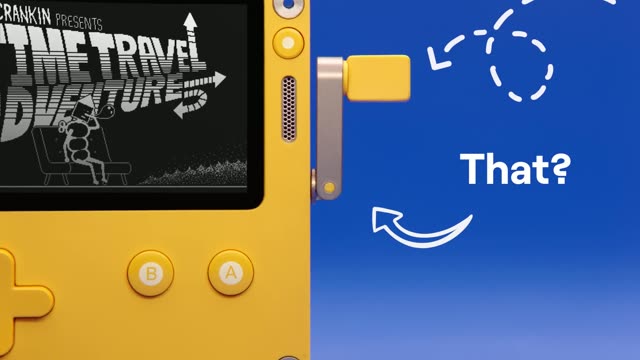

Say Hello to Playdate!!
Playdate · Hardware · Jun 2021
Captions · Apr 2024 · 0:49 · AI-annotated
Captions’s 0:49 launch film runs 41 scenes, about 1.2 s each. The product is on screen from the first frame and 9 features are revealed. There is no explicit call to action; a voiceover carries the film. A rapid-fire feature montage built on one visual language: a white cursor taps pill-shaped chips over blurred live-action plates, with hard cuts timed to a 140 BPM beat. Deep purple gradients and teal highlights carry the eye, while meme inserts and scaling type keep the tone playful.
Is this your launch? to your site or press kit.
Playdate · Hardware · Jun 2021
Adobe · Apr 2025
Discord · Consumer · Mar 2025
A video file icon named Launch_Final.mp4 rests on a dark field of diagonal purple beams, a white cursor hovering over it. The shot then zooms into a dark app window with a small logo, the file framed inside and a purple highlight behind its name.
Techniques: Cursor demo, UI zoom
Camera: Static
A man in a tan suit, red tie and red-framed glasses reclines in a red leather chair, holding a teal phone receiver to his ear. A dark preview window fades out at the start, and a white cursor arrow hovers beside the centered headline.
On-screen text: “introducing video editing”
Camera: Push in
A row of pill-shaped edit chips floats over blurred footage, with a scrolling filmstrip timeline below and a cursor arrow. The chips read introducing video editing made simple, then swap to a 59/60 second simple counter, ending on add.
On-screen text: “introducing video editing”, “made”, “simple”, “second”, “59”, “60”, “add”
Techniques: Kinetic type, Cursor demo
Camera: Push in
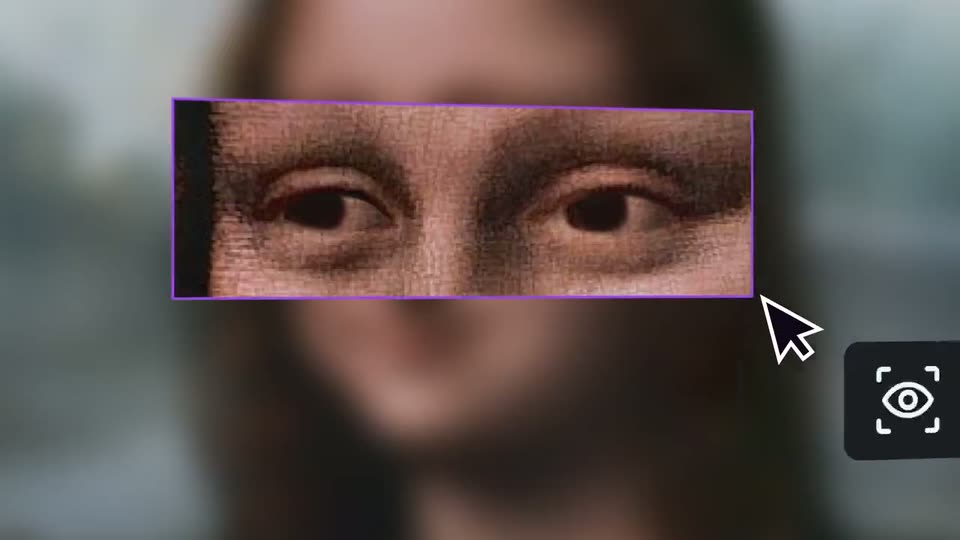
A blurred woman's face fills the frame behind three sharp chips, add in white on dark, eye and contact? in black on green. Two outline cursors move; one taps the eye chip and a purple-framed magnified patch of the eye appears top left.
On-screen text: “add”, “eye”, “contact?”
Techniques: Cursor demo
Camera: Static
A purple-bordered crop of a woman's eyes sits over a blurred portrait, with a dark pill labeled AI Eye Contact and a toggle below. A white cursor hovers as the toggle flips on, then the overlay clears to reveal the full sharp face.
Techniques: Cursor demo
Camera: Pull out
A close-up of a girl in a blue headscarf fills the frame with a white cursor at right. It cuts to a golden pharaoh mask on black, a black cursor resting near the ear.
Techniques: Cursor demo
Camera: Static
A close-up photograph of a blonde woman with red lips on a red background holds a black cursor arrow near her ear. The frame blurs and whips to a second photo of the same woman, hand raised to her lips, on a dark background.
Techniques: Cursor demo
Camera: Pull out
A black and white cartoon plays a paddle boat, then the mouse character turning the wheel, while two dark rounded chips with white text, background and noise?, stay locked in the upper center over the animation.
On-screen text: “background”, “noise?”
Camera: Pull out
A black-and-white Mickey cartoon plays behind two dark rounded labels reading background and noise?, while a purple filmstrip of repeated frames and a red waveform sit below. A cursor and mute icon appear at lower left.
Techniques: Cursor demo
Camera: Static
A cartoon of a mouse at a ship's wheel sits under a purple wash, with teal chips reading doesn't matter and a waveform below; a white cursor hovers a purple mute icon. The view reframes to the timeline, a beach clip above the waveform and a chip reading add.
On-screen text: “background noise?”, “doesn't matter”, “add”
Techniques: Cursor demo, UI zoom
Camera: Push in
A dark editor timeline holds two moon-landing clips. The cursor taps a green flame tile in the gap, the background flashes yellow, and the flame scales up to fill the frame.
On-screen text: “add a little bit of spice”
Techniques: Kinetic type, Cursor demo, Masking
Camera: Static
A dark editor view shows a row of caption tiles reading add a little bit of spice sliding left over a blurred astronaut, while a cursor taps a film-strip icon in a horizontal clip strip. The view scrolls down to reveal a yellow panel with large white numerals.
On-screen text: “add a little bit of spice”, “NO.10.76”
Techniques: Kinetic type, Cursor demo
Camera: Static
On a blurred purple gradient, the word add slides in small, then more scales up in place from a modest centered word to a huge headline. The frame stays locked off while the type grows.
On-screen text: “add”, “more”
Techniques: Kinetic type
Camera: Static
A fiery orange backdrop sits behind a dark tab bar; the center tab is outlined in teal with a green level meter above it and a white cursor on it. A magenta-framed panel below plays fire. The word more scales across the frame.
On-screen text: “more”
Techniques: Kinetic type, Cursor demo
Camera: Static
A dark horizontal clip strip scrolls left over a smoky orange background as a white cursor selects highlighted cells labeled billy then bezos, while a preview row of thumbnails updates below.
Techniques: Cursor demo
Camera: Push in
A blurred clip of cash fills the background as a dark editing timeline scrolls left past a teal-outlined clip labeled bezos, with a white cursor pinned to its right edge and a teal bar-graph icon above it. Below, video thumbnails of flames, money and schoolchildren slide by.
Techniques: Cursor demo
Camera: Push in
A blurred shot of children running sits behind a video-editor timeline; a green waveform pulses above dark clips, one outlined in green reads “bier”, and a white cursor hovers on it; a preview monitor below plays the same footage.
Techniques: Cursor demo
Camera: Static
White bold text reading “even more” sits centered on a soft purple gradient and scales up from small to full size over the first third of the clip, then holds.
On-screen text: “even more”
Techniques: Kinetic type
Camera: Static
Behind a tilted row of dark tabs, two hosts sit blurred at a table with laptops in warm red light. “Even more” scales in as the “CPUs” tab flashes green with an underline under a white cursor arrow.
On-screen text: “even more”, “CPUs”
Techniques: Kinetic type, Cursor demo
Camera: Static
A row of dark cards scrolls across a blurred office set. The center card glows green and reads CPUs under a cursor; the strip advances so the next card, reading coin, centers as the backdrop shifts from a glowing server rack to the room.
On-screen text: “CPUs”, “coin”
Techniques: Cursor demo
Camera: Static
A row of dark rounded tiles runs across a blurred shot of a streamer at a desk, the center tile glowing teal with 'coin' and a cursor. The tile turns green as 'creatine' scales in and the Doge illustration on the right clears.
On-screen text: “coin”, “creatine”
Techniques: Cursor demo, Kinetic type
Camera: Pan
A split screen shows a realistic man in a grey tank top on a street at left and a comic-book superhero version at right. A green rounded label reading creatine with a cursor scales in at the center, flanked by dark placeholder boxes.
On-screen text: “creatine”
Techniques: Split screen, Kinetic type
Camera: Static
A soft purple blur fills the frame while the white headline let's caption this holds centered and still, with no motion on the text.
On-screen text: “let's caption this”
Camera: Static
A close-up of a mandrill's face fills the frame as pixelated sunglasses pop onto its eyes. The caption let's caption this sits centered with a cursor arrow, its style shifting from white outlined text with a colored word to dark type on a light gray pill.
On-screen text: “let's caption this”
Camera: Static
A soft, blurred purple gradient fills the frame. The white bold lowercase text “go global” holds centered and static for the full shot, with no movement or reveal.
On-screen text: “go global”
Camera: Static
A blurred live-action shot of a man in a recording booth holds the DUB app icon and wordmark. A white cursor clicks, and the background resolves into a 3x3 grid of video tiles, each tagged with a national flag, as the cursor lands on the center tile.
On-screen text: “go global”, “DUB”
Techniques: Cursor demo, Morph
Camera: Static
Nine video tiles of the same man with headphones form a grid, each tagged with a country flag, over a blurred backdrop. A white cursor moves between tiles, then the view zooms into one tile as French subtitles appear.
On-screen text: “Je veux vous guider à travers”, “ma démarche créative aujourd'hui”
Techniques: Cursor demo, UI zoom
Camera: Push in
A soft, out-of-focus purple gradient fills the frame while the bold white 3D text 'go viral' holds centered and still; small French captions sit at the bottom.
On-screen text: “Je veux vous guider à travers”, “ma démarche créative aujourd'hui”, “go viral”
Camera: Static
A man in headphones sits in a rounded video card over a blurred gradient. A cursor flips the “shorts?” toggle to purple, the pill slides away, and the card shrinks as a progress bar plus a smaller card with an icon rail appear.
On-screen text: “shorts?”, “go viral”
Techniques: Cursor demo
Camera: Static
Four vertical short-video cards showing a man in headphones slide in one by one on a dark rounded panel over a blurred multicolor gradient, while a segmented purple progress bar fills beneath them. A large caption reads “shorts?” as it slides across the frame.
On-screen text: “shorts?”
Camera: Static
A white lowercase phrase sits centered on a soft, out-of-focus purple background. The frame is locked off and the text holds still for the full duration, with only the blurred backdrop shifting subtly.
On-screen text: “go anywhere”
Camera: Static
Two podcast hosts sit at a desk under pink and blue neon as a window graphic with three control buttons floats over the center. A cursor clicks the buttons one by one, the background blurs, and the window switches to a vertical split of both hosts.
On-screen text: “go anywhere”
Techniques: Cursor demo
Camera: Static
A rounded video-call window over a blurred studio background shows two hosts in a neon-lit radio booth; a cursor clicks from the middle tab to the right tab as the footage zooms in on the ON AIR sign.
Techniques: Cursor demo
Camera: Pull out
A blurred studio set with two hosts sits behind a rounded video window showing a curly-haired person in headphones and pink glasses. A white cursor arrow quickly hops between three outline aspect-ratio shapes above the window, highlighting each in green.
Techniques: Cursor demo
Camera: Static
A flat purple rounded EXPORT button sits centered over a blurred live-action plate of people at a table. A white outlined cursor glides from the lower right to hover at the button's corner as small plus-shaped sparkles pop in around it.
Techniques: Cursor demo, Particles
Camera: Static
The word “whew” holds center on a blurred purple gradient while flat rounded purple bars slide in from the edges, framing the text in a quick one-second beat.
On-screen text: “whew”
Camera: Static
A static field of rounded purple blocks fills the locked-off frame. The centered white word “whew” is swapped for “get serious”, which then shrinks toward the middle. The background pattern does not move.
On-screen text: “whew”, “get serious”
Techniques: Kinetic type
Camera: Static
On a dark purple background with a faint perspective grid, the white headline scales in at center while two purple rounded bars slide from offset positions into an aligned stack beneath it.
On-screen text: “get serious”, “without getting complicated”
Techniques: Kinetic type
Camera: Static
A flat front-facing phone mockup sits on the right over a dark purple grid, its screen playing a two-person podcast clip with a captions toolbar. The white word captions slides in from the left with motion blur, then a lighter purple line without getting complicated scales up beneath it.
On-screen text: “captions”, “without getting complicated”
Techniques: Kinetic type
Camera: Static
A dark purple backdrop with faint vertical grid lines. On the right, a smartphone in 3D perspective tilts gently, its screen showing a video editor with a clip of two people at microphones and a timeline below. The word captions sits in white on the left.
On-screen text: “captions”
Techniques: 3D mockup
Camera: Pull out
A dark purple grid background frames a laptop mockup on the right, its screen showing a video editor with a podcast preview of two hosts and a timeline. To the left, the words now and on web sit still in white and purple.
On-screen text: “now”, “on web”
Techniques: 3D mockup
Camera: Static