1:01

Introducing Microsoft Copilot Studio | Your Copilot, Your Way
Microsoft · AI · Nov 2023
Levocred AI · Aug 2026 · 1:32 · AI-annotated
Levocred AI’s 1:32 launch film runs 46 scenes, about 2.0 s each. The product shows up at 0:16 and 3 features are revealed. The call to action lands at 1:22 (90% in), over a voiceover. The video alternates full-frame kinetic type cards with UI mockups that fly in from scattered stacks and settle into locked-off compositions, cut at a steady pace of about 18 cuts per minute. Signature moves include word-by-word text builds, blur-to-sharp resolves, and 3D-tilted browser windows that flatten to frontal views over soft grainy teal and cream gradients.
Is this your launch? to your site or press kit.
Microsoft · AI · Nov 2023
Spline · Design · Oct 2026
Craft · Productivity · Nov 2025
A dark teal grainy gradient fills the locked-off frame as white centered text builds word by word, reading “Every lender runs on.”
On-screen text: “Every lender runs on”
Techniques: Kinetic type
Camera: Static
White kinetic type sits centered over a blurred teal field; the phrase swaps to the word analysts, then the background racks into a 3D desk in perspective with papers, a hand and dashed HUD tracking lines.
On-screen text: “Every lender runs on”, “analysts”
Techniques: Kinetic type, 3D mockup
Camera: Static
A blurred blue desk of papers and pens sits behind a dashed web of pink coordinate tags. The white word analysts scales in at center, then gives way to a scatter of large white numbers popping across the frame.
On-screen text: “analysts”, “(26)”, “8”, “-8”, “2”, “7”, “7”, “-29”, “2”, “2”
Techniques: Kinetic type
Camera: Static
A four-panel grid on a textured blue-gray field holds a spreadsheet, hands typing on a laptop, a man at a monitor, and a close-up of eyes reflecting code, with a centered white caption. Faint letter fragments fade in across the grid near the end.
On-screen text: “doing the same reports manually”
Camera: Static
A dark teal textured grid fills the frame with white month names scattered across it. The labels drift and lock into a calendar layout while four white date tiles, 04, 31, 02 and 23, pop into place. The bold white headline every single month holds steady in the center.
On-screen text: “every single month”
Techniques: Kinetic type
Camera: Static
A desktop monitor floats in 3D against a teal wall, its screen a soft purple gradient. The view zooms into the screen as a notification card appears: a bold title scales in above an italic subtitle that slides in.
Techniques: 3D mockup, UI zoom, Kinetic type
Camera: Static
A frosted-glass notification card sits centered on a grainy lavender gradient. A multicolor block logo marks the left; a bold headline scales in above an italic subline that slides in from the right.
Techniques: Kinetic type
Camera: Static
On a textured paper background, a flat auto-loan payment table holds the left side as a second table slides in beside it. A headline scales in and a source line slides in below.
On-screen text: “Servicing file received - Auto Loan Portfolio (June)”, “Source: SFTP · 2,184 loans - Ready for processing”
Techniques: Kinetic type, Split screen
Camera: Static
A dark spreadsheet of loan data fills the screen. The view zooms out from a magnified close-up of the rows to a full grid as the rows scroll upward.
Techniques: UI zoom
Camera: Push in
A man in a light blue shirt types on a laptop at a desk, a city skyline filling the window behind him. The camera slowly pulls back to reveal binders, a framed print and a coffee mug on the desk.
Camera: Pull out
A light-blue financial dashboard with eight labeled panels sits over a blurred office background. The frame zooms in until the dashboard fills the screen, centering a yellow box around the Daily Funded Volume panel.
Techniques: UI zoom
Camera: Push in
A light-blue loan dashboard fills the frame. Two white metric cards slide in from the right over the origination chart and yield panels. A large serif headline and a small building photo reveal at the lower right as the layout settles.
Camera: Pan
A rapid shuffle of overlapping loan-dashboard cards slides across a bright background. Panels with a donut chart, line graph, gauge, a white car and a building photo stack and reframe, each showing metrics like delinquency rate and on-time payments.
Camera: Push in
A cream paper dashboard shows a six-bar chart rising from green to red, topped by a dark dotted trend line and percentage labels. A bold underlined title with a pill tag and a white arrow callout card slide down into the top of the frame as the chart holds.
Camera: Pull out
A dark, blurred gradient of deep blue and gray fills the frame, soft and out of focus. It holds for a beat, then fades down to pure black.
Camera: Static
A black frame holds the line “there's a better way” in white text at center. The line fades in from a soft blur, holds steady, then fades back to black.
On-screen text: “there's a better way”
Camera: Static
A soft cream-and-blue gradient background holds centered black text. 'Meet Levo' appears, then is replaced by '24x7 AI analyst for lenders.' which slides in. The frame then zooms into the word 'lenders.' until it fills the screen.
On-screen text: “Meet Levo”, “24x7 AI analyst for lenders.”
Techniques: Kinetic type
Camera: Static
A dark navy frame holds a data table that scrolls upward through monthly rows while a thin white progress bar fills at the top left. The large white headline “24x7 AI analyst for lenders.” slides up and out from the right.
On-screen text: “24x7 AI analyst for lenders.”
Techniques: Kinetic type
Camera: Static
A scrolling financial report table fills the left under a centered headline, while two small live-action clips of people working at computers sit stacked on the right.
On-screen text: “Investor Report — Auto Loan Portfolio Performance (Monthly)”
Techniques: Split screen
Camera: Static
A spreadsheet interface fills the left of the frame, its tables swapping between a collections breakdown and a monthly summary, while a large Investor Report title fades out over it. Two live-action clips, hands typing and a woman at a desk, sit stacked on the right.
On-screen text: “Investor Report — Auto Loan Portfolio Performance (Monthly”
Techniques: Split screen
Camera: Static
Two financial spreadsheets cut quickly, each carrying a large gray headline, while two small live-action clips of a person typing and a woman at a desk sit stacked on the right.
On-screen text: “Monthly Performance - Actual vs Forecast Variance Analysis”, “Investor Report - Auto Loan Portfolio Performance (Monthly)”
Techniques: Split screen
Camera: Static
A soft blue-and-cream gradient holds the headline 'Just ask for it', which is replaced by the larger word 'Once!'. A chat view then types John's request to @Levo and Levo's reply, with a 'Can be integrated with' caption and three app icons at the lower left.
On-screen text: “Just ask for it”, “Once!”, “Can be integrated with”
Techniques: Kinetic type
Camera: Static
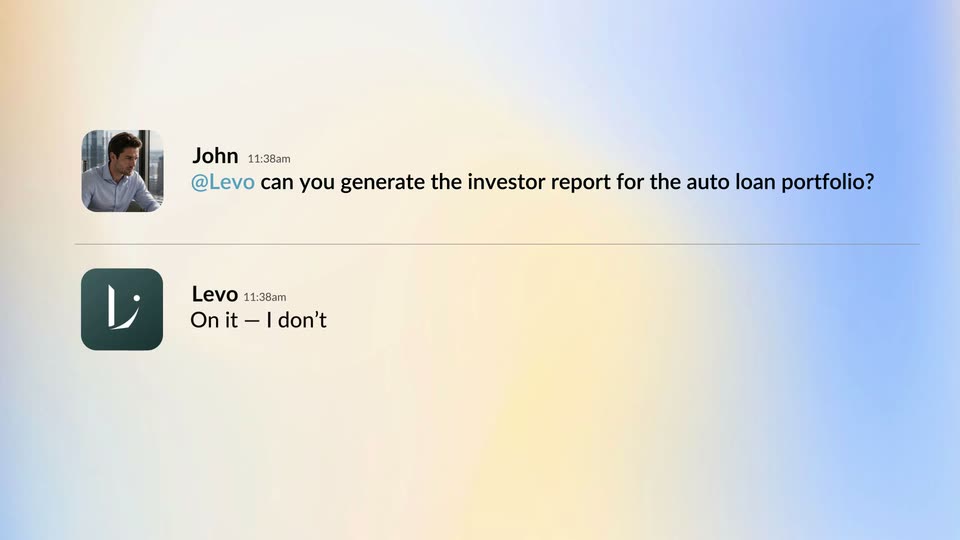
A flat chat UI on a pale blue and yellow gradient shows two messages. John asks Levo to generate an investor report for an auto loan portfolio; Levo replies it will build the workflow. The lines slide and scale in from a horizontal blur, settling sharp by mid-clip.
Techniques: Kinetic type
Camera: Push in
A soft cream-and-blue gradient fills the frame. A line of black text reads 'in yet, so I'll build it for you.' while a red curved underline draws itself in from left to right beneath the words.
On-screen text: “in yet, so I'll build it for you.”
Techniques: Kinetic type
Camera: Static
A dark issue-creation card floats on a soft peach-to-blue gradient. The title and description fields type out the issue title and spec text while the card scales up slightly.
On-screen text: “in yet, so I'll build it for you.”
Camera: Static
A dark interface card fills the left half, cut off at the left edge, with a spec line, labels pill, three-dot menu, Create more toggle and purple Create issue button. The right half is a blurred blue and cream gradient. The frame stays locked off and static.
Camera: Static
Five black bullet points list a monthly servicing workflow on a soft pastel gradient of pale blue, cream, and yellow. The text block resolves from a slight blur into a sharp, locked-off frame and holds.
On-screen text: “Input: monthly servicing file (.xlsx), delivered via SFTP / upload”, “Reconcile loan tape against the book; flag unexplained deltas”, “Build AV analysis - actuals vs reforecast (original as reference)”, “Generate Excel tracker, Word commentary, final PDF”, “Park at approval gate; full audit trail on every run”
Camera: Static
A dark gray checklist sits on a soft peach-to-blue gradient. The top line, the input file item, expands to reveal five indented sub-bullets while the remaining chevron lines fade and the whole list drifts downward.
On-screen text: “Input: monthly servicing file (.xlsx), delivered via SFTP / upload”, “Reconcile loan tape against the book; flag unexplained deltas”, “Build AV analysis - actuals vs reforecast (original as reference)”, “Generate Excel tracker, Word commentary, final PDF”, “Park at approval gate; full audit trail on every run”, “Detect file arrival via SFTP / manual upload trigger”, “Validate file format (XLSX/CSV schema check)”, “Map columns to internal loan schema (loan_id, balance, status, etc.)”, “Handle missing / malformed fields (null checks, type validation)”, “Store raw file snapshot for audit trail.”
Camera: Static
The clip opens zoomed into a checklist, then pulls back to a split layout: a blue task list left, three stacked code editors right. Code types and scrolls in each editor as the list items tick off one by one, ending on a zoom into the code.
Techniques: UI zoom, Split screen
Camera: Pan
A dark code editor and a white worker-lanes table fly in from a scattered stack of overlapping panels and settle into a side-by-side layout, then the view zooms into the table, framing its rows and the system notes footer.
Techniques: UI zoom
Camera: Pan
On a soft cream-and-blue gradient, a chat thread types out Levo's question, then John's reply beside a photo avatar, then Levo's one-line confirmation. The list scrolls up to center the final message.
Techniques: Kinetic type
Camera: Static
A tilted browser window shows the Monthly Investor Report form on a blue gradient. A green X-shaped cursor glides to the Continue button and presses it; the form spins up a loading indicator while a heading slides in from the right edge.
On-screen text: “Levo 11:38am”, “Got it. Finishing up.”
Techniques: 3D mockup, Cursor demo
Camera: Pull out
A split screen pairs a browser window on the left, showing the investor report form on a light blue gradient, with a dark code editor on the right where Python lines type in. The form fields update as the demo advances.
Techniques: Split screen
Camera: Pan
A split screen pairs a browser window on a blue field with a dark Python code editor. The window slides left and shrinks as the code scrolls, then the left half cuts to a man in a suit looking down while the browser reopens larger on the right.
Techniques: Split screen
Camera: Pan
A blurred analyst in a suit sits left of a 3D-tilted browser window on a blue field, then the shot flattens to a frontal view of the Monthly Investor Report form. A cursor hovers the upload box, the xlsx file finishes with a green check, and a green Continue button appears.
On-screen text: “Monthly Investor Report”, “Auto Loan Desk”
Techniques: 3D mockup, Cursor demo, UI zoom
Camera: Pan
A browser window showing a report form shrinks and moves to the top of a blue gradient background, revealing a Slack message from Levo with a PDF attachment that slides in below.
Camera: Pull out
A chat thread on a light blue gradient. Levo's dark-green avatar posts a message with a PDF attachment that types out; John's photo avatar replies 'Yes!' below a divider. The list scrolls up to show Levo's confirmation with an underlined workflow name.
Camera: Static
A 3D-tilted Workflows screen, its grid of collection cards receding in perspective, sits behind two chat bubbles. John's 'Yes!' and Levo's 'Done View workflow' messages slide in over the panel as the panel eases toward a flat, front-on view.
Techniques: 3D mockup
Camera: Pan
A pale blue Workflows panel with a 3x3 grid of collection cards (Accounts, Work Lists, Reports, Collectors, Collector Books, Today, Enrichment, Insights, Data Wiki) fades in over a soft blue gradient, holds steady, then dissolves out. A slim icon sidebar with a logo sits at left.
Camera: Static
A pale blue workflow form, 'July's inputs', sharpens from a stacked blur into a clean layout with a file drop zone, month dropdown and Continue button. A small green 3D cube drops into the zone, then the screen fades out to an empty frame.
Techniques: Cursor demo
Camera: Static
A rounded UI panel on a blue background displays a monthly report document with a stats row and review notes. The view then zooms in to read the document closely, settling on the review text and a row of three file icons.
Techniques: UI zoom
Camera: Push in
A pale blue report screen fills the frame, showing a July 2026 investor summary with an IN REVIEW tag and a row of five metrics, followed by a paragraph block. The view zooms in gently, cropping the top heading and pushing the metric card toward center.
Techniques: UI zoom
Camera: Pan
On a blue gradient, three white connection cards appear left to right, each with a colored icon, a heading and a Connected badge. The set then defocuses and blurs while the word Skip fades in at the lower left.
On-screen text: “Skip”
Camera: Static
A black headline scales up from a small, blurred size to full size at the center of a soft blue gradient background, then holds still on the locked-off frame.
On-screen text: “Skip the upload entirely”
Techniques: Kinetic type
Camera: Static
A soft blue-to-teal gradient fills the frame behind centered text. The phrase 'Skip the upload entirely' crossfades word by word into 'Hire your best analyst', old words blurring out as new ones sharpen. The camera is locked off.
On-screen text: “Skip the upload entirely”, “Hire your best analyst”
Techniques: Kinetic type
Camera: Static
A blurred teal field holds the white headline 'Hire your best analyst', which sharpens, then breaks apart as 'Focus on what matters!' scales in. The line clears and a white logo mark, a bar with a curved stroke and dot, assembles above a 'BACKED BY Y Combinator' credit.
On-screen text: “Hire your best analyst”, “Focus on what matters!”, “BACKED BY”, “Y”, “Combinator”
Techniques: Kinetic type
Camera: Static