
1:26
Explore
Lucite: The AI Platform for Group Benefits
Lucite · Apr 2025 · 1:21 · Full motion · AI-annotated
- Length
- 1:21
- Scenes
- 28 · 2.9 s avg
- Product on screen
- 0:11
- Features shown
- 4
- Voiceover
- No
- Views
- 310 on YouTube
as of November 26, 2026
00:00:00 / 01:21:01
- Length
- 1:21
- Scenes
- 28 · 2.9 s avg
- Product on screen
- 0:11
- Features shown
- 4
- Voiceover
- No
- Views
- 310 on YouTube
as of November 26, 2026
Lucite’s 1:21 launch film runs 28 scenes, about 2.9 s each. The product shows up at 0:11 and 4 features are revealed. There is no explicit call to action. The video is built on a flat teal field that alternates plain type cards with zooming captures of the white app interface, moving from a cycling-word problem statement into a feature-by-feature demo and a final logo card. Signature moves are the push-in zooms that reframe on a single UI control, a hand cursor that performs every click, and tilted 3D app mockups that punctuate each new feature.
No filming indicatedEstimated needs: 5 capture groups — your screens or recordings · 1 official logo — reused across the film · 3 3D passages — build or supply
Is this your launch? to your site or press kit.
More like this



Similar soundtrack
Films whose music sounds like this one, voice left out
1:22

Higgsfield AI 🧩 - ChatGPT can now do motion design in After Effects. Introducing Higgs
Higgsfield · Electronic, Drum and Bass, Future Bass
1:26

MCP 2.0: Don't Just Build Fast. Build for What's Next.
Webflow · Electronic, Hip-Hop
0:50
deel - Your wish is granted.🧞♂️✨ A whole new Deel is here, and we're movin
Deel · Lo-fi hip-hop, chillhop, funk
Lucite: The AI Platform for Group Benefits, scene by scene
· 28 scenes as text
01 · Problem · 0:00–0:06
On a flat teal background, the line 'Reviewing ... can take forever.' sits centered in white. The middle word cycles through Booklets, Contracts, Proposals, Renewals and Utilization in a lighter mint, each term fading in over the last.
On-screen text: “Reviewing Booklets can take forever.”, “Reviewing Contracts can take forever.”, “Reviewing Proposals can take forever.”, “Reviewing Renewals can take forever.”, “Reviewing Utilization can take forever.”
Techniques: Kinetic type
Camera: Static
02 · Problem · 0:06–0:11
On a flat teal background, the line “What if all that information was” sits centered. Below it, “organized”, “searchable” and “exportable” pop into dark highlight boxes one after another, joined by an ampersand, then “in seconds?” fades in underneath.
On-screen text: “What if all that information was”, “organized”, “searchable”, “&”, “exportable”, “in seconds?”
Techniques: Kinetic type
Camera: Static
03 · Product intro · 0:11–0:15
On a flat teal field, a half-faded sentence and a highlighted word dissolve into the white title with a bolt mark, then a thinner tagline fades in beneath. A 3D document interface slides in from the right at an angle, its fields and a cursor visible.
On-screen text: “What if all that information was”, “organized”, “searchable”, “&”, “Introducing Lucite”, “The AI Platform for Group Benefits”
Techniques: 3D mockup
Camera: Static
04 · Demo · 0:15–0:16
A flat browser window of the Lucite app on a teal background zooms into its top-left corner, reframing on the logo and group header, as a hand cursor moves to the Upload documents button.
Techniques: UI zoom, Cursor demo
Camera: Push in
05 · Demo · 0:16–0:19
A dimmed dashboard sits behind a centered upload modal. A hand cursor taps the Booklet option and the drop zone, then a file picker opens and highlights a PDF row in blue.
Techniques: Cursor demo
Camera: Push in
06 · Demo · 0:19–0:21
A native file picker with a selected PDF closes over a blurred upload modal, then the frame zooms out to reveal the full app dashboard. A hand-shaped cursor hovers over the Open button and then the teal upload button.
Techniques: Cursor demo, UI zoom
Camera: Pull out
07 · Demo · 0:21–0:21
A browser window frames the Lucite app, a centered modal titled Upload Plan Design Documents with the Booklet option selected and a PDF file listed. A hand cursor rests on the teal button as the shot pushes in on the modal.
Techniques: UI zoom, Cursor demo
Camera: Pull out
08 · Demo · 0:21–0:23
A hand cursor clicks the confirm button on an upload dialog, the dialog closes to reveal a two-row document list, and a success toast slides into the bottom right corner.
Techniques: Cursor demo
Camera: Static
09 · Demo · 0:23–0:24
A flat browser window displays the Lucite document table with two file rows. A hand cursor glides upward from the empty space and hovers the top row, which tints light gray.
Techniques: Cursor demo
Camera: Push in
10 · Demo · 0:24–0:27
On a white product screen, a hand cursor selects a PDF row, the page swaps to a detail view with metadata chips, then the cursor opens the Basic Life accordion to reveal a list of benefit figures.
Techniques: Cursor demo
Camera: Push in
11 · Demo · 0:27–0:28
A white document-extraction table fills the frame, rows of values aligned in columns. A hand cursor glides from the right edge leftward, hovering a highlighted row, while the view eases slightly right to reveal a teal side bar.
Techniques: Cursor demo
Camera: Pan
12 · Feature reveal · 0:28–0:29
A browser window holding a benefits document scales up and centers over the dimmed Lucite editor, its Export panel open on the right. A white hand cursor hovers at the right edge as the window settles into place.
Techniques: UI zoom
Camera: Pull out
13 · Feature reveal · 0:29–0:30
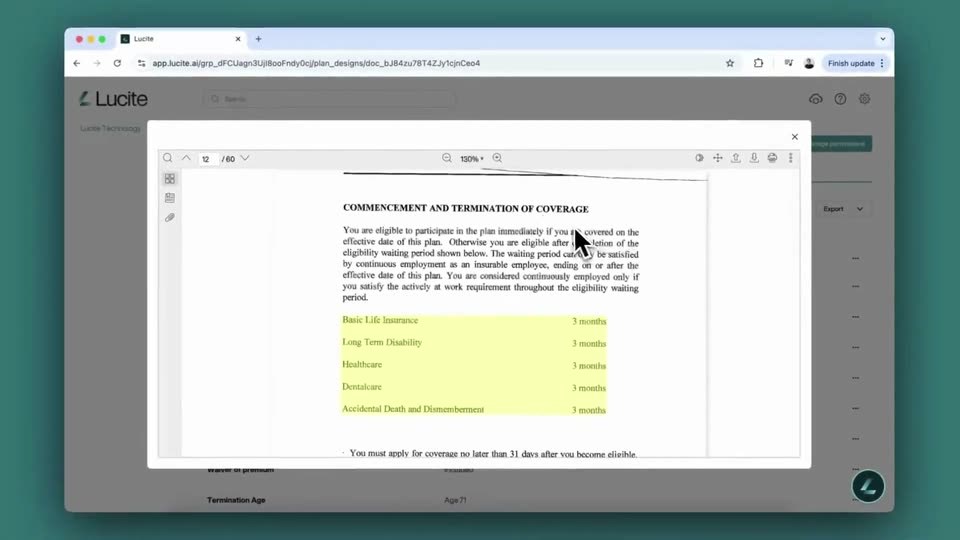
A document viewer overlay sits over the dimmed Lucite app, showing a coverage page with a yellow-highlighted table. A white cursor glides from the page center to the close icon in the top-right corner and clicks it.
Techniques: Cursor demo
Camera: Static
14 · Feature reveal · 0:30–0:34
A browser window shows the Lucite document page. The view zooms in on the Export button, a cursor clicks it to open a dropdown and picks Benefits at Glance. A download toast slides in at the top right, then the view pulls back to the full page.
Techniques: UI zoom, Cursor demo
Camera: Static
15 · Feature reveal · 0:34–0:40
The Lucite app document view cuts to a presentation editor holding the benefits booklet deck. The cursor clicks through slide thumbnails, the view zooms into the Overview of Your Group Benefits Coverage slide, then zooms back out to the Healthcare Benefits slide.
Techniques: Cursor demo, UI zoom
Camera: Static
16 · Feature reveal · 0:40–0:42
A browser window of the Lucite app shows a document list. A cursor clicks two checkboxes to select files while the frame zooms in on the table. A white caption sits along the bottom.
On-screen text: “Easily compare plan design details and rates across documents”
Techniques: Cursor demo, UI zoom
Camera: Push in
17 · Feature reveal · 0:42–0:43
A browser window on a teal background shows a plan comparison table. The framing pushes in from the full window to the Benefit Schedule rows, where highlighted cells compare two quotes side by side. A white caption sits below the window.
On-screen text: “Easily compare plan design details and rates across documents”
Techniques: UI zoom
Camera: Push in
18 · Feature reveal · 0:43–0:48
A white comparison panel sits on a teal field. A hand cursor taps a row checkmark, opens a small Confirm/Flag/Dismiss menu, then clicks the Rates toggle so the table swaps to rate columns, and hovers a row to highlight it. A white caption holds at the bottom.
On-screen text: “Easily compare plan design details and rates across documents”
Techniques: Cursor demo
Camera: Static
19 · Feature reveal · 0:48–0:50
A flat product screen shows a side-by-side rate comparison table with two quote columns and a hand cursor hovering the rows. The view pans right and up to reveal a third quote column and an export button, which the cursor taps.
On-screen text: “Easily compare plan design details and rates across documents”, “and instantly export into Excel”
Techniques: Cursor demo, UI zoom
Camera: Pan
20 · Feature reveal · 0:50–0:54
Close-up of a quote comparison table in the Lucite web app. A hand cursor clicks the Export comparison button, the label switches to Exporting, and a download toast slides in with the file name. The view then zooms out to reveal the full browser window.
On-screen text: “and instantly export into Excel”
Techniques: Cursor demo, UI zoom
Camera: Pull out
21 · Feature reveal · 0:54–0:57
An Excel spreadsheet mockup in 3D perspective flattens to a front view, the table content swaps to a numeric comparison, then the window fades out, leaving the caption on a plain teal field.
On-screen text: “and instantly export into Excel”
Techniques: 3D mockup
Camera: Pull out
22 · Feature reveal · 0:57–0:58
A spreadsheet view with a comparison dropdown cuts to a web app screen where a hand cursor clicks an export menu. A white headline reads across the top. The teal background frames both interfaces in a flat, centered layout.
On-screen text: “No more wasted time copying and pasting data”
Techniques: Cursor demo
Camera: Push in
23 · Feature reveal · 0:58–1:00
A white headline sits above a flat browser window on a teal background. A hand cursor opens the Export menu, clicks Export to PowerPoint, and a download pill reading Done appears in the toolbar.
On-screen text: “No more wasted time copying and pasting data”
Techniques: Cursor demo
Camera: Static
24 · Feature reveal · 1:00–1:03
A white headline sits above a Keynote window on a teal background. A cursor clicks through slide thumbnails on the left, switching the main view from a title slide to a Life Volume chart slide with bars and pie charts.
On-screen text: “No more wasted time copying and pasting data”
Techniques: Cursor demo
Camera: Pull out
25 · Feature reveal · 1:03–1:06
A two-line light gray headline fades in on a dark teal background. A tilted browser mockup of a document review app with an AI chat panel slides in from the right, partially covering the headline.
On-screen text: “Condense hours into seconds with”, “AI insights at your fingertips...”
Techniques: 3D mockup
Camera: Static
26 · Feature reveal · 1:06–1:07
A tilted 3D browser mockup of the Lucite app sits on a dark teal field, the Lucite AI chat panel on the right. The camera zooms into the chat panel as the white headline sharpens above the window.
On-screen text: “What's the copay?”
Techniques: 3D mockup, UI zoom
Camera: Push in
27 · Feature reveal · 1:07–1:16
A Lucite AI chat window sits on a teal backdrop while a cursor types a question into the input bar and sends it. The reply bubble loads, then a long bulleted answer scrolls up as the headline above swaps through demo prompts.
On-screen text: “What's the copay?”, “Did anything change in my new plan design?”, “How did claims trend this year?”, “Lucite answers your client's questions.. before they ask”, “Book a demo today at lucite.ai”
Techniques: Cursor demo
Camera: Static
28 · Outro · 1:16–1:21
On a plain teal background, the white Lucite logo and the line below it fade in from low opacity to full, then hold still, centered in frame.
On-screen text: “Book a demo today at lucite.ai”
Camera: Static