0:46
Lattice Health: Your AI Governance Team
Lattice Health · Healthcare · Jun 2026
Haladir’s 1:53 launch film runs 30 scenes, about 3.8 s each. The product is on screen from the first frame and 4 features are revealed. The call to action lands at 1:41 (89% in), over a voiceover. A founder interview carries the narrative, intercut with screen-captured 3D digital twins and UI panels that cut on the voiceover's sentence beats at about twelve cuts a minute. Signature moves: white headline text that assembles word by word over the speaker, defocus-to-caption transitions, and slow orbits of the isometric warehouse model.
Is this your launch? to your site or press kit.
Lattice Health · Healthcare · Jun 2026
Operon · Industrials
Boom AI · B2B · Oct 2025
Films whose music sounds like this one, voice left out
Submagic · Electronic, Corporate
Tenera · Corporate electronic
LionBio · Modern electronic
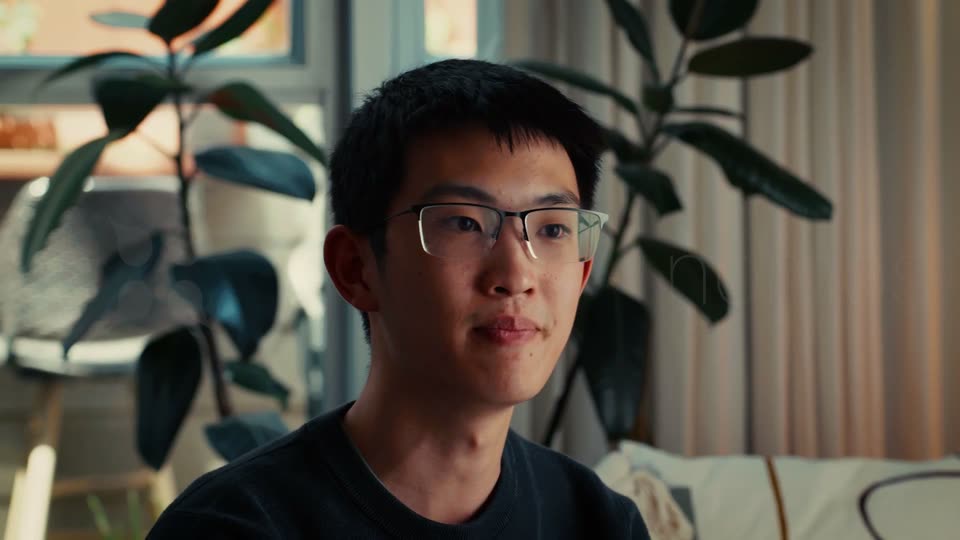
A man in glasses and a dark sweater sits on a leather couch, speaking to camera and gesturing with his hands. Plants frame the shot and a window behind shows a red building. A lower-third name caption builds in at the lower left, holds, then collapses out.
On-screen text: “Joseph Tso”, “Co-Founder @ Haladir”
Techniques: Masking
Camera: Static
A young man in glasses and a dark sweater talks to camera in a sunlit room with leafy plants behind him. The image then defocuses as a blank white caption box appears at left.
Camera: Static
A man with glasses sits in a soft-focus room, blurred behind a horizontal chain of three white label cards joined by thin lines. The left card reads 3PL, the middle Dist., the right BCOs, each with a small index number; the right card stays at low opacity.
On-screen text: “3PL”, “Dist.”, “BCOs”
Camera: Static
A man with glasses sits blurred in a plant-filled room while three white cards reading 3PL, Dist., and BCOs connect across the frame. The cards drop away and the focus pulls sharp on his face as he speaks.
On-screen text: “3PL”, “Dist.”, “BCOs”
Camera: Static
A young man with glasses speaks on a leather couch in a plant-filled room. Corner tags 3PL, Dist., BCOs sit still while a large white headline builds word by word: Better, more optimal decisions faster. The text clears as the shot widens to a centered medium view.
On-screen text: “3PL”, “Dist.”, “BCOs”, “Better, more optimal decisions faster.”
Techniques: Kinetic type
Camera: Static
A man in a dark sweater and glasses sits on a brown leather couch, gesturing with his hands as he speaks to camera. A window with plants fills the background. White headline text appears in the upper frame in sequence over the locked-off shot.
On-screen text: “The hardest part of adopting”, “AI isn't the technology”, “it's change management”
Techniques: Kinetic type
Camera: Static
A young man with glasses and a dark sweater speaks to an off-camera interviewer in a sunlit room with houseplants. A white nomos logo mark and wordmark fade in to his right, hold, then fade out. The frame is locked-off.
On-screen text: “nomos”
Camera: Static
A 3D digital twin of a distribution center fills a flat software window, showing packed storage racks, loading docks and parked trucks. Two white tooltips with leader lines label an aisle and a dock, while a cursor rests at lower left and the frame holds still.
Techniques: 3D mockup
Camera: Static
A young man with rectangular glasses and a dark sweater sits in a sunlit room with leafy plants behind him, speaking to an off-camera interviewer. White caption text on the right swaps from “Months” to “A single session” as he talks.
On-screen text: “Months”, “A single session”
Camera: Static
A young man with glasses sits on a brown leather sofa among potted plants, speaking to camera and gesturing. Large white captions build word by word over the shot: “A single session,” then “They can watch it instead.”
On-screen text: “A single session”, “They can watch it instead.”
Techniques: Kinetic type
Camera: Static
Medium close-up of a young man with glasses in a dark sweatshirt, speaking in a softly lit room with leafy plants and a window behind him. The camera is locked off as he talks, and large captions appear in sequence.
On-screen text: “They”, “can”, “watch it”, “instead.”
Camera: Static
A locked-off 3D view of a port layout fills the app window, a centered modal reads Trailer arrival delay, and a cursor rests on the Free exploration button. A top-left panel expands to show an Operations description.
Techniques: 3D mockup, Cursor demo
Camera: Static
An isometric 3D port terminal fills the frame, showing dock bays, container stacks and a central conveyor. A cursor hovers over an Operations panel top left, which expands to reveal its text.
Techniques: 3D mockup, Cursor demo
Camera: Static
A static view of a warehouse digital-twin interface in 3D perspective: conveyor lines, purple lanes, workstations labeled S01 to S07, trucks and forklifts on a light gray floor. A hand cursor hovers by the top-left toolbar while the frame stays locked-off.
Camera: Static
A Demos page fades and scales into view, showing two warehouse simulation cards with 3D floor plans and a row of video thumbnails. A cursor glides down and across the thumbnails, highlighting each play button in turn.
On-screen text: “S07”
Techniques: Cursor demo
Camera: Static
An isometric 3D warehouse floor with trucks and labeled zones fills the left of a console screen, while a side panel shows an allocation comparison. The view then zooms into the panel's proposed-versus-current table as the 3D floor blurs out.
Techniques: 3D mockup, UI zoom
Camera: Push in
A close-up of a warehouse planning panel pulls back to reveal the full app as a tilted 3D mockup over a 3D warehouse render. A centered modal draws a line chart while its figures count up, then the modal slides away as the cursor moves to a return button.
Techniques: UI zoom, 3D mockup, Cursor demo
Camera: Pull out
An isometric 3D warehouse of packed racks and dock trucks fills the left beside an AI side panel. The view zooms into the floor as a cursor clicks Review application, opening a confirmation dialog over the 3D scene.
Techniques: 3D mockup, UI zoom, Cursor demo
Camera: Push in
A 3D warehouse digital twin fills the screen in perspective, with stacked racks and docked trucks. A detail panel sits at the left edge as a white modal card scales in at the center. A hand cursor hovers on the right and drifts toward the modal.
Techniques: Cursor demo
Camera: Pull out
A 3D digital twin of a warehouse fills a light UI window. The camera orbits the model of box racks and dock trucks while a cursor clicks the 240x zoom control, then a wave tooltip and green route lines appear over the floor.
Techniques: 3D mockup, Cursor demo
Camera: Static
A young man wearing glasses and a dark sweater sits in a softly lit room, speaking to an off-screen interviewer. A leafy plant and a window fill the blurred background. He turns his head slightly as he talks, in a static medium close-up.
Camera: Static
A man with glasses in a dark sweater sits centered on a brown leather couch, talking to the camera and gesturing with his hands. Houseplants frame him on both sides, with a bright window and red wall behind. The static medium shot holds steady for the full clip.
Camera: Static
A young man with rectangular glasses and a dark crew-neck sweater talks in a medium close-up, framed slightly off-center. Leafy houseplants and a sunlit window stay softly out of focus behind him as he speaks.
Camera: Static
A 3D isometric warehouse with trucks at loading docks and stacked boxes on blue racks. A translucent UI panel floats in the center, its header settling from a brief blur, while a cursor glides across the Status, Waves and Assignments tabs and clicks the icon at the top right.
Techniques: 3D mockup, Cursor demo
Camera: Static
A white scheduling panel sits over a dimmed 3D warehouse view. A cursor clicks the tab, then scrolls the transport list, switching the highlighted shipment from TR-9008 at 37% to TR-4417 at 0%, while the isometric warehouse with docked trucks stays still.
Techniques: Cursor demo
Camera: Static
A 3D warehouse of stacked orange boxes and docked trucks fills a light interface window. A translucent status panel at center solidifies and grows into a detail card with a line chart, while a corner widget clears and the cursor drifts.
Techniques: 3D mockup, Cursor demo
Camera: Static
A young man with rectangular glasses and a dark crew-neck shirt sits in a sunlit room, speaking in a medium close-up. Leafy plants and a window fill the soft-focus background. The locked-off camera holds still as he turns his head slightly while talking.
Camera: Static
A young man with glasses sits on a brown leather couch in a plant-filled room, talking to the camera and gesturing with his hands. The shot is a locked-off medium frame. At the end, a white nomos wordmark, a URL and a bottom caption fade in over him.
On-screen text: “nomos”, “haladir.com/demo”, “Nomos Sandbox lets you prove the value upfront. From there, full deployment is hands-on with our team.”
Camera: Static
A man with glasses sits on a couch and gestures while talking, locked-off medium shot. A thin white nomos logo lockup with a four-petal mark and the URL fade in over his chest, then a translucent isometric 3D city render dissolves across the middle of the frame.
On-screen text: “haladir.com/demo”, “Nomos Sandbox lets you prove the value upfront. From there, full deployment is hands-on work alongside our team.”
Camera: Static
A darkened aerial of a port with cranes and warehouses holds still. The white nomos icon and wordmark sit centered over the URL, with a caption at the bottom and the haladir mark bottom right. The prior scene dissolves out at the start.
On-screen text: “nomos”, “haladir.com/demo”, “Nomos Sandbox lets you prove the value upfront. From there, full deployment is hands-on work alongside our team.”, “haladir”
Camera: Static