4:32

DJI - Introducing DJI Transmission
DJI · Hardware · Jun 2022
Submagic’s 1:11 launch film runs 30 scenes, about 2.4 s each. The product shows up at 0:04 and 2 features are revealed. The call to action lands at 1:00 (84% in), over a voiceover. A talking-head presenter in a warm studio alternates with flat motion graphics on cream and peach gradients, using a recurring funnel of thin lines to show files flowing from Google Drive or HeyGen into the Submagic wand icon. Cuts land near 12 per minute against a 115 BPM pulse, with bold glowing type pops for key claims, storyboarded vertical video cards for the edits, and a sharpening logo sting to close.
Is this your launch? to your site or press kit.
Films whose music sounds like this one, voice left out
Shopify · Corporate tech presentation with electronic underscore
Gemini · Electronic
A man in a dark green tee sits at a desk talking into a studio microphone, gesturing with both hands while a phone lies on the desk and a leafy plant frames the right. White subtitles on a dark bar cycle through his question at the bottom.
On-screen text: “What if you could”, “create content at scale”, “without even”, “being in front”, “of your computer?”
Camera: Pull out
A man in a dark green shirt talks into a studio microphone in front of a warm-lit shelf. Glowing white text reads at left, then a large orange numeral over white text at right as he gestures. It cuts to a wider desk shot where he holds the mic and the submagic logo sits at left.
On-screen text: “Over the past”, “Over the past two years,”, “2 years”, “submagic”
Techniques: Kinetic type
Camera: Static
A white left panel holds the Submagic logo as its wordmark slides in, while a rounded video on the right plays a man speaking into a microphone. Dark caption boxes at the bottom cycle through his words, and small video thumbnails slide in from the left edge.
On-screen text: “Over the past two years,”, “2 years”, “Submagic has become”, “the best tool”, “on the market”
Techniques: Split screen
Camera: Static
A man speaks into a mic on the right as a left panel scrolls short-video clips, then flips to a blue icon pattern with a big orange '+3M USERS' stat. The panel vanishes, 'AI Agents' and 'Submagic API' text pop in over the speaker as the camera pulls back.
On-screen text: “on the market”, “to create captivating”, “short-form content”, “used by over 3 million people”, “+3M”, “USERS”, “And we believe that”, “the future of video editing”, “will be fully automated,”, “powered by AI agents. AI Agents And so that's why we are launching today Submagic API the Submagic API.”
Techniques: Split screen, Kinetic type
Camera: Pull out
A man in a dark green shirt sits at a desk with a studio microphone, gesturing with both hands as he speaks to the camera. The shot opens on abstract red and cream color bars that wipe away to reveal the room, with a plant and shelf behind him, while subtitles run along the bottom.
On-screen text: “So let's say”, “you need to create”, “the Submagic API.”
Camera: Static
A man in a dark green shirt sits at a studio microphone in a warm-lit room with shelves and a plant, gesturing with both hands as he speaks. White subtitle lines cycle at the bottom of the locked-off frame.
On-screen text: “you need to create”, “100 videos a day,”, “but you just”
Camera: Static
A close-up of a grid of gray name buttons on a cream background. A black arrow cursor hovers over the HORMOZI 4 tile, whose orange highlight border pulses. A small caption reads but you just at the bottom of the frame.
On-screen text: “but you just”
Techniques: Cursor demo
Camera: Static
Close-up of a size slider on a pale pink field: a hand cursor drags the black knob right as the value jumps from 10 to 141 px. A gray caption pill at the bottom shows “but you just,” then “don't have the time.”
On-screen text: “but you just”, “don't have the time”
Techniques: Cursor demo
Camera: Static
A light UI shows a size slider at 28 px with a hand cursor on the handle, then a caption list with icons; the hand, labeled captions, sits over the rows as lower rows blur. A gray pill at the bottom reads don't have the time, then to spend hours.
On-screen text: “don't have the time”, “captions”, “to spend hours”
Techniques: Cursor demo
Camera: Static
A flat caption list with timestamps scrolls up. A white sound menu opens on the right and a black cursor hovers over an option. A gray pill caption sits at the bottom.
On-screen text: “editing them manually.”
Techniques: Cursor demo
Camera: Static
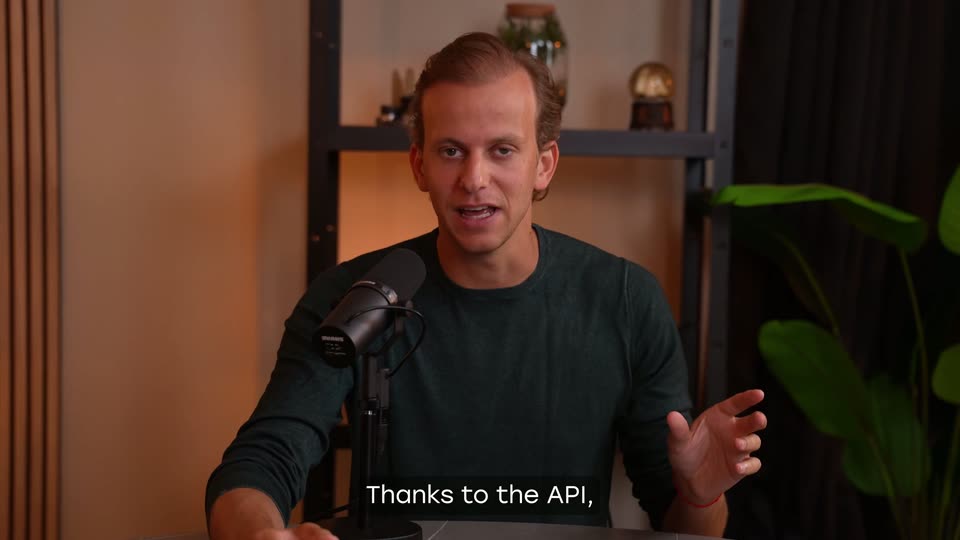
A man in a dark green long-sleeve shirt sits at a desk, speaking into a black microphone and gesturing with both hands. A shelf with jars and a leafy plant sit behind him. A white caption reads 'Thanks to the API,' at the bottom.
On-screen text: “Thanks to the API,”
Camera: Static
A Google Drive window mockup sits on a soft peach gradient. A video file card labeled Video2.mp4, held by a large black cursor, is dragged from the right into the Files row and scales down to join three other video thumbnails.
On-screen text: “you will be able to drop”, “those videos,”, “in a Google Drive,”
Techniques: Cursor demo
Camera: Static
A Google Drive icon sits centered on a plain white background and gains a soft blue glow. A smaller Drive icon and an orange app icon fly in from the left and right edges, blurred, while the subtitle swaps lines.
On-screen text: “in a Google Drive,”, “and they will be”
Camera: Static
A video file icon slides from the Google Drive logo at left to the orange wand icon at right, crossing a funnel of thin curved lines, then a second file follows the same path. Gray caption bars at the bottom swap lines in place while the frame stays locked off.
On-screen text: “and they will be”, “automatically sent”, “to your Submagic account”
Camera: Static
A peach gradient background shows the word Editing scaling in above a caption pill. The layout then populates with a talking-head video card, yellow and orange gradient placeholders, a speaker icon, and scissors and clapperboard emojis, as the bottom pill reads to your Submagic account.
On-screen text: “Editing”, “to be fully edited”, “to your Submagic account”
Techniques: Kinetic type
Camera: Static
A peach gradient backdrop holds a horizontal storyboard: a vertical clip of a talking man on the left with a speech bubble and scissors icon, three orange gradient video cards on the right with a volume and clapperboard emoji. A gray caption box at the bottom reads the line.
On-screen text: “the YouTube analytics”, “with subtitles,”
Camera: Static
A row of vertical video cards slides left on a pink gradient background. The left card shows a man talking as his subtitle caption changes, the middle card crossfades from an orange gradient to a burning dollar bill clip, and emoji stickers of scissors, a speaker and a clapperboard sit beside the cards. A gray caption bar reads B-rolls, transitions, at the bottom.
On-screen text: “B-rolls, transitions,”
Camera: Static
A row of vertical video cards scrolls left across a pale pink background, each holding a talking-head clip with caption overlays. Flat icons, a speech bubble, speaker, film strip, scissors and clapperboard, drift at the edges at different speeds. A gray box at the bottom cycles short phrases.
On-screen text: “B-rolls, transitions,”, “zoom effects, hook titles”, “and your own music”
Techniques: Parallax
Camera: Pull out
A man in a dark green sweater sits at a table, speaking into a desktop microphone and gesturing with both hands. A static medium shot holds on him against a shelf and a leafy plant, with a white caption reading 'Or let's imagine' pinned to the lower edge.
On-screen text: “Or let's imagine”
Camera: Static
On a cream gradient background, a dashed “Create New Avatar” card fills with a purple gradient as a large black cursor hovers over it. The card then morphs into a portrait video of a man on an orange background, while the HeyGen logo stays fixed on the right.
On-screen text: “Or let's imagine”, “you don't want to”, “record yourself”, “and you want to use an”, “AI avatar”, “from HeyGen”
Techniques: Cursor demo, Morph
Camera: Static
A cream field with soft purple and orange glows. An orange pill holding a face fragment swells into a bow-tie of thin lines connecting the HeyGen wordmark and the orange Submagic wand icon. The ribbon tilts while the face sliver drifts through the middle; captions change at the bottom.
On-screen text: “it will be automatically sent”, “to your Submagic account,”, “fully edited again,”
Techniques: Morph
Camera: Static
A peach vortex of concentric rings swirls around a white core on a cream gradient, the orange word Editing sitting at its center. The rings keep spinning as a portrait video card with a smiling man on an orange backdrop scales up from the core, while the caption fully edited again, stays at the bottom.
On-screen text: “HeyGen”, “to your Submagic account,”, “fully edited again,”, “Editing”
Techniques: Masking
Camera: Static
A vertical story-style video card sits centered on a pale peach gradient background. A young man in a navy tee talks to camera against a solid orange backdrop, his mouth moving as yellow caption boxes swap from I'M JOHN to AND I'M EXCITED, while gray subtitles at the card's base change from and directly to sent to a Google Drive.
On-screen text: “fully edited again,”, “and directly”, “sent to a Google Drive”
Camera: Static
A flat Google Drive window sits centered on a peach gradient, showing a video thumbnail of a person on an orange background. A dark caption pill at the bottom swaps white text from 'sent to a Google Drive' to 'to be published everywhere.'
On-screen text: “sent to a Google Drive”, “to be published everywhere.”
Camera: Static
A man in a dark green shirt sits at a table with a studio microphone, raising two fingers as he speaks to camera. The frame is locked off, with a subtitle line fixed at the bottom.
On-screen text: “So these two workflows”
Camera: Static
A man in a dark shirt speaks into a microphone, framed in a rounded rectangle at the center. Numbered workflow step cards with icons slide in and settle on either side over a mint background, while subtitles change at the bottom of the video.
On-screen text: “Workflow #1”, “1. Upload RAW video”, “2. Edit Video”, “3. Publish Video”, “Workflow #2”, “1. Create an Avatar”, “2. Edit Video”, “3. Send to Folder”, “So these two workflows”, “you are now possible”
Techniques: Split screen
Camera: Push in
Split layout: left, app icons for YouTube, Drive, Premiere and audio sit on faint concentric rings around a glowing orange Submagic icon; right, a man in a dark shirt speaks into a studio microphone, gesturing with his right hand. Subtitles run along the bottom.
On-screen text: “you are now possible”, “using Submagic API.”, “But this is more than just”
Techniques: Split screen
Camera: Static
A man in a dark green shirt sits at a table with a studio microphone, speaking to camera and gesturing with both hands. White subtitles in a dark box appear at the bottom center on a locked-off frame.
On-screen text: “But this is more than just”, “an API,”, “it's your own AI”, “agent for video editing.”
Camera: Static
A man talks to camera in a rounded video inset on the left of a pale background. An orange wand icon appears center right, dashed lines draw out to n8n, Zapier and Make app icons. The layout cuts to a full-frame shot of the speaker at his desk.
On-screen text: “agent for video editing.”, “connect it with Zapier, N8N,”, “Make or any tool”, “and unlock”, “unlimited possibilities.”, “Build your first automated”, “workflow today”
Techniques: Split screen
Camera: Static
On a light gray field, a blurred orange app icon sharpens into the Submagic mark, a white wand and star inside an orange rounded square, as the dark wordmark resolves to its right. A gray pill caption reads on Submagic.co at the bottom, then fades out, and the scene ends on black.
On-screen text: “on Submagic.co”
Techniques: Masking
Camera: Static