1:37

Samora (YC W26): Multilingual and Production Grade Voice Agents
Samora AI · B2B · Mar 2026
Karumi · Nov 2026 · 1:02 · Full motion · AI-annotated
Karumi’s 1:02 launch film runs 44 scenes, about 1.4 s each. The product shows up at 0:05 and 5 features are revealed. The call to action lands at 0:58 (92% in), over a voiceover. A single coral-on-cream palette drives a fast, typographic launch film: short word-by-word headlines type out over an animated orange halftone dot field, and the dots break into a pixel mosaic to cut between beats. Product UI is shown as tilted 3D mockups and flat chat panels that slide, zoom and tilt on a steady 126 bpm pulse, with the Karumi arrow mark recurring as the only persistent character.
Is this your launch? to your site or press kit.
Samora AI · B2B · Mar 2026
hardware intelligence · B2B · Jul 2026
Films whose music sounds like this one, voice left out
Lottielab · Electronic, Lo-fi Hip-hop
Delhivery · Modern electronic
Apple · Modern electronic
A white pill with a play icon and a typing cursor sits centered over a glowing field of peach dots. The word Your types out as two 3D cards, a red one and a white one, float in from the top corners.
On-screen text: “Your”
Techniques: Kinetic type, 3D mockup
Camera: Static
A video placeholder with a play button sits center on a pale gray field, its caption typing out letter by letter over an orange dotted halo. Small slide cards with headlines fade in around the edges, framing the placeholder.
On-screen text: “Your product video is being ignored.”
Techniques: Kinetic type
Camera: Static
A white play-button pill reads “Your product video is being ignored.” over a cream field of orange dot clusters and small 3D mockup cards. The dot clusters scale up into a full-screen orange mosaic that swallows the pill.
On-screen text: “Your product video is being ignored.”
Camera: Static
Centered headline builds word by word on a cream background with orange halftone dot clusters. The words Videos, don't, then sell... appear in sequence, ending as a rounded dot panel covers the center.
On-screen text: “Videos”, “don't”, “sell...”
Techniques: Kinetic type
Camera: Pull out
On a cream background, an orange rounded square settles into the brand app icon on the left. A white chat bubble slides in beside it, typing a message with a blinking cursor, while the coral word Conversations fades in above.
On-screen text: “Conversations do.”
Techniques: Morph
Camera: Static
A coral 'Conversations' headline holds centered on a cream background. To the left, an orange rounded app icon sits beside a white chat bubble that types a greeting; the icon and bubble then shrink to a smaller scale as the message continues.
On-screen text: “Conversations”
Techniques: UI zoom
Camera: Static
A cream card holds the locked headline above a chat bubble with an orange app icon. The bubble's message settles into place while a gray reply bubble types out letter by letter behind a blinking caret.
On-screen text: “Conversations do.”
Techniques: Kinetic type
Camera: Static
A black arrow logo shrinks from a large centered mark into a small icon on the left as the headline “Meet Karumi.” fades in beside it, over a peach halftone-dot background with soft blurred shapes.
On-screen text: “Meet Karumi.”
Camera: Static
The “Meet Karumi.” logo lockup sits centered on a peach halftone-dot background. The dots then break into a pixel mosaic that dissolves to reveal a product interface screen behind it.
On-screen text: “Meet Karumi.”
Camera: Static
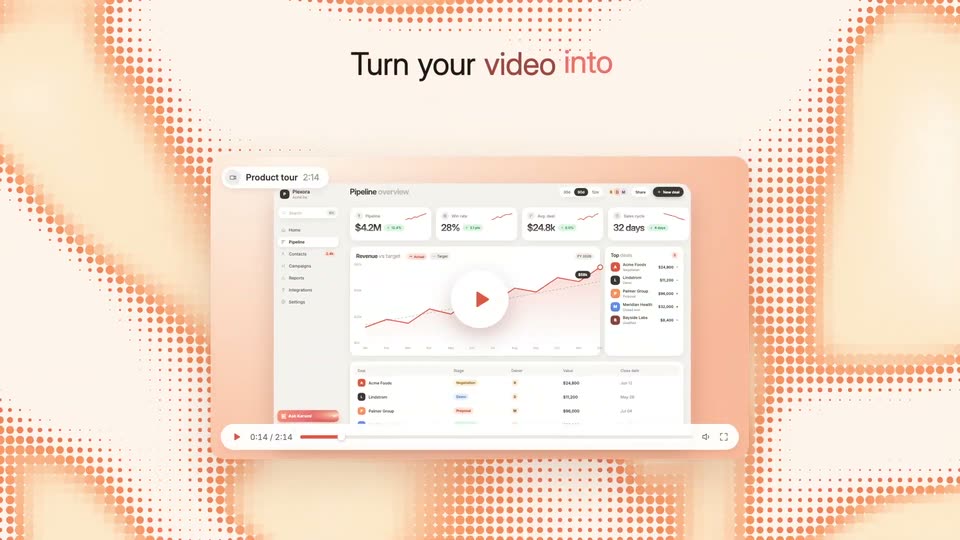
A video player card holding a sales dashboard sits on an orange halftone-dot background. The card narrows and a chat window card slides in beside it, while the headline words appear above.
On-screen text: “Turn your video into a conversation”
Techniques: Kinetic type, Morph
Camera: Static
On an orange halftone background, a video player on the left plays a dashboard demo while an orange chat panel on the right shows the contact Karumi. The left video enlarges and the right panel reveals a chat bubble, as the headline gains the words with AI.
On-screen text: “Turn your video into a conversation with AI”
Techniques: Split screen, UI zoom
Camera: Push in
A tilted 3D mockup of a sales dashboard floats on a peach dotted background. The headline word Live. cross-fades into Interactive. above it while a cursor hovers the chart and a purple Visitor tag pops up, then the whole frame fades out.
On-screen text: “Live.”, “Interactive.”
Techniques: Kinetic type, 3D mockup, Cursor demo
Camera: Push in
On a cream background, the headline 'In any language.' slides in with 'language.' in coral, beside a language pill that flips from Español to Français. A dotted orange map of Europe assembles on the right.
On-screen text: “In any language.”
Techniques: Kinetic type
Camera: Static
A chat view on an orange halftone dot background that resolves from a coarse pixel mosaic. A message bubble with a small orange logo avatar pops in above the input bar, carrying the greeting while the placeholder field stays fixed below.
Techniques: Kinetic type
Camera: Static
A white chat bubble with an orange icon slides in over a peach halftone dot field, with a matching input bar below. The greeting text fills in word by word from gray to black.
Techniques: Kinetic type
Camera: Static
A tight crop of a chat bubble and input bar zooms out to reveal a two-panel layout: a near-empty browser view on the left, the Karumi chat on the right, where a blue “My name is John.” bubble and a “Listening…” status appear.
Techniques: UI zoom, Split screen
Camera: Static
Two tilted interface panels, a CRM dashboard and a chat window, float in 3D over an orange dot-grid background. A red cursor glides to a point on the revenue chart, popping a Karumi tooltip, as chat bubbles fill in and small status chips appear below.
On-screen text: “plexora.com - Karumi is showing John around”, “Karumi noted”, “John”, “Wants: payment set-up”
Techniques: 3D mockup, Cursor demo
Camera: Push in
A CRM dashboard cross-fades from a pipeline overview into a workspace settings form as the cursor clicks the Settings item in the left sidebar, which gains a red ring; the Karumi assistant bubble stays pinned at the lower left.
Techniques: Cursor demo, Morph
Camera: Push in
A Plexora settings screen dissolves from the General view to the Payments tab. A red cursor slides from the Settings menu item to the Payments tab, drawing a red circle around it. A Karumi tooltip labeled “Showing you around” tracks the cursor.
Techniques: Cursor demo
Camera: Static
A light settings page shows a payment setup checklist with the Connect Stripe row outlined in red. The cursor glides from the Payments tab to the orange Connect button as a Karumi onboarding tooltip updates. The opening frame crossfades from the prior state.
Techniques: Cursor demo
Camera: Static
A payments settings screen shows a cursor hovering the orange Connect button on the Connect Stripe row, with a Karumi tooltip reading Start here: connect Stripe. An orange pixel-block pattern then tiles across the frame, masking the interface.
Techniques: Cursor demo, Masking
Camera: Static
A white 'Qualified leads' card sits center on a peach halftone background. Labeled visitor chips fly in from the edges and dissolve into the card as the list fills with four leads and the count climbs to 1,246. The headline types in above the card.
On-screen text: “Karumi turns traffic into qualified leads.”
Techniques: Kinetic type, Particles
Camera: Static
A white leads card listing four names glides left over a peach halftone field that breaks into an orange pixel mosaic, while the word And fades in on the right.
On-screen text: “And”
Techniques: Morph
Camera: Static
A blurred peach gradient with a dotted center frame holds the static headline 'And the best part...'. A white rounded input bar then expands across the middle and a product URL is typed into it.
On-screen text: “And the best part...”
Camera: Static
A white browser bar holds the address plexora.com with a caret, a Karumi Agent Builder label, and a red up-arrow button tagged You under a cursor. The bar then collapses left as halftone dots spread across the coral background into a pixelated map outline.
On-screen text: “plexora.com”
Techniques: Cursor demo
Camera: Push in
On a cream halftone background, a sphere of tiny orange square particles disperses outward. White pill labels with icons slide in around it while the headline extends with “on its” in orange and an orange cursor appears.
On-screen text: “It explores your product on its”, “Release notes”, “Contacts”, “Landing pages”, “Campaigns”, “Automations”, “Karumi”, “Learning”
Techniques: Particles, Kinetic type, Cursor demo
Camera: Push in
A pale dotted world map holds a network of white cards labeled with product screens and features. A red cursor hovers over one card while the headline finishes at the top and the whole graph drifts down to reveal its full structure.
On-screen text: “and learns how to demo it.”
Techniques: Kinetic type, Cursor demo
Camera: Static
A cream field of orange halftone dots recedes from the center, opening a white window where the serif line “No more recordings.” scales in, “No” in dark and the rest in orange. The dots settle into a wavy border framing the centered text.
On-screen text: “No more recordings.”
Techniques: Masking, Kinetic type
Camera: Static
A cream panel framed by an orange halftone dot pattern holds a centered headline. The phrase holds on “No more recordings.” then the tail word cross-fades and re-types to “outdated videos.” while “No more” stays fixed, the swap landing on a coral accent.
On-screen text: “No more recordings.”, “No more outdated videos.”
Techniques: Kinetic type
Camera: Static
A cream field framed by drifting orange halftone dot waves holds a centered headline that scales in word by word. The frame stays locked off while the dot pattern shifts slowly around the edges.
On-screen text: “No more outdated videos.”
Techniques: Kinetic type
Camera: Static
A sales dashboard fades in over a cream background with orange halftone dots, settling into a flat front view. A peach headline reads “It updates” at the top while a Kakaromi card slides in on the right.
On-screen text: “It updates”
Techniques: Kinetic type
Camera: Static
A light CRM dashboard sits left, its table rows swapping as new data loads, while an orange panel on the right stacks three update cards one by one. A cursor hovers the bottom card. Above, a headline types out with the final word in coral.
On-screen text: “It updates with every product”
Techniques: Kinetic type, Cursor demo
Camera: Push in
A white prompt bar on a cream background types out a sentence about improving the analytics step while the heading above fills in word by word. A blue cursor clicks the orange send button and a small blue You tag slides in from the corner.
On-screen text: “Just tell it what you want improved.”
Techniques: Kinetic type, Cursor demo
Camera: Pull out
A light chat interface holds a gray message bubble and a status line with an orange icon. The view scrolls up, carrying the headline off the top and revealing a second status line. A blue cursor with a You tag rests in the bottom right corner.
On-screen text: “Just tell it what you want improved.”, “You”
Techniques: Cursor demo
Camera: Static
A light product screen shows a walkthrough panel where a chat bubble and a three-item task list appear in sequence. Above it, the headline fades in word by word, the last words in coral, then dissolves.
On-screen text: “Guide it in plain language.”
Techniques: Kinetic type
Camera: Pull out
A flat chat interface sits under the headline, showing a user prompt and an AI response that walks through steps ending in a Done check and a result card. The panel's content dissolves into its final layout over the short clip.
On-screen text: “Guide it in plain language.”
Camera: Pull out
A flat chat panel with a task list and a reply box tilts into 3D perspective as dashboard cards and a pipeline table slide in around it at varying depths.
Techniques: 3D mockup
Camera: Pull out
A 3x3 grid of app screens on a cream background, each headed by a visitor name and a quoted question with a cursor, holds still while a white caption banner slides in from the left across the top.
On-screen text: “Visitor 1 “Show me the pipeline?””, “Visitor 2 “How do reports work?””, “Visitor 3 “Can I invite my team?””, “Visitor 5 “What's in the Scale plan?””, “You “Improve the analytics step””, “Visitor 6 “Show me automations””, “Visitor 7 “Where do I see usage?””, “Visitor 8 “How does billing work?””, “Visitor 9 “Can I export deals?””, “And it gets smarter with every interaction.”
Techniques: Kinetic type
Camera: Pull out
A 3x3 grid of dashboard screens, each tagged with a visitor question caption and a cursor hovering a small AI card. A headline sits across the top row, then an orange dotted pixel mask floods over the whole grid.
On-screen text: “And it gets smarter with every interaction.”, “Visitor 5 “What’s in the Scale plan?””, “You “Improve the analytics step””, “Visitor 6 “Show me automations””, “Visitor 7 “Where do I see usage?””, “Visitor 8 “How does billing work?””, “Visitor 9 “Can I export deals?””
Techniques: Split screen, Masking
Camera: Static
Orange halftone dots animate over a cream field, condensing into a rounded frame around the centered line “Always on.”, which then swaps to “Always learning.” Faint app screenshots sit behind the dots.
On-screen text: “Always on.”, “Always learning.”
Techniques: Kinetic type, Morph
Camera: Static
On a cream field of orange halftone dots, the line “Always on.” holds center, then the coral second word swaps to “learning.” and “selling.” through soft blur crossfades, the final line scaling slightly as it lands.
On-screen text: “Always on.”, “Always learning.”, “Always selling.”
Techniques: Kinetic type
Camera: Static
A wavy orange halftone dot pattern on cream fills the frame, with the centered headline “Always selling.”, “Always” in dark gray and “selling.” in coral. The text scales out as the dots reorganize into a blocky pixel mosaic of orange and white squares.
On-screen text: “Always selling.”
Techniques: Kinetic type, Morph
Camera: Static
A cream background with drifting orange halftone dots holds the centered line “Try it at” in gray, as the red URL karumi.ai. forms in place beside it. The frame stays locked off.
On-screen text: “Try it at karumi.ai.”
Techniques: Kinetic type
Camera: Static
The black angular logo mark and the word Karumi fade in at the center of a cream field, then the red URL karumi.ai appears beneath. The frame stays locked-off and centered.
On-screen text: “karumi.ai”
Camera: Static