1:28

Customer Support Software Demo | Help Scout x MotionCue
Help Scout · Oct 2026
Item · Nov 2026 · 1:06 · AI-annotated
Item’s 1:06 launch film runs 28 scenes, about 2.4 s each. The product is on screen from the first frame and 4 features are revealed. There is no explicit call to action; a voiceover carries the film. The video opens with a typed product name over a blurred live-action shot, then alternates pale centered title cards with kinetic type and short UI demos, each feature introduced by a word that scales in behind an orange caret. Pacing is even at about 112 bpm with 2 to 4 second cuts, and its signature moves are the orbiting icon ring, the orange dot mark, and 3D-tilted interface cards over warm orange gradients.
Is this your launch? to your site or press kit.
Help Scout · Oct 2026
Designeer · Oct 2026
Windsurf · Developer tools · Jun 2026
A blurred, warm-toned shot of two people at a table. The text 'Meet item' types out in the center, starting with an orange cursor.
On-screen text: “Meet item”
Techniques: Kinetic type
Camera: Static
The phrase “Meet item” sits centered on a plain off-white background, static and locked off. Light gray lettering holds still for the full duration, with no motion or staging.
On-screen text: “Meet item”
Camera: Static
A small orange dot at the center of a pale gray background scales up into a solid orange circle as a ring of small white rounded-square app icons fades in around it, then the circle shrinks back down to a dot.
On-screen text: “Meet item”
Camera: Static
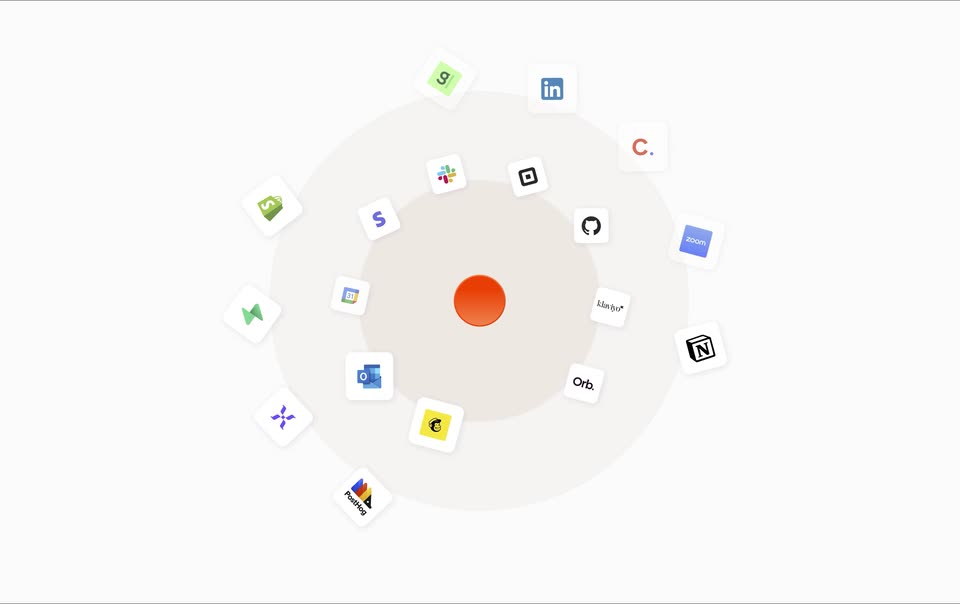
On a plain light background, a glossy orange sphere sits at the center while two concentric rings of white app-icon tiles orbit it. The rings rotate at slightly different speeds, the tiles scale up, then dissolve outward one by one while the frame stays locked.
Techniques: Parallax
Camera: Push in
On a light off-white background, an orange button sits inside a soft gray halo at center. Orange line icons of a person and a smiley calendar fade in at left and right with gray labels Team and Agents, then the icons un-draw and the halo contracts.
On-screen text: “Team”, “Agents”
Camera: Static
A red-orange circular mark with pale halo rings sits at the center of a white field, flanked by the gray words Team and Agents. The mark shrinks and dissolves as the rings fade, then a large pale O forms in the middle and the word Assistant scales in and out.
On-screen text: “Team”, “Agents”, “O”, “Assistant”
Techniques: Kinetic type
Camera: Static
The word “Assistant” in light gray sans-serif sits centered on a plain off-white background. It scales in from a small size to full size, then holds still for the rest of the shot.
On-screen text: “Assistant”
Techniques: Kinetic type
Camera: Static
A blurred orange backdrop sharpens into a light app window with an icon rail on the left. In the centered white input field, the prompt “Add CEO of Augmental, the company” types out behind a blinking caret, and a Run Skills chip with an up arrow appears beneath it.
Techniques: Kinetic type
Camera: Static
A white app window with a left icon rail sits on a red-orange gradient. The bottom prompt field types out the line 'Add CEO of Augmental, the company working on the MouthPad!' letter by letter while the panel drifts slightly left.
Camera: Static
A pale interface panel holds a two-line task list above a contact card for Tomas Vega, with a company row and Cancel and Create Profile buttons inside, and a Run Skills command bar below. The group drifts upward to settle.
Camera: Static
A light contact card for Tomas Vega, co-founder of Augmental Technologies, sits above an empty input bar with a Run Skills chip. A short checklist of completed steps scrolls out of frame at the top as the view drifts down.
Camera: Static
A white “New Meeting” form card slides down and fades in at the center of a pale gray screen. The card holds a title field, two date pickers, a calendar and notifications row, one attendee, and Cancel and Create Meeting buttons.
Camera: Static
A pale interface shows an AI activity list with a Gmail icon and a Run Skills card. The list scrolls up as the item text cycles through tasks, while a red-orange gradient rises from the bottom and wipes the frame.
Techniques: Masking
Camera: Pan
The word Agents sits in light gray at the center of a pale field. A rounded white card expands over the frame, covering orange and red gradient corners that fade out in the first second, leaving a plain static title.
On-screen text: “Agents”
Techniques: Masking
Camera: Static
A 3D-tilted white Agents panel sits over an orange background while a cursor moves across the manager pills. Selecting each pill crossfades the heading, summary, and table rows to the corresponding agent.
Techniques: 3D mockup, Cursor demo
Camera: Pull out
A flat product dashboard titled Meeting Insights Manager fills the frame above a warm orange gradient band. The screen drifts and the top band grows taller as the view settles on the analytics chart, stat counters and run history table.
Camera: Static
A man in a black shirt sits at a white desk, seen from behind, facing a large monitor showing a marketing automation interface with a document and a side panel. The camera slowly pushes in toward the screen. A black mug rests on the desk.
Camera: Push in
Over-the-shoulder view of a desk monitor. The screen holds a two-pane interface: a long document on the left and an autonomous-agent panel on the right, where the agent types a sequence name and lists trigger options. A cursor drifts across the right pane.
Techniques: Cursor demo
Camera: Push in
The words “GTM Stack” appear centered in light gray on a plain off-white background. A vertical list of feature names builds below and scrolls upward, each line turning orange as it reaches the highlight. Small ChatGPT, Claude and Slack logos appear beside the last three lines.
On-screen text: “GTM Stack”, “Lead search”, “Enrichment”, “E-mail”, “LinkedIn”, “Call Recorder”, “Lead discovery”, “Tasks”, “Smart lists”, “Pipeline management”
Techniques: Kinetic type
Camera: Pan
A browser window with a CRM companies table floats in 3D perspective over a coastal desktop wallpaper. The tilted window settles toward a flatter angle as the camera reframes, while the table rows stay static.
Techniques: 3D mockup
Camera: Static
A meetings app window rests on a colorful gradient desktop. The left pane lists upcoming meetings with the Amanda Gonzales row highlighted, while the right pane shows its Preparation tab, meeting details and participants. A cursor hovers over the highlighted row.
Camera: Static
A product workflow screen shows a left panel with a three-touch LinkedIn sequence and a right panel setting up a LinkedIn message action. A cursor hovers the manual trigger, then the view crossfades into a CRM contact card with a small cancel/create menu.
Techniques: Cursor demo
Camera: Static
A browser window on a blue gradient background holds the item app screen. A chat bubble asks to add a company and CEO, above two stacked record cards for Ivan Zhao and Notion Labs, Inc. with Cancel and Create buttons below. The frame stays static.
Camera: Static
A light product interface fills the frame over a purple gradient. The left side shows a skill form with sections and a New Document button. On the right, a test panel lists three LinkedIn touch options; the first option, Three direct messages, fills in with a checkmark.
Camera: Static
On a white background, three orange line icons, a closed eye, a shield and a fingerprint, draw in one after another from left to right, each with a gray label, Private, Protected and Yours, fading in beneath it.
On-screen text: “Private”, “Protected”, “Yours”
Camera: Static
Three orange line icons, a closed eye, a shield and a fingerprint, sit above the gray words Private, Protected and Yours on a pale background. The row fades out and Welcome types itself in the center behind an orange cursor.
On-screen text: “Private”, “Protected”, “Yours”, “Welcome”
Techniques: Kinetic type
Camera: Static
On a pale gray background, centered light-gray sans-serif text types out behind an orange caret. The phrase “Welcome to the” gives way to “agentic revenue era”, then “Welcome to item”, each line scaling in as it lands. Locked-off frame, steady pace.
On-screen text: “Welcome to the”, “agentic revenue era”, “Welcome to item”
Techniques: Kinetic type
Camera: Static
A light gray headline reading Welcome to item holds centered on a plain off-white background, locked off and static for the full shot.
On-screen text: “Welcome to item”
Camera: Static