1:14

What is GitHub Spark? Introducing a brand new way to build powerful, AI assisted applications
GitHub · Developer tools · Oct 2024
Item’s 1:03 launch film runs 14 scenes, about 4.5 s each. The product is on screen from the first frame and 1 feature is revealed. There is no explicit call to action; a voiceover carries the film. A locked-off talking head in a bright white room hands off to flat white UI screens, with a dark caption pill at the bottom restating the voiceover line by line. Pacing is slow and sparse, about five cuts a minute, so the motion lives in the cursor-driven walkthrough, the sliding panels, and the recurring orange dot accent.
Is this your launch? to your site or press kit.
GitHub · Developer tools · Oct 2024
Cedar · B2B · Feb 2025
Films whose music sounds like this one, voice left out
Anthropic · Electronic
Windsurf · Upbeat electronic
GovGuard · Modern electronic
A man in a light blue shirt sits at a desk with a black laptop, speaking to camera. A white name and title lower-third with an orange dot sits on the left, subtitles run along the bottom, and the frame pans slowly right to reveal a wall sign.
On-screen text: “Arun Ramamurthy”, “Founding Engineer”, “Hey! I'm Arun,”, “and I'm the engineer behind the permissioning layer”, “in item.”
Camera: Pull out
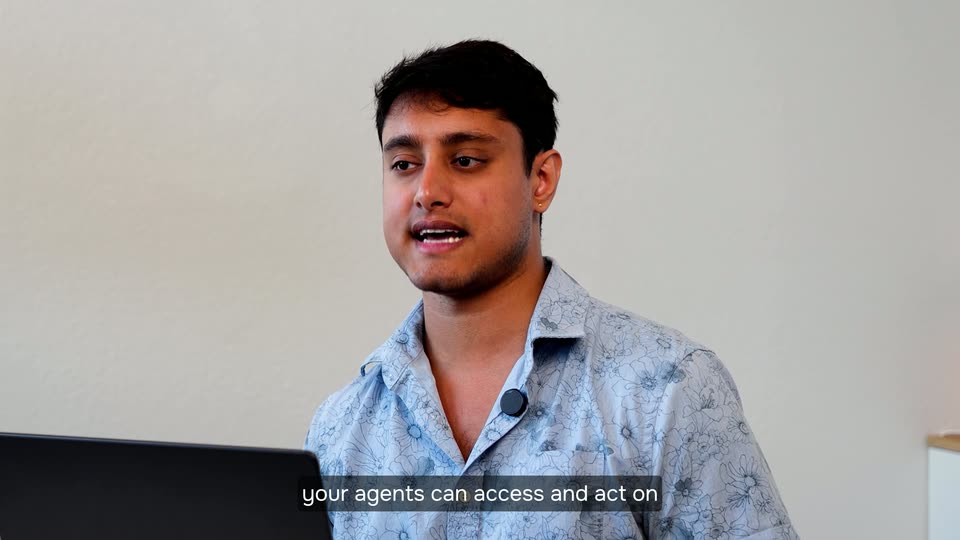
A man in a light blue floral shirt stands behind a laptop, speaking to camera and gesturing with his hands, a lavalier mic clipped to his collar. The locked-off shot frames him against a plain off-white wall, with white subtitles along the bottom.
On-screen text: “in item.”, “Admins can now control everything users can see and do.”, “This also pertains to agents.”, “You can control everything”, “your agents can access and act on”, “on the most granular level.”
Camera: Push in
A man in a light blue patterned shirt sits behind a closed laptop at a desk, speaking to camera in a bright room. A shelf with a plant and decor and an item sign sit behind him. White subtitles on a black bar appear at the bottom.
On-screen text: “on the most granular level.”, “Here's how you can set them up:”
Camera: Pull out
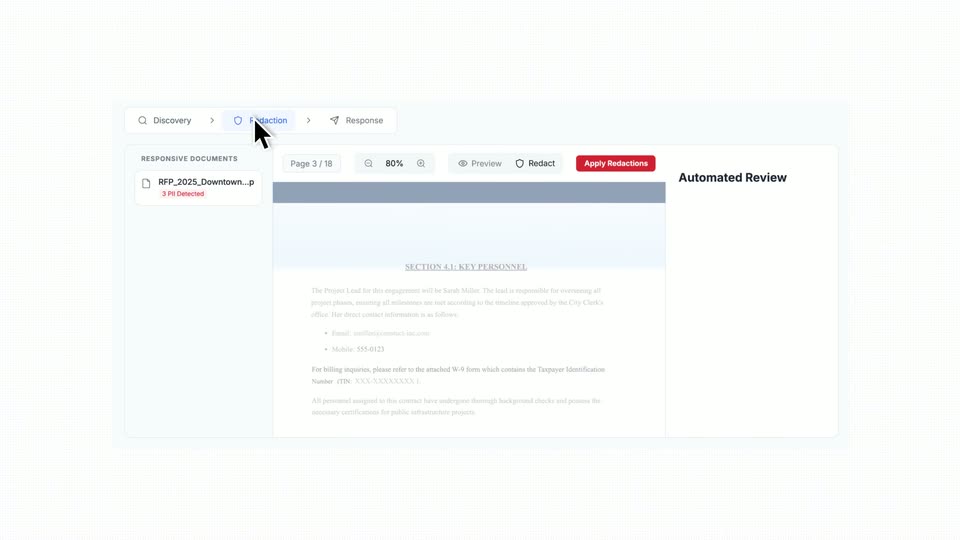
A blank white screen with a bottom caption gives way to a product interface with a left sidebar. A cursor moves to the Settings item, turning its gear icon orange, as a second bottom caption appears.
On-screen text: “Here's how you can set them up:”, “Open settings, then permissions”
Techniques: Cursor demo
Camera: Static
A cursor glides up to the orange gear icon at the bottom of a left sidebar and clicks it, expanding a settings menu that lists Permissions and other rows. A dark caption box at the bottom reads the instruction.
On-screen text: “Open settings, then permissions”
Techniques: Cursor demo
Camera: Static
A white settings screen shows a Permissions table with agent and team rows. A cursor rests on the Permissions menu, then moves right while the list scrolls down to the connectors section and back. A dark caption pill at the bottom updates its text.
On-screen text: “Open settings, then permissions”, “this is where you control what your agents can access”, “and what your team can do.”
Techniques: Cursor demo
Camera: Push in
A white agents table fades in, listing four roles with team and connector columns. A cursor glides from the top right to the Edit button on the first row, then the list scrolls down to reveal a Team section below.
On-screen text: “Start with agents, pick an agent,”, “hit edit.”
Techniques: Cursor demo
Camera: Pull out
The item settings page shows the Outbound Agent permissions, the cursor moves down from the Team Access list to the Connector Access rows. A Connector Actions panel slides in from the right with toggles, then the view zooms into the panel as the cursor opens the access-level dropdown.
On-screen text: “First, choose who on your team can use the agent.”, “Then, set connector access for every app you've connected”, “decide what that agent can see”, “and what actions they can take.”, “Full, Read-Only, Custom or None.”
Techniques: Cursor demo, UI zoom
Camera: Push in
A white interface dissolves between a member list with teal, yellow and red access tags and a Connector Actions panel whose dropdown lists Full, Read-Only, Custom and None. A black cursor hovers by None as a dark caption states the four levels.
On-screen text: “Full, Read-Only, Custom or None.”
Techniques: Cursor demo
Camera: Pull out
A light admin panel crossfades from a member access list to a Settings menu. A dark caption bar at the bottom swaps its text, and two cursors hover at the right edge.
On-screen text: “Full, Read-Only, Custom or None.”, “Same idea for people.”
Camera: Static
A flat settings screen for a teammate's permissions. The page scrolls down to reveal an Agent Access panel with toggle switches, while captions appear at the bottom and a cursor hovers at the right edge.
On-screen text: “Same idea for people.”, “Edit a teammate”, “choose which agents they can work with”, “and which apps they can access.”
Camera: Pull out
A man in a light blue patterned shirt sits at a desk with a black laptop, speaking and gesturing with his right hand. A lavalier mic is clipped to his collar. Subtitles appear at the bottom of the frame. The camera is locked off.
On-screen text: “That's it! Agents and teammates”, “each with the exact access you want”
Camera: Pull out
A man in a light blue patterned shirt sits at a desk behind a laptop, speaking to camera in a bright room with a shelf and a brand sign on the right. White subtitles on a dark bar at the bottom change line by line.
On-screen text: “each with the exact access you want”, “built to work for the way your specific team”, “is structured.”
Camera: Static
The item wordmark sits centered on a plain off-white background, holding still as a faded shot of a man at a laptop dissolves out behind it. A small caption reads is structured. at the bottom before clearing.
On-screen text: “is structured.”
Camera: Static