2:03
Sublingual AI Demo
Sublingual · B2B · Feb 2025
Cedar’s 3:26 launch film runs 15 scenes, about 14 s each. The product is on screen from the first frame and 4 features are revealed. There is no explicit call to action; a voiceover carries the film. A screen-recording walkthrough with a persistent webcam inset, moving from the Cedar landing page through dashboards and a previous-product case study, each beat punctuated by zooms into UI details. Signature moves: zoom in and out on elements, caption pop-ins beside a cartoon hand cursor, and a light-to-dark mode flip to mark personalization.
Is this your launch? to your site or press kit.
Sublingual · B2B · Feb 2025
cocreate · Consumer · Aug 2025
Miro · Productivity · Jan 2026
A locked-off screen recording of the Cedar landing page shows a green serif headline, two buttons and a row of feature cards. A small video-call inset in the corner shows the founder talking and gesturing, while the cursor drifts up to the browser tabs.
Camera: Static
A browser window shows the Link Management dashboard with a left sidebar and an analytics panel on the right, while a rounded video-call inset in the lower right shows a person in a room. The cursor travels down the sidebar toward the link list.
On-screen text: “The Al Copilot for your app”, “Imagine the founder being behind every user's screen, actively guiding”, “Secure and private”
Techniques: Cursor demo
Camera: Static
A browser window loads the Cedar landing page, fading from a blank gray screen to the headline, buttons and feature cards, while a small webcam self-view of the presenter stays in the bottom right corner and a cursor drifts across the page.
Techniques: Cursor demo
Camera: Static
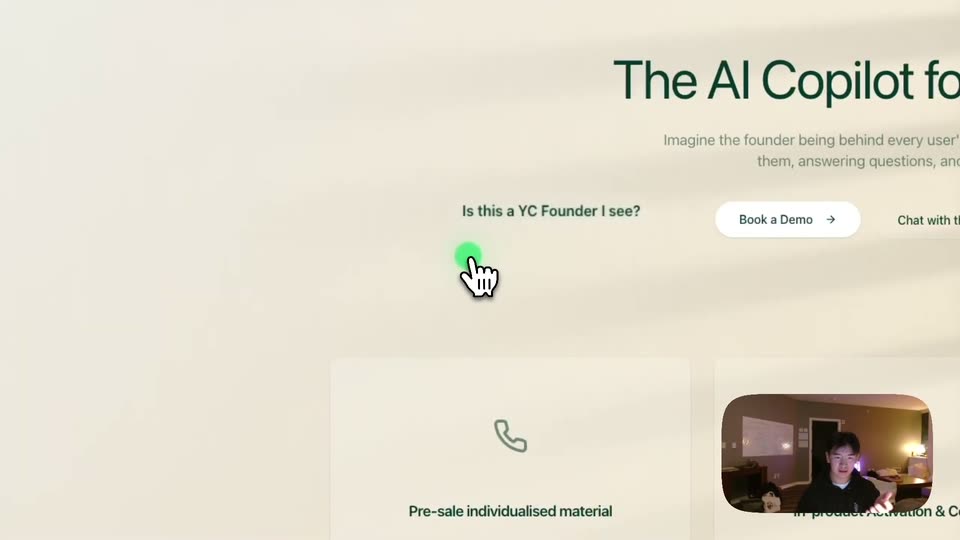
A browser screen recording of the Cedar landing page, with the founder on a small video call in the corner. A cartoon hand cursor drifts up the page as the view zooms in, a caption pops in beside it, then the frame zooms back out.
On-screen text: “Oh...”, “Is this a YC Founder I see?”
Techniques: Cursor demo, UI zoom
Camera: Static
A browser screen recording of a landing page, with the presenter's webcam self-view in the lower right. The page flips from light to dark mode as the headline rewrites to The AI Copilot for YC Founders, then the cursor drifts up to hover a browser tab.
Techniques: UI zoom, Cursor demo
Camera: Push in
A browser shows a link dashboard; a hand cursor clicks the edit icon on a row, opening a centered modal with form fields. The cursor then selects the URL, short-link and context fields, and the view blurs and zooms out. A webcam feed sits bottom right.
Techniques: Cursor demo
Camera: Push in
A bright analytics dashboard zooms out from a close-up of its grid, panning right to reveal the full interface with a pink bell curve. A cursor hovers the curve, popping a Feb 24 tooltip, while a small webcam feed of the presenter sits in the bottom-right corner.
Techniques: UI zoom, Cursor demo
Camera: Static
A light analytics dashboard fills the frame: a left sidebar, two stat cards, and a large area chart. A rounded webcam window in the lower right shows a person talking and gesturing. The mouse cursor drifts across the chart, then hovers over sidebar menu items.
Techniques: Cursor demo
Camera: Push in
A product dashboard switches from a Link Management list to a Conversion Flow funnel view. A hand cursor hovers over the left sidebar while a small webcam feed of a presenter sits in the bottom right corner.
Techniques: Cursor demo
Camera: Push in
A Conversion Flow dashboard shows a funnel diagram with blue and pink bands. A cursor hovers over the blue band, opening a tooltip with conversion stats. The view zooms out to the full browser window, with a webcam of a person in the corner.
Techniques: Cursor demo, UI zoom
Camera: Pull out
A screen capture of a contract editor shows a purchase agreement beside a Lawvai Assistant sidebar. A rounded webcam inset in the lower left shows a woman in a black hoodie talking and gesturing. The cursor clicks sidebar tabs, swapping the panel to AI Suggestions.
Techniques: Cursor demo
Camera: Static
A conversion funnel dashboard fills the frame, a Sankey diagram of colored flows, with a small webcam inset of a woman speaking in the lower left. A cursor hovers over a pink flow, popping a tooltip, then the view zooms in on the left node.
Techniques: Cursor demo, UI zoom
Camera: Push in
A Sankey funnel in a white dashboard shows blue, teal, and pink flow bands. A cursor hovers over the bands, popping white tooltip cards with user counts as the view zooms out and back in. A presenter's webcam sits in a rounded box at bottom left.
Techniques: UI zoom, Cursor demo
Camera: Pull out
A full-screen contract editor shows a purchase agreement, left chat and right assistant panels, plus a lower-right presenter webcam. Green tooltips guide a cursor that clicks Semantic Search, types indemnification, and clicks Search as the view zooms in.
On-screen text: “Open the Semantic Search Tab”, “Type “indemnification””, “Click “Search””
Techniques: UI zoom, Cursor demo
Camera: Static
A young woman and a teen in black hoodies sit side by side in a gray-walled room, smiling and waving at the camera. They lower their hands and hold their smiles as the clip ends.
Camera: Static