
1:55
Explore
Meet Google Pixel Watch 2
Google · Oct 2023 · 1:15 · Full motion · AI-annotated
- Length
- 1:15
- Scenes
- 38 · 2.0 s avg
- Product on screen
- 0:00
- Features shown
- 6
- Voiceover
- Yes
- Views
- 379K on YouTube
as of November 26, 2026
00:00:00 / 01:15:03
- Length
- 1:15
- Scenes
- 38 · 2.0 s avg
- Product on screen
- 0:00
- Features shown
- 6
- Voiceover
- Yes
- Views
- 379K on YouTube
as of November 26, 2026
Google’s 1:15 launch film runs 38 scenes, about 2.0 s each. The product is on screen from the first frame and 6 features are revealed. There is no explicit call to action; a voiceover carries the film. Clean product film built as a feature reel: a dark hardware reveal, then a rapid chain of single-feature beats (stress, Fitbit, Assistant, safety, sleep, battery) each cut to a calm cream or pale blue stage, closed by a design montage and brand card. Signature moves are 3D watch spins and band morphs between beats, line-art icons that draw themselves, and counting numbers, all held to a steady 118 bpm pulse with legal fine print pinned to the bottom edge.
No filming indicatedEstimated needs: 3 capture groups — your screens or recordings · 1 official logo — reused across the film · 3 graphic passages — draw or supply · 28 3D passages — build or supply
Is this your launch? to your site or press kit.
More like this


Similar soundtrack
Films whose music sounds like this one, voice left out
1:12

Meet the new Surface Copilot+ PCs
Microsoft · Electronic dance music
0:59
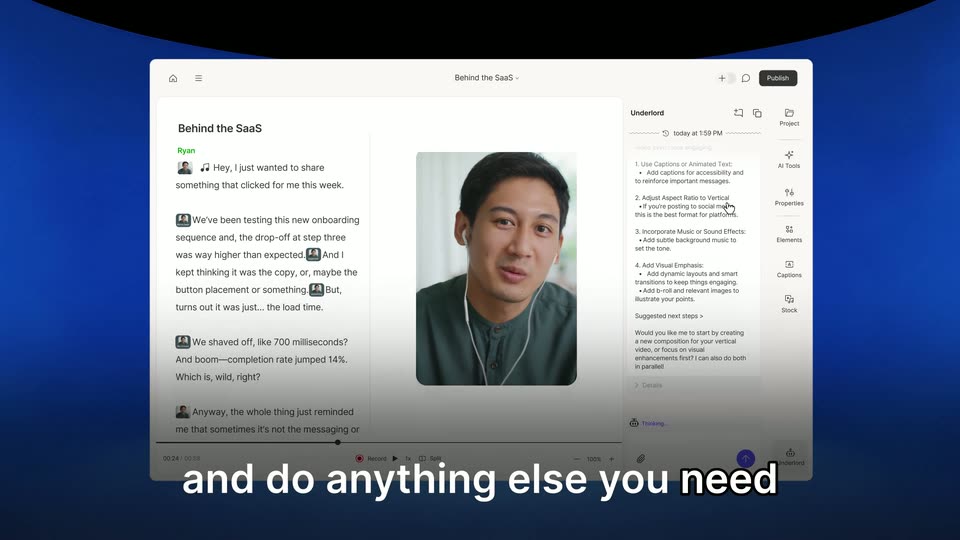

Descript - Never edit alone again. Underlord is now available in beta. Underlor
Descript · Modern electronic, cinematic
3:00

Control Your Mac With Aina | A Whole New Way to Mac
Aina · Electronic dance music
Meet Google Pixel Watch 2, scene by scene
· 38 scenes as text
01 · Product intro · 0:00–0:01
Two smartwatch backs emerge from black, angled in 3D perspective. The left case shows a gold four-sensor cross, the right a blue four-petal sensor array; each catches a thin rim of light as it settles into frame.
Techniques: 3D mockup
Camera: Static
02 · Product intro · 0:01–0:01
Two smartwatches turn on a vertical axis against a dark backdrop, flipping between glowing faces and the sensor backs. The left watch carries a circular face with gold accents; the right a green LED-style face. The silicone bands swap between white, black and blue as they rotate.
Techniques: 3D mockup
Camera: Static
03 · Product intro · 0:01–0:02
Two Pixel Watches float in 3D against a gray gradient, a blue-banded one in front showing its face with a spinning multicolor ring, a beige-banded one behind showing its back with glowing green sensor dots. They rotate slightly toward the camera as small gray disclaimer text sits at the bottom.
On-screen text: “Screen images simulated throughout this ad. Works with most phones running Android 9.0 or newer and requires a Google Account,”, “Google Pixel Watch app and internet access. Some features require a Fitbit mobile app andor a paid subscription. Google apps”, “and services are not available in all countries or languages. See g.co/pixelwatch/specs for technical and device specifications.”
Techniques: 3D mockup
Camera: Static
04 · Product intro · 0:02–0:05
A blue-strap and a cream-strap Pixel Watch turn over in 3D on a light gray background, screens showing the Google logo and a dot pattern. The view pushes in on the cream watch's back as its green sensor lights glow.
On-screen text: “Screen images simulated throughout this ad. Works with most phones running Android 9.0 or newer and requires a Google Account, Google Pixel Watch app and intern”, “and services are not available in all countries or languages. See g.co/pixelwatch/specs for technical and device specifications.”
Techniques: 3D mockup
Camera: Static
05 · Product intro · 0:05–0:07
A 3D render of the watch back starts on the glowing green sensor array and pulls back to reveal the full circular case, crown and side button against a pale blue background. A small legal disclaimer slides in along the bottom edge.
On-screen text: “Screen images simulated throughout this ad. Works with most phones running Android 9.0 or newer and requires a Google Account,”, “Google Pixel Watch app and internet access. Some features require a Fitbit mobile app andor a paid subscription. Google apps”, “and services are not available in all countries or languages. See g.co/pixelwatch/specs for technical and device specifications.”
Techniques: 3D mockup
Camera: Pull out
06 · Product intro · 0:07–0:09
Close-up of a black watch face on a pale blue background. Blue gauge arcs draw in around a central thermometer icon, which shifts from blue to peach, while a white dot travels along the top arc. A small disclaimer line appears at the bottom.
On-screen text: “Skin temperature tracking not available in all countries. Accuracy of heart rate tracking may be affected by physiology, location of device and your movements, ”, “”, “”
Techniques: 3D mockup
Camera: Static
07 · Product intro · 0:09–0:11
A black watch face fills the frame on a light blue background, its crown at the right edge. A blue heart outline draws itself in the center, then a pulse line forms inside it.
On-screen text: “Skin temperature tracking not available in all countries. Accuracy of heart rate tracking may be affected by physiology, location of device and your movements,.”
Techniques: 3D mockup
Camera: Static
08 · Feature reveal · 0:11–0:15
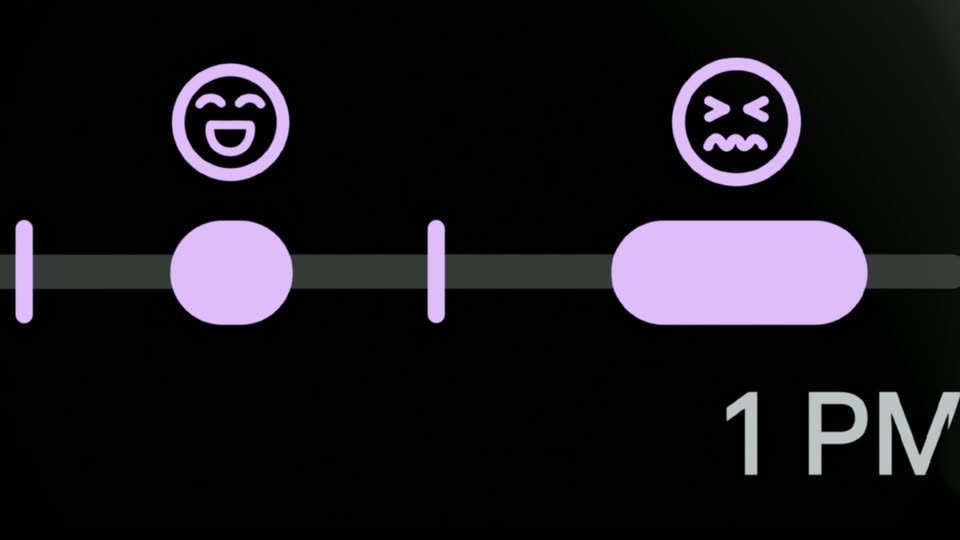
A black watch face shows a check-in timeline: emoji faces above a bar at 11 AM and 1 PM, a person icon and a Check in button. The view then zooms in and pans right, moving from the neutral face to the stressed face.
On-screen text: “Skin temperature tracking not available in all countries. Accuracy of heart rate tracking may be affected by physiology, location of device and your movements.”
Techniques: UI zoom
Camera: Push in
09 · Feature reveal · 0:15–0:18
A dark mood log scrolls up on black: a stressed-face bubble labeled Stressed gives way to a smiling Happy bubble, then it cuts to a 3D render of a black-and-white rounded device with a purple Inside button.
Techniques: 3D mockup
Camera: Static
10 · Feature reveal · 0:18–0:20
A 3D close-up of a black oval smartwatch on a cream band shows a breathing screen, a lavender oval pulsing as the label switches from Inhale to Exhale. It cuts to a diagonal grid of watches in red, blue and gray bands, each face showing a green sport icon.
Techniques: 3D mockup
Camera: Pull out
11 · Feature reveal · 0:20–0:22
A field of angled Fitbit watches with perforated red, blue, gray and black bands drifts slowly diagonally across a cream background. Each black round face shows a teal activity icon for swimming, cycling, running or tennis. A small gray disclaimer line sits still along the bottom edge.
On-screen text: “X”, “Accessory bands sold separately. Options may vary by country and retailer.”
Techniques: 3D mockup
Camera: Pull out
12 · Feature reveal · 0:22–0:24
A red-banded smartwatch sits centered on a pale pink background, locked-off. On its black face the heart-rate readout climbs from 84 to 152 bpm, the zone label shifts from Light to Vigorous, and a multi-colored arc fills along the left edge while distance and pace hold steady.
On-screen text: “Accessory bands sold separately. Options may vary by country and retailer.”
Techniques: 3D mockup
Camera: Push in
13 · Feature reveal · 0:24–0:25
A black smartwatch with a red band rotates from an angled 3D view to face the camera. On its screen a small teal blob grows into a multicolored splash behind a trophy icon, and the white caption Way to go! scales in below it.
Techniques: 3D mockup, Morph
Camera: Push in
14 · Feature reveal · 0:25–0:26
Five watch bodies sit in profile across a cream backdrop while matching bands extend from above and below each case. The outer two watches rotate forward to reveal their faces as the strap segments lengthen outward.
On-screen text: “Way to go!”
Techniques: 3D mockup, Kinetic type
Camera: Push in
15 · Feature reveal · 0:26–0:27
A row of black-faced smartwatches with varied bands stands on a cream background. The center watch, seen in profile, rotates to face forward while the surrounding watches hold their front view. A small disclaimer line sits at the bottom.
On-screen text: “Sequence is creative. Does not accurately depict band attachment.”
Techniques: 3D mockup
Camera: Push in
16 · Feature reveal · 0:27–0:29
Three round smartwatches sit side by side on a cream background, the center one on a blue band. The camera pushes in on the center watch, its face showing the time and a voice prompt, while the flanking watches drift toward the frame edges.
On-screen text: “Sequences shortened. Google Assistant and some related features require LTE or a paired phone within Bluetooth range of your device and are not available in all”, “countries. See g.co/assistant/languages for updates to language availability.”, “Sequence is creative. Does not accurately depict band attachment.”
Techniques: UI zoom
Camera: Push in
17 · Feature reveal · 0:29–0:30
A black smartwatch face in 3D perspective fills the frame on a cream background. Running stats are listed: a 9:30 timer at top, 8'32″ avg and 8'27″ pace, a teal 2.1 mi, and 21:34. A progress arc with a white dot sits on the left as the watch shifts slightly.
Techniques: 3D mockup
Camera: Push in
18 · Feature reveal · 0:30–0:32
A 3D smartwatch with a light blue strap sits on a pale blue background, its dark face showing the Personal Safety menu. The camera pushes in until the screen fills the frame, bringing the Safety Check and Emergency Sharing rows into focus.
On-screen text: “Data rates may apply. Emergency Sharing and Safety Check require location enabled and are dependent upon network connectivity and other factors”
Techniques: 3D mockup, UI zoom
Camera: Push in
19 · Feature reveal · 0:32–0:33
A dark gray rounded pill on a black background shows a yellow shield icon with a clock and white text “Safety Check”, which scales and fades out as “to check in” fades in beside a larger shield. Small gray legal fine print sits at the bottom.
On-screen text: “Data rates may apply. Emergency Sharing and Safety Check require location enabled and are dependent upon network connectivity and other factors”, “and may not be reliable for emergency communications or available in all countries or languages. See g.co/pixelwatch/personalsafety for more details.”
Techniques: Kinetic type
Camera: Static
20 · Feature reveal · 0:33–0:34
A black screen holds a large white countdown timer that ticks from 29m 59s to 29m 57s above the line to check in. Two dark gray pill buttons, one with an X and one with a contact icon, sit below, with small gray disclaimer text along the bottom edge.
Camera: Static
21 · Feature reveal · 0:34–0:37
On black, a red location pin with signal arcs sits inside expanding concentric rings as the headline fades out. Three circular portrait photos pop in around the pin. The scene then shifts to a peach gradient where an orange line-art starburst with a center circle appears.
On-screen text: “Sharing real-time location”, “Data rates may apply. Emergency Sharing and Safety Check require location enabled and are dependent upon network connectivity and other factors and may not be a”
Techniques: Kinetic type
Camera: Static
22 · Feature reveal · 0:37–0:38
An orange sun icon, a circle ringed by a jagged starburst outline, sits centered on a soft gradient that shifts from peach to violet, the icon rotating slowly with a brief offset echo outline.
On-screen text: “Data rates may apply. Emergency Sharing and Safety Check require location enabled and are dependent upon network connectivity and other factors”, “and may not be reliable for emergency communications or available in all countries or languages. See g.co/pixelwatch/personalsafety for more details.”
Camera: Static
23 · Feature reveal · 0:38–0:39
On a flat lavender field, a centered brown circle with a tan segment and a small star morphs into a dark purple crescent moon beside a four-pointed star. The warm brown and tan tones shift to deep purple as the shape opens into a crescent.
Techniques: Morph
Camera: Static
24 · Feature reveal · 0:39–0:42
A close-up of a black watch face pulls back to reveal the full device on white. A purple sleep ring draws around a moon icon while the duration counts up. The watch then fades to white, leaving a small disclaimer caption.
On-screen text: “Max battery life is approximate and based on testing using default settings with a median Pixel user battery usage profile across a mix of features. Batterylife”
Techniques: UI zoom, 3D mockup
Camera: Pull out
25 · Feature reveal · 0:42–0:44
Two blurred smartwatches whip past, then the frame locks on a centered gold-cased watch with a black dial. A mint-green charging ring fills the bezel while the battery readout counts up from 15% to 99% over the 09:31 clock face.
On-screen text: “Max battery life is approximate and based on testing using default settings with a median Pixel user battery usage profile across a mix of features. Batterylife”
Techniques: 3D mockup
Camera: Static
26 · Feature reveal · 0:44–0:44
A black smartwatch with a mint progress ring sits centered on a cream background. The clock ticks from 10:48 to 10:50 and the battery climbs from 98 to 100 percent as the ring closes. A gray disclaimer line runs along the bottom.
On-screen text: “Max battery life is approximate and based on testing using default settings with a medium level user battery usage profile across a mix of features. Batterylife”, “Battery life depends on many factors. Use of certain features will decrease battery life. Actual battery life may be lower.”
Camera: Static
27 · Demo · 0:44–0:45
A white smartwatch with a black circular face floats centered on a plain cream background, angled in 3D and turning slowly. The face shows a navigation screen with an up arrow, a distance and a street name. A small gray disclaimer line sits at the bottom.
On-screen text: “Max battery life is approximate and based on testing using default settings with a median Pixel user battery usage profile across a mix of features.”, “Battery life depends on many factors. Use of certain features will decrease battery life. Actual battery life may be lower.”
Techniques: 3D mockup
Camera: Static
28 · Demo · 0:45–0:46
A 3D-rendered Pixel Watch on a cream background shows a Gmail notification on its black face. The blue sport band swaps to a woven checkered strap as the face changes to a morning yoga calendar event.
On-screen text: “Max battery life is approximate and based on testing using default settings with a median Pixel user battery usage profile across a mix of features.”, “Actual results may be slower. Charging speed depends upon many factors, including battery age and ambient temperature. Adapters sold separately.”, “Fast wired charging rate (up to 2.5 watts) is based on testing with a Pixel Watch Charging Cable plugged into a wall outlet with 30W adapter.”
Techniques: 3D mockup
Camera: Static
29 · Demo · 0:46–0:47
A light blue Apple Watch with a woven band rests on a cream background, turning slowly in 3D to reveal its side crown and buckle. The calendar face shows a morning yoga class event. Small gray disclaimer text sits at the bottom.
On-screen text: “Fast wired charging rate (up to 2.5 watts) is only available with Apple Watch Series 10. Fast Charging Cable plugged into a wall outlet with 30W adapter. Actual”
Techniques: 3D mockup
Camera: Static
30 · Demo · 0:47–0:48
The back of a white smartwatch with a green circular sensor array turns slowly in 3D against a plain off-white background, bringing engraved rim labels into view. A two-line legal disclaimer sits static at the bottom.
On-screen text: “Fast wired charging rate (up to 2.5 watts) is based upon use of the USB-C Fast Charging Cable plugged into a wall outlet with 30W adapter.”, “Actual results may be slower. Charging speed depends upon many factors, including battery age and ambient temperature. Adapters sold separately.”
Techniques: 3D mockup
Camera: Static
31 · Demo · 0:48–0:49
A 3D render of a round smartwatch with a cream band and silver case tilts from a side angle toward a front view as the camera pushes in. The black face shows gold complications and hands, with a glint crossing the glass.
On-screen text: “Fast wired charging rate (up to 2.5 watts) is based upon use of the USB-C® Fast Charging Cable plugged into a wall outlet with 30W adapter.”, “Actual results may be slower. Charging speed depends upon many factors, including battery age and ambient temperature. Adapters sold separately.”
Techniques: 3D mockup, Light sweep
Camera: Push in
32 · Demo · 0:49–0:50
Close-up of a black watch face with cream hands and four complications. The camera pushes in from a wide frame that includes the crown to a tight crop on the dial. The bottom dial's number scales up as the zoom settles.
On-screen text: “Fast wired charging rate (up to 2.5 watts) is based upon use of the USB-C® Fast Charging Cable plugged into a wall outlet with 30W adapter.”, “Actual results may be slower. Charging speed depends upon many factors, including battery age and ambient temperature. Adapters sold separately.”
Techniques: UI zoom
Camera: Push in
33 · Demo · 0:50–0:52
A macro close-up of a dark watch face with a gold ring pulls back as 62 flips to 98. The steel watch spins in 3D on a light blue background, then focus racks to a smaller watch centered inside a loop of the mesh strap.
On-screen text: “62”, “98”, “Some Google apps and services require LTE or a paired phone within Bluetooth range of your device, and are not available in all countries or languages. Data may”
Techniques: 3D mockup, Morph, Parallax
Camera: Pull out
34 · Demo · 0:52–0:54
A smartwatch spins in 3D on a pale blue backdrop. Its metal mesh band morphs into a light blue sport band, and the dial changes from a numeric 9:12 face to an analog face with blue hands.
Techniques: 3D mockup, Morph
Camera: Pull out
35 · Outro · 0:54–0:56
A blue smartwatch floats and rotates in 3D against a pale blue background, its face turning toward the camera. The static black text Pixel Watch 2 sits behind it, split by the watch body. The dial shows blue hands and a heart-rate ring.
On-screen text: “Pixel”, “Watch 2”
Techniques: 3D mockup
Camera: Pull out
36 · Outro · 0:56–0:58
On a pale pink field, the dark gray line “Engineered by Google” sits low and soft, then sharpens and settles to center. The text clears and a multicolor Google G scales up from the middle as the closing mark.
On-screen text: “Engineered by Google”
Techniques: Kinetic type, Masking
Camera: Static
37 · Outro · 0:58–1:00
A multicolor Google G logo sits centered on a plain off-white background. It scales gently in place while the frame stays locked off.
Camera: Static
38 · Outro · 1:00–1:15
A static end screen on a cream background groups a blue and gray Pixel phone, a Pixel Watch and Pixel Buds at center under a large black Google Pixel wordmark. A subscribe circle sits left, two empty video placeholders sit right.
On-screen text: “@MadeByGoogle”, “@GooglePixel”, “Subscribe”, “Google Pixel”, “Video You Might Like”, “Playlist You Might Like”
Techniques: 3D mockup
Camera: Static