
0:28
Explore
00:00:00 / 03:00:12
- Length
- 3:00
- Scenes
- 30 · 6.0 s avg
- Product on screen
- 0:00
- Features shown
- 4
- Voiceover
- Yes
- Views
- 44 on YouTube
as of November 25, 2026
Aina’s 3:00 launch film runs 30 scenes, about 6.0 s each. The product is on screen from the first frame and 4 features are revealed. There is no explicit call to action; a voiceover carries the film. The video is a first-person demo built from repeating blocks: a blurred live-action setup, a macro gesture shot of the ring, and a clean 3D UI mockup, all synced to word-by-word typed captions. Pacing is steady and mostly locked-off, using slow focus racks and the ring's small screen as the recurring anchor between real hands and interface cards.
Footage neededEstimated needs: 4 capture groups — your screens or recordings · 1 official logo — reused across the film · 15 filmed passages — shoot, supply or replace · 2 3D passages — build or supply
Is this your launch? to your site or press kit.
More like this


1:12

Perplexity - Comet is here. A web browser built for today’s internet.
Perplexity · AI · Jul 2025
0:43

Street.co.uk - Street AI
Street · Oct 2024
Similar soundtrack
Films whose music sounds like this one, voice left out
1:30


Alkera AI (S26) | Launch Video
Alkera AI · Upbeat, modern electronic promotional music
2:30
Introducing NVIDIA Alpamayo 2 Super
NVIDIA · Technical presentation with electronic background music
1:50


HABU Launch Video
HABU · Electronic
Control Your Mac With Aina | A Whole New Way to Mac, scene by scene
· 30 scenes as text
01 · Product intro · 0:00–0:07
A heavily defocused, warm-toned shot of a person seated at a laptop holds a locked-off frame while white captions type out word by word in the center, synced to the voiceover. At the end the laptop lid begins to lift.
On-screen text: “There's already so much you”, “with Aina on your phone,”, “but on the Mac,”, “it unlocks a whole new level”, “of possibilities.”
Techniques: Kinetic type
Camera: Static
02 · Feature reveal · 0:07–0:08
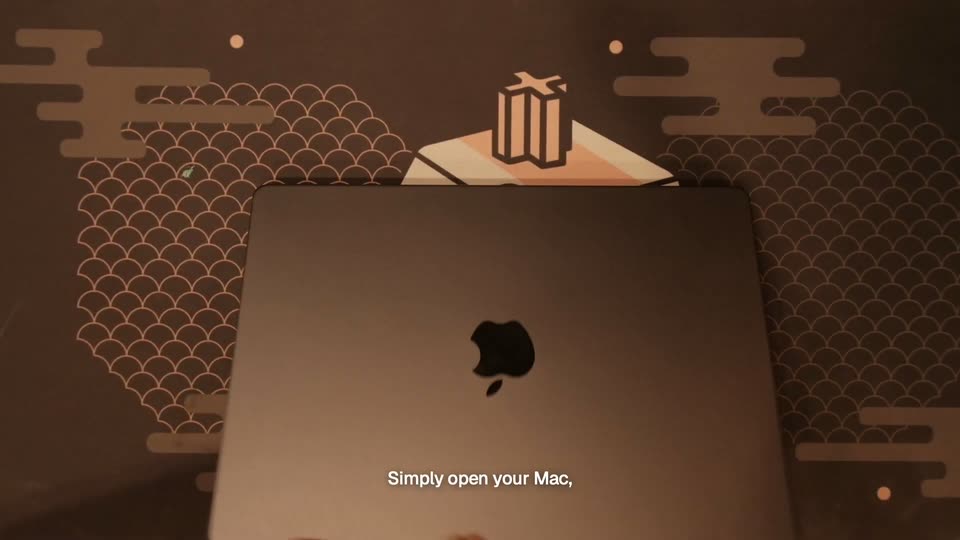
Top-down shot of a hand lifting the lid of a silver laptop on a dark brown backdrop patterned with stylized clouds and a pagoda icon. The lid opens in a soft dissolve to reveal the keyboard and trackpad while a caption fades in at the bottom.
On-screen text: “Simply open your Mac,”, “of possibilities.”
Techniques: Masking
Camera: Static
03 · Feature reveal · 0:08–0:12
A macro shot of a Mac hinge racks from blur to focus, white body left against a dark bokeh background. The frame cuts to a hand holding a silver Apple Watch above a keyboard. White caption text sits on the right edge.
On-screen text: “Simply open your Mac,”, “and Aina automatically makes Mac controls available.”, “To get started, we double press the shifter,”
Camera: Static
04 · Feature reveal · 0:12–0:15
A close-up of a hand wearing a ring-shaped device with a small rectangular display. The thumb rests near a polished metal shifter. The ring's screen lights up to show a short list of actions. A white caption sits at right over a blurred desk.
On-screen text: “To get started, we”, “double press the shifter,”
Camera: Static
05 · Feature reveal · 0:15–0:33
Locked-off macro shot of a small black device with a round button, clipped to the edge of a laptop. Its screen shows the Aina sidebar with four action labels, and white chevron glyphs appear beside the button to indicate flick gestures. The background stays a blurred warm room.
On-screen text: “and the Aina sidebar expands to show the available”, “actions at this point. So, for example, here,”, “you can see that my Aina is configured to open Claude,”, “lock my Mac, take a screenshot,”, “start screen recording.”, “I can access any of these actions by flicking up, down,”, “or holding up or holding down.”, “So if I want to lock my device,”
Camera: Static
06 · Feature reveal · 0:33–0:35
A close-up of a hand wearing a small ring device with a rectangular black screen on the index finger, held over a blurred desk with a laptop and phone. The finger makes a small upward flick while white subtitles appear on the right.
On-screen text: “So if I want to”, “lock my device,”, “I'm just going”, “to flick up,”
Camera: Static
07 · Feature reveal · 0:35–0:43
A 3D Mac desktop mockup with stacked app windows on the left locks to a date-and-time screen, then blurs as a white caption types in. The blur lifts and a dark window expands to reveal the Aina shortcuts panel.
On-screen text: “I'm just going to flick up,”, “and you'll see that”, “my device is locked.”, “You can configure your own shortcut.”, “To do that, you can”, “just open the Aina app,”
Techniques: 3D mockup, Kinetic type, UI zoom
Camera: Static
08 · Feature reveal · 0:43–1:33
A tilted 3D window of the Aina app's dark settings screen floats over a laptop mockup; the camera eases in as a cursor clicks the Apps tab, opens the ChatGPT action page, and steps through its tabs while rolling captions run below.
On-screen text: “just open the Aina app,”, “and you'll see that you”, “So you can configure it”, “for specific apps, too.”, “So, for example, here for”, “ChatGPT,”, “to start a new chat,”, “copy the last response,”, “stop generating,”, “or there are times where I just want to open Claude because ChatGPT did not give me the right answer, so I can do that, too. If I want to configure a shortcut, ”
Techniques: 3D mockup, UI zoom, Cursor demo
Camera: Static
09 · Feature reveal · 1:33–1:39
A heavily blurred dark chat screen stays locked in the background while white text types out word by word in the center, swapping between three short phrases.
On-screen text: “chatting with AI apps”, “back and forth”, “Aina gets even more powerful.”
Techniques: Kinetic type
Camera: Static
10 · Feature reveal · 1:39–1:49
A locked-off low-angle side shot of a laptop on a desk, keyboard soft in the foreground, its screen showing a chat app where reply text and a code block stream in line by line. White subtitles at the bottom swap as the voiceover plays.
On-screen text: “So let's say I'm chatting on an app like Claude.”, “I can use Aina as a trigger and a mic for dictation.”, “It already connects with the dictation apps that you”, “already use, so things like Wispr Flow or Monologue,”
Camera: Static
11 · Feature reveal · 1:49–1:57
Two rounded app icons, a dark purple waveform tile and a teal tile with a white serif M, fade in and out over a blurred laptop. The shot then racks into focus on the screen, showing a settings window, code text and a dock.
On-screen text: “already use, so things like Wispr Flow or Monologue,”, “you can just connect that with Aina and start using it.”, “So I have connected Wispr Flow.”, “I'm going to dictate some text right now.”
Camera: Static
12 · Feature reveal · 1:57–2:00
A locked-off macro shot frames the edge of a Mac laptop, where a small black Ring with a coral logo clips onto the side. A blurred settings panel fills the screen, and a defocused desk with a teddy bear sits right. White captions appear on the right.
On-screen text: “To do that,”, “when I'm on the Mac live controls on the Ring,”
Camera: Static
13 · Feature reveal · 2:00–2:06
A hand holds a small smart ring with a lit screen against a warm blurred background, tilting it as the display switches from a menu to a listening state. White captions sit on the right. The shot ends as focus pulls to the out-of-focus desk.
On-screen text: “when I'm on the Mac live controls on the Ring,”, “I long press, and it starts dictation,”, “and then I can say something like,”
Camera: Push in
14 · Feature reveal · 2:06–2:13
A macOS chat window with a message thread and a dictation bar showing an animated waveform sits above the app dock. Subtitle phrases swap at the bottom of the frame while the cursor stays still.
On-screen text: “Let's incre”, “to 90”, “connect window to 60”, “current one is”, “and it's not really”, “working well.”, “and then I can say”, “something like,”
Camera: Push in
15 · Feature reveal · 2:13–2:15
A close-up hand on a desk wears a ring fitted with a small dark screen. It rests beside a laptop keyboard, a phone with a calendar blurred behind. Focus racks onto the ring as the fingers curl. White subtitle text holds at right.
On-screen text: “When I'm done, I press the center button again,”
Camera: Static
16 · Feature reveal · 2:15–2:21
A locked-off Mac screen shows the Claude document; the dictation bar at the bottom pulses with an audio waveform, then fills with the dictated sentence, while small black captions fade in beneath the window.
On-screen text: “and the dictated text”, “appears on the Claude window.”, “If I want to send it,”
Camera: Pull out
17 · Feature reveal · 2:21–2:22
A hand wearing a small ring-shaped display rests on a laptop, then the shot cuts to a phone screen where a finger swipes up across a Submit notification.
On-screen text: “I can just flick up to submit,”
Camera: Static
18 · Feature reveal · 2:22–2:23
Macro shot of a tablet edge in a dim room. On the white app screen a black pill control with Submit, Dismiss and Delete collapses into a small tab showing an orange starburst icon. A white caption sits in the blurred background on the right.
On-screen text: “I can just flick up to submit,”
Techniques: Morph
Camera: Static
19 · Feature reveal · 2:23–2:30
A front-facing UI mockup of a Claude chat beside a Connectors panel floats on white, the reply text typing out as black captions cycle phrase by phrase below. The shot cuts to a close-up of a laptop keyboard.
On-screen text: “and the whole dictated”, “text is just sent to Claude”, “without me having to touch”, “my keyboard or mouse,”, “or press any other key.”
Camera: Static
20 · Feature reveal · 2:30–2:35
Low-angle close-up of a laptop on a warm-lit desk, the backlit keyboard soft in the foreground. The screen shows a chat interface whose message text types out line by line, while white subtitles roll across the bottom.
On-screen text: “There are times where Claude needs an approval or”, “rejection from us. In these cases,”
Techniques: 3D mockup
Camera: Static
21 · Feature reveal · 2:35–2:39
A tight close-up of a laptop screen showing a pull-request page, shallow depth of field. A dark notification card slides in from the top edge, and Approve and Reject pills appear beside the slim Aina sidebar strip. White captions at the bottom and right explain the notification flow.
On-screen text: “rejection from us. In these cases,”, “it notifies you on the Aina sidebar.”, “So you can see a notification on the sidebar.”
Camera: Static
22 · Feature reveal · 2:39–2:41
A close-up of a hand wearing a smart ring with a small screen, resting on a laptop. The ring's display shows a payment approval notification, then the hand rotates to turn the screen away and back. A phone keypad sits blurred in the background.
On-screen text: “You can also see”, “it on the Ring,”
Camera: Static
23 · Feature reveal · 2:41–2:44
A flat UI mockup holds still: a chat thread on the left, a code review panel with a floating notification card on the right, and an Approve/Reject rail at the edge. A black caption at the bottom swaps phrases in time with the voiceover.
On-screen text: “and you can approve or”, “reject right from here.”, “So if I want to approve,”
Camera: Static
24 · Feature reveal · 2:44–2:45
A close-up of a hand resting on a wooden desk, the index finger wearing a small metallic ring topped with a horizontal bar. A laptop, phone and a propped phone showing a dialer sit blurred in the background. The hand stays nearly still.
On-screen text: “I'm just going to hold up,”
Camera: Static
25 · Feature reveal · 2:45–2:47
Macro shot of a phone screen showing a code review view. A dark Claude Code banner appears, then an Approve/Reject panel, and the vertical icon rail collapses to one orange sparkle icon. A white caption holds on the right over a blurred warm background.
On-screen text: “and it's going to send an approval to Claude.”, “I'm just going to hold up,”
Camera: Static
26 · Feature reveal · 2:47–2:48
Locked-off close-up of a laptop trackpad with a hand resting on it, the index finger wearing a smart ring with a small glowing screen. The hand stays nearly still while a white subtitle builds word by word on the right.
On-screen text: “and it's going to send an approval to Claude.”, “I can do all of this without ever having”
Techniques: Kinetic type
Camera: Static
27 · Feature reveal · 2:48–2:52
A close-up shows a hand wearing a small screen ring hovering over a MacBook trackpad, fingers resting without touching the keys. The locked-off frame holds while white caption lines build up on the right as the hand makes small gestures.
On-screen text: “I can do all of this without”, “ever having to touch my”, “keyboard or mouse.”
Camera: Static
28 · Other · 2:52–2:53
The product interface blurs and dims to a gray overlay, then the word “dictation” appears centered in white. The frame holds locked-off on the blurred screen for the rest of the clip.
On-screen text: “dictation”
Camera: Static
29 · Other · 2:53–2:57
A blurred, darkened Mac app window holds the frame as large centered white words swap one by one: dictation, hooks, custom scripts. A small two-line caption appears below: there's so much you can do with Aina on the Mac.
On-screen text: “dictation”, “hooks”, “custom scripts”, “there's so much you can”, “do with Aina on the Mac.”
Techniques: Kinetic type
Camera: Static
30 · Outro · 2:57–3:00
A small polished chrome sphere with a black arc sits left of the widely spaced wordmark A I N A, centered on a plain off-white field. The lockup holds perfectly still for the full duration.
Camera: Static