1:19

Runway - Runway is now in DaVinci Resolve Access the world's best models dire
Runway · AI · Sep 2026
Descript · Jul 2025 · 0:59 · AI-annotated
Descript’s 0:59 launch film runs 37 scenes, about 1.6 s each. The product shows up at 0:25. The call to action lands at 0:54 (91% in), over a voiceover. The video is built as a dark cinematic pain montage that hard-pivots at 0:14 into a bright indigo brand world, where a pill-shaped prompt bar and 3D-tilted interface tours carry the product story. Signature moves include the macro eye reflection, the absurd single-spotlight vignettes (the bear, dynamite, blender), and the continuous zoom-in and zoom-out camera that follows the chat flow through the editor.
Is this your launch? to your site or press kit.
Runway · AI · Sep 2026
Capveon · Government · Oct 2026
Trident · B2B
A woman in a white turtleneck sits at a desk in a dark room, facing a monitor showing a video editor with a timeline and a video preview. The shot opens wide and locked-off, then cuts to a close side profile of her working.
On-screen text: “There's a feeling you get when”, “you sit down to edit a video.”
Techniques: Kinetic type
Camera: Static
In a dark room, a woman in a cream turtleneck sits at a desk, hands on a keyboard, facing a monitor showing a video editing timeline with a preview of two people. The camera slowly pushes in from a medium profile shot to an extreme close-up of her worried face as she stares at the screen.
On-screen text: “There's a feeling you get when”, “you sit down to edit a video.”
Camera: Push in
Extreme close-up of a woman's face in warm low light. The shot pushes in to a macro of her eye; the reflection in the dark pupil resolves into a video editing screen, a red-framed preview of a man above a multitrack timeline.
Camera: Push in
A desktop monitor on a white table against a black backdrop displays a video editor with a timeline and a person in the preview window. A red outline frames the screen while animated flames erupt from the top and sides, flickering and growing across the shot.
Techniques: 3D mockup
Camera: Push in
A glass hourglass with pale yellow sand stands centered on a black surface under a bright overhead light. Sand flows steadily through the neck, the upper bulb level drops and a small pile builds in the lower bulb while the camera holds still.
Camera: Static
A person in a brown bear costume stands under a single top spotlight on a black stage, holding three balloons and a small white cylindrical speaker. The bear steps forward as low white fog drifts across the foreground and parts around its legs.
Camera: Push in
A stack of red dynamite sticks bound by a black band sits under a top spotlight on a dark stage, with a silver alarm clock on top. A lit fuse on the clock throws sparks to the left. The frame is locked off.
Techniques: 3D mockup, Particles
Camera: Push in
A black and chrome blender sits centered on a dark platform as a burst of red liquid erupts from the top of the jar, droplets scattering outward in slow motion against a black backdrop.
Techniques: Particles
Camera: Push in
A 3D brown bear stands in a top spotlight holding a rifle. The rifle fires with a muzzle flash, a bunch of red, green, blue and yellow balloons appears at the bear's right, and a large fireball explosion expands across the right side of the frame.
Camera: Static
A low rail-level view of a dark tunnel lit by a single overhead beam. A train with bright headlights advances down the tracks toward the camera, growing larger through the fog until it fills the frame.
Camera: Static
A deep red gradient fills the frame with a curved black band along the top edge. The serif line 'What you need...' fades in at the center from transparent to full opacity, then holds on a locked-off frame.
On-screen text: “What you need...”
Camera: Static
A blurred background shifts from dark red to purple as two lines of serif text appear in sequence at the center: 'What you need...' then '...is an expert co-editor'. The frame stays locked off and the text remains static.
On-screen text: “What you need...”, “...is an expert co-editor”
Camera: Static
A centered line of white serif text sits on a deep blue gradient, with a black curved band across the top edge. The frame is locked off and the text stays still for the full duration.
On-screen text: “...is an expert co-editor”
Camera: Static
On a blue stage with a dark curved ceiling, the serif line “...is an expert co-editor” sits centered, then dims as the bold caption “With good taste” fades in at the bottom edge.
On-screen text: “...is an expert co-editor”, “With good taste”
Camera: Static
On a blue stage with a dark dome and a wall of rounded panels, a white hand cursor hovers as a white pill-shaped input bar scales out from the center to full width. The bar carries a small lightbulb icon on the left and a blue up-arrow button on the right, while a caption line at the bottom swaps from one phrase to the next.
On-screen text: “With good taste”, “and reliable judgment,”
Techniques: Cursor demo
Camera: Static
A white pill-shaped prompt bar types a query against a blue backdrop of vertical rounded bars. A hand cursor taps the circular send button, a spinner appears, and the bar scales down toward the center.
On-screen text: “and reliable judgment,”, “and all the tools”, “to make a video”, “that looks and sounds good.”
Techniques: Cursor demo
Camera: Pull out
A wall of vertical blue pill shapes fills the frame behind a centered white prompt input, where a typed question and text cursor scale gently. A white caption stays locked at the bottom.
On-screen text: “that looks and sounds good.”
Camera: Static
Over a blue field of vertical rounded panels, a translucent prompt bar centered on screen reads a user query; it fades out as the serif word Underlord fades in at the center.
On-screen text: “Underlord”
Camera: Static
A white serif Underlord wordmark scales up at the center of a blue abstract background of vertical bars and pill shapes, with the tagline 'You need Underlord.' below. It cuts to the app editor showing a man in a video preview, captioned 'It's your AI co-editor.'
On-screen text: “Underlord”, “You need Underlord.”, “It's your AI co-editor”
Techniques: Kinetic type
Camera: Push in
A web video editor interface floats in 3D over a deep blue field of soft rounded shapes. The mockup tilts as the camera pushes in, reframing onto the top of the layout where a talking-head video plays beside a text panel. A white caption holds the bottom edge.
On-screen text: “It's your AI co-editor”
Techniques: 3D mockup, UI zoom
Camera: Push in
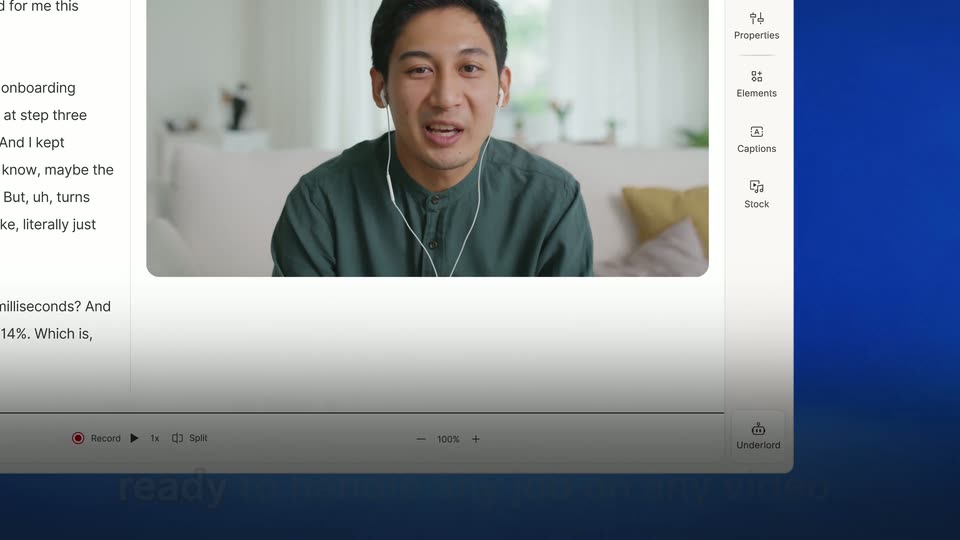
A video editor interface shows a man with earbuds speaking in the preview window, with a transcript panel on the left and a tool sidebar on the right. The view zooms into the bottom-right corner, isolating the Underlord button, while a caption reads ready to handle any job on any video. at the bottom.
On-screen text: “ready to handle any job on any video.”
Techniques: UI zoom
Camera: Push in
A tight crop on a white interface card holding a robot-icon button and a hand cursor, with a caption along the bottom. The frame zooms out, shrinking the card to a thin left strip against a blue field.
On-screen text: “ready to handle any job on any video.”
Techniques: UI zoom
Camera: Static
Close-up of the editor interface. A cursor types a prompt into the Underlord chat field and clicks the purple send button, then the layout switches to the chat panel showing the sent message and a reply box. White captions appear at the bottom.
On-screen text: “ready to handle any job on any video.”, “Just describe what you want to do.”, “It'll make a plan and get after it.”
Techniques: Cursor demo
Camera: Pan
A product interface shows a chat panel on the right typing a reply to a user's request, beside a video preview of a man on the left. A caption at the bottom reveals word by word, white over a gray remainder.
On-screen text: “It'll make a plan and get after it.”
Techniques: Kinetic type
Camera: Static
A flat product screen shows a document on the left and an Underford chat panel on the right, with a video thumbnail of a man wearing earphones in the center. A white caption holds at the bottom over a dark gradient while the panels shift slightly.
On-screen text: “It'll make a plan and get after it.”
Camera: Pull out
A close-up of a document post with an embedded talking-head video zooms out to reveal the full editor and its right-hand tools sidebar. A large white caption at the bottom swaps from one line to the next.
On-screen text: “It'll make a plan and get after it.”, “It can edit to maximize engagement,”
Techniques: UI zoom, Kinetic type
Camera: Pull out
A video-editing interface with a talking head and a side panel fades into a close-up of the Underlord chat box, where text types out: “Great! How could we make this even more engaging?” A white outlined caption at the bottom reads “It can edit to maximize engagement,”.
On-screen text: “It can edit to maximize engagement,”
Techniques: UI zoom
Camera: Push in
A close-up of the AI chat document pulls back to reveal the full Underlord editor window on a blue background. The white caption “control the pacing,” holds at the bottom, then fades as the window settles smaller in frame.
On-screen text: “control the pacing,”
Techniques: UI zoom
Camera: Pull out
A Descript editor window on a blue backdrop scales down and tilts into 3D perspective. The center preview flips to a vertical frame with captions and a 14% badge as the AI panel updates; white captions run along the bottom.
On-screen text: “cover clumsy edits,”, “and do anything else you need”, “because it's built right into Descript.”
Techniques: 3D mockup
Camera: Pull out
A comment box labeled Underlord with a robot icon scales up to fill the frame. A hand icon and a blue arrow button sit in the field as the words 'Now we're cooking!' type out, while a white caption at the bottom fades.
On-screen text: “because it's built right into Descript.”
Techniques: UI zoom
Camera: Static
A flat chat interface fills the frame, showing a typed message with paperclip, hand and send icons. A hand cursor taps the blue send button and the header label switches to purple Thinking. A caption rests along the bottom edge.
On-screen text: “With Underlord at your side,”
Techniques: Cursor demo
Camera: Static
A close-up of the AI chat bubble asking for a Spanish version pulls back to reveal the full editor: transcript on the left, video preview center, assistant on the right. A bottom caption reads “With Underlord at your side,” then “you can make any video you want.”
On-screen text: “With Underlord at your side,”, “you can make any video you want”
Techniques: UI zoom
Camera: Pull out
A full editor screen with a Spanish transcript and a video preview; the view zooms into the chat card at the bottom right as a hand cursor hovers over the blue send button while the message “Let’s ship it!” appears.
On-screen text: “you can make any video you want”, “and make it good.”
Techniques: UI zoom, Cursor demo
Camera: Push in
A light purple chat panel shows a bot named Underlord with the message Let's ship it! and a rocket emoji, a paperclip icon below, and a blue send button with a hand cursor on it. The panel stays fixed while the blurred pill-shaped background shifts to a deeper purple.
Techniques: Cursor demo
Camera: Static
On a field of indigo rounded pill shapes, a comment bubble with a robot icon reads Underlord and Let's ship it!, then fades away as the serif tagline Never edit alone fades in at the center of a blue panel.
On-screen text: “Underlord”, “Let's ship it!”, “Never edit alone”
Techniques: Kinetic type
Camera: Static
A layered field of vertical blue bars and rounded pill shapes drifts slowly across the frame. The white serif line “Never edit alone” holds centered, then clears, leaving the abstract shapes to keep sliding.
On-screen text: “Never edit alone”
Techniques: Parallax
Camera: Push in
A blue field of vertical columns filled with rounded pills and circles in layered indigo shades holds a white Descript mark and lowercase wordmark centered. The logo bars assemble and the wordmark settles in over the first half second, then the frame holds still.
On-screen text: “descript”
Camera: Static