3:17

Resend - Announcing Headless Webhooks API Programmatically... ▪️ list webhook
Resend · Developer tools · Sep 2026
Google’s 0:41 launch film runs 17 scenes, about 2.4 s each. The product shows up at 0:26 and 1 feature is revealed. The call to action lands at 0:35 (85% in). The video opens with a 3D interface tour that generates a slide deck, then lets that deck play as the launch narrative: a black and white problem montage, a gradient promise card, a black intro card, static feature and benefit cards, and a drawn logo end card with the URL. Its signature moves are the pull back and zoom in camera on the app window, the cut from live UI to the generated slides, and the recurring blue to green gradient accent on near black.
Is this your launch? to your site or press kit.
Resend · Developer tools · Sep 2026
Films whose music sounds like this one, voice left out
Codepawl · Electronic dance and indie rock
Airtable · Electronic dance, funk, and pop-rock
Qwen · Upbeat instrumental funk, soul, and pop-rock
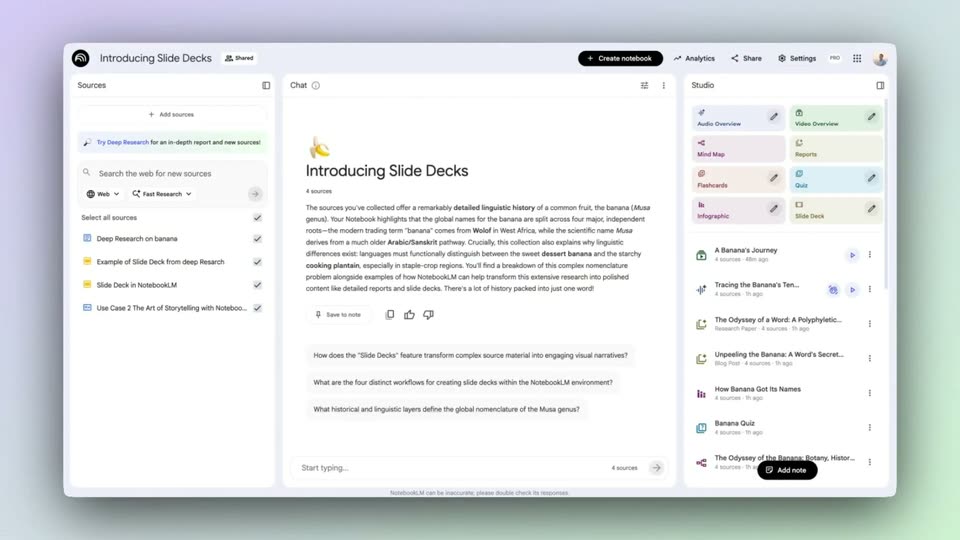
A tilted 3D window of a three-pane note app floats over a soft lavender gradient with a drop shadow. In the center chat pane, gray skeleton bars are replaced by a paragraph of text and three question chips.
Techniques: 3D mockup
Camera: Push in
A white Customize Slide Deck modal slides in from the left over a blurred studio screen. The description field fills with typed text, a spinner spins on the blue Generate button, then the modal fades to reveal the generated Introducing Slide Decks document.
Techniques: Cursor demo
Camera: Push in
The Slide Deck tile is selected in the right panel as a Generating Slide Deck row with a spinner appears. The view pulls back to frame the whole app window, cuts to black, then zooms in on the panel where the finished Create your narrative deck tops the list.
Techniques: UI zoom
Camera: Push in
A tight frame on the Studio panel, where a dark slide reads The Presentation Problem above a blank tablet mockup, pulls back to reveal the full interface: a top toolbar and a left Decks column of body text.
Techniques: UI zoom
Camera: Pull out
A split product interface with a research note on the left and a slide studio on the right scales down and drifts right, revealing the note title and a banana icon. A Start slideshow tooltip hovers beside the play button.
Techniques: UI zoom
Camera: Pull out
A black-and-white locked-off shot of a man slumped at a cluttered desk, head in his hands, lit by a single desk lamp over a laptop and coffee cups. Large white serif text sits across the upper third, with a small brand mark in the bottom right corner.
On-screen text: “The Presentation Problem.”, “NotebookLM”
Camera: Static
Locked-off shot of a blank white presentation slide filling a dark screen. Small gray caption sits at the bottom center, and a small NotebookLM watermark holds in the bottom right corner.
On-screen text: “The Presentation Problem.”, “The horror of the blank slide!!!”, “NotebookLM”
Camera: Static
A white card holds a large black serif headline above a wide dark rectangle filled with a fine grainy texture that reads as a wall of text. The composition is static, with a small NotebookLM logo locked in the bottom right corner.
On-screen text: “Or the dreaded wall of text.”, “NotebookLM”
Camera: Static
A black and white clock face with blurred hands sits above three lines of bold serif text. The text reads: Hours wasted. Ideas lost in translation. Audiences disengaged. A small NotebookLM logo is in the bottom right.
On-screen text: “Hours wasted.”, “Ideas lost in translation.”, “Audiences disengaged.”, “NotebookLM”
Camera: Static
A dark frame holds a soft purple, blue and green gradient glow on the right. White text reads in the center, the word inspiring set in italics, while a small NotebookLM mark sits in the bottom right corner.
On-screen text: “What if creating a presentation felt... inspiring?”
Camera: Static
A black title card holds three centered lines: small white 'Introducing', large bold white 'NotebookLM', and large bold green 'Slide Decks'. A small NotebookLM logo sits in the bottom right corner. The frame is locked off with no motion.
On-screen text: “Introducing”, “NotebookLM”, “Slide Decks”
Camera: Static
A dark field holds a two-line white tagline, left of center, while glowing blue and green 3D ribbons knot at the lower left and arc up to the top right. The frame is locked off and still, with a small NotebookLM mark in the bottom right corner.
On-screen text: “Stop making slides.”, “Start telling stories.”
Camera: Static
Two feature columns sit on a dark field: a document icon over the green headline Sources to Slides and a notebook icon over the purple headline Notes to Slides, each with white body copy. Thin wireframe lines drift across the top corners. The layout holds still.
On-screen text: “Sources to Slides”, “Instantly synthesize trusted documents into a clear presentation.”, “Notes to Slides”, “Transform your rough notes and outlines into a structured narrative.”
Camera: Static
A dark slide holds two feature columns side by side. Each pairs a gradient line icon, a colored headline and white body copy. Faint wavy lines frame the corners; a small NotebookLM watermark sits bottom right.
On-screen text: “Deep Research to Slides”, “Explore a new topic and get a comprehensive slide deck as your starting point.”, “Slides to Pretty Slides”, “Upload an existing draft and let us handle the design and beautification.”
Camera: Static
A dark screen shows a centered stack of large green and purple sans-serif words reading the three phrases, over faint wavy lines and scattered dots. The text and background remain static for the full clip.
On-screen text: “Effortless Ideation. Powerful Storytelling. Stunning Design.”
Camera: Static
A locked-off title card on a near-black background with a faint grid texture. The white headline sits centered, a thin blue-to-green gradient line runs along the bottom edge, and a small NotebookLM mark rests in the lower right corner.
On-screen text: “NotebookLM Slide Decks”
Camera: Static
On a near-black background with a soft green and blue glow along the bottom, the NotebookLM arc logo draws itself in the center, the white wordmark fades in beside it, and the URL notebooklm.google fades in below, shifting from blue to white. The frame stays locked.
On-screen text: “NotebookLM”, “notebooklm.google”
Camera: Static