0:18

SideShift - LAUNCH ALERT: NEVER PAY FOR A BOTTED VIEW AGAIN. Bot Detection is no
SideShift · Oct 2026
Riverside’s 1:45 launch film runs 58 scenes, about 1.8 s each. The product shows up at 0:12 and 4 features are revealed. The call to action lands at 1:38 (94% in), over a voiceover. A single presenter in a plant-filled home office alternates with tight, shallow-focus shots of a dark interface, cut at a brisk ~32 cuts per minute to the voiceover. Signature moves are 3D agent avatars popping out of type, animated checklists and captions, and rack-focus screen close-ups that track each agent's handoff.
Is this your launch? to your site or press kit.
SideShift · Oct 2026
Microsoft · AI · Nov 2023
ClickUp · Productivity · Nov 2026
A man in a dark cardigan sits at a desk, gesturing with both open hands as he speaks. A bookshelf, plants and a sunrise lamp fill the background; an orange mug and headphones sit in the blurred foreground.
Camera: Static
A curly-haired man in a dark cardigan sits at a white desk before a plant-filled bookshelf. He lifts a black laptop open and speaks to camera while white captions appear at the bottom of the frame.
On-screen text: “Today”, “we're launching a team of agents”, “built for video.”
Camera: Static
A dark app screen shows a row of four 3D avatar heads labeled Producer, Editor, Clipper and Marketer under a heading. A mouse cursor glides left to right across the avatars, and the caption “Many people are using ChatGPT” appears at the bottom.
On-screen text: “Many people are using ChatGPT”, “built for video.”
Techniques: Cursor demo
Camera: Static
A curly-haired man in a dark cardigan sits at a white desk before a plant-filled bookshelf, speaking to camera and gesturing. He then rests his hands on an open laptop and types. White subtitles run along the bottom edge of the locked-off medium shot.
On-screen text: “Many people are using ChatGPT”, “or Claude for video production.”
Camera: Static
A curly-haired man in a dark cardigan sits at a desk in a plant-filled study, speaking to camera and gesturing with one hand. An open laptop and an orange mug sit in the foreground as a white subtitle reads at the bottom center.
On-screen text: “or Claude for video production.”, “These models are great.”
Camera: Static
A curly-haired man in a dark cardigan sits at a white desk in a plant-filled room, gesturing with his hands while speaking to the camera. A silver laptop, microphone, orange mug and phone sit on the desk, with a bookshelf of plants and a neon sun sign behind him. Subtitles read across the bottom.
On-screen text: “These models are great.”, “They can pick the best”, “restaurant in town,”
Camera: Static
Extreme close-up on a man's eyes and nose, then a hard cut to another man's face in three-quarter profile. The camera stays locked off while white subtitles run along the bottom of the frame.
On-screen text: “restaurant in town,”, “they can build you an app,”, “but these models are not built for video.”
Camera: Pan
A man in a dark cardigan talks to camera at a desk with a laptop and microphone, bookshelf behind. White subtitles run along the bottom. The huge white word Agents scales in as four colorful 3D cartoon avatars pop out from behind the letters.
On-screen text: “but these models are not built for video.”, “That's why Riverside today”, “is launching the best team of agents”, “Agents”, “only to do that.”
Techniques: Kinetic type
Camera: Static
A curly-haired man in a dark cardigan sits at a white desk with an open laptop, speaking to the camera and gesturing with both hands. Bookshelves, plants and a window fill the background; the locked-off camera holds a medium shot as subtitles run along the bottom.
On-screen text: “only to do that.”, “Each of these agents”, “is built for one task only”, “and does the task super super well.”
Camera: Static
A curly-haired man in a dark cardigan sits at a desk before a wall of bookshelves, gesturing with both hands as he speaks to camera. A laptop, orange mug, and phone sit on the desk in the foreground. Subtitles appear at the bottom center of the locked-off frame.
On-screen text: “and does the task super super well.”, “Let me show you how it works.”
Camera: Static
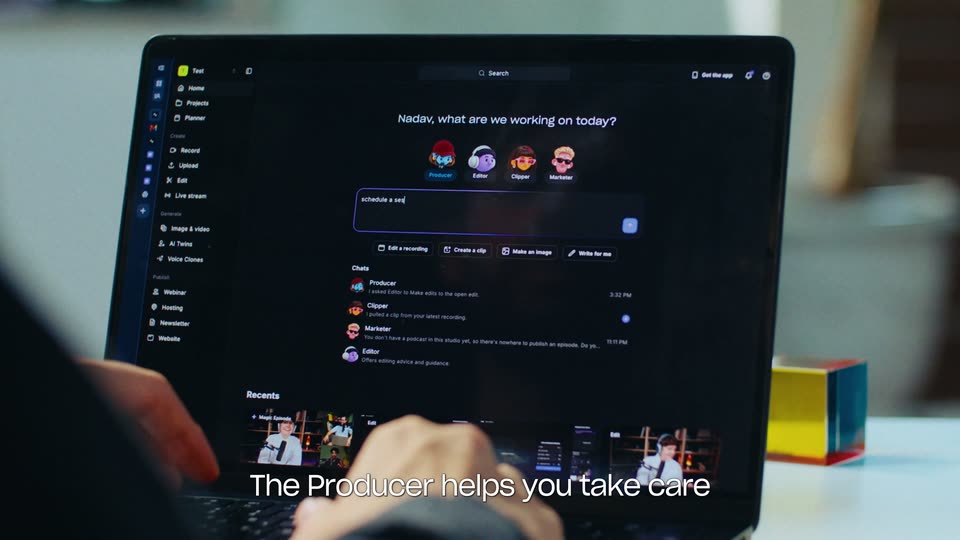
Locked-off over-the-shoulder shot of a laptop on a desk; blurred hands type on the keyboard as the dark interface shows an input field filling with text and a chat list below. White subtitles swap at the bottom edge.
On-screen text: “Let me show you how it works.”, “This is the Producer,”, “The Producer helps you take care”
Camera: Static
A dark interface list scrolls upward, showing task items such as lower thirds and branding, while a white caption remains fixed along the bottom edge.
On-screen text: “The Producer helps you take care”
Camera: Pan
A tight close-up of white sans-serif text on a black background lists notes about a studio setup, logo and lower third. The frame pans slowly downward while a faint chromatic-aberration glitch fringes the letters. A small white caption sits at the bottom.
On-screen text: “of everything before,”
Camera: Pan
A man with curly hair sits at a white desk, typing on a laptop, framed from the waist up in a home office with bookshelves and plants. Subtitles appear at the bottom center as he speaks. The camera is locked off.
On-screen text: “of everything before,”, “during, and after the session.”
Camera: Static
A laptop on a desk displays a video call app with a left-hand producer panel and two participant tiles, an avatar and a waving woman, while blurred hands type on the keyboard. A white caption line is centered at the bottom edge.
On-screen text: “during, and after the session.”, “The agent helps me”
Camera: Static
A dark rounded input card on a black frame types out a query letter by letter behind a blinking cursor, with a light-blue wand icon at the lower left and a purple send button at the lower right. A white caption at the bottom swaps text.
On-screen text: “prepare for the guest,”, “but so really the whole”
Techniques: UI zoom
Camera: Static
A dark rounded checklist panel with a cyan top edge floats over a close-up of a person's hair. Checkmarks appear row by row as the text crossfades from checking states to verified values, and the header switches to You're all set. White subtitles run along the bottom.
On-screen text: “but also really makes sure”, “that your whole gear, studio”, “is set up the right way.”
Camera: Static
A dark session interface holds a left rail of 3D avatar icons, a “Producer / Listening” chip, and a paragraph with colored “Clipper” and “Editor” names. The layout stays still while a white caption line fades in at the bottom.
On-screen text: “So when you're done recording.”
Camera: Static
A curly-haired man in a dark cardigan sits at a white desk before tall wooden bookshelves, gesturing with both open hands as he speaks toward an open laptop. The locked-off frame holds him centered, with a white subtitle line fixed at the bottom.
On-screen text: “So when you're done recording,”
Camera: Static
A curly-haired man in a dark cardigan sits at a white desk before a plant-lined bookshelf, gesturing with both hands as he talks to camera. A laptop, orange mug, phone and studio microphone rest on the desk. White subtitles sit at the bottom.
On-screen text: “So when you're done recording,”, “the Editor agent”, “already has a whole plan for you ready.”
Camera: Static
A dark chat interface is held in a locked-off, slightly angled close-up: an Editor avatar with a Working badge, a Start editing plan button, and a transcript panel on the right. White subtitles swap at the bottom.
On-screen text: “already has a whole plan for you ready.”, “And the whole idea of this”, “is that it does it end to end.”
Camera: Static
A laptop filmed at an angle against a blurred background shows a video-editing app: a left project sidebar, a middle transcript panel with numbered steps, and a right panel holding a transcript and a small preview of a seated man. White captions appear line by line at the bottom.
On-screen text: “is what it does it needs to and”, “behind the agents”, “that are able to deliver”
Techniques: 3D mockup
Camera: Static
Close-up of a dark interface panel listing numbered steps, ending with a purple Start editing button. A white cursor glides in and presses the button, which darkens on click. A white caption reads the best possible edits. along the bottom.
On-screen text: “the best possible edits.”
Techniques: Cursor demo
Camera: Static
A dark tablet screen sits at an angle against a soft off-white wall, starting out of focus and pulling sharp to reveal an Editor chat panel with an avatar, a Start editing plan button and a body of advice text. A right-hand panel shows a Search field and an outline. The caption sits along the bottom edge.
On-screen text: “The agent already knows your taste,”
Techniques: 3D mockup
Camera: Pan
A laptop on a desk shows a video editor interface with a project sidebar, chat panel, transcript and timeline. A cursor drifts over a video clip in the chat panel. A white caption sits at the bottom. The camera holds still with a soft, blurred background.
On-screen text: “so this Editor is built specifically for you.”
Techniques: Cursor demo
Camera: Static
A man in a dark cardigan sits at a white desk with an open laptop, speaking to camera in a home office lined with bookshelves and plants. A microphone and headphones sit to his right. A white caption holds at the bottom.
On-screen text: “And then we have the tools.”
Camera: Static
A curly-haired man with a beard speaks to camera in a softly lit room, blurred shelves and green plants behind him. He lifts one hand to gesture while a white subtitle line sits at the bottom of the locked-off frame.
On-screen text: “And then we have the tools.”, “So the tools themselves are super strong.”
Camera: Static
A locked-off shot of a laptop on a desk displays a dark editing interface: a transcript panel, a timeline with clips and audio waveforms, and a preview of two men talking. A hand rests on the keyboard while white captions swap at the bottom.
On-screen text: “For example, we have the best”, “possible motion graphics tools”, “So the tools themselves are super strong.”
Camera: Static
A dark video editor interface fills the frame in shallow focus, a preview panel showing a checkered background and a Riverside 2.0 label. A cursor glides down to rest on the Add to timeline button as the timecode ticks forward. White subtitles read at the bottom edge.
On-screen text: “possible motion graphics tools”, “Let's say you like 99% of the work”
Techniques: Cursor demo
Camera: Static
A man with curly hair sits at a white desk before a plant-filled bookshelf, talking to the camera with a laptop open in front of him. He gestures with his hands as white subtitles appear at the bottom of the locked-off frame.
On-screen text: “Let's say you like 99% of the work”, “but still want to make those final edits,”
Camera: Static
Extreme close-up of a man's eyes and nose against a dark background. He blinks and shifts his gaze slightly while a white subtitle line sits at the bottom of the frame. The shot is locked off.
On-screen text: “but still want to make those final edits,”
Camera: Static
A laptop on a desk fills the frame, showing the video editor with transcript, preview and timeline. A hand rests at the bottom edge and a cursor moves over the timeline while a white caption holds at the bottom.
On-screen text: “you can still go into our editor”
Techniques: Cursor demo
Camera: Static
A close-up of a video editor interface racks from soft blur into sharp focus, showing a transcript paragraph above a toolbar and a timeline ruler, with a white caption held at the bottom edge.
On-screen text: “and do the last mile edits,”
Camera: Pan
A person's hands type on a laptop keyboard, shot low with shallow focus; the screen shows a video editing interface with thumbnails. The camera stays locked off while the hands keep typing, and white subtitles sit at the bottom.
On-screen text: “and do the last mile edits,”, “so you're always in control.”
Camera: Static
Locked-off close-up of a laptop on a desk, its screen filled with a video-editing interface: a chat panel, a transcript, and a small video preview. Out-of-focus hands type on the keyboard in the foreground. A static caption sits at the bottom of the frame.
On-screen text: “so you're always in control.”
Camera: Static
A curly-haired man in a dark robe speaks directly to camera in a medium close-up, the softly blurred room with shelves and plants behind him. A white caption sits locked at the bottom of the frame.
On-screen text: “While the Editor is doing the editing work,”
Camera: Static
A laptop sits on a desk in 3D perspective, its screen filling the frame and showing a dark video editor with a transcript panel, clip thumbnails and a timeline. A white caption line is locked at the bottom while the background stays softly blurred.
On-screen text: “the Clipper is already preparing”, “While the Editor is doing the editing work,”
Techniques: 3D mockup
Camera: Static
A close-up of an angled screen shows a video editor interface. A card of a man with a microphone sits left, with a Boost button and scissors icon on top; a vertical strip of clip thumbnails runs right. A cursor moves from Boost to the scissors icon.
On-screen text: “the clips for you as well.”, “created, whether”
Techniques: Cursor demo
Camera: Static
A laptop on a desk shows a video editor with a style grid, a transcript and a timeline. A hand hovers at the bottom edge of the keyboard while a white caption stays centered at the base of the frame.
On-screen text: “Motion graphics added,”
Camera: Static
A heavily blurred close-up of a screen showing a grid of colorful design cards, the focus soft across the whole frame. A white caption at the bottom reads “music added,” then changes to “the filler words are removed.” The shot stays static.
On-screen text: “music added,”, “the filler words are removed.”
Camera: Static
A shallow-focus close-up of a dark settings panel titled Choose what to add, listing options with a cursor resting on Background music. Blurred interface elements sit at the frame edges. A caption at the bottom reads the filler words are removed.
On-screen text: “the filler words are removed.”
Techniques: Cursor demo
Camera: Static
Locked-off shot of a laptop on a desk, shallow depth of field. The dark editor shows a transcript on the left, a preview of a person speaking into a microphone on the right, and a timeline below. White captions cycle at the bottom of the frame.
On-screen text: “The only thing you need to do”, “is to review them.”, “You get a push notification”
Camera: Static
A curly-haired man in a dark cardigan sits at a white desk with a laptop, talking to camera in a plant-filled home office. White caption lines appear at the bottom of the frame.
On-screen text: “BORIC”, “You get a push notification”, “on your phone.”
Camera: Static
A hand holds a smartphone at an angle in shallow focus, the screen showing a Clipper notification that the clips are ready. A dark monitor blurs in the background. The shot is locked-off and static.
On-screen text: “There are five clips ready,”
Camera: Static
Locked-off close-up of a hand holding a smartphone showing a video editing app. The thumb swipes up through a vertical feed of talking-head clips, each filling the screen in turn. White subtitles run along the bottom over a blurred desk and laptop background.
On-screen text: “and with a matter of a swipe,”, “I can choose what I'm”, “publishing to social media”, “without needing to do any hard work.”
Camera: Push in
A bearded man in a dark cardigan sits at a white desk, speaking and gesturing toward the camera. A silver laptop and a studio microphone sit in the foreground, with a plant-filled bookshelf behind him. A white subtitle line is locked at the bottom.
On-screen text: “without needing to do any hard work.”
Camera: Static
A man with curly hair and a beard sits in an armchair in a room lined with wooden bookshelves, holding a phone and looking down at it. A white subtitle sits at the bottom of the locked-off frame.
On-screen text: “without needing to do any hard work.”, “BITCC”
Camera: Static
A curly-haired man in a dark cardigan over a white tee speaks to camera in a shallow-focus room with blurred shelves and plants behind him. A white subtitle line sits centered at the bottom of the frame.
On-screen text: “Once the Clipper is done, it”
Camera: Static
A laptop on a desk shows the app in dark mode, a chat panel on the left and a video timeline with a podcast thumbnail on the right. The left panel types out a post description line by line. White captions sit at the bottom of the frame.
On-screen text: “Once the Clipper is done, it”, “it hands over the work to the Marketer.”, “The Marketer then takes it”
Camera: Static
A dark product interface is framed in close-up. A rounded input field types “write the captions and” with a blinking caret, while a white subtitle at the bottom reads “The Marketer then takes it to the finish line.”
On-screen text: “The Marketer then takes it”, “to the finish line,”
Techniques: Kinetic type
Camera: Static
A dark interface card holds a LinkedIn caption draft with a Copy button at the top right. The view pans slowly upward while the white step caption 'writes the captions' stays fixed at the bottom.
On-screen text: “writes the captions”
Camera: Static
On a dark calendar grid, a cursor hovers over a green LinkedIn event on the 21st. A detail panel slides in from the right, revealing the recording's date and description. White subtitles at the bottom follow the voiceover.
On-screen text: “and schedules every post.”, “The only thing you need to do is”
Techniques: Cursor demo
Camera: Static
A man with curly hair and a beard, in a dark cardigan over a white tee, speaks to camera in a warm room with blurred plants and shelves. White subtitles at the bottom carry his words line by line.
On-screen text: “The only thing you need to do”, “is hit publish.”
Camera: Static
A dark scheduling screen shows a video preview above Like, Comment, Repost and Send actions, with a date field and a purple Schedule 1 post button. A cursor glides to the button and clicks it as a white caption line appears at the bottom.
On-screen text: “is hit publish.”, “The production crew is ready for you,”
Techniques: Cursor demo
Camera: Static
A curly-haired man in a dark shirt sits at a desk with an open laptop, speaking toward the camera. Behind him, a floor-to-ceiling bookshelf holds plants and a neon sun sign. A softbox light fills the right edge of the frame.
On-screen text: “The production crew is ready for you,”
Camera: Static
A curly-haired man in a dark shirt sits at a white desk before a bookshelf, speaking and gesturing toward the camera. A laptop, phone, mug, and studio microphone sit on the desk. White subtitles appear at the bottom of the frame.
On-screen text: “The production crew is ready for you,”, “go check it out.”
Camera: Static
A curly-haired man in a dark cardigan over a white tee sits at a white desk, speaking to camera and gesturing with both hands toward his chest. An orange mug, phone and open laptop sit blurred in the foreground while a tall bookshelf with plants fills the background. The frame stays locked off.
On-screen text: “go check it out.”
Camera: Static
On a black field, a white rounded-square icon holding a black tilde mark sits left of the wordmark RIVERSIDE in white sans-serif. The letters form from thin strokes into full weight, the lockup holds centered, then the whole logo fades to black.
Techniques: Kinetic type
Camera: Static