1:16

Subscribfy – The AI-Powered Subscription Growth Platform
Subscribfy · Jun 2026
Qwen · Dec 2025 · 0:56 · AI-annotated
Qwen’s 0:56 launch film runs 25 scenes, about 2.3 s each. The product is on screen from the first frame and 4 features are revealed, with social proof. The call to action lands at 0:49 (88% in). Built as a dark, neon-purple product film: a glowing title card, a 3D leaderboard, then four feature blocks, each pairing a glowing headline with a prompt card and a tilted photo card that swaps examples, closed by a release CTA and the Qwen logo. Pacing is slow and steady at 80 bpm, with motion concentrated in 3D tilts, light-beam sweeps and cross-fades between cards, while text stays sharp and centered.
Is this your launch? to your site or press kit.
Subscribfy · Jun 2026
DJI · Hardware · Apr 2023
On a dark purple background, the white glowing title assembles in the center as two purple taglines fade in beneath it, while a ring of sample image cards drifts and sharpens around the edges.
On-screen text: “Qwen-Image-2512”, “The Peak of Open Source.”, “Yours to Explore.”
Techniques: Kinetic type
Camera: Push in
A glowing purple title reads Qwen-Image-2512 with two taglines, framed by four tilted sample cards (winter ornaments, a woman by a tree, a 2026 horse, a cake recipe) on a dark background. The composition then whips left with heavy motion blur.
On-screen text: “Qwen-Image-2512”, “The Peak of Open Source.”, “Yours to Explore.”
Techniques: Speed ramp
Camera: Pan
A tilted 3D leaderboard card on a dark purple background scrolls from lower ranks up to the top five. A gradient border draws around the highlighted Qwen-Image row at rank four as the card zooms in.
Techniques: 3D mockup, UI zoom
Camera: Push in
A white leaderboard card listing text-to-image models with scores and win rates slides left on a dark purple background, revealing a second white card holding a prompt sentence and a gray bar. The Qwen-Image-2512 row is outlined in purple with a green check.
Techniques: Split screen
Camera: Pan
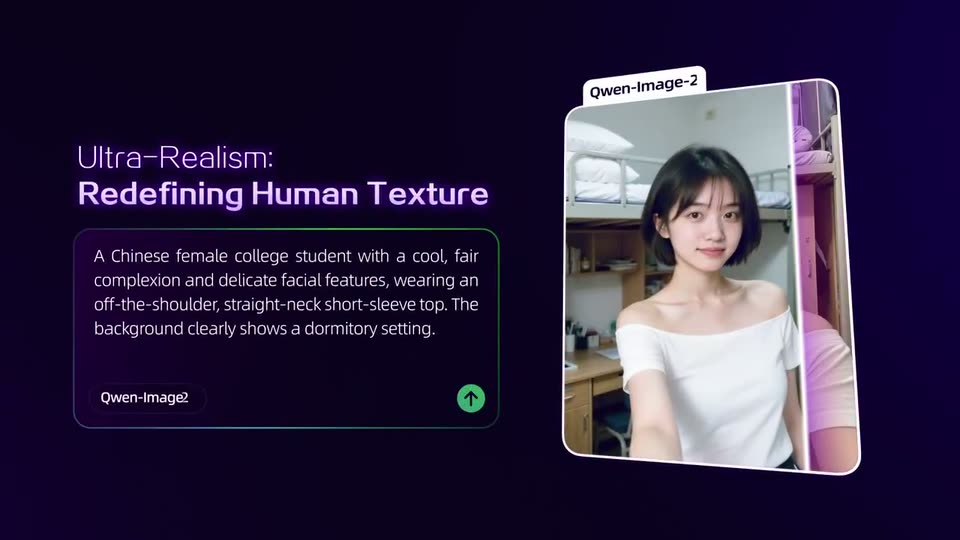
A 3D composition on a dark purple background: a prompt card on the left and a generated portrait card on the right, both tilted in perspective. The portrait card rotates upright as a light beam sweeps across it while the headline sharpens into focus.
On-screen text: “Ultra-Realism: Redefining Human Texture”
Techniques: 3D mockup, Light sweep
Camera: Pull out
A dark purple layout pairs a glowing two-line headline and a prompt card on the left with a tilted portrait card on the right. The portrait and its prompt cross-fade to a second example as the card rotates slightly.
On-screen text: “Ultra-Realism: Redefining Human Texture”
Camera: Static
Left, a glowing purple headline sits above a rounded prompt card holding a text description. Right, a tilted photo of a smiling schoolboy in a blue uniform sharpens from blur while a white model label settles into place above it.
On-screen text: “Ultra-Realism:”, “Redefining Human Texture”
Techniques: 3D mockup
Camera: Static
A dark purple layout holds a glowing headline and a prompt card on the left, while a 3D-tilted photo card on the right crossfades from a smiling student on a track to an older man in a kitchen.
On-screen text: “Ultra-Realism: Redefining Human Texture”
Techniques: 3D mockup
Camera: Static
On a dark indigo field, a glowing purple headline sits above a bordered prompt card on the left. On the right, a white-framed image card tilts in 3D perspective and swaps from one photo of an elderly couple at the stove to another.
On-screen text: “Ultra-Realism: Redefining Human Texture”, “An elderly Chinese couple in their seventies stand in a clean, bright home kitchen, smiling as they watch a steaming pot of buns on the stove. Shot wide, warm,”, “Qwen-Image”, “Qwen-Image-2512”
Techniques: 3D mockup
Camera: Static
Rounded image cards tagged Qwen-Image float in 3D perspective on a dark purple field, each paired with a glowing purple heading and a prompt caption. The camera glides through the row, brightening the golden retriever card as it swings to the foreground and the couple card exits frame.
On-screen text: “-Realism”, “efining Human Texture”, “chly Chinese couple in their seventies stand in a bright home kitchen, smiling as they watch wing pot of buns on the stove. Shot wide, and harmonious.”, “Natural Brush, Capturing Finer Details”, “A hyper-realistic close-up of a Golden Retriever with soft, natural fur. The lighting is evenly layered, golden fur texture, expressive moist eyes, a high-light”
Techniques: 3D mockup, Parallax
Camera: Pan
On a dark navy field, a rounded image card of a golden retriever sits left of a lavender headline and a prompt text box. The card tilts in 3D as a second card with a vet and a dog rotates in behind it, swapping the example.
On-screen text: “Natural Brush: Capturing Finer Details”
Techniques: 3D mockup
Camera: Static
A dark purple stage holds a fanned stack of image cards on the left that rotates in 3D and settles into one photo of a horned sheep on rocky ground. On the right, a white and violet headline sits above a bordered prompt box whose text sharpens.
On-screen text: “Natural Brush: Capturing Finer Details”
Techniques: 3D mockup
Camera: Pan
Left: a rounded card of a horned argali on a rocky slope; a purple beam sweeps across as the photo crossfades and the card eases from a tilt to upright. Right: a glowing violet heading above a prompt box with a model pill and up-arrow button.
On-screen text: “Natural Brush:”, “Capturing Finer Details”
Techniques: Light sweep
Camera: Static
A ram photo card and a bordered description panel slide left across a dark purple background while the purple heading settles on the right. A brief double-exposure of the card and body copy resolves into one clean layout.
On-screen text: “Natural Brush: Capturing Finer Details”
Techniques: Parallax
Camera: Pan
On a dark purple field, a Qwen-Image card showing a jungle waterfall rotates from a tilted angle to face the camera, while two text cards with green headings blur and slide off the left and right edges.
Techniques: 3D mockup
Camera: Pull out
A rounded image card in 3D perspective on the left flips between two generated landscapes, a green waterfall canyon then a misty lighthouse, with a white label tab above it. On the right, a glowing purple headline sits over a text panel whose prompt paragraph crossfades to match each card.
On-screen text: “Vivid Landscapes: Recreating Primal Vitality”, “A jade-green river winds through a lush canyon, moss and ferns cloak the cliffs, waterfalls cascade, mist swirls, and dappled sunlight dances–pristine and untou”, “At dawn, mist veils the sea; an ancient stone lighthouse stands at the shore's edge, its light faint in the haze. Black reefs crash with white spray beneath a”, “Qwen-Image-2512”
Techniques: 3D mockup
Camera: Push in
A dark purple screen shows a horizontal carousel of UI cards. A lighthouse image card on the left scrolls off as two prompt cards with purple headlines and white body text slide in from the right.
Camera: Pan
Glowing purple text reading 'Precision Rendering: Pro-Grade Design' resolves from a motion blur into a sharp, centered position on a dark background.
On-screen text: “Precision Rendering:”, “Pro-Grade Design”
Techniques: Kinetic type
Camera: Pull out
A glowing purple headline sits above a blue timeline card on the left, showing two gradient arrows with date pills, while a translation panel on the right scrolls English body text and a circular arrow button cycles colors.
On-screen text: “Precision Rendering: Pro-Grade Design”, “This is a modern slide with a deep blue gradient background, titled “Qwen-Image Development Timeline”. Below is a glowing timeline labeled “Image Generation”, “”, “December 31, 2025 - Qwen-Image-2512 Open-Sourced” (with pronounced glow). Another timeline, marked “Editing Track”, follows the same design. Date labels include”, “December 19, 2025 - Qwen-Image-Layered Open-Sourced”, “December 23, 2025 - Qwen-Image-Edit-2511 Open-Sourced”.”
Techniques: Split screen
Camera: Pull out
A dark purple interface shows a slide on the left and a translation panel on the right. The left card slides up, replacing a timeline with a release card holding two female portraits, as the right panel's garbled text settles into clean English.
On-screen text: “Precision Rendering: Pro-Grade Design”
Camera: Static
A purple gradient frame holds the headline over two side-by-side cards. The left blue card compares two female portraits with a glowing green arrow, then dissolves into a chart of icons with check and cross marks. The right panel streams scrolling English translation text as the clip ends.
On-screen text: “Precision Rendering: Pro-Grade Design”
Techniques: Split screen, Kinetic type
Camera: Static
A purple headline sits above two side-by-side panels: a glowing blue infographic card on the left and a translation panel on the right. The English text in the right panel scrolls upward while the left card stays fixed, and the bottom-right arrow button shifts color.
On-screen text: “Precision Rendering:”, “Pro-Grade Design”
Techniques: Split screen
Camera: Static
A dark indigo field holds a glowing headline, Open-source Release, in white and purple, above three white pill buttons carrying the ModelScope, GitHub, and Hugging Face logos. The composition is locked off and static, settling from a brief blur at the start.
On-screen text: “Open-source Release”, “ModelScope”, “GitHub”, “Hugging Face”
Camera: Static
A dark purple card holds the headline Open-source Release above three white pill buttons for ModelScope, GitHub and Hugging Face, locked off, then cuts to the Qwen logo centered on the same background.
On-screen text: “Open-source Release”, “ModelScope”, “GitHub”, “Hugging Face”
Camera: Static
The Qwen logo, a purple and white hexagonal mark, holds centered beside the purple wordmark on a dark purple field. It stays still as a closing sign-off.
Camera: Static