1:16


Sidekick | Run Frontline Operations Over Text
Sidekick · B2B · Jul 2026
Resend · Sep 2026 · 3:17 · AI-annotated
Resend’s 3:17 launch film runs 26 scenes, about 7.6 s each. The product is on screen from the first frame and 1 feature is revealed. There is no explicit call to action; a voiceover carries the film. The video alternates locked-off studio talking head with dark UI screen captures, cutting between them at a moderate pace so the walkthrough keeps moving. Signature moves include the persistent lower-left presenter inset on UI shots, slow push-ins on the presenter, and cursor-driven demos that close on a centered logo card.
Is this your launch? to your site or press kit.
Sidekick · B2B · Jul 2026
primitive · B2B · Oct 2026
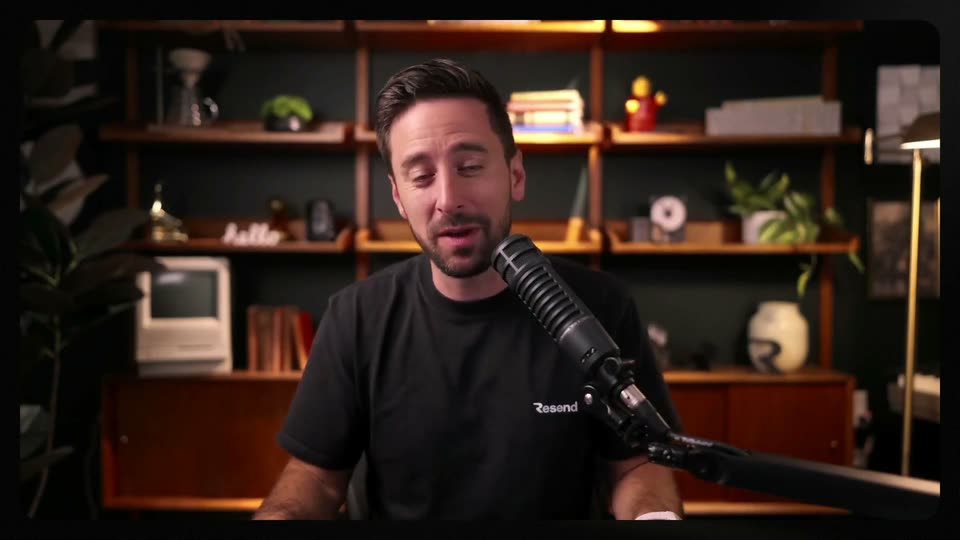
A man in a black Resend t-shirt sits at a studio microphone, speaking to camera and gesturing with both hands. Behind him, warm-lit wooden shelves hold books, plants and a vintage computer. The camera slowly pushes in on the medium close-up.
Camera: Push in
A dark webhook dashboard fills the frame with a talking-head inset at bottom left. A cursor glides to the Replay button, then opens the overflow menu, as the view zooms in on the event log showing a 404 response body.
Techniques: Cursor demo, UI zoom
Camera: Push in
A man in a black t-shirt sits in a medium shot, speaking into a studio microphone and gesturing with his hands. Wooden shelves with books, plants and a vintage monitor sit behind him. The locked-off camera frames him inside a black rounded border.
Camera: Static
A dark API documentation screen for Resend fills the frame, locked off. A left sidebar lists webhook endpoints, the center shows the Rotate Signing Secret page with a code panel and response on the right, and a cursor hovers over the sidebar then drifts down the list.
Techniques: Cursor demo
Camera: Static
A tilted dark browser mockup of the Resend API docs. A cursor moves down the left sidebar, shifting the highlight from List Events to Retrieve Event, while the main heading, GET path and the right-hand code and response panels update to match.
Techniques: Cursor demo, 3D mockup
Camera: Static
A dark Resend API documentation page shows a cursor moving from the Replay Event item to List Attempts in the left sidebar, the main panel and code snippet updating to match. The screen then cross-dissolves into a man speaking into a microphone in a warm-lit room with bookshelves.
Techniques: Cursor demo
Camera: Static
A man in a black t-shirt speaks into a studio microphone, gesturing with both hands. He is centered in a static medium shot against a wooden shelf holding books, plants and a vintage computer, set in a dark green room. A rounded black border frames the footage.
Camera: Static
A dark dashboard shows an empty Listeners page with a centered empty-state card and a white button. A small video of a man at a microphone sits in the bottom-left corner. A cursor drifts across the page, then the interface fades to a full-screen shot of the man.
Techniques: Cursor demo
Camera: Static
A man in a black Resend t-shirt sits at a studio microphone, talking to the camera and gesturing with open hands. The locked-off medium shot holds against a warm-lit bookshelf backdrop with plants and vintage decor for the full scene.
Camera: Static
A dark dashboard shows an empty Listeners page while a man speaks into a microphone in a small webcam box at the lower left. A cursor glides down and clicks Create a listener, opening a modal of event checkboxes.
Techniques: Cursor demo
Camera: Static
A dark New listener dialog fills a dimmed app window. A cursor ticks checkboxes in four event groups, types All events into the name field, then clicks Start listening, closing to an empty Listeners page. A small video of a man at a microphone plays in the lower-left corner.
Techniques: Cursor demo
Camera: Static
A dark Listeners dashboard fills the frame beside a small webcam inset of the presenter. A cursor opens the Demo controls panel, clicks Burst of 6, a toast confirms the send, then the cursor clicks Activity and the event list appears with six timestamped entries.
Techniques: Cursor demo
Camera: Static
A dark Activity dashboard dominates the frame with a small presenter inset bottom-left. A cursor moves through the feed, fires event tags from the right panel, toggles the webhook offline, and the view swaps to Behind the scenes.
On-screen text: “Stored in your browser only.”
Techniques: Cursor demo
Camera: Static
A dark web dashboard fills the frame, with a small inset of a man speaking into a microphone at the bottom left. The cursor drifts across a table of email deliveries, the page scrolls to expose an event JSON block, and the cursor settles on a Replay button.
Techniques: Cursor demo, UI zoom
Camera: Static
A man in a black t-shirt sits at a desk, speaking into a studio microphone on a boom arm. He gestures with his right hand, pointing, then lowers it. A wooden shelf behind him holds plants, books and a vintage computer, softly lit. The frame stays locked off.
Camera: Static
A dark webhooks dashboard fills the frame with a small webcam inset of the presenter at lower left. A cursor flips the endpoint toggle from offline to online, then clicks Replay as the view scrolls to show the event marked success.
Techniques: Cursor demo
Camera: Static
A dark product dashboard shows a webhook deliveries list beside a server log, with a small inset video of a man speaking into a microphone at lower left. A cursor moves from the event list up to the sidebar menu.
Techniques: Cursor demo
Camera: Static
A dark Activity feed of the WayBack Store app fills the screen, listing colored event labels and timestamps. A small webcam video of a man speaking into a microphone sits in the lower left. A cursor drifts from the left sidebar down the event list.
Techniques: Cursor demo
Camera: Static
A man in a black t-shirt sits centered at a desk, speaking into a black studio microphone on a boom arm. He gestures with both hands. Behind him, warm-lit wooden shelves hold books, plants, a retro monitor and a white vase. The camera stays locked off.
Camera: Static
A dark dashboard view of a webhook inspector is shown, with a small presenter video in the lower left. A cursor drifts across the server log, then to the sidebar and clicks Listeners, and the view zooms into the Listeners page over a blurred backdrop.
Techniques: Cursor demo, UI zoom
Camera: Static
A dark dashboard with a small presenter video in the lower left. The cursor clicks Rotate key on the listener card, then Burst of 6 in the right controls; a toast pops top right and the count jumps from 9 to 15 before the cursor selects Activity.
Techniques: Cursor demo
Camera: Static
A dark activity dashboard fills the frame, listing event rows with colored status tags. A small video of a man at a microphone sits in the lower-left corner. A cursor glides over the list as a white toast pops in at the top right and a control panel appears.
Techniques: Cursor demo
Camera: Static
A bearded man in a black t-shirt sits before a studio microphone, speaking and gesturing with both hands. A wooden shelf behind him holds a vintage computer, books, plants, and small objects under warm light. The camera holds a fixed medium shot.
Camera: Static
A dark code editor fills the frame; TypeScript code scrolls upward and a text cursor hops between lines while a small inset video shows a man speaking into a microphone in the lower-left corner. The Resend wordmark scales in at the corner.
On-screen text: “Resend”
Techniques: Cursor demo
Camera: Pan
A presenter in a black tee sits before a studio microphone, speaking to camera and gesturing with both hands. Wooden shelves with books, plants, and small objects fill the dark background; the edit alternates between medium and tighter framings.
Camera: Static
The white Resend wordmark sits centered on a near-black field. A soft light glow drifts slowly across the upper right while faint diagonal lines cross the lower corner. The logo and frame stay locked off for the full duration.
Camera: Static