
0:45
Explore
00:00:00 / 01:01:14
- Length
- 1:01
- Scenes
- 42 · 1.5 s avg
- Product on screen
- 0:00
- Features shown
- 6
- Voiceover
- Yes
- Views
- 442K on YouTube
as of November 22, 2026
Google’s 1:01 launch film runs 42 scenes, about 1.5 s each. The product is on screen from the first frame and 6 features are revealed. There is no explicit call to action; a voiceover carries the film. The film is a rapid montage of short live-action vignettes, each pairing a playful on-screen question with a gesture demo on a split white-and-video layout, cut to a steady 124 bpm. Its signature moves are kinetic type that shatters, scatters and reassembles, gradient accents on a clean white field, and corner-bracket viewfinders that zoom into the phone screen to reveal results.
Footage neededEstimated needs: 5 capture groups — your screens or recordings · 1 official logo — reused across the film · 21 filmed passages — shoot, supply or replace · 1 3D passage — build or supply
Is this your launch? to your site or press kit.
More like this
0:57

Claude - Starting to roll out today: Claude Whiteboards, Claude Sheets and Cla
Anthropic · AI · Nov 2026
1:00
Your apps have moved into Claude
Anthropic · AI · Nov 2026
Similar soundtrack
Films whose music sounds like this one, voice left out
3:34

What’s New in Creative Cloud and Adobe Firefly | Adobe MAX 2026
Adobe · Electronic dance music, house, deep house, and pop-rap crossover.
1:40
Google AI - Today we introduced Lyria 3, @GoogleDeepMind's latest music generatio
Google Deepmind · Electronic, Funk, Country-Pop, Rock, Metalcore, Pop
0:30

Meta Ray-Ban Display: AI Glasses With an EMG Wristband
Meta · Electronic dance music with funk and disco influences
Introducing a new way to search | Circle to Search, scene by scene
· 42 scenes as text
01 · Product intro · 0:00–0:01
On white, a thick gradient arc from green to orange thins into a thin multicolor line and disappears, then Introducing fades in small at center and scales up.
On-screen text: “Introducing”
Techniques: Kinetic type
Camera: Static
02 · Product intro · 0:01–0:03
The black word 'Circle' fills the white frame, a small gradient dot orbiting the i. It scales down and the phrase 'to Search' appears, 'Search' rendered in a purple-to-orange gradient.
On-screen text: “Circle”, “Circle to Search”
Techniques: Morph, Kinetic type
Camera: Static
03 · Product intro · 0:03–0:04
On a plain white background, the wordmark “Circle to Search” holds, with “Search” in an orange-to-green gradient, then it is replaced by the black phrase “A whole new way to”.
On-screen text: “Circle to Search”, “A whole new way to”
Techniques: Kinetic type
Camera: Static
04 · Product intro · 0:04–0:05
On white, the black headline resolves from overlapping letters into the clean line, then a diagonal field of the word Search in pastel mint, lavender, pink and peach fades in behind it.
On-screen text: “A whole new way to”
Techniques: Morph
Camera: Pan
05 · Product intro · 0:05–0:06
A diagonal wall of the word Search fills the white frame, rows offset and tilted. The pastel gradient lettering fades to solid black as the pattern drifts slowly along its diagonal.
On-screen text: “A whole new way to”
Techniques: Kinetic type
Camera: Pull out
06 · Product intro · 0:06–0:09
A man in a green jacket holds a phone and smiles as the camera settles from a fast spin into a locked-off medium shot. The oversized word Anything shatters into loose letters that reassemble into the line Anywhere on your phone.
On-screen text: “Anything”, “Anywhere on your phone.”, “Results may vary. Sequences shortened and simulated.”
Techniques: Speed ramp, Kinetic type
Camera: Push in
07 · Feature reveal · 0:09–0:11
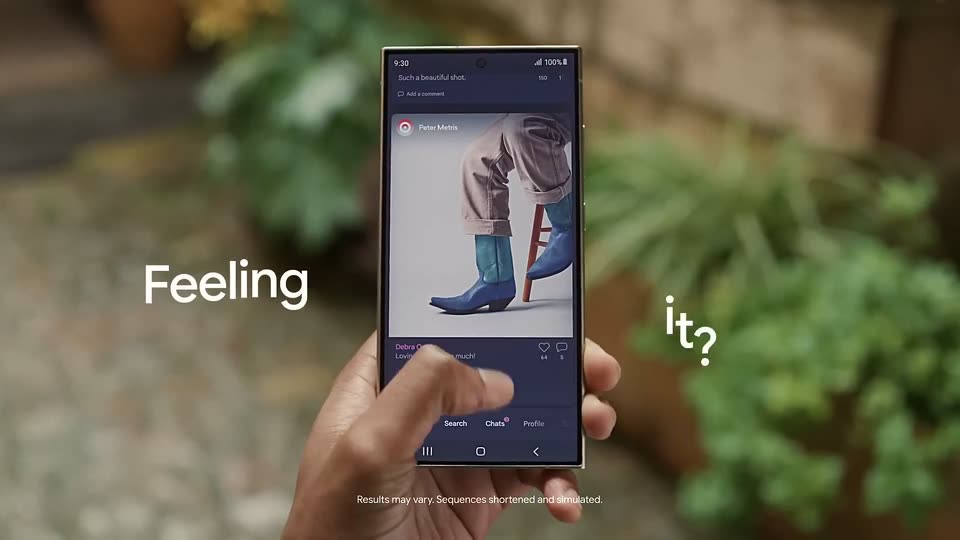
A hand holds a phone in a blurred garden as its feed scrolls past a photo of blue boots. A ghost phone and colored shapes fade out, then the white words Feeling and it? lock in either side of the device.
On-screen text: “Feeling it?”, “Results may vary. Sequences shortened and simulated.”
Techniques: Masking, Kinetic type
Camera: Push in
08 · Feature reveal · 0:11–0:11
A hand holds a phone upright in a blurred garden, its screen showing a Google view with a photo of blue boots. The words “Feeling” and “it?” sit on either side of the device, while a small disclaimer line runs along the bottom edge.
On-screen text: “Feeling”, “it?”, “Results may vary. Sequences shortened and simulated.”
Camera: Static
09 · Feature reveal · 0:11–0:13
Split layout: on the left, a white panel where the headline “Circle it.” slides in, then gives way to a green-to-purple gradient blob; on the right, a hand holds a Pixel phone over a cobblestone path as a finger draws a circle on the screen.
On-screen text: “Circle it.”
Techniques: Kinetic type, Split screen
Camera: Static
10 · Feature reveal · 0:13–0:14
A split screen shows a ring of the words Circle it. on the left and a hand holding a phone with a white circle drawn over a search result on the right. The view then zooms into the phone screen, filling the frame with the circled shoe image and the search bar.
On-screen text: “Circle it.”
Techniques: Split screen, UI zoom
Camera: Pull out
11 · Feature reveal · 0:14–0:15
A Google Lens screen shows legs in blue heeled boots inside a corner-bracket viewfinder. The image zooms onto the boots as the brackets shrink. The search bar with a boot thumbnail and “Add to your search” slides up, and a row of product thumbnails rises from below.
Techniques: UI zoom
Camera: Pull out
12 · Feature reveal · 0:15–0:17
Low-angle shot of a person's feet stepping down outdoor concrete stairs past a metal railing and potted plant, first in a white sock, then cut to a blue rubber boot. A white card slides in from the right, covering the frame with the Google logo, a close X, and a blue Add to your search button.
On-screen text: “Google”, “X”, “Add to your search”
Techniques: Masking
Camera: Static
13 · Feature reveal · 0:17–0:18
Three people sit in a clinic waiting room as the woman in the center lowers her phone. A multicolor arc sweeps behind the headline, which settles into plain white.
On-screen text: “Curious about it?”
Techniques: Kinetic type
Camera: Static
14 · Feature reveal · 0:18–0:20
Close-up of two hands in green knit sleeves holding a smartphone over a dark wooden surface. The screen shows a travel article, upside down at first, then a finger taps and swipes up, scrolling the page so a street photo with a walking figure slides into view. The phone tilts slightly as the hand adjusts its grip.
Camera: Pull out
15 · Feature reveal · 0:20–0:21
A rack focus brings three people on a couch into sharp view. The man in the center taps a phone held in his hands, while a man to his left holds a mug and a woman to his right holds an open magazine.
Camera: Pull out
16 · Feature reveal · 0:21–0:21
Centered dark gray text “Squiggle it.” sits under a blue-purple gradient blob on white. The word slides right, its letters spreading and shifting to a blue-pink gradient as the blob exits. A travel article card then slides in from the left, showing a temple photo with a white squiggle, a teal serif headline and a WRLD pill.
On-screen text: “Squiggle it.”
Techniques: Kinetic type
Camera: Pan
17 · Feature reveal · 0:21–0:23
A split layout pairs a travel article card on the left, its temple photo scrolling down as a white spring-shaped squiggle draws itself down the image with a glowing dot, beside a plain gray panel on the right.
On-screen text: “Squiggle it.”
Techniques: Split screen
Camera: Pan
18 · Feature reveal · 0:23–0:24
A flat mobile UI panel on the left scrolls vertically through a search bar and two travel article cards. On the right, the black tagline Squiggle it. holds steady, blurring out and back in as the left content changes.
On-screen text: “Squiggle it.”
Camera: Pull out
19 · Feature reveal · 0:24–0:26
Top-down view of a man in a colorful sweater lying on a gray sofa, staring at a blue phone. Scattered white letters of the phrase slide inward and settle into “Stuck” and “on it?” on either side of his head as the camera pushes in closer.
On-screen text: “Stuck on it?”
Techniques: Kinetic type
Camera: Push in
20 · Feature reveal · 0:26–0:27
Two hands hold a phone upright in a room, a window with blue sky on the left and a white pleated lamp on the right. The screen shows a crossword app with the clue “What a landlubber likely lacks (6)” above a dark-and-white grid, the frame held steady.
On-screen text: “Stuck”, “on it?”
Camera: Static
21 · Feature reveal · 0:27–0:27
A man in a blue sweater lies on a grey sofa against a striped beige pillow, frowning as he thrusts his index finger toward the camera, the fingertip blurring closer to the lens. White caption lines sit at the bottom of the locked-off frame.
On-screen text: “What a landlubber”, “likely lacks (6)”
Camera: Static
22 · Feature reveal · 0:27–0:29
A man lies back with hands behind his head, softly out of focus, as a finger extends toward the lens in the foreground. The image sharpens and a dark rounded label reading “Highlight it.” with two blue dots locks in over the fingertip.
On-screen text: “Highlight it.”
Camera: Static
23 · Feature reveal · 0:29–0:30
Split screen: a man reclines on a couch holding a phone on the left, while a Google crossword view on the right scrolls up to reveal a definition card for the word. The interface content shifts from the puzzle grid to the answer text.
On-screen text: “Highlight it.”
Techniques: Split screen
Camera: Static
24 · Feature reveal · 0:30–0:32
A woman in a green shirt stands in a kitchen looking at a blue phone. White “Craving” builds letter by letter on the left as “it?” slides in on the right. The frame cuts to the YouTube video she watches: a jar of BOON, a hand scooping from it.
On-screen text: “Craving”, “it?”
Techniques: Kinetic type
Camera: Static
25 · Feature reveal · 0:32–0:33
Inside a YouTube player frame, a hand lowers a spoon dripping dark red seeded sauce into a BOON mason jar on a wooden counter; a whisk rests in a glass bowl at left against a gray tile wall. The progress bar advances as a 'Craving it?' tagline slides in over the footage.
On-screen text: “Craving”, “it?”
Camera: Static
26 · Feature reveal · 0:33–0:34
A YouTube player frame holds a cooking clip: dark sauce pours into a mason jar marked BOON on a tiled counter, whisk and bowl to the left. A Google search bar sits below. The red close icon and a second search logo fade out.
Camera: Static
27 · Feature reveal · 0:34–0:35
A Google search screen plays a YouTube clip of hot sauce poured into a Boon jar, framed by a white target bracket. The Boon mark grows on the label, the timestamp slides, and the search bar with product thumbnails settles below.
Camera: Pull out
28 · Feature reveal · 0:35–0:37
A light gray input bar on a white background types out a gray sans-serif sentence with a thin caret, 'what else can I put this o?'. The line scrolls left as it grows, and a small rounded jar thumbnail slides off the left edge early on.
On-screen text: “what else can I put this o?”
Techniques: Kinetic type
Camera: Static
29 · Feature reveal · 0:37–0:38
Three recipe cards with food photos sit in a row on a white background. The center card grows larger while the outer cards shrink and slide toward the edges, reframing the view onto the middle recipe.
On-screen text: “else can I put this o”
Techniques: UI zoom
Camera: Pull out
30 · Feature reveal · 0:38–0:40
Top-down shot of a wooden kitchen table. A person in a green shirt spoons from a small jar into a blue bowl of food, with a phone and a fruit basket on the table. The frame starts blurred and sharpens as a letter M scales in.
On-screen text: “M”
Techniques: Kinetic type
Camera: Pull out
31 · Feature reveal · 0:40–0:41
Split layout: a rounded-corner clip on the left shows a long-haired woman on a train with a shocked face as a finger points at her. On the right, the caption “Kind of shook by it?” sits on a pale background, its gray words turning black.
On-screen text: “Kind of”, “shook”, “by it?”
Techniques: Split screen, Kinetic type
Camera: Static
32 · Feature reveal · 0:41–0:42
A rounded live-action clip on the left shows a woman with a blue particle glow on her raised finger, her face sharpening into focus. On the right, the dark headline holds, then its letters explode outward into scattered colored glyphs.
On-screen text: “Kind of”, “shook”, “by it?”
Techniques: Particles, Kinetic type
Camera: Static
33 · Feature reveal · 0:42–0:46
Three people stand in a wood-paneled elevator as the tagline builds up word by word across the frame. The shot cuts to a close-up of the woman's phone, where a finger taps a search image and a result card slides in over the screen.
On-screen text: “Can't describe it?”
Techniques: Kinetic type
Camera: Push in
34 · Feature reveal · 0:46–0:48
Split screen: left, the phrase See it. repeats across a white field in mixed sizes and blur depths, drifting slowly; right, an extreme close-up of a person's eye with a small screen reflected in the pupil.
On-screen text: “See it.”
Techniques: Split screen, Parallax, Kinetic type
Camera: Static
35 · Feature reveal · 0:48–0:49
A hand holds a phone over a green sofa with a yellow pillow; a pointing finger taps the screen, which shows a Google search page with an image and a handwritten note. White caption text sits on either side of the phone.
On-screen text: “Search”, “it.”
Camera: Push in
36 · Feature reveal · 0:49–0:50
A dark gray headline completes on a white field, then cuts to a 3D perspective of pastel rounded cards floating at different depths, each showing a Generating state with skeleton bars, the center green card filled with bullet-point text.
On-screen text: “Get AI-powered overviews on it.”
Techniques: Kinetic type, 3D mockup
Camera: Static
37 · Feature reveal · 0:50–0:51
A cluster of white AI note cards floats over a pale gray background, the panels drifting apart at different speeds in a parallax field.
Techniques: Parallax
Camera: Pull out
38 · Other · 0:51–0:54
Scattered multicolored words rotate and converge into the black headline on the left, while a rounded-corner clip on the right shows two women chatting at a diner table, one holding a foldable phone upright on the counter.
On-screen text: “And then”, “get back to it.”
Techniques: Kinetic type, Split screen
Camera: Pull out
39 · Outro · 0:54–0:55
The black wordmark Circle to Search sits centered on a plain white background. A small multicolored dot with a blue core traces a thin gray ellipse around the word Circle, drawing the loop as it moves, while the text stays still.
On-screen text: “Circle to Search”
Techniques: Masking
Camera: Static
40 · Outro · 0:55–0:57
A person in a gray sweatshirt holds a phone flat in one hand and taps its screen with the other, in front of a blurred wooden bookshelf. The caption “Circle to Search” holds still on screen.
On-screen text: “Circle to Search”
Camera: Push in
41 · Outro · 0:57–0:59
On a plain white background, the dark gray words “Only on” sit centered. “Android” and the green Android head then slide in to the right, completing the line. The frame stays locked throughout.
On-screen text: “Only on Android”
Techniques: Kinetic type
Camera: Static
42 · Outro · 0:59–1:01
The Google G logo sits centered on a plain white background, starting in a washed-out pastel tint, then filling to full red, yellow, green and blue color before holding still. A static caption reads below it.
On-screen text: “Only on Android”
Camera: Static