1:42
Explore
Google DeepMind - Genie 4 is now available in Project Genie. It brings native audio, r
Google Deepmind · Nov 2026 · 1:21 · AI-annotated
- Length
- 1:21
- Scenes
- 37 · 2.2 s avg
- Product on screen
- 0:00
- Features shown
- 4
- Call to action
- 1:18 · 97%
- Voiceover
- Yes
- Views
- 251K on X
as of November 23, 2026
00:00:00 / 01:21:04
- Length
- 1:21
- Scenes
- 37 · 2.2 s avg
- Product on screen
- 0:00
- Features shown
- 4
- Call to action
- 1:18 · 97%
- Voiceover
- Yes
- Views
- 251K on X
as of November 23, 2026
Google Deepmind’s 1:21 launch film runs 37 scenes, about 2.2 s each. The product is on screen from the first frame and 4 features are revealed. The call to action lands at 1:18 (97% in), over a voiceover. The film is built as a single continuous camera move that dives from floating glass orbs into a black 3D grid, then rides through a rapid montage of generated worlds while a prompt bar and WASD key hints stay pinned to the frame. Signature moves are the zoom-into-button transitions, the side-sliding agent panel, and the recurring orb cluster that bookends the piece, all cut at a steady ~111 bpm over a near-black palette with white sans-serif type.
Footage neededEstimated needs: 5 capture groups — your screens or recordings · 2 filmed passages — shoot, supply or replace · 4 graphic passages — draw or supply · 13 3D passages — build or supply
Is this your launch? to your site or press kit.
More like this
0:39

0:17

Hana V2 is here to stay 🌸 #3d #3danimation #uiux #productdesign #graphicdesign
Spline · Design · Sep 2026
Similar soundtrack
Films whose music sounds like this one, voice left out
2:25

How Discord Works in 148,000 Miliseconds or Less
Discord · Upbeat modern electronic
2:54
Insta360 Luna Pro - Drawn to brilliance.
Insta360 Luna Pro · Upbeat electronic dance music with a four-on-the-floor beat, bright arpeggiated synth melodies, and
0:46
teej - Introducing Tapkit Tapkit is a Mac app that lets your agents use you
Tapkit · Electronic
Google DeepMind - Genie 4 is now available in Project Genie. It brings native audio, r, scene by scene
· 37 scenes as text
01 · Product intro · 0:00–0:01
Three glowing spheres float on a black background: a haunted house, a wireframe globe holding a Create with Genie button with a hand cursor, and a pink jellyfish scene. The orbs drift and rotate slowly.
Techniques: 3D mockup, Cursor demo
Camera: Push in
02 · Product intro · 0:01–0:02
Three glowing orbs on black: a haunted-house render, a wireframe globe, and a mushroom scene with a cat. The globe swells and the camera dives into its grid, which stretches across the frame.
Camera: Push in
03 · Product intro · 0:02–0:06
A dark prompt bar floats above a black 3D grid floor. The camera pushes into the text field as a prompt sentence types out, then reframes onto the white Create button, which ends centered on a black background.
Techniques: 3D mockup, UI zoom
Camera: Pull out
04 · Product intro · 0:06–0:07
On a black screen, a gray pill button labeled Create with a right arrow sits center frame while a white hand cursor hovers beneath it. The cursor taps the button, which blurs and scales away, leaving only a small disclaimer line at the bottom.
On-screen text: “Sequences shortened. Results for illustrative purposes throughout.”
Techniques: Cursor demo, Speed ramp
Camera: Static
05 · Feature reveal · 0:07–0:11
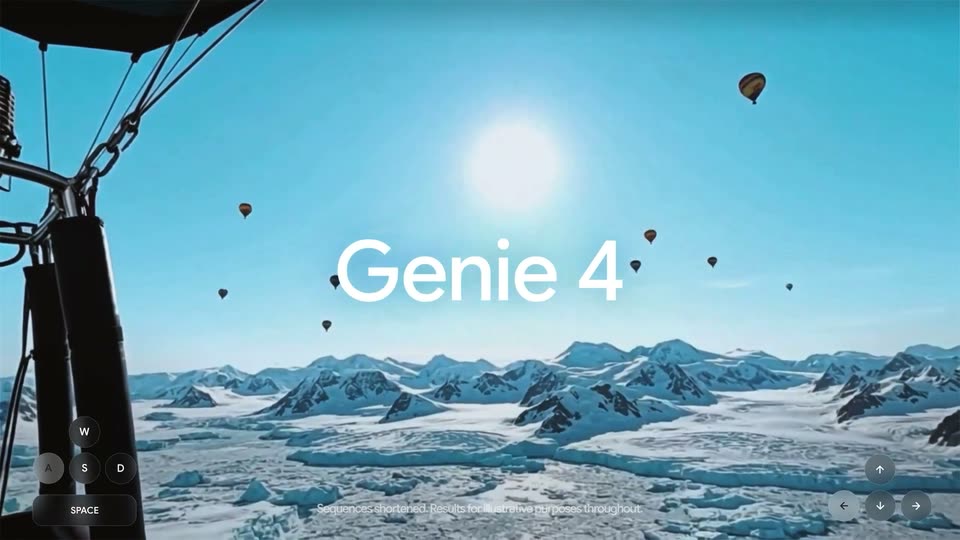
A wide 3D vista of snow-covered mountains and floating hot air balloons under a bright sun, framed by a dark aircraft strut on the left. The white Genie 4 title holds centered as the scene drifts forward and the balloons move. Navigation keys sit in the lower corners.
On-screen text: “Genie 4”, “Sequences shortened. Results for illustrative purposes throughout.”
Camera: Static
06 · Feature reveal · 0:11–0:14
A man in a brown suit stands on a grassy floating platform in a misty lake, holding a saxophone beside a glowing moon-like sphere. WASD and arrow key controls frame the view; a prompt box at the bottom then gives way to a right-side panel listing numbered options.
Camera: Push in
07 · Feature reveal · 0:14–0:16
A suited figure holds a saxophone on a lakeshore while a numbered prompt panel and keyboard keys float over the frame. Snow begins to fall across the scene.
Techniques: Particles
Camera: Push in
08 · Feature reveal · 0:16–0:17
A man in a brown jacket plays a brass saxophone outdoors, snow resting on his shoulders. A numbered prompt list panel sits in the upper right, while WASD and arrow key indicators frame the lower corners.
Camera: Static
09 · Feature reveal · 0:17–0:19
A first-person view in a dark concrete room faces two glowing doors: the left shows a Mars desert, the right an underwater scene with jellyfish. The camera moves forward through the left door into the hazy red landscape as a static prompt box and key hints remain overlaid.
Techniques: 3D mockup, Masking
Camera: Pull out
10 · Feature reveal · 0:19–0:21
A static 3D concrete room with two glowing doorways: a Mars desert on the left, an underwater jellyfish scene on the right. A prompt box with a Create button sits center-bottom, flanked by WASD, arrow and SPACE key hints.
Camera: Static
11 · Feature reveal · 0:21–0:26
A blue and silver robotic arm reaches over a petri dish on a microscope stage, the camera panning around it. A gloved hand rests on a mouse in the foreground. A dark prompt bar with the prompt text and a Create button sits fixed at the bottom, with WASD and arrow key hints in the corners.
Camera: Push in
12 · Feature reveal · 0:26–0:30
A dark prompt card on black shows the eyewear store request. A hand cursor drags a beige photo of yellow sunglasses in from the left and drops it into the bottom-left slot, as the camera zooms in on the drop and pulls back.
Techniques: UI zoom, Cursor demo
Camera: Static
13 · Feature reveal · 0:30–0:32
A 3D rendered minimalist eyewear boutique fills the frame. A curved white counter holds three sunglasses; wall shelves display more frames. A dark prompt bar with a Create button sits at the bottom center, flanked by WASD and arrow key hints. The camera pulls back to widen the room.
Camera: Pull out
14 · Feature reveal · 0:32–0:35
A 3D-rendered eyewear pop-up store fills the frame: a curved cream counter holds four sunglasses while wall shelves and a mirror line the back. The camera orbits left around the room as a flat prompt box and WASD navigation buttons overlay the lower corners.
Techniques: 3D mockup
Camera: Pan
15 · Feature reveal · 0:35–0:36
A low-angle view of a dirt ant mound with bright grass behind it drifts slowly to the right. A translucent prompt box in the center shows a typed prompt and a Create button, with WASD and arrow key hints at the edges.
Camera: Push in
16 · Feature reveal · 0:36–0:41
Low-angle camera glides across a soil mound with crawling black ants and bright grass behind, a dark prompt box and WASD key hints overlaid. It cuts to a 3D alpine course with striped poles and a flag against snowy mountains.
Camera: Push in
17 · Feature reveal · 0:41–0:42
A first-person view races down a snowy alpine slope, ski poles and red course flags blurring past, while a translucent prompt box with the skier prompt and a Create button sits at bottom center, flanked by WASD and arrow key controls.
Camera: Push in
18 · Feature reveal · 0:42–0:43
First-person view of a skier racing down a snow-covered alpine course between rocky outcrops, red skis and black-gloved hands at the frame bottom. A dark rounded prompt box with a Create button sits centered, key hints W A S D and arrows in the corners.
Camera: Push in
19 · Feature reveal · 0:43–0:47
A first-person view follows a skier carving down a snow-covered alpine chute, red course flags and rocky walls rushing past, while a gray prompt box and WASD and arrow key controls stay fixed over the frame. The view tilts and shakes with the fast descent.
Camera: Push in
20 · Feature reveal · 0:47–0:48
A dark product screen shows a POV ski video on the left and an Experience builder agent panel on the right. As the skier carves down the slope, the panel updates and three suggestion chips slide in at the top.
Camera: Push in
21 · Feature reveal · 0:48–0:54
Split screen: a first-person ski run on the left, a dark chat panel on the right. A prompt, Add an avalanche to the ski run, is typed in, then status lines and a new paragraph of instructions scroll in as the agent responds.
Techniques: Split screen, Kinetic type
Camera: Push in
22 · Feature reveal · 0:54–0:56
A first-person ski run fills the left frame while a dark Experience builder panel sits on the right. As the agent processes the avalanche prompt, a snow cascade rolls down the slope inside the game view.
Camera: Static
23 · Feature reveal · 0:56–0:56
A first-person ski POV with a prompt panel and agent sidebar blurs out of focus as a share dialog pops in at center, listing a thumbnail, title, access radios and a Publish button.
Camera: Static
24 · Feature reveal · 0:56–0:58
A dark share dialog sits over a blurred ski-video background, showing a snowy mountain thumbnail and an access panel with Public selected. A hand cursor rests on the Publish button as the dialog scales up to fill the frame.
Techniques: Cursor demo, UI zoom
Camera: Push in
25 · Feature reveal · 0:58–1:03
A dark grid of experience cards appears and scrolls up to show a second row. The view then pushes in on the Downhill Ski Adventure card, the surrounding cards falling out of focus, while a Visit button scales in.
Techniques: UI zoom
Camera: Push in
26 · Feature reveal · 1:03–1:04
A sharp card with a ski-course photo and a white 'Visit' pill button hovers in 3D over a blurred wall of cards. The card's title and body copy slide and scale into place.
Techniques: 3D mockup
Camera: Push in
27 · Feature reveal · 1:04–1:05
A first-person downhill ski view fills a curved screen, then the camera pulls back to reveal the scene as a floating rounded 3D card. Below it, a title, description line and control buttons sit on a dark background.
Techniques: 3D mockup
Camera: Pan
28 · Feature reveal · 1:05–1:07
A close-up of a dark app interface zooms in on the Remix button. The row of pill buttons blurs and slides as the Remix pill scales up and sharpens in the center, below a defocused image card showing a pen on white paper.
Techniques: UI zoom
Camera: Push in
29 · Feature reveal · 1:07–1:08
The camera glides across a 3D-tilted dark interface. A photo card of mountain climbers with a red ribbon sits at left; a 'Experience builder' panel with an 'Agent' chip sits right; a toolbar of Share, Publish and ULTRA runs along the top.
Techniques: 3D mockup, Parallax
Camera: Pull out
30 · Feature reveal · 1:08–1:10
A dark UI shows Share and Publish buttons above an Experience builder panel while the caption Edit your experience fades. The view zooms onto the chat input as the rest blurs, and the prompt Show me this downhill course at night. types out letter by letter.
On-screen text: “Edit your experience”, “Show me this downhill course at night.”
Techniques: Kinetic type, UI zoom
Camera: Static
31 · Feature reveal · 1:10–1:13
A first-person night skiing view races down a floodlit slope lined with red barriers and crowds, yellow skis and green poles in the foreground, WASD and arrow key hints in the corners. The frame then closes into a circular scope vignette.
Techniques: Masking
Camera: Pull out
32 · Demo · 1:13–1:14
On a black field, a central circular window plays a first-person night ski run with yellow skis. Six more circular clips, each holding a different scene, scale in around it to form a flower-like cluster.
Techniques: Masking
Camera: Pull out
33 · Demo · 1:14–1:15
Seven circular video clips cluster on a black background, each holding a different scene: a galaxy, a flower, a red house, a foggy path, a road, a painted field, two figures. The group rotates slowly as a unit.
Camera: Static
34 · Demo · 1:15–1:17
A loose cluster of glass orbs, each holding a different illustrated scene, floats in a black void. The camera pushes through the field, orbs drifting at varying depths with heavy bokeh blur on the near and far layers.
Techniques: Parallax
Camera: Static
35 · Demo · 1:17–1:17
A curved row of glowing spheres, each holding a different image, floats on a black background. The camera glides through them, keeping the near spheres sharp and blurring the rest.
Techniques: Parallax
Camera: Static
36 · Demo · 1:17–1:18
On a black field, glossy 3D spheres carrying small images (a dog, a room, a figure) drift across the frame and pull into focus, while a thin white caption holds still at the bottom.
On-screen text: “Project Genie is available for eligible Google AI Ultra subscribers.”
Techniques: Parallax
Camera: Static
37 · CTA · 1:18–1:21
A dark void filled with floating glass spheres, each holding a different scene such as a kite or aurora, some blurred in the foreground. The centered white title and tagline hold still while the URL fades in below them.
On-screen text: “Project Genie”, “Step inside your imagination.”, “Project Genie is available for eligible Google AI Ultra subscribers.”, “labs.google/ProjectGenie”
Camera: Static