1:21

HeyReach| Motion Design Video
HeyReach · Oct 2026
Google Deepmind · Nov 2026 · 1:31 · AI-annotated
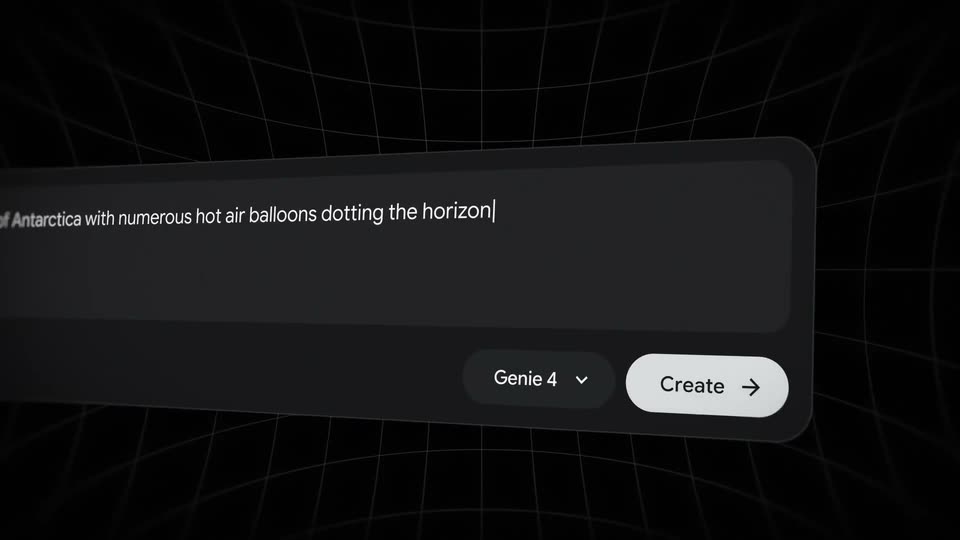
Google Deepmind’s 1:31 launch film runs 39 scenes, about 2.4 s each. The product shows up at 0:09 and 5 features are revealed, with social proof. The call to action lands at 1:24 (92% in), over a voiceover. The film is built as a dark void where glowing circular orbs mask and hand off between generated worlds, punctuated by a floating prompt card that types itself and a camera that dives through wireframe spheres into each scene. Pacing is steady at about 111 bpm with quick 4 to 6 second shots, and the signature moves are the orb carousel transitions, the fisheye zooms, and the persistent WASD key hints that frame every world as playable.
Is this your launch? to your site or press kit.
HeyReach · Oct 2026
Higgsfield AI · Nov 2026
Films whose music sounds like this one, voice left out
F4 · Electronic
Discord · Upbeat modern electronic
Tapkit · Electronic
A speckled egg rests on a gray surface against a dark backdrop. Cracks spread across the shell, then the top breaks open and a downy chick emerges as a shell half falls away. Dust motes drift in the air; faint WASD and arrow key hints sit in the corners.
Techniques: Particles
Camera: Push in
A 3D rendered chick sits in a cracked speckled egg on a dark surface, with WASD and arrow key buttons overlaid in the corners. The view zooms into a fisheye close-up of the chick's head, a small circular bubble with a panda illustration popping in at the right edge.
Techniques: UI zoom
Camera: Pull out
On a black field, a horizontal row of glowing circular frames scrolls left, each holding a different 3D scene: a hatching chick, a spider in foliage, a Starry Night town, a panda figure, a penguin, a jungle path, a white room, and a Halloween house. The center circle is enlarged with a bright rim while the side circles shrink, giving the row a depth carousel feel.
Techniques: Parallax
Camera: Pan
A row of glowing circular spheres scrolls left across a black background, each masking a different image: a figure in a field, a stylized house, a wireframe globe, and a bar scene. The caption slides in over the globe sphere as the strip keeps moving.
On-screen text: “Create with Genie”
Techniques: Masking
Camera: Push in
Three glowing orbs float on black: a wireframe globe in the center, a Halloween house on the left, a jellyfish scene on the right. A pill button labeled 'Create with Genie' slides in at the center while a hand cursor rises and clicks it, flashing the button lighter.
Techniques: Kinetic type, 3D mockup, Cursor demo
Camera: Push in
Three glowing spheres float on black: a wireframe globe in the center, two smaller spheres showing game worlds at the sides. The camera dives into the wireframe sphere, revealing a dark grid tunnel.
Camera: Push in
A dark prompt bar hovers in a black void above a curved wireframe grid. The camera pushes into the empty field as a prompt types itself out, then glides right to settle on the Genie 4 selector and the white Create button.
Techniques: UI zoom, Kinetic type, 3D mockup
Camera: Pan
A gray pill button reading Create with a right arrow sits centered on black. A white hand cursor moves in and presses it, then a white circle expands from the center to cover the frame.
On-screen text: “Sequences shortened. Results for illustrative purposes throughout.”, “Genie 4”
Techniques: Cursor demo, Masking
Camera: Static
First-person view from a hot air balloon basket drifts slowly over a sunlit snowy mountain range, with several balloons floating in the blue sky. The white title Genie 4 holds centered while keyboard control keys rest in the lower corners.
On-screen text: “Genie 4”, “Sequences shortened. Results for illustrative purposes throughout.”
Techniques: Parallax
Camera: Static
A man in a brown suit holds a saxophone on a grassy floating platform in a misty lake, beside a glowing orange orb, inside a video player UI. A prompt box and key badges sit at the bottom; a numbered options panel appears top right near the end.
On-screen text: “Genie 4°”
Camera: Push in
A person in a brown suit stands at the water's edge holding a golden saxophone, hands shifting slightly on the keys. A UI panel of numbered prompts sits top right, with WASD and arrow key clusters in the lower corners. The camera holds still.
Camera: Push in
A man in a brown suit plays a golden saxophone by a lake, framed mid-torso. A command panel with three numbered prompts sits at the right; as the typed line reads “It starts to snow,” snowflakes begin drifting across the frame.
Techniques: Particles
Camera: Push in
A man plays a brass saxophone outdoors in falling snow, framed from a low angle. A prompt panel on the right lists scene modifiers with the last line dimmed, while WASD and arrow key controls sit in the bottom corners.
Camera: Static
A hazy Mars desert with brick ruins and a low sun, with a prompt panel and key hints at the bottom. The view pushes through a glowing doorway into a concrete room whose two luminous portals show Mars terrain and an underwater scene with bubbles.
Techniques: 3D mockup, Parallax
Camera: Pull out
A 3D concrete room with two glowing doorways, left revealing orange dunes, right blue water with drifting jellyfish. A dark prompt card with a Create button floats centered, key hints in the corners, camera locked off.
Techniques: 3D mockup
Camera: Static
A scientist's gloved hand rests on a lab bench while a light blue robotic arm reaches over a petri dish; the camera tracks right. A dark prompt box with the prompt text and Create button sits below, key hints in the corners.
On-screen text: “A scientist working alongside a robotic arm examining specimens in a scientific lab.”, “A blank concrete room with two shining doors of light:”
Camera: Push in
A dark prompt card with a typed request sits on black. A hand cursor drags a small photo of orange sunglasses into the lower-left attachment slot, where it snaps in as a thumbnail. The card zooms in during the drop, then settles.
Techniques: UI zoom, Cursor demo
Camera: Static
A 3D-rendered eyewear boutique with a curved counter holding black and yellow sunglasses; wall shelves of glasses sit behind. The camera slowly pulls back to widen the room. A prompt box with a product photo and a Create button, plus WASD and arrow key hints, overlays the bottom.
Camera: Pull out
A beige 3D eyewear boutique with a curved display counter and wall shelves. The camera orbits the counter, circling four sunglasses in brown, yellow, black and yellow on top. A dark prompt box and WASD navigation buttons overlay the lower frame.
Techniques: 3D mockup
Camera: Pan
A low 3D render of a dirt mound with blurred grass behind, tiny ants crawling across the soil. A dark prompt box sits mid-frame reading “Create a day in the life of a foraging worker ant.” with a Create button, while W, A, S, D, SPACE and arrow key hints float in the corners. The camera drifts slowly forward.
Camera: Push in
Ground-level macro view of black ants marching across a loose dirt mound toward the lens, blurred green grass behind. A dark input bar with the ant prompt and a Create button sits lower center, flanked by WASD and arrow key hints. The camera drifts slowly forward.
Camera: Push in
A low-angle 3D view of worker ants on a gravel mound, with a translucent prompt box and WASD and arrow key hints overlaid, cuts to a 3D skier carving down a snowy alpine slope past red and yellow flags and a white tent.
Camera: Push in
A first-person ski run down a snowy alpine course fills the frame, tilting and shaking as the skier carves between red and blue flags and rocky outcrops. A dark rounded prompt box and a set of keyboard key icons sit overlaid at the bottom, staying fixed while the footage moves.
Camera: Push in
First-person ski footage rushes down a snowy alpine chute between rocky outcrops and red flags. A grey prompt box holding the typed prompt and a Create button sits centered, flanked by W, A S D, SPACE and arrow-key hints.
Camera: Pan
A POV skiing video plays in the left window of a product UI while a dark Experience builder panel on the right lists generation steps. A four-option prompt menu slides in over the video as the frame pulls back to reveal the full panel.
Techniques: UI zoom
Camera: Push in
Split screen: a first-person ski run plays on the left with an on-screen arrow pad, while a dark chat panel on the right types a prompt, lists processing steps, then fades in a new response. The snow video keeps moving throughout.
Techniques: Split screen
Camera: Push in
A two-pane product view: a first-person ski game on the left with a prompt list, and a dark experience-builder panel on the right. The game plays an avalanche, then the background blurs as a share-and-publish modal pops in at center.
Techniques: Split screen
Camera: Static
A dark share dialog floats over a blurred backdrop, pairing a ski video thumbnail with access settings where Public is selected. A hand cursor rests on the Publish button while the frame tightens around the dialog.
Techniques: Cursor demo, UI zoom
Camera: Push in
The Project Genie interface fades in from black, header and filter chips at top, three experience cards below. The view scrolls down, dropping the header and revealing a second row of cards.
Camera: Pan
A dark grid of app cards sits in tilted 3D perspective, edges blurred by depth of field. The grid drifts and scrolls as a white outline hand cursor glides in from the right and hovers over the Downhill Ski Adventure card.
Techniques: 3D mockup, Cursor demo
Camera: Pan
A 3D perspective grid of post cards fills the frame, all blurred except one in sharp focus at center showing a snowy ski course with the Matterhorn behind it. A glossy pill button scales in at the card's lower right corner.
Techniques: 3D mockup
Camera: Static
A grid of story cards sits in a blurred field, one ski-adventure card held in sharp focus at center. The card scales up and lifts as a pill-shaped Visit button with a right arrow rests over its lower half, catching a soft pink glint.
Techniques: UI zoom, Light sweep
Camera: Push in
A first-person 3D ski world, framed as a rounded card on black, shows a groomed slope lined with red barriers and crowds, the Matterhorn behind. The card eases out from a tight crop to reveal the title and share controls.
On-screen text: “Downhill Ski Adventure”, “ESC”, “Copy link”, “Remix”
Techniques: UI zoom
Camera: Pull out
Close-up of a media interface: a snowy clip with a ski pole and floating arrow buttons above a row of dark pill buttons. The frame zooms onto the Remix button, which scales to center focus while the rest blurs.
Techniques: UI zoom
Camera: Push in
A tight close-up holds on a dark Remix pill button, sharp against a blurred video of climbers. The shot pulls back to reveal the full interface: a video player with round control icons on the left and an Experience builder panel with Share and Publish buttons on the right.
Techniques: UI zoom
Camera: Pan
A white headline “Edit your experience” slides over a dark builder UI; the frame zooms onto a prompt field as “Show me this downhill course at night.” types in word by word, then cuts to a first-person POV of a skier on a floodlit night course.
On-screen text: “Edit your experience”, “Show me this downhill course at night.”
Techniques: UI zoom, Kinetic type
Camera: Static
First-person view of a skier descending a floodlit night slope, yellow skis and green poles at the bottom of the frame, spectators behind orange barriers and a starlit peak ahead. The view closes into a circular porthole at the end.
Techniques: Masking
Camera: Pull out
A night ski POV fills a central circle on black; five more circular clips fade in around it, showing a spider web, a lit van interior, a figure in snow, a corgi, and a starry painting, drifting as a loose cluster.
Techniques: Masking
Camera: Pull out
A cluster of round video bubbles floats in black space, each showing a different scene. The camera glides through them with shallow focus, spheres passing at different depths, until the white title and tagline settle in the center.
On-screen text: “Project Genie”, “Step inside your imagination.”, “labs.google/ProjectGenie”, “Project Genie is available for eligible Google AI Ultra subscribers.”
Techniques: 3D mockup, Parallax
Camera: Pull out