1:56

Timper.ai - Demo Jan 2026
Timper · Jan 2026
Gale’s 2:18 launch film runs 12 scenes, about 12 s each. The product shows up at 0:03. There is no explicit call to action; a voiceover carries the film. The video opens with typewriter serif cards that pose the problem and name the product, then hands off to a single talking-head intro before a long, steady screen-recording tour of the dashboard with a persistent rounded webcam in the corner. Pacing is slow and deliberate at about two cuts a minute, with the typewriter caret reveal and the dissolve from presenter to UI as the signature moves.
Is this your launch? to your site or press kit.
Timper · Jan 2026
terminal-mac · Nov 2026
On a plain white field, a black serif headline types itself out line by line with a blinking caret, reading 'Immigration lawyer' then 'taking forever?'. A small black sans URL, getgale.app, sits static at the bottom center. The frame stays locked off.
On-screen text: “Immigration lawyer”, “taking forever?”, “getgale.app”
Techniques: Kinetic type
Camera: Static
A black serif headline types out word by word with a blinking caret on a white background, with a small URL at the bottom. The text fades as a man in a beige sweater seated at a desk fades in behind it, with a white caption below.
On-screen text: “getgale.app”, “With Gale, enter the H-1B lottery”, “in 10 minutes right now.”, “Hi, I'm Rahul, the CEO of Gale.”
Techniques: Kinetic type
Camera: Static
A man in a beige sweater sits in an office and speaks to a locked-off camera, gesturing with his hands. A serif headline holds at the top, a white lower-third bar scales in to reveal his name and title, and white subtitles track his speech along the bottom.
On-screen text: “With Gale, enter the H-1B lottery”, “in 10 minutes right now.”, “Hi, I'm Rahul, the CEO of Gale.”, “CEO, GALE”, “RAHUL GUDISE”, “an AI powered immigration platform.”, “We use AI to automate the entire H-1B process for”, “US employers.”, “and also coordinate with immigration attorneys who”, “verify and submit everything we do.”
Camera: Static
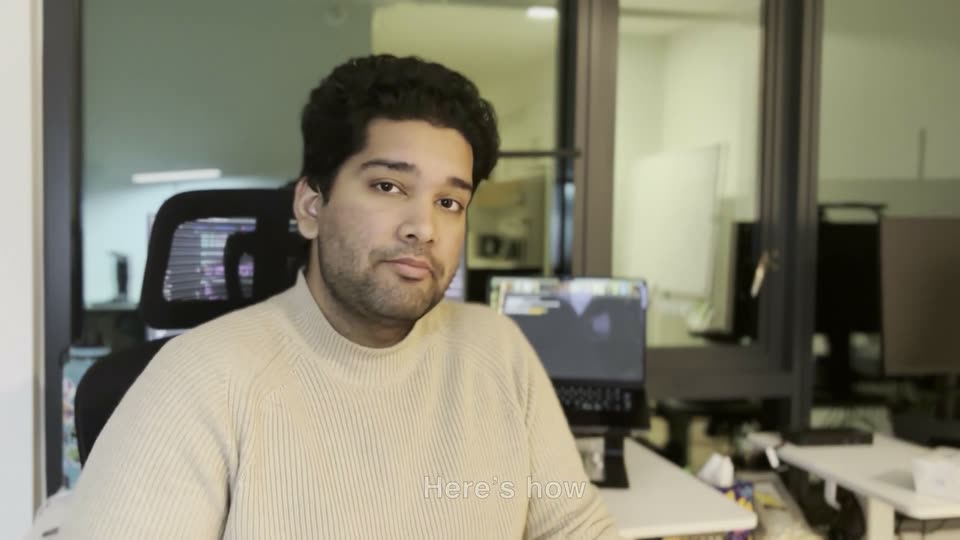
A man in a beige turtleneck sits in an office chair, smiling at the camera, as a translucent H-1B Employer Dashboard UI dissolves in over him. A small caption scales in at the bottom.
On-screen text: “Here's how”
Camera: Static
A screen capture of the H-1B Portal employer dashboard fills the frame with a cursor at center and a rounded webcam tile of a man in a beige sweater bottom right. A faded face overlay crossfades out in the first frame.
Camera: Static
The H-1B Portal dashboard screen zooms into the case table, then the cursor clicks Add New H-1B Case. A modal form opens; the cursor types a name and email, opens the case type dropdown, and clicks Send Invitation. A small webcam feed of the presenter stays in the bottom-right corner.
Techniques: UI zoom, Cursor demo
Camera: Push in
The H-1B Portal employer dashboard slides into view on a white background, its case table and status columns settling into place. A hand cursor hovers over the Bill Doe row. A small rounded webcam of a man talking sits in the bottom-right corner with a caption.
On-screen text: “So, I'm a lawyer and I've been on the other side of this.”
Techniques: Cursor demo
Camera: Pull out
A web form titled H-1B Lottery Registration fills the frame, with a six-step progress bar and company identification fields. A hand cursor glides across the page, hovering over step labels and field help icons. A small video call window with a man talking sits in the bottom right.
Techniques: Cursor demo
Camera: Static
Screen recording of an H-1B registration form, presenter's webcam in the corner. A cursor closes a help modal, switches a field to text input, clicks an AI fill button; a progress modal shows extracted fields and a success check. The view zooms in, then crossfades to a dashboard.
Techniques: UI zoom, Cursor demo
Camera: Push in
A crossfade settles on the H-1B Portal Employer Dashboard, a single-row case table on a white screen. A small webcam of a man talking and gesturing sits in the bottom right. The cursor holds center, then slides right to hover the Post LCA button.
Techniques: Cursor demo
Camera: Static
A dark case-management table sits behind a confirmation dialog. The view zooms in on the dialog as a cursor moves to the Confirm button. A small webcam feed of a man stays in the bottom right corner.
Techniques: UI zoom, Cursor demo
Camera: Push in
A white H-1B employer dashboard with a one-row case table fills the frame, settling out of a brief crossfade. A rounded video of a man speaking plays in the bottom right above a success note, while a black cursor rests in the open space.
Camera: Pull out