1:28


Launch YC - Particularity (YC F26)
Particularity · Government · Oct 2026
terminal-mac · Nov 2026 · 0:43 · AI-annotated
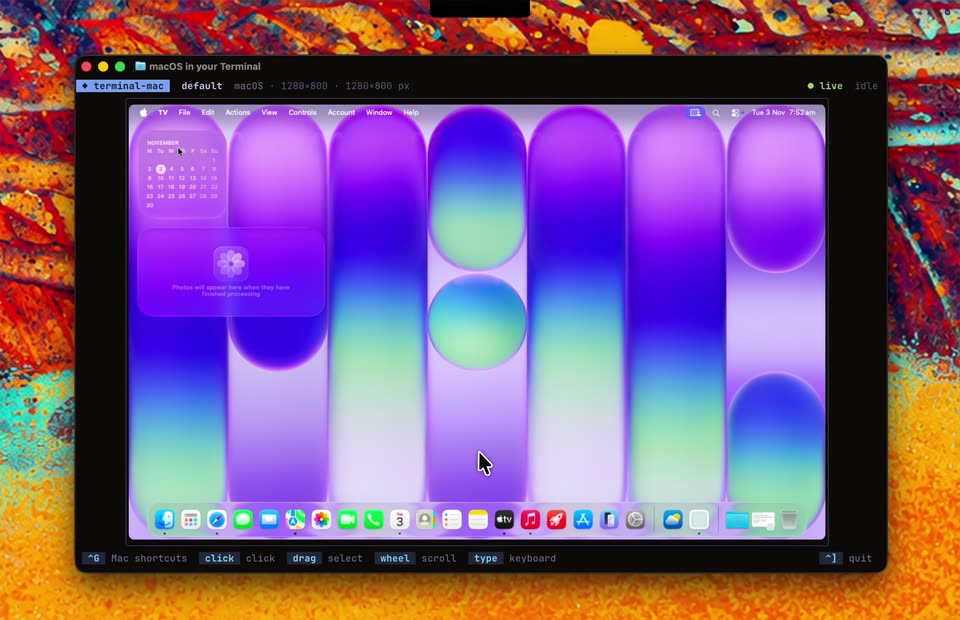
terminal-mac’s 0:43 launch film runs 19 scenes, about 2.3 s each. The product shows up at 0:01. There is no explicit call to action. A single locked-off terminal window runs a live macOS desktop over a vivid paint-splatter backdrop, with cuts landing on cursor clicks and live fps counters. The pacing is even and demo-driven, letting the screen recording carry the story while the saturated texture keeps the frame lively.
Is this your launch? to your site or press kit.
Particularity · Government · Oct 2026
TwelveLabs · AI · Oct 2026
Mosaic · B2B · Aug 2026
A black terminal window with macOS traffic lights and a folder icon floats over a marbled red, orange and blue texture. The prompt types the command letter by letter while a large I-beam cursor sits centered in the dark pane.
Techniques: Kinetic type
Camera: Push in
A dark terminal window with red, yellow and green dots slides in over a vivid orange abstract texture. Its title bar reads macOS in your Terminal while a prompt line types a command, ending with a bone-shaped text cursor centered in the empty pane.
Camera: Pull out
A static terminal window frames a purple-and-green macOS desktop with a calendar widget and dock. A white arrow cursor glides diagonally from the calendar down to a dock icon while the top status bar updates its live timing.
Techniques: Cursor demo
Camera: Static
Inside a terminal window, a macOS desktop runs; a cursor navigates System Settings, opening About and Software Update, then selects the Sequoia wallpaper, switching the desktop from purple ovals to pink and blue diagonal stripes.
Techniques: Cursor demo
Camera: Static
A macOS System Settings window runs inside a terminal frame over a colorful abstract backdrop. The Wallpaper pane is open; the cursor scrolls the list upward, shifting from landscape photo thumbnails to Mac Blue, Shuffle Aerials and Colours rows while the desktop background stays fixed.
Techniques: Cursor demo
Camera: Static
A macOS System Settings window sits inside a terminal frame. A cursor moves across the Wallpaper options, and the desktop background behind the window shifts from blue to pink to yellow.
Techniques: Cursor demo
Camera: Static
A terminal window frames a macOS desktop with the Wallpaper settings pane open. A white cursor glides across the thumbnail grid and clicks, switching the preview from Mac Yellow to Radial Sky Blue. The frame stays locked-off and flat.
Techniques: Cursor demo
Camera: Static
A macOS System Settings window open to the Wallpaper pane sits inside a terminal window over a colorful paint-textured background. A cursor drifts left across the wallpaper thumbnails while the terminal's bottom status bar swaps its command hints.
Techniques: Cursor demo
Camera: Static
A terminal window titled macOS in your Terminal runs a full macOS desktop over a colorful abstract backdrop. The System Settings Wallpaper panel is open on a yellow-green screen, and a cursor glides from a Mac Yellow thumbnail to the window's top-left corner.
Techniques: Cursor demo
Camera: Static
A dark terminal window floats on a mottled orange-and-blue paint backdrop, rendering a macOS desktop with striped green wallpaper, widgets and a dock. A cursor glides from the menu bar to the dock and clicks a blue icon while the bottom bar logs the click.
Techniques: Cursor demo
Camera: Static
A terminal window on a painted backdrop renders a macOS desktop. A cursor clicks the Finder icon in the dock, scrolls the sidebar, selects Applications to load app icons, then closes the window to reveal the desktop.
Techniques: Cursor demo
Camera: Static
A terminal window titled “macOS in your Terminal” sits on a multicolored paint-splatter background, displaying the Apple TV app home screen with a NOCTURNE hero banner and a dock. A white cursor glides up from the dock to the hero image.
Techniques: Cursor demo
Camera: Static
A terminal window runs a live macOS desktop; the Apple TV app fills the screen and its content grid scrolls up from the Monarch row to the 'Criminally Entertaining' row while a white arrow cursor hovers over the dark cards.
Techniques: Cursor demo
Camera: Static
A dark terminal window shows a macOS desktop with the Apple TV app open over a vivid painted background. The hero carousel slides to the NOCTURNE banner while the cursor hovers the Top 10 shows row.
Techniques: Cursor demo
Camera: Static
A terminal window renders the Apple TV app over a colorful abstract background. The interface shows ranked show and movie thumbnails, then the whole content fades to white while a cursor rests at the center.
Camera: Static
A terminal window frames a macOS desktop running the Apple TV app, its Ted Lasso page filling the screen. A cursor drifts across the dark hero panel and registers a click, while the bright abstract wallpaper and dock stay fixed behind. The shot holds on a locked-off frame.
Techniques: Cursor demo
Camera: Static
A flat terminal window on a paint-splatter wallpaper shows the Apple TV app. The view switches from the Home grid of show cards to the Ted Lasso About page as a cursor moves across the interface.
Techniques: Cursor demo
Camera: Static
A terminal window shows a macOS desktop running the Apple TV app on a colorful abstract background. The cursor moves from the Ted Lasso hero panel to the left sidebar while the live fps and ms counters update.
Techniques: Cursor demo
Camera: Static
A flat terminal window titled macOS in your Terminal rests on a paint-splatter background, displaying a macOS desktop with a green-and-yellow wallpaper, a calendar widget, and a dock. A white cursor arrow glides from the calendar toward the center while a click coordinate prints at the lower left.
Techniques: Cursor demo
Camera: Static