1:53

samagra14 - Introducing Whip Web: Youtube for interactive experiences The next w
Whip · Consumer · Sep 2026
FlashDrive · Nov 2026 · 1:29 · AI-annotated
FlashDrive’s 1:29 launch film runs 34 scenes, about 2.6 s each. The product shows up at 0:02 and 8 features are revealed. There is no explicit call to action; a voiceover carries the film. The video alternates short live-action presenter beats with dark UI and 3D motion graphics, each feature introduced by a bold caption line and demoed in tight three to eight second cuts. Its signature moves are the pixel-gradient folder filling and dissolving, dotted connection lines linking people and tools, and drifting pixel squares on black.
Is this your launch? to your site or press kit.
Whip · Consumer · Sep 2026
Sila · B2B · Aug 2026
Films whose music sounds like this one, voice left out
Evokoa · Modern electronic
Melius · Meme-style montage with dancehall elements
Wajo AI · Upbeat electronic
A translucent amber USB drive with a metal connector floats in 3D over a blurred dusk city street, a rainbow-striped folder icon inside. White text types in word by word at the bottom.
On-screen text: “Today, we're introducing”
Techniques: 3D mockup, Kinetic type
Camera: Static
A 3D city street at dusk; the camera pushes into a brick building window where a bearded man in a cap holds up a flat device with a glowing orange edge. White caption text sits centered at the bottom.
On-screen text: “Today, we're introducing”
Camera: Static
A bearded man holds a small amber USB drive up to the camera in a dim home studio. The “FlashDrive” title scales in beside a pixel folder icon, then bold white lines build top-left as he gestures, ending on a pan to his monitor showing the dark app.
On-screen text: “Today, we're introducing”, “FlashDrive”, “A shared drive”, “for you, your team,”, “and every AI agent”, “and more”
Techniques: Kinetic type
Camera: Push in
A macOS editor window showing a CRM dashboard and a code panel floats over a purple grid wallpaper, rotating from a side angle to face front. A white headline reads across the lower third while the window settles into place.
On-screen text: “Cloud drives were built for people.”
Techniques: 3D mockup
Camera: Pull out
A dark macOS desktop shows a folder icon filling with orange and pink pixels as yellow pixels burst upward. Two avatars labeled Dale and Dalton appear on the left. The bottom caption switches from Cloud drives were built for people. to We rebuilt the folder for people and agents.
On-screen text: “Cloud drives were built for people.”, “We rebuilt the folder for people and agents.”, “Dale”, “Dalton”
Techniques: Particles
Camera: Static
A flat macOS desktop centers a folder filled with a pixelated orange-purple gradient, dashed lines linking two avatar circles on the left to app icons on the right. A white bottom caption reads for people and agents, then swaps to working together. as document cards and a FaceTime banner pop in.
On-screen text: “for people and agents”, “working together.”
Techniques: Cursor demo
Camera: Static
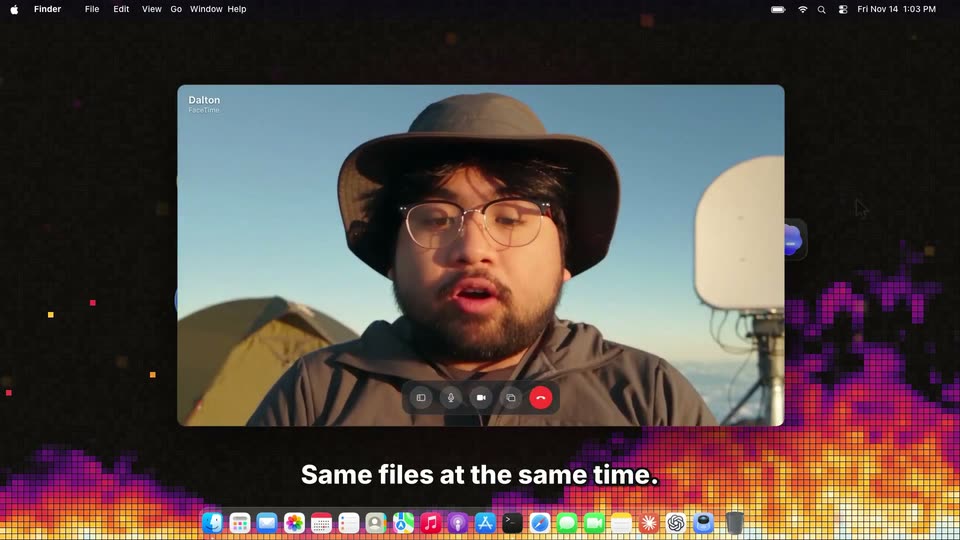
A macOS desktop shows a shared folder tied by dotted lines to two contacts and app icons. The cursor clicks the green FaceTime button, and a video call window with two people opens over the folder. The caption changes to “Same files at the same time.”
On-screen text: “working together.”, “Same files at the same time.”
Techniques: Cursor demo
Camera: Static
A dark macOS desktop shows a FaceTime call window with a man in a hat and glasses outdoors. The window zooms forward until it fills the frame, while a white caption stays fixed at the bottom.
On-screen text: “Same files at the same time.”
Techniques: UI zoom
Camera: Push in
A man in a hat sits cross-legged with a laptop on a rocky summit above the clouds, tent and satellite dish behind, as the camera pulls back from close-up to wide. A dark file-list panel overlays the left, rows filling in as statuses flip to Synced; captions appear.
On-screen text: “Same files at the same time.”, “Even up here.”, “Wait, where are you?”
Camera: Pull out
A bearded man in a hat and glasses sits at a laptop on a mountaintop as a file-sync window and floating file-name chips fade out around him; the shot then reframes into a product UI where he appears as a video tile beside a Launch prep panel.
On-screen text: “Needed some headspace, man.”
Camera: Pull out
A macOS desktop shows two dark windows side by side: left, an agent chat types HTML code into landing.html; right, a Finder list re-sorts as new files appear with a named Dalton cursor. A FaceTime tile in the corner ends the call. White subtitles caption the bottom.
On-screen text: “Dalton and I are building”, “different parts of the same project,”, “with our agents”, “working alongside us.”
Techniques: Split screen, Cursor demo
Camera: Pull out
Two macOS windows sit side by side on a pixelated desktop, a chat panel left and a file list right. Their contents refresh as a cursor hovers over rows, and a white caption swaps at the bottom.
On-screen text: “working alongside us.”, “Different tools,”
Techniques: Split screen, Cursor demo
Camera: Static
A dark customers.csv table on a Mac desktop gains new rows typed in with Claude, Codex and Cursor badges as caption phrases appear below. The view then zooms into a search field where claude code, codex and cursor are typed, each highlighting the matching app.
On-screen text: “Different tools,”, “same files,”, “all at the same time.”, “Claude Code,”, “Codex,”, “Cursor.”
Techniques: Kinetic type, UI zoom, Cursor demo
Camera: Push in
Three rounded app icons, an orange spark, a blue cloud prompt and a white wireframe cube, sit in a row on a black field with a warm glow behind the middle one. The outer icons soften while the center stays sharp. A white caption reads below.
On-screen text: “Use the tools you already use”
Camera: Static
Three flat app icons on a dark glowing field collapse into a single rainbow-striped folder icon as small colored pixel squares drift outward. Below, the white caption swaps from “Use the tools you already use” to “and love.”
On-screen text: “Use the tools you already use”, “and love.”
Techniques: Morph, Particles
Camera: Static
A striped folder icon with purple, pink, red, orange and yellow bands sits centered over a warm radial glow on black. The white caption and love. holds at the bottom, then fades out as the glow brightens.
On-screen text: “and love.”
Camera: Static
A dark customers.csv table card sits under a striped folder icon. Two agent input bars at the bottom type commands, joined by a hand-drawn gradient loop. Two highlighted rows with green checks drop into the table, then the inputs fade and the folder glows.
On-screen text: “Two agents add customers”, “to the same list?”, “Both rows stay”
Techniques: Kinetic type
Camera: Static
On a black background, a search bar with the query “Who wants annual billing?” drops in above a pixelated folder. White file cards fan out in a 3D arc, three light up with orange outlines and speech-bubble labels, while rotating words and a bottom caption cycle through search modes.
On-screen text: “Need an answer?”, “Who wants annual billing?”, “GLOB”, “files by name”, “Your agents can search”, “wants annual billing”, “annual plan?”, “asked for an annual plan”, “GRAD”, “exact patterns you need”
Techniques: 3D mockup, Kinetic type
Camera: Static
A white headline card sits at the top over an arc of document cards, three glowing orange and the rest dimmed, with a pixel-art folder centered below. A white caption reads at the bottom. Small colored squares drift into the dark background.
On-screen text: “Stealth Startup and AGI by Friday”, “want annual billing.”, “across the whole drive.”
Techniques: Particles
Camera: Static
Three app icons, a red asterisk, a blue cloud with code brackets, and a white cube, float apart from the center over a dark field with a warm radial glow and scattered colored squares.
Techniques: Particles
Camera: Static
Three app icons float over a dark field with a warm central glow and scattered pixel dots. A pink CRM list card assembles under the left icon, and a burst of orange and pink pixels erupts above the center icon. The caption “Build a CRM,” holds at the bottom.
On-screen text: “Build a CRM,”
Techniques: 3D mockup, Particles
Camera: Static
Three white UI cards assemble left to right from a mosaic of pink and orange pixels: a CRM list, a knowledge base with four colored tiles, and an investor update with a rising chart. Small app icons float above each card while colored specks drift across the dark background.
On-screen text: “a knowledge base,”, “your investor update.”, “The files and instructions”
Techniques: Particles
Camera: Static
Four floating UI cards, a CRM list, knowledge base grid, How-to notes and revenue chart, shrink and rise above a pixelated folder labeled FlashDrive. Colored pixel squares drift in the dark background as a bottom caption updates from “The files and instructions” to “live in FlashDrive,”.
On-screen text: “The files and instructions”, “live in FlashDrive,”
Techniques: 3D mockup, Particles
Camera: Static
A pixelated folder icon lifts and shrinks at center as three laptops rise from the bottom edge, each tagged with a name avatar, against a dark field with a warm radial glow and drifting colored square particles.
On-screen text: “so your whole team”
Techniques: Particles, 3D mockup
Camera: Pull out
A dark field of drifting colored squares frames a central folder with an animated pixel gradient, dashed orange lines linking it to three laptops labeled Dalton, Dale, Maya. File icons pop onto each screen, then a cloud of three sandbox panels slides in above, and the view pushes in.
On-screen text: “so your whole team”, “and their agents”, “can use what you've built.”, “And yes,”, “you can connect your sandboxes too.”, “Same files wherever your agent is.”
Techniques: Particles, UI zoom
Camera: Push in
A pixel-filled folder hovers above three laptops joined by a dotted arc while a pill types a clean-up command. The pixels dissolve into drifting squares, the folder opens empty, and the count slides from 3 files to 0 files.
On-screen text: “Clean up the launch folder”, “3 files”, “0 files”
Techniques: 3D mockup, Morph, Particles
Camera: Push in
A dimmed empty file manager sits behind a chat: Dalton's card asks 'dale did you delete everything again', blue bubbles 'im sorry' and 'it was my agent' pop in, a gray 'it's fully recoverable' answers, then the messages fade to leave the round avatar on black.
Techniques: Kinetic type
Camera: Static
A man in a bucket hat sits on a rocky peak with a laptop, tent and dish behind him. A dark UI panel on the right runs a restore sequence, its folder thumbnail filling with color until a green checkmark confirms, then the panel fades to transparent.
On-screen text: “Relax.”, “And done.”
Camera: Static
A man in a bucket hat sits on a rocky ridge above a sea of clouds, a closed laptop on his lap. He tosses a small device into the air. A white satellite dish stands behind him, a battery with an antenna beside him, a tent to the left.
On-screen text: “Heads up.”
Camera: Static
A brown USB-C flash drive hovers and rotates above a sunlit mountain ridge rising over a sea of clouds, then settles to show its face. The caption at the bottom scales up into place.
On-screen text: “Heads up.”, “Even huge files work”
Techniques: 3D mockup, Kinetic type
Camera: Static
A dark video-player window plays a 3D render of a flash drive flying over sunset clouds and into a city street. A cursor taps the mute icon while white captions scale in and swap at the bottom.
On-screen text: “Even huge files work”, “without downloading the whole thing.”
Techniques: 3D mockup, Cursor demo, Kinetic type
Camera: Static
A 3D camera flies down a narrow brick city street at dusk toward a small tablet hovering in the air, then pushes into an open window where a woman in a black shirt holds the tablet out toward the lens, editing monitors behind her.
Techniques: Parallax, 3D mockup
Camera: Static
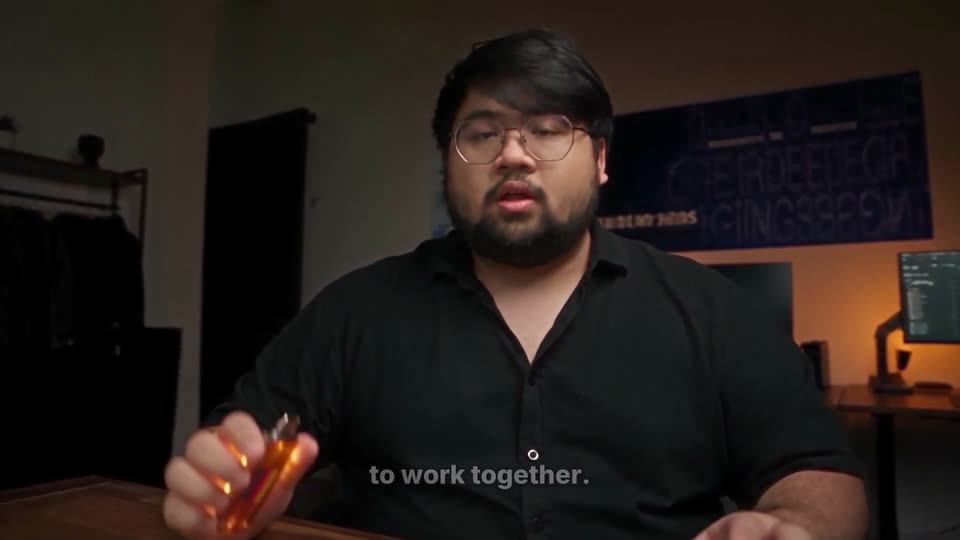
A bearded man in a black shirt holds a small orange cylindrical device at a desk in a dim room, talking to camera with white subtitles below. The shot opens through a window, then locks off; at the end the device floats and catches flame.
On-screen text: “You've got your team,”, “you've got your agents,”, “now give them a place”, “to work together.”, “That's FlashDrive.”, “And this is just for the video.”, “Everything's all in the cloud.”
Camera: Push in
On a black background with a warm radial glow, a striped folder icon sits left of the bold white FlashDrive wordmark. The URL flashdrive.ai fades in below, then a Backed by Y Combinator line appears at the bottom.
On-screen text: “flashdrive.ai”, “Backed by”, “Combinator”
Camera: Static