1:36

Introducing Yam: AI-powered romance simulation games for women
Yam · Consumer · Nov 2026
Vidu AI · Jan 2026 · 0:59 · AI-annotated
Vidu AI’s 0:59 launch film runs 33 scenes, about 1.8 s each. The product shows up at 0:02 and 8 features are revealed. There is no explicit call to action. The video is a rapid montage of 2 to 4 second feature loops, each tagged with a bold caption chip and cut hard on a fast beat, running from a striking car-to-tractor transformation through a logo lockup. Signature moves are the split-screen reference comparison, the picture-in-picture source thumbnail, the material swatch pills and the closing sphere-ring logo animation.
Is this your launch? to your site or press kit.
Yam · Consumer · Nov 2026
Whip · Consumer · Sep 2026
A red open-wheel race car numbered 18 speeds toward the camera down a dusty desert road between rocky canyon walls, kicking up a wide plume of dust. A low tracking shot follows the car under bright sunlight.
Camera: Pull out
A red vintage formula car charges toward the camera through a dusty desert canyon, throwing up a wide cloud of dust. The ground streaks with motion blur. A dark rounded chip in the lower left holds the white word Tractors, held static.
On-screen text: “Tractors”
Camera: Pull out
A red 3D tractor speeds through a desert canyon, kicking up dust, then dissolves into a blurred backdrop as a white title card fades in. The camera tracks the tractor head-on before settling on the locked-off text.
On-screen text: “Q2 Reference to Video Pro”, “Now Live Worldwide”
Camera: Pan
A black frame holds a large gray headline with a faint extruded edge and a smaller white line below it. Both lines fade from dim to full brightness over the shot, locked off with no camera move.
On-screen text: “Q2 Reference to Video Pro”, “Now Live Worldwide”
Camera: Static
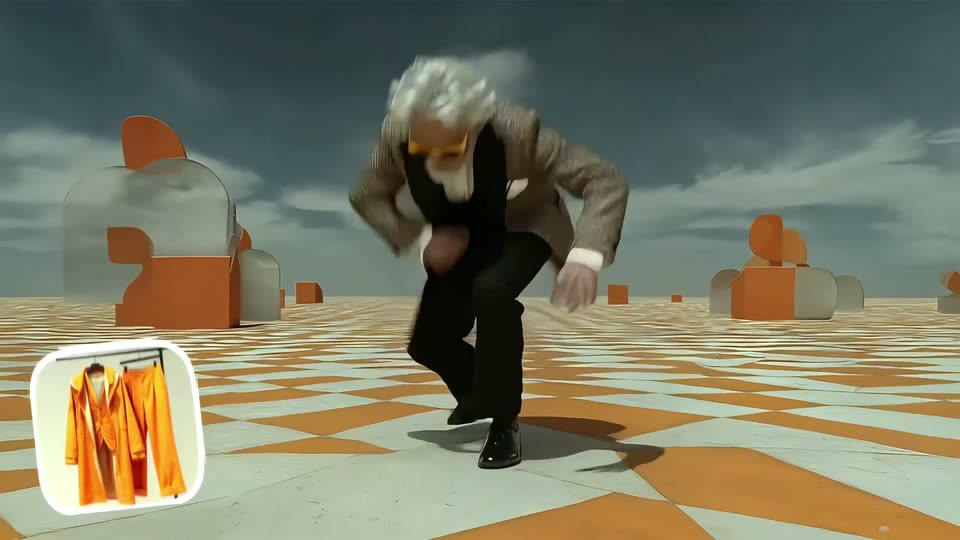
A white-bearded man in a tuxedo and orange sunglasses crouches, drops to his hands, and rises on an orange-and-white checkered plain scattered with giant 3D letter shapes under a gray sky, then a white app icon with orange hangers and a cursor bar pops into the lower left.
On-screen text: “Q2 Reference to Video Pro”, “Now Live Worldwide”
Camera: Static
A bottom-left label reads Outfit Swap beside a jumpsuit icon as a white-haired man in a tuxedo and yellow sunglasses leaps in a desert, his jacket switching to a patterned blazer under dark storm clouds.
On-screen text: “Outfit Swap”
Camera: Static
A 3D white-bearded man in orange clothing crouches on a checkered floor under a stormy sky, motion-blurred, then rises to a standing pose in a new coat while abstract orange and white shapes sit around him. A dark rounded caption bar with white text appears at the bottom.
On-screen text: “Outfit Swap”, “Boxing Ring Background”
Techniques: Morph
Camera: Pull out
An older man in an orange quilted jacket stands center ring, adjusting his lapels under stage lights and drifting smoke. A white title on a dark bar reads Boxing Ring Background at the bottom, then clears.
On-screen text: “Boxing Ring Background”
Camera: Static
A 3D-rendered old man in an orange coat and tinted glasses raises both fists in a smoke-filled boxing ring under bright stage lights. The camera holds a low angle and pushes in from a full-body wide shot to a closer waist-up framing.
Camera: Push in
A split screen faces off a bald, tattooed monk in a red robe on the left against a hooded, masked figure on the right. The right panel brightens from shadow as the monk's eyes flare with blue light.
Techniques: Split screen
Camera: Static
Two 3D-rendered characters face the camera in a split screen: a shaved-head monk with glowing white eyes and a red robe on the left, a hooded figure with a blue mask on the right. Purple and white electric energy flares around both, and the left panel flashes bright white mid-clip.
Techniques: Split screen
Camera: Static
Split screen, locked off: left black panel holds the white heading 'Reference Effects', a small vertical clip of a robed figure with glowing eyes, and a prompt caption; right panel shows a hooded, masked 3D character in arcing blue lightning as its eyes shift from yellow to white.
On-screen text: “Reference”, “Effects”, “PROMPT:”, “APPLY THE LIGHTNING EFFECT FROM THE”, “REFERENCE VIDEO AND GENERATE A”, “LIGHTNING-WRAPPED CHARACTER.”
Techniques: Split screen
Camera: Static
A tabby cat walks forward through soft-focus jungle foliage, facing the camera in warm side light. A white caption on a dark rounded box slides in at the lower left near the end.
On-screen text: “Transform into a Tiger”
Camera: Push in
A close-up 3D render of a tiger's face in a sunlit jungle, framed by blurred green leaves. The tiger blinks, then opens its mouth to snarl, baring its teeth. The camera stays locked off on the centered face.
On-screen text: “Transform into a Tiger”
Camera: Push in
A glossy yellow smiley ball hovers over a 3D grass field beneath a cloudy blue sky as the camera drifts forward. White text reading Reference Texture and a black pill holding three texture swatches fade in along the bottom.
On-screen text: “Reference”, “Texture”
Techniques: Parallax
Camera: Static
A rainbow knitted smiley ball hovers over a 3D grassy field under a wide cloudy sky as the camera drifts forward. A black pill at the bottom holds three material swatches, the middle one matching the ball. White text reads Reference Texture at lower left.
On-screen text: “Reference Texture”
Techniques: Parallax
Camera: Pan
A wood-grain sphere with a carved smiley face hovers over a 3D grassy field under a cloudy sky. A black pill with three material swatches sits at the bottom right, and the label Reference Texture marks the left. The camera drifts slowly, shifting the clouds and grass.
On-screen text: “Reference”, “Texture”
Techniques: 3D mockup, Parallax
Camera: Static
A person skateboards down a sunlit coastal path, followed by a camera from behind. A small picture-in-picture video sits in the bottom left corner. White text is centered in the frame.
On-screen text: “Turn it into”, “SPRING”
Techniques: Parallax
Camera: Push in
A person skateboards away down a sunlit seaside path, orange beach umbrellas at left and houses at right. A small rounded video inset mirrors the shot in the lower left. White text reads Turn it into SUMMER, the word SUMMER scaling up as the camera follows the skater.
On-screen text: “Turn it into”, “SUMMER”
Techniques: Kinetic type
Camera: Push in
A skater rides away down a coastal path while a rounded thumbnail on the left holds the original summer clip. The main frame warms to autumn tones with fallen leaves as the large word swaps from SUMMER to AUTUMN beneath the caption Turn it into.
On-screen text: “Turn it into”, “SUMMER”, “AUTUMN”
Techniques: Kinetic type
Camera: Push in
A horizontal wipe turns an autumn path into a snowy street as a figure rolls away on a board over a sea of clouds; a small framed thumbnail of the autumn shot sits in the lower left while a white headline overlays the center.
On-screen text: “Turn it into”, “AUTUMN”, “WINTER”
Techniques: Split screen, Masking, Morph
Camera: Push in
A man in silhouette plays a grand piano in a dark room, backlit by a bright window with visible haze in the air. A rounded bear icon and a dark pill reading “Reference Action” fade in at the lower left and hold on a locked-off frame.
On-screen text: “Reference Action”
Camera: Static
A 3D brown bear sits at a grand piano in a sunlit room, paws on the keys, a small bear thumbnail in the lower left. The shot cuts to a woman in a white robe on a beanbag couch, holding a phone.
On-screen text: “Reference Action”
Camera: Static
A woman in a cream hoodie sits cross-legged on a beige beanbag in a warm dim room, looking at her phone. A rainbow color slider with a white knob overlays the bottom; the knob glides across the bar as a cursor drags it while the caption types in above.
On-screen text: “Refine the Lighting”
Techniques: Kinetic type, Cursor demo
Camera: Static
A woman in a cream hoodie sits cross-legged on a beanbag in a dim, plant-filled room, watching her phone. Below her, a rainbow gradient slider with a white knob and a cursor arrow drags from the cyan band to the magenta end under the static caption.
On-screen text: “Refine the Lighting”
Techniques: Cursor demo
Camera: Static
A woman in a white hoodie sits cross-legged on a fluffy bean bag in a dim room, looking at her phone. A rainbow color slider with a white handle and a cursor appears at the bottom under the caption, then both vanish as the room darkens.
On-screen text: “Refine the Lighting”
Techniques: Cursor demo
Camera: Static
A blue gradient background holds the centered white title Reference & Edit, which sharpens to full opacity as two diagonal columns of blurred keywords drift in on either side.
On-screen text: “Reference & Edit”
Camera: Static
A purple-to-blue gradient fills the frame as the bold white title Reference & Edit holds center, then fades to translucent. Around it, two diagonal columns of editing terms sharpen from a soft blur into crisp white type.
On-screen text: “Reference & Edit”
Techniques: Kinetic type
Camera: Push in
A ring of glossy multicolored spheres surrounds the gray title “Reference & Edit” over a dark field of faint category words. The spheres turn white, align into a spinning pinwheel, and the title fades out.
On-screen text: “Reference & Edit”
Techniques: Morph
Camera: Static
Six gradient spheres in a ring on black. The ring tilts, the spheres flatten into ellipses, then scale up to fill the frame as flat circles, then reset. The centered title fades from gray to white, then swaps to a two-line tagline.
On-screen text: “Q2 Reference-to-Video Pro”, “The world's first video model”, “where anything can be a reference”
Camera: Static
A centered white tagline on black reads the model claim, then it cuts to the white V mark, and the wordmark Vidu slides in beside it to complete the lockup.
On-screen text: “The world's first video model where anything can be a reference”, “Vidu”
Camera: Static
A black field holds the centered white Vidu logo, a looped mark beside the wordmark. A thin vertical rule appears to its right, then the handwritten phrase Yes Vidu is written in two lines.
On-screen text: “Vidu”, “Yes Vidu”
Techniques: Kinetic type
Camera: Static
A white Vidu lockup, pairing a rounded V mark, the word Vidu, a thin vertical divider and the script Yes Vidu, holds centered on a black field, then dims to gray as it fades out.
Camera: Static