1:51

Introducing...Duolingo Chess!
Duolingo · Consumer · Sep 2025
Evokoa’s 1:29 launch film runs 37 scenes, about 2.4 s each. The product shows up at 0:02 and 8 features are revealed. The call to action lands at 1:26 (97% in), over a voiceover. A launch video that opens on a physical amber drive, names the product, then pivots from the problem (cloud drives built for people) into a rapid run of feature beats, each announced by a caption and shown through a mix of live action, UI and pixel-mosaic graphics. Its signature move is the orange pixel folder that scatters into drifting squares and reassembles to diagram every concept, set against a near-black field with warm glows and a fast, music-driven cut rhythm.
Is this your launch? to your site or press kit.
Films whose music sounds like this one, voice left out
FlashDrive · Modern electronic, cinematic
Assemble · Corporate electronic
Wajo AI · Upbeat electronic
A small amber capsule drive hovers centered over a blurred city street at dusk, a rainbow-striped folder icon glowing inside its body. White caption text types in word by word along the bottom edge while the device stays locked in frame.
On-screen text: “Today, we're introducing”
Techniques: 3D mockup, Kinetic type
Camera: Static
A 3D street between brick buildings rushes toward the camera with heavy motion blur; a glowing orange-pink rounded device hovers mid-frame, then the view lands on a window where a suited man sits beside a small glowing folder icon.
On-screen text: “Today, we're introducing”
Techniques: Parallax
Camera: Static
A man in a dim room holds a small USB drive with a colorful pixelated folder icon toward the camera, pushing it slightly closer to the lens. White captions sit at the bottom: a small line above a large FlashDrive wordmark beside the folder icon.
On-screen text: “Today, we're introducing”, “FlashDrive”
Techniques: Kinetic type
Camera: Static
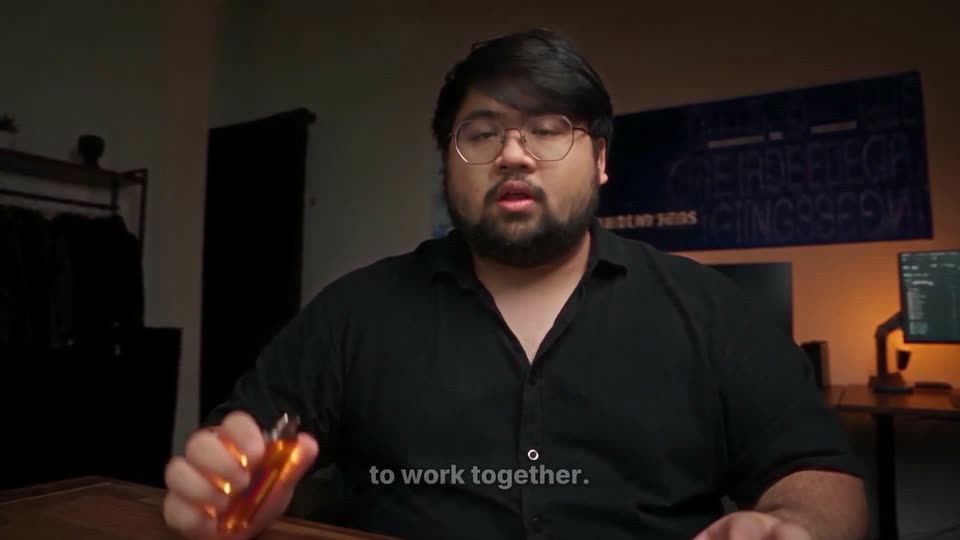
A bearded man in a black shirt and glasses talks to camera in a dim room, holding an orange pen. A white headline builds line by line on the left, then three app icons and 'and more' appear. The shot ends over his shoulder on a dark interface.
On-screen text: “A shared drive”, “for you, your team,”, “and every AI agent”, “and more”
Techniques: Kinetic type
Camera: Push in
A dark app window showing a CRM dashboard, file list and terminal sits on a macOS desktop. The plain wallpaper turns into a colorful pixel mosaic and the window scales back to reveal the dock, under a static white caption.
On-screen text: “Cloud drives were built for people.”
Camera: Pull out
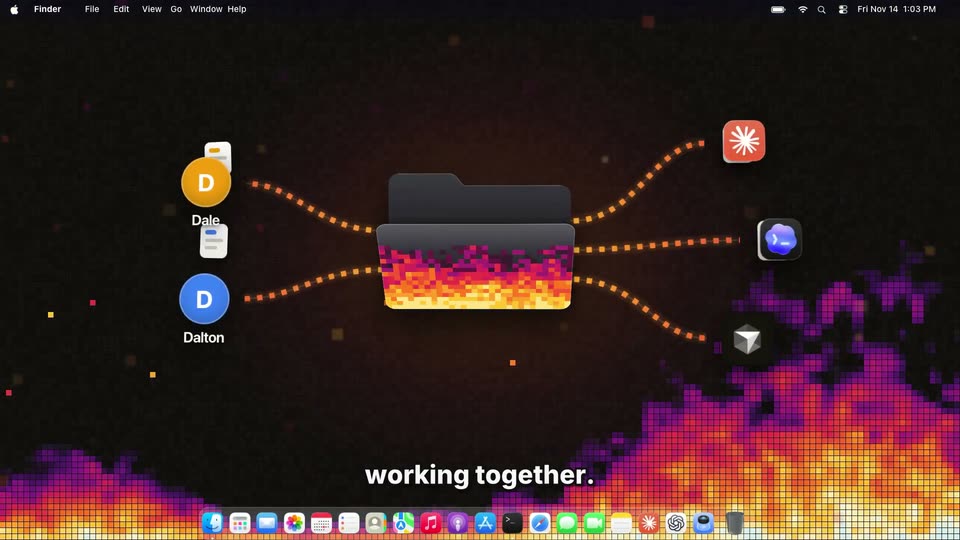
On a dark pixelated macOS desktop, a central folder fills with orange pixel data. Avatars Dale and Dalton slide in from the left, dashed lines connect them to app icons on the right, the folder opens, and a FaceTime banner drops in at the top right.
On-screen text: “Cloud drives were built for people.”, “We rebuilt the folder”, “for people and agents”, “working together.”
Techniques: Kinetic type, Particles, Morph
Camera: Static
A macOS desktop shows a folder linked by dotted lines to two user avatars and three app icons. A FaceTime window pops up in the center with two people on video, and the bottom caption switches from “working together.” to “Same files at the same time.”
On-screen text: “working together.”, “Same files at the same time.”
Techniques: Cursor demo
Camera: Static
A macOS desktop shows a centered FaceTime call window with a man in a hat and glasses, set over a dark backdrop with colorful pixel waves. The call window scales up to fill most of the frame while a white caption sits at the bottom.
On-screen text: “Same files at the same time.”
Techniques: UI zoom
Camera: Push in
A man in a hat sits cross-legged on a mountain summit above the clouds with a laptop. A file-list window on the left populates with files whose status flips from spinners to Synced. The camera pulls back from a close-up to reveal the tent and satellite dish.
On-screen text: “Same files at the same time.”, “Even up here.”, “Wait, where are you?”
Camera: Pull out
A bearded man in a wide-brim hat and glasses sits at a laptop on a mountaintop at sunset, a tent and satellite dish behind him. White file-name chips drift around his head while a dark synced-files window slides out to the left. A subtitle sits at the bottom.
On-screen text: “Needed some headspace, man.”
Camera: Static
A bearded man in a bucket hat sits at a laptop on a mountaintop at golden hour, a tent and satellite dish behind him. White file-name chips such as TODO-before-launch.md and who-let-dale-deploy.md drift and scale around his head, then the shot pulls back into the app window of a launch-prep interface.
On-screen text: “dale-pushed-to-main.md”, “TODO-before-launch.md”, “away-from-dales-yapping.md”, “fix-dales-fix.md”, “who-let-dale-deploy.md”
Techniques: Kinetic type, Morph
Camera: Pull out
A dark macOS desktop shows two windows side by side: an AI chat on the left types an HTML pricing section, while a Finder folder on the right gains new files with Dalton presence tags. A video call ends in the top corner. White subtitles run along the bottom.
On-screen text: “Dalton and I are building”, “different parts of the same project,”, “with our agents”, “working alongside us.”, “Different tools,”
Techniques: Split screen, Cursor demo
Camera: Pull out
A dark CSV table in a Mac window adds rows with colored highlights and agent badges, then the camera zooms into a search field where claude, codex and cursor are typed, each matching a dropdown result.
On-screen text: “Different tools,”, “same files,”, “all at the same time.”, “Claude Code,”, “Codex”, “Cursor.”
Techniques: Kinetic type, UI zoom, Cursor demo
Camera: Push in
A dark screen with a warm central glow holds three app icons in a row: an orange sparkle, a blue cloud with a code mark, and a white wireframe cube. A faint search bar fades out as the icons settle in. A white caption sits below.
On-screen text: “Use the tools you already use”
Camera: Static
Three app icons, an orange starburst, a blue cloud with a prompt symbol, and a gray cube, sit in a row on a black field with a warm glow. They give way to a rainbow-striped folder that scatters small colored squares, as the caption below changes to “that you love”.
On-screen text: “Use the tools you already use”, “that you love”
Techniques: Particles
Camera: Static
A striped folder icon, dark gray tab over purple, red, orange and yellow bands, rests on a black field with a faint red glow. Red specks drift above it and dissolve, while the white caption “and love.” stays fixed at the bottom.
On-screen text: “and love.”
Techniques: Particles
Camera: Static
A dark customers.csv table sits under a gradient folder icon while two agent command bars at the bottom target the same file. Two rows, Prompt Engineers Inc and Yolo Deploy Co, slide in with colored highlights and green checks as the bars fade and captions swap below.
On-screen text: “to the same list?”, “Both rows stay?”
Camera: Static
On a black field with a warm radial glow, a search bar types out “Who wants annual billing?” while a pixel-art folder icon scales up in the center. Five document cards fan out around it, the orange label GLOB and “files by name” appear on either side, and the caption “Need an answer?” scales in at the bottom.
On-screen text: “Need an answer?”, “GLOB”, “files by name”
Techniques: Kinetic type
Camera: Static
An arc of white file cards frames a pixel-patterned folder on black. Three cards glow orange as a chat bubble shows the answer, while side captions swap GLOB files by name to exact patterns over the line Your agents can search across the whole drive.
On-screen text: “FULL-GLOB”, “files by name”, “Your agents can search”, “across the whole drive.”, “GLOB”, “exact patterns”
Techniques: Kinetic type, Particles
Camera: Static
Three flat app icons, an orange asterisk, a blue cloud and a white cube, sit in a row over a dark field with a warm central glow. Small colored squares drift around them while the icons scale up and brighten.
Techniques: Particles
Camera: Static
Three app icons float in the upper third of a dark frame with a warm orange glow: an orange sparkle icon on the left with a pixel trail, a blue cloud terminal icon in the center, a white cube icon on the right. Small colored square particles drift across the background.
Techniques: Particles
Camera: Static
Three rounded app icons hover over a dark field of drifting colored pixels. A pixel grid on the left assembles into a small CRM card listing deals, then dissolves back into loose squares.
On-screen text: “Build a CRM,”
Techniques: Morph, Particles
Camera: Static
Three tilted app cards with small icons above them sit on a dark field; the middle and right cards assemble from a mosaic of orange pixels, left to right, while tiny pixel dots drift behind.
On-screen text: “a knowledge base,”, “your investor update.”, “The files and instructions”
Techniques: 3D mockup, Particles
Camera: Static
On a dark field of drifting colored squares, flat document cards (CRM, Knowledge base, Investor update, orange How-to) slide into a row above a centered folder of pixelated orange and pink blocks, as the white caption fades out.
On-screen text: “The files and instructions”
Techniques: Particles
Camera: Static
On a dark grid backdrop with drifting pixel squares, small UI cards (CRM list, knowledge base, investor update, how-to notes) tumble into a pixel-orange folder and fade out as it settles center. The caption live in FlashDrive, holds at the bottom.
On-screen text: “live in FlashDrive,”
Techniques: 3D mockup, Particles
Camera: Static
A pixelated folder icon hovers above the name Dale, then three flat laptops rise into view at the bottom, each tagged Dalton, Dale, Maya. Floating pixel squares drift in a dark field with a warm central glow. The caption so your whole team holds at the base.
On-screen text: “so your whole team”
Techniques: Particles
Camera: Pull out
On a dark field of drifting pixel squares, a pixel-filled folder hovers above three 3D laptops labeled Dalton, Dale and Maya, joined by dotted orange arcs. Document icons pop onto each screen, the folder drifts up, and white subtitles run along the bottom.
On-screen text: “so your whole team”, “and their agents”, “can use what you've built.”, “And yes,”
Techniques: Particles, 3D mockup
Camera: Pull out
A glowing pixel folder anchors a dark starfield diagram, dotted orange lines linking it to three sandbox cards in a cloud above and three laptops below. The sandboxes sync with file icons, then the view zooms in as a prompt bar types a command.
On-screen text: “And yes,”, “you can connect your sandboxes too.”, “Same files wherever your agent is.”
Techniques: Particles, UI zoom
Camera: Push in
Three laptops line up under a folder of sunset files, joined by dotted arcs, as a command bar prompts to clean up the launch folder. The files dissolve into pixels, the folder goes empty, and a red file count slides in below.
On-screen text: “3 files”, “0 files”
Techniques: Particles
Camera: Push in
A dark chat mockup opens with a top notification card showing a circular avatar, the name Dalton and the line dale did you delete everything again. Blue reply bubbles im sorry and it was my agent pop in on the right, a gray it's fully recoverable bubble pops in on the left, then all bubbles fade, leaving only the floating avatar on black.
Techniques: Kinetic type
Camera: Static
A man sits on a rocky summit with a laptop. A dark recovery window on the right cycles from a delete notice with an orange Restore all button to a progress bar and a green all-restored line, then fades. Bottom captions read Relax. and And done.
On-screen text: “Relax.”, “And done.”
Camera: Static
A man in a bucket hat sits on a rocky mountain peak above a sea of clouds, holding a laptop. He throws a small object into the air.
On-screen text: “Heads up.”
Camera: Static
A dark 3D device with a USB-C plug whooshes in over a sunlit mountain ridge above the clouds, then slows to a steady hover. The caption 'Heads up.' opens the shot, and 'Even huge files work' settles at the bottom as the device floats.
On-screen text: “Heads up.”, “Even huge files work”
Techniques: 3D mockup, Speed ramp
Camera: Static
A video player window on black plays a 3D render of a translucent amber USB drive floating over a sunset desert. The drive turns as the camera orbits, orange scrubber blocks advance, and a cursor hovers over the mute button. The caption below swaps to a second line.
On-screen text: “Even huge files work”, “without downloading the whole thing.”
Techniques: 3D mockup, Cursor demo
Camera: Static
A dark player window on black streams a 3D hover car flying through a hazy sunset city, orange segments marking the read portion of the timeline. A cursor hovers over the mute icon while a bold caption sits below the window and fades out.
On-screen text: “Only the part you're watching is read. The rest stays in the drive.”, “without downloading the whole thing.”
Techniques: Cursor demo
Camera: Static
A video-player overlay with a caption fades over a train shot as the view pushes into a room. A bearded man at a desk holds up an amber USB drive and speaks to camera; subtitles track his lines, then the drive lifts from his hand and bursts into flames.
On-screen text: “Only the part you're watching is read. The rest stays in the drive.”, “You've got your team,”, “you've got your agents,”, “now give them a place”, “to work together.”, “That's FlashDrive.”, “And this is just for the video.”, “Everything's all in the cloud.”
Camera: Push in
On a black field with a soft orange glow, a striped folder icon scales up at left as the white FlashDrive wordmark fades in beside it. The URL and a backing credit line then fade in below, holding on the lockup.
On-screen text: “flashdrive.ai”, “Backed by Y Combinator”
Camera: Static