1:07

Introducing ElevenAgents Architect
ElevenLabs · AI · Oct 2026
Figma · Nov 2025 · 0:40 · Full motion · AI-annotated
Figma’s 0:40 launch film runs 16 scenes, about 2.5 s each. The product shows up at 0:29 and 1 feature is revealed. There is no explicit call to action. The video is built as one continuous screen demo: a question opens, a prompt is typed, a connector is attached, a Notion PRD is fetched, a UI is generated, and Linear tasks are created, then a black headline names the product and an animated logo closes it. The style is flat and rhythmic, swapping bold color-block backgrounds per beat and using a single oversized black cursor plus snappy zooms as the signature moves.
Is this your launch? to your site or press kit.
ElevenLabs · AI · Oct 2026
Runway · AI · Oct 2026
Google · AI · May 2023
Films whose music sounds like this one, voice left out
Photoroom · Modern funk, disco, and electronic dance music (EDM)
Sopht · Electronic dance music with house, funk, and disco influences
Result · Electronic dance music
A light gray question is centered on a plain off-white background. A black cursor arrow with a white outline slides in from the bottom, hovers under the text, then slides out.
On-screen text: “What do you want to make?”
Techniques: Cursor demo
Camera: Static
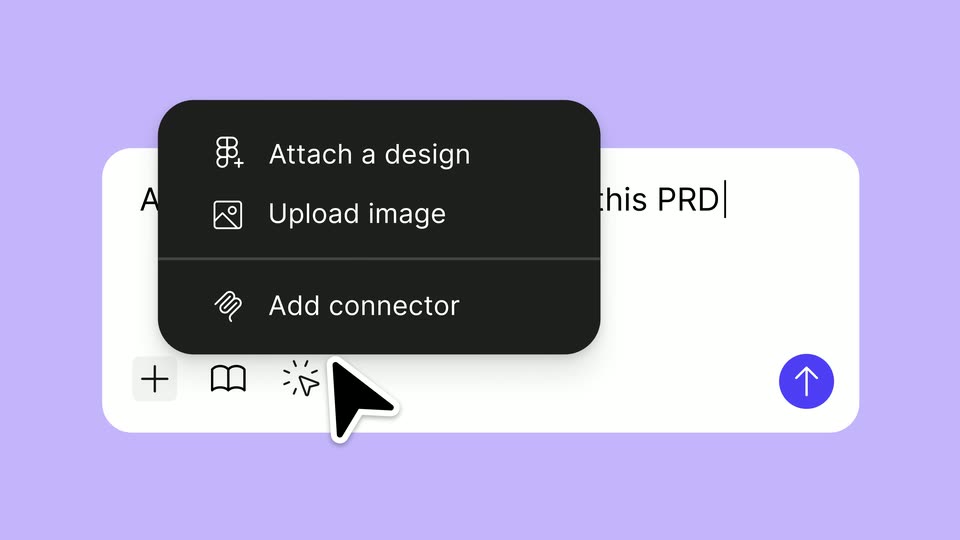
A white prompt card on a lavender background types out a sentence with a blinking caret. A black cursor moves to the plus icon, a dark menu pops open, and the cursor hovers over the blue Add connector row.
On-screen text: “Add a star rating feature from this PRD”
Techniques: Kinetic type, Cursor demo
Camera: Static
A product screen shows a dark “Add connector” pill above a prompt line with typed text, then settles on a list of integration cards for Notion, GitHub and Atlassian. A large black cursor hovers over rows as the list scrolls up and the Add buttons flip to Manage.
Techniques: Cursor demo
Camera: Pan
Flat file icons for WhatsApp, GitHub, Figma, After Effects and Notion pop onto a muted green background. A black cursor arrow glides to the Notion file, a blue selection outline snaps on, then the cursor turns into a hand and tilts the file as if grabbing it.
Techniques: Cursor demo
Camera: Pan
A white prompt box with a blue outline holds the line 'Add a star rating feature from this PRD' while a Notion logo icon, pressed by a hand cursor, sits over it. The view zooms in as a blue link appears below and a black arrow cursor glides to the round send button.
On-screen text: “https://www.notion.so/Rating-PRD/7cf?00F”
Techniques: UI zoom, Cursor demo
Camera: Push in
A chat interface scrolls up to reveal a Notion card with a notion-fetch row and Run, Cancel buttons. A black cursor clicks Run, a spinner starts, then a dark Thinking... panel slides in from the right over the interface.
On-screen text: “https://www.notion.so/Rating-PRD/7cf?00F”
Techniques: Cursor demo, Masking
Camera: Static
On a black field, a white orbit logo and the word Thinking... hold the center while colored code fragments and small circles drift through the corners. The status text scales in place as the snippets and dots rearrange around it.
On-screen text: “Thinking...”
Techniques: Kinetic type, Particles
Camera: Static
A collage of black bars, white and orange circles, and a purple App tile scatters away to reveal a cream review card on an orange field. The card shows a cake thumbnail and a five-star rating row, and a black arrow cursor slides in from the left.
On-screen text: “Thinking...”
Techniques: Masking
Camera: Static
A cream recipe card sits on an orange field beside a scrolling documentation panel. A black cursor sweeps across the star row, filling four stars green, then drops into the text field as the left column scrolls upward.
Techniques: Cursor demo, Split screen
Camera: Push in
On a light screen, a rounded input box with a gray placeholder slides up to center as a black cursor hovers over it. The cursor then types a prompt character by character and moves down to press the purple send button.
Techniques: UI zoom, Cursor demo
Camera: Static
A chat feed in a light UI scrolls up, bringing a new message into view, then a Linear card grows to list four tasks, each with a status icon and chevron.
Techniques: Morph
Camera: Pan
A white Linear checklist card sits on a light gray background. Green checkmarks draw themselves in sequence down the five task rows, then the list scrolls up, pushing the top row out of the frame.
Camera: Static
Black background, locked-off frame. The headline builds word by word across three lines, “Connect your everyday tools to Figma Make”. Green and gray accent words fade to white as each line completes.
On-screen text: “Connect your”, “everyday tools to”, “Figma Make”
Techniques: Kinetic type
Camera: Static
On a black field, scattered purple and blue squares regroup as a red circle and pink square resolve into an orange pill, a green circle in a checkered frame, and a blue target ringed by yellow squares. The static headline holds over the cluster.
On-screen text: “Connect your”, “everyday tools to”, “Figma Make”
Camera: Static
A black rounded app icon with a multicolor abstract mark holds the center of a light gray field. The camera pulls back, revealing white app icons with black and blue marks flanking it on either side.
Camera: Static
Seven app icons sit in a row on a light gray field. They begin overlapping in the middle, then slide apart to even spacing and hold.
Camera: Static