0:34
Figma - Together at last: design and code on the canvas Code Layers are here
Figma · Design · Oct 2026
Burp · Sep 2025 · 0:32 · AI-annotated
Burp’s 0:32 launch film runs 18 scenes, about 1.8 s each. The product shows up at 0:01. There is no explicit call to action. A 32-second teaser built as one continuous prompt-to-asset montage: the camera racks focus across UI cards, 3D mockups, and generated banners, then lands on the logo reveal. Signature moves are shallow depth-of-field focus pulls, letter-by-letter type reveals, and the recurring rainbow gradient border.
Is this your launch? to your site or press kit.
Figma · Design · Oct 2026
Webflow · Design · Aug 2020
A white rounded input card tilts in 3D perspective on a light gray backdrop, framed by a multicolor gradient border. The placeholder prompt “What do you want to make today?” sits beside a color-cycling text cursor, with a circular plus button at the lower left.
Techniques: 3D mockup
Camera: Pull out
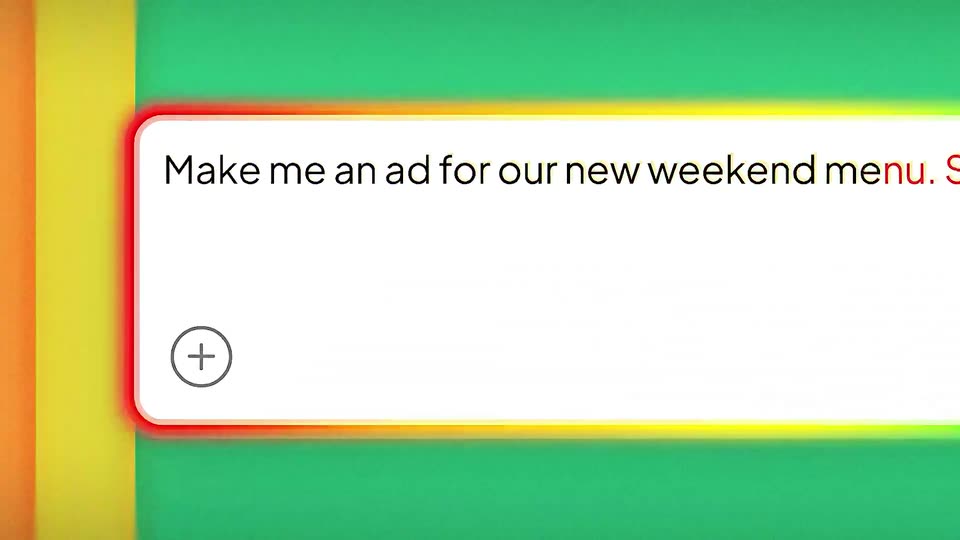
A white prompt card with a glowing rainbow border sits on a shifting multicolor block background. The placeholder scales away as the prompt types out word by word, each new word appearing in red before settling to black.
On-screen text: “What do you want to make today?”, “Make me an ad for our new weekend menu. Short, catchy,”
Techniques: Kinetic type
Camera: Static
A white rounded prompt box with a glowing, color-cycling border sits on a flat background that shifts from green and yellow to pink and orange. The prompt text types out left to right, ending with the final phrase in red, above a black Generate button.
Techniques: Kinetic type
Camera: Pull out
A white prompt bar with a shifting rainbow border floats over a design canvas. The first prompt types out, then swaps to a second prompt as the selected artboard behind it changes from red to rainbow.
Techniques: Kinetic type
Camera: Static
A design canvas with dashed guides and selection handles shows nested rainbow rounded rectangles scaling up behind a white prompt box. The box reads “Make a social post style ad for my healthtech platform.” with a black Generate button, its border glow shifting from violet to orange to green.
Camera: Push in
A white prompt box with a rainbow border sits over a design canvas, its text cycling through three example prompts while a /bundle command turns into a chip. Behind it, the canvas re-lays-out from concentric color blocks to a grid that fills with a sneaker image.
Techniques: Kinetic type
Camera: Pull out
A grid of red Nike Air Max banners on white starts out of focus, then sharpens as the color swatches on the right swap for banner variants. The tall left banner scales up to fill the frame while the others shrink to the right edge.
On-screen text: “Generate”, “Banner set for my Shopify store's sneaker launch, bold red”, “theme. Bundle”
Techniques: UI zoom
Camera: Static
A grid of red Nike sneaker ad panels collapses into one full-screen close-up of a brown eye, a thin menu bar runs along the top, and the headline TEAR INTO fills in across the lower third.
On-screen text: “TEAR INTO”
Techniques: Morph, Kinetic type
Camera: Static
A 3D smartphone mockup on the left shows a chat interface with a diagonal cascade of flower photos. On the right, a larger, zoomed-in view of the same photos floats over a white grid background.
On-screen text: “Search Serv”, “TEAR INTO”, “A flower for”, “your lover”
Techniques: 3D mockup, UI zoom
Camera: Pan
A split screen shows a dark and a light toggle, each a 3D pill with a moon icon. The two halves slide horizontally and trade places, so the glowing moon stays on the dark side.
On-screen text: “A flower for”, “your lover”
Techniques: Split screen
Camera: Static
A white gradient wall of large black sans-serif type with shallow depth of field. Two toggle switches, a crescent moon on dark and a sun on light, sit in the sharp center, then slide out as focus racks down the text, holding the word “a feature” sharp before racking to a foreground word “ting”.
On-screen text: “a feature”, “ting”
Techniques: Parallax
Camera: Static
A tilted close-up of a white interface shows a dark rounded Generate button with a white hand cursor at its right edge, above a thin yellow-to-blue gradient line. Blurred prompt text sits at the top. The cursor shifts slightly toward the button as the frame holds.
Techniques: 3D mockup, Cursor demo
Camera: Static
A dashed rounded-rectangle outline on a light gridded background first holds a colorful gradient shape, then a gray sparkle icon, as the text “Generating asset” types in letter by letter, “asset” in purple.
On-screen text: “Generating asset”
Techniques: Kinetic type
Camera: Static
A locked-off macro close-up of a dark interface screen. A circular icon's center dot draws into a plus while the label 'Import Design' types in beside it; thin white grid lines frame the shot and the top prompt line stays blurred by shallow depth of field.
Camera: Static
A rounded card of vertical color stripes rotates in 3D, its stripes shifting as it turns from a tilted angle to a flat front view. The gray headline 'Designing and animating' above it scales down. A blurred prompt chip drifts at the top right.
On-screen text: “Designing and animating”
Techniques: 3D mockup, Kinetic type
Camera: Static
On a white field, the line “Cooking up our most magical release yet.” resolves word by word from a soft blur, left to right. It holds centered, then fades out as a small dash appears beneath the text.
On-screen text: “Cooking up our most magical release yet.”
Techniques: Kinetic type
Camera: Static
A black bowl-shaped mark sits centered on a white field, its open arc closing into a filled rim, while a faint blurred word fades out to the right.
Techniques: Morph
Camera: Static
A vertical ribbon of rainbow stripes hangs from a small arc, its lower edge pixelated, then contracts into a clean half-circle logo. The wordmark and tagline fade in beneath it on a plain white background.
On-screen text: “burp.app”, “make anything move”
Techniques: Morph
Camera: Static