0:30
Jibran - Introducing Lightreel - the first AI that doomscrolls for you Analyz
Lightreel · Mar 2026
Sol · Oct 2026 · 2:26 · AI-annotated
Sol’s 2:26 launch film runs 62 scenes, about 2.4 s each. The product shows up at 0:07 and 4 features are revealed, with social proof. The call to action lands at 2:13 (91% in), over a voiceover. The video alternates between a host talking to camera in a mint-walled office and locked-off screen recordings set over a soft desert backdrop, cutting fast at roughly 22 cuts per minute. Its signature moves are hand-drawn diagram cards and 3D models that draw in over whatever the host is looking at, with bold lowercase captions carrying the voiceover.
Is this your launch? to your site or press kit.
Lightreel · Mar 2026
Pika · AI · Oct 2026
A man in a green shirt sits at a wooden desk in a room lined with framed art. He opens with his face jammed against the lens, out of focus, then settles to a medium frame. Large lowercase white text overlays the opening, then subtitles carry the line.
On-screen text: “today iwanna”, “show you guys something”, “new that we've been working on.”
Camera: Static
A bearded man in round glasses and a green shirt sits at a wooden desk, speaking to camera. Behind him, framed prints with white logo marks line the wall beside a potted plant and black lamp. A large numeral slides across the frame as white subtitles caption his words.
On-screen text: “new that we've been working on.”, “It's really magical and we're”, “11”
Camera: Static
A man with round glasses and a beard sits in a bright studio, framed Arc logos on the wall behind him. In the blurred foreground, a hand holds a small white earbud with a blue tip near the lens. White subtitles appear at the bottom.
On-screen text: “It's really magical and we're”, “calling it real-time graphics.”
Camera: Static
A hand holds a small white and black object with blue accents close to the lens, out of focus, while a person sits blurred in the background of a home office with framed art on the wall. The shot stays locked off with shallow depth of field.
On-screen text: “calling it real-time graphics.”
Camera: Static
A bearded man in glasses and a light green shirt sits at a wooden table before a row of framed posters, speaking to the camera as a dark blurred object passes in front of his face. A white caption scales in at the bottom of the frame.
On-screen text: “Within just a couple of seconds, we can”
Camera: Static
A bespectacled host in a green jacket talks to camera in an office lined with Arc-branded posters, then a hard cut reveals a screen showing a generated Faker infographic with a line chart and a player card. The shot is locked off and the pace is quick.
On-screen text: “Within just a couple of seconds, we can”
Camera: Static
A locked-off screen capture shows a bespectacled presenter on the left, a video editor in the center with a T1 team photo and a dynasty infographic card, and a browser on the right. White captions scale in at the bottom.
On-screen text: “Within just a couple of seconds, we can”, “actually generate complex visuals”
Camera: Static
A presenter in a black polo and white earbuds sits at the left, smiling, beside a screen capture of an X post. The post shows an F-35 in the sky above a labeled diagram of the jet with blue arrows. A white caption sits at the bottom.
On-screen text: “actually generate complex visuals”
Camera: Static
A presenter in a black shirt and glasses looks down at his desk on the left against a sunflower wallpaper. A browser window on the right displays a Raspberry Pi product page with a 3D board render and a labeled diagram. A white caption sits along the bottom.
On-screen text: “directly on your screen using the context of whatever you're looking at.”
Camera: Static
A man with glasses speaks at the left while a browser window of X fills the right, showing a post of an F-35 with 3D callout labels (Engine, Lift fan, Ducted exhaust) pointing to its parts. White subtitles roll along the bottom.
On-screen text: “directly on your screen using the context”, “of whatever you're looking at.”
Techniques: 3D mockup, Split screen
Camera: Static
A dark social-media post fills the screen as a 3D cutaway jet engine rotates at center, with note-style callouts marking its fan, compressor, combustor and turbine. White caption text at the bottom swaps from one phrase to the next.
On-screen text: “whatever you are looking at.”, “And all you have to do is use”
Techniques: Kinetic type, 3D mockup
Camera: Static
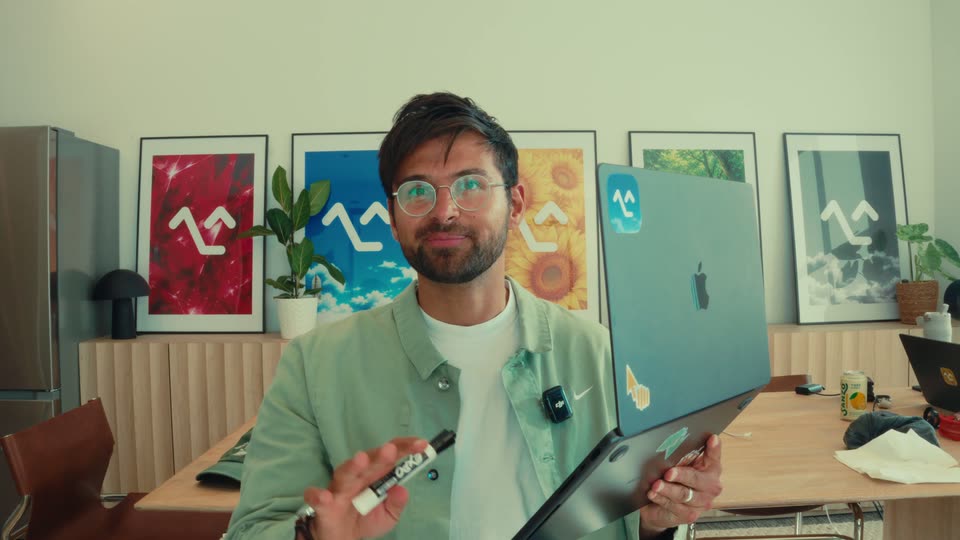
A man with glasses and a beard in a green shirt holds a silver laptop covered in stickers in one hand and gestures with a white pen in the other, addressing the camera. Framed posters line the wall behind him. A subtitle sits at the bottom of the frame.
On-screen text: “your voice. Let me show you.”
Camera: Static
A man with round glasses holds an open sticker-covered black laptop, gesturing with his free hand as he talks to camera. He then rotates the lid to face the lens. Framed posters and a fridge fill the office background; white subtitles sit at the bottom.
On-screen text: “So let's say I'm trying to learn more”, “about how an LLM actually works.”
Camera: Static
A bearded man with glasses in a gray quarter-zip holds a dark laptop lid toward the camera, the lid showing a blue app icon sticker and a yellow sticker. He speaks in a bright room with framed posters and a stainless fridge behind him, while white subtitles run along the bottom of the frame.
On-screen text: “HeyClicky, I'm watching this video, but”, “Clicky, I'm still not understanding how,”, “about how an LLM actually works.”
Camera: Static
A locked-off screen recording of a Mac desktop with a Chrome window open to a YouTube tutorial. The video frame shows a Python code editor, a speaker in a webcam cutout, and a sidebar of related videos. A large caption sits at the bottom.
On-screen text: “I'm still not understanding how”
Camera: Static
A laptop screen, angled on a desk, fills the frame with a Jupyter notebook of Python code. A yellow hand-drawn ellipse loops around one code line. The YouTube player bar with a red progress line sits at the bottom. The shot is locked off.
On-screen text: “this tensor thing makes”, “training data for an AI model.”
Camera: Static
A bearded man in a gray zip-up holds a dark laptop with an Arc logo sticker, talking in an office with framed art behind him. A white caption and a small scaling numeral sit at the bottom of the locked-off frame.
On-screen text: “training data for an AI model.”, “1”
Camera: Static
A static screen capture of a Mac desktop with Chrome open to a YouTube coding video. The embedded player shows a Python notebook with a highlighted tensor line and the presenter's face at the bottom right. A white caption and a Gemini logo overlay the lower edge.
On-screen text: “A tensor holds numbers. Karpathy uses”
Camera: Static
A Mac screen recording shows a code editor beside a white card titled “Make a question and its answer.” Blue input boxes and red target boxes with arrows build up row by row, then a small node graph labeled Guess, Compare, Adjust draws in. The shot cuts to a man in a light hoodie holding a laptop that displays the same screen.
On-screen text: “Tensor is numbers to Karpathy loses”, “Notice here, it's using the context of”, “what's already on my screen”, “to create and help me visualize an”, “example based on what's”, “actually already on the video.”
Camera: Push in
A bearded man in glasses and a light gray hoodie sits at a wooden desk, holding a laptop upright with both hands while talking. The laptop screen shows a web page. Behind him, an office with framed posters, a refrigerator and a table. White subtitles caption his speech along the bottom of the frame.
On-screen text: “So can you explain this to me more? Like,”, “how does this lead to me”
Camera: Static
A static screen capture of a macOS desktop shows a Chrome browser with a code editor on the left and a diagram pairing input tensors with target answers on the right. A white caption 'now does this lead to' sits centered over the video.
On-screen text: “now does this lead to”
Camera: Static
A social app feed shows a hand-drawn diagram card titled 'tensors and targets', with blue input tensors mapping to red target values. A yellow line draws a loose circle around the diagram, then fades. A white caption sits at the bottom.
On-screen text: “ChatGPT being created?”
Camera: Static
A tilted 3D mockup of a Mac desktop plays a YouTube lecture on building GPT, showing code beside a diagram of input tensors and targets. The browser then shifts to a search sidebar listing LLM videos. A white caption sits along the bottom edge.
On-screen text: “This same guessing game, scaled.”
Techniques: 3D mockup
Camera: Static
A Mac desktop screen shows a browser with a code editor left and a ChatGPT panel right, where numbered word-tile and neural-network diagrams draw in as a cursor moves through them. Subtitles run along the bottom. It cuts to a man holding a laptop before framed wall art.
On-screen text: “This same guessing game, scaled enormously, is a foundation of ChatGPT.”, “Again, I get this full kind of visual directly on my screen as if I have like a tutor right next to me.”
Techniques: Cursor demo
Camera: Push in
A man in a gray zip-up holds a sticker-covered laptop lid up, gesturing with his free hand as he talks, Arc-logo art framed on the wall behind him. The shot cuts to a Mac screen showing a tweet with a short video of an F-35 hovering.
On-screen text: “Or let's say that I'm not really learning”, “about anything at all.”, “But I come across this crazy tweet that”
Camera: Static
A screen recording of a Mac desktop shows an X post in Chrome, its embedded video playing an F-35 hovering over a building. White outlined captions cycle at the bottom, phrase by phrase, matching the voiceover.
On-screen text: “But I come across this crazy tweet that”, “my friend Hubert posted”, “about an F-35 hovering”
Techniques: Kinetic type
Camera: Static
A bearded man in a light gray hoodie holds a dark laptop up at an angle, tilting it as he looks at the screen and smiles. He sits in a bright room with a stainless fridge and framed posters behind him. The frame stays locked off while he talks.
On-screen text: “And I don't know if it's real or not. I”, “can just say, “HeyClicky, is this real?””
Camera: Static
A locked-off screen recording of a Mac desktop shows an X post playing a video of an F-35 jet hovering. A Gemini panel opens on the right and hand-draws a labeled diagram of the lift fan and swivel nozzle while bottom captions explain the hover.
On-screen text: “can just say, “HeyClicky, is this real?””, “Can an airplane actually”, “hover like this in midair?”, “Yes, the F-35B can hover. Pushing air”, “downward pushes the jet upward.”
Camera: Static
A dark X post on the left plays a clip of two F-35s hovering, while a cream diagram card on the right shows the jet's side view with lift, air-down and swivel-nozzle arrows; a weight arrow fades in. White caption text sits at the bottom over a desert backdrop.
On-screen text: “Steady hovering means”, “lift balances its weight.”
Camera: Static
A bearded man in glasses and a light gray sweater holds an open laptop in one hand, gesturing with the other as he speaks to camera. He sits in an office with framed posters on the wall behind him. Subtitles appear centered at the bottom of the frame.
On-screen text: “Okay, this is pretty cool, but”, “let's take it a step further.”
Camera: Static
A bearded man in a gray sweatshirt holds a laptop up, fingers on the trackpad, gazing at the screen showing a 3D jet in CAD software. He stands in a bright room with framed posters behind him. A white caption sits at the bottom while the camera holds still.
On-screen text: “Can you draw the full jet for me in 3D”
Camera: Static
A bearded man with round glasses holds a laptop upright in a bright room, watching its screen as white captions appear below him. The locked-off shot cuts to a Mac screen recording showing an X post with a hand-drawn jet diagram.
On-screen text: “Can you draw the full jet for me in 3D”, “and really explain how the engines work?”
Camera: Static
A desktop browser shows an X post of jets in the sky. A translucent 3D F-35 model spins into the center, then morphs into a cutaway revealing engine parts, colored airflow arrows and small labels. White captions sit at the bottom.
On-screen text: “The F-35B has one just...”, “get this beautiful diagram.”
Techniques: 3D mockup, Morph
Camera: Static
A bearded man in a gray zip-up holds a laptop up to the camera, its screen showing a 3D wireframe fighter jet with callout labels. He gestures at the screen with his free hand and looks at it while speaking. A white subtitle sits at the bottom.
On-screen text: “And again, I can ask for literally”
Camera: Static
A macOS desktop shows a browser open to an X post featuring a 3D cutaway of an F-35 jet. Colored callout labels such as 'Burn fuel' and 'Lift fan' drift and fade around the model, while a white caption stays locked at the bottom.
On-screen text: “And again, I can ask for literally”
Camera: Static
A bearded man in round glasses holds a laptop up toward the camera, its screen showing a blue 3D jet model inside a dark interface. He gestures with his free hand, glances at the screen, and speaks, while white subtitles caption his words at the bottom of the frame.
On-screen text: “And again, I can ask for literally”, “anything because this”, “is not pre-rendered.”, “It's all done on the fly using a”
Camera: Pull out
A locked-off screen capture of a macOS desktop with a browser open on a Twitter post. Inside the post, a 3D cutaway model of an F-35 turns slowly with colored callout labels, while a white caption line swaps at the bottom of the frame.
On-screen text: “It's all done on the fly using a”, “rendering engine that we built in-house.”
Techniques: 3D mockup
Camera: Static
A man in a white sweater and glasses holds a laptop up beside his face, looking at its screen which shows a blue 3D technical drawing. He sits in an office with framed posters behind him. A caption sits at the bottom center of the locked-off frame.
On-screen text: “Pretty cool.”
Camera: Static
A bearded man in a light zip hoodie sits in an office, holding a laptop. He rotates it toward the camera to show a blue design app on the screen. Framed posters hang on the wall behind him. White subtitles read his words at the bottom.
On-screen text: “Let's say I'm turning it more into”, “hardware, but I don't really quite”
Camera: Static
A man with round glasses holds a laptop toward the camera, its screen showing a product page, while he speaks in a locked-off shot. The clip then cuts to a full-screen browser recording of the Raspberry Pi 5 page.
On-screen text: “hardware, but I don't really quite”, “understand how a Raspberry Pi works.”
Camera: Static
A full-screen browser window shows the Raspberry Pi 5 product page, with a green board diagram gaining labeled pins. The scene cuts to a man in an office holding a MacBook, the same page visible on its screen.
On-screen text: “The Pi is a tiny computer.”, “So what's cool about this is I can”
Camera: Static
A bearded man in a gray sweater holds a laptop up in a kitchen, tilting the open screen toward the camera to show a 3D building model. He looks at the screen, then at the lens. White subtitles appear at the bottom.
On-screen text: “actually keep following”, “up with it. Check this out.”
Camera: Static
A bearded man in a gray zip-up holds a laptop tilted up toward him, its screen showing a 3D model viewer. He looks at the screen and talks, framed in a static medium close-up in an office with framed posters on the wall. White subtitles sit at the bottom.
On-screen text: “up with it. Check this out.”, “How do I attach a camera to a Raspberry”, “Pi? Can you show me exactly how?”
Camera: Static
A locked-off screen recording of a Safari window on a Mac desktop, showing the Raspberry Pi 5 product page. A yellow sticky note reads “Power off Unplug first” over the title, while a 3D render of the green board and black case slowly rotates below. A white caption sits across the bottom of the frame.
On-screen text: “Pi? Can you show me exactly how?”, “Use a 22 to 15 pin camera cable. Gently”
Techniques: 3D mockup
Camera: Static
A 3D render shows a green Raspberry Pi board above a matching board, joined by a camera flex cable, with a 22-pin end callout on the connector. The frame holds locked over a documentation page while white subtitles cycle through assembly steps at the bottom.
On-screen text: “Use a 22 to 15 pin camera cable. Gently”, “lift the latch, insert the ne-”, “And it's literally showing me exactly how”
Techniques: 3D mockup
Camera: Push in
A bearded man in a light hoodie holds a dark laptop toward the camera, its screen showing a Raspberry Pi image with a yellow sticky note. He looks at the screen, gesturing with his free hand. White subtitles swap at the bottom of a locked-off frame in a bright office.
On-screen text: “And it's literally showing me exactly how”, “to even just gently lift”, “the latch on the Raspberry Pi”
Camera: Static
A locked-off screen recording shows a browser on the Raspberry Pi 5 product page, with a 3D render of the board and a camera module attached. White captions at the bottom center read the latch on the Raspberry Pi, then and plug in the camera.
On-screen text: “the latch on the Raspberry Pi”, “and plug in the camera.”
Techniques: 3D mockup
Camera: Static
A bearded man in a gray zip-up sweater sits at a wooden table, turning a dark laptop between its lid and keyboard as he speaks. Four framed logo prints line the wall behind him, and white subtitles sit at the bottom of the frame.
On-screen text: “So the use cases for this are kind of”, “endless, and we're seeing our users doing”
Camera: Static
A man in a pale green hoodie sits at a desk holding a laptop, partly hidden behind a white Twitter post card on the right. The card shows a 3D heart on a purple screen with Urdu labels. A white subtitle line runs along the bottom.
On-screen text: “endless, and we're seeing our users doing”
Camera: Static
A vertical social feed and a tweet showing a heart diagram sit side by side over a softly focused live-action shot of a person at a desk holding a tablet. A white caption line reads across the bottom.
On-screen text: “some really magical things with it.”
Techniques: Split screen
Camera: Static
A filmed man at a desk sits behind a floating phone screen and two social posts. The frame stays locked as bottom subtitles change to match the voiceover.
On-screen text: “some really magical things with it.”, “To us, this is truly a”
Camera: Static
A bearded man in round glasses and a gray zip sweater sits at a wooden table, gesturing with both hands while speaking. Framed art and a stainless refrigerator fill the background, with white subtitles at the bottom.
On-screen text: “To us, this is truly a”, “new visual interface for AI.”
Camera: Static
A bearded man in a gray quarter-zip and glasses sits in a bright office, gesturing with his hands while speaking. Framed posters with a white arc logo hang on the wall behind him; a stainless fridge and wooden table set the scene. White subtitles run along the bottom.
On-screen text: “One that doesn't”, “require a chat or a terminal.”
Camera: Static
A man in a gray zip-up sweater and round glasses speaks to camera in a locked-off medium shot, gesturing with both hands. Behind him, a row of framed posters repeats the Arc logo over pink, blue, yellow and green images. White subtitles run along the bottom edge.
On-screen text: “And so yeah, this is all very new. It's”, “in production right now.”, “It's available for Mac and for Windows.”, “If you want to try it, I'll drop the link”
Camera: Static
A bearded man in glasses and a gray zip-up sits in a studio lined with framed logo posters, gesturing with both hands while speaking to the camera, then stills to say goodbye. White subtitles caption his words along the bottom.
On-screen text: “If you want to try it, I'll drop the link”, “below, and I hope you enjoy.”, “Cool. That's it. Bye.”
Camera: Static
A notes-app screen shows a card reading “A dynasty across generations” with a six-title timeline. A yellow line draws across it as the year 2025 types in by hand. A team photo tops the card and a Faker jersey card sits at right.
Camera: Static
A 3D green Raspberry Pi board sits in perspective on a desk, with pastel tag labels and thin lines pointing to the USB ports, GPIO, processor, RAM and microSD slot. A chip graphic with a raspberry logo sits at left and a white text box holds body copy below.
On-screen text: “USB ports”, “GPIO: electronics”, “Processor”, “RAM”, “microSD storage”
Techniques: 3D mockup
Camera: Static
A screen recording of the X interface shows an off-white diagram card over the center, drawing a gray jet with a blue lift fan, swivel nozzle and downward arrows, while the caption 'Air downward' types in. A video of a jet hovering in blue sky plays behind the card.
On-screen text: “Push air down → jet gets pushed up”, “Lift fan”, “Swivel nozzle”, “Air downward”
Camera: Static
A gray 3D fighter jet hovers and slowly rotates above a dark X app feed. Three colored tags with leader lines label its parts, Engine, Lift fan and Downturned exhaust, while blue arrows mark the exhaust ports.
On-screen text: “Engine”, “Lift fan”, “Downturned exhaust”
Techniques: 3D mockup
Camera: Static
On a black background, a white lowercase wordmark builds from left to right: “hey” appears first, then “clicky” extends to its right to complete the brand name, ending centered in frame.
On-screen text: “heyclicky.com”
Techniques: Kinetic type
Camera: Static
A plain black background holds the white URL centered in the frame. The text stays static and locked off for the full duration, with no motion or reveal.
On-screen text: “heyclicky.com”
Camera: Static
On a black field, a white line logo of two angular strokes, a zigzag and a chevron, reveals at center and holds still. The frame is locked off with no camera movement.
Camera: Static