
1:57
Explore
Excellence Learning Demo
Excellence Learning · Feb 2025 · 1:01 · Code only · AI-annotated
- Length
- 1:01
- Scenes
- 6 · 10.2 s avg
- Product on screen
- 0:00
- Features shown
- 2
- Voiceover
- Yes
- Views
- 114 on YouTube
as of November 24, 2026
00:00:00 / 01:01:03
- Length
- 1:01
- Scenes
- 6 · 10.2 s avg
- Product on screen
- 0:00
- Features shown
- 2
- Voiceover
- Yes
- Views
- 114 on YouTube
as of November 24, 2026
Excellence Learning’s 1:01 launch film runs 6 scenes, about 10 s each. The product is on screen from the first frame and 2 features are revealed. There is no explicit call to action; a voiceover carries the film. A founder-led screen recording that moves from the marketing homepage into a live demo, with slow zooms and cursor-driven clicks that hand each feature to the next. Clean white interface with navy accents, minimal motion, and a steady 90 BPM pace; features are announced by cards or buttons and then demonstrated in place.
No filming indicatedEstimated needs: 3 capture groups — your screens or recordings
Is this your launch? to your site or press kit.
More like this

0:38

Decisional Knowledge Engine Teaser
Decisional AI · B2B · May 2025
0:28

Cursor - The Agent SDK is now available. Define agents as code, with prompts
Cursor · Developer tools · Oct 2026
Similar soundtrack
Films whose music sounds like this one, voice left out
1:05


Introducing Zapier Tables
Zapier · Upbeat electronic
2:32


1:00

Introducing Subscribe with Google
Google · Upbeat electronic
Excellence Learning Demo, scene by scene
· 6 scenes as text
01 · Product intro · 0:00–0:14
A browser window shows the Excellence homepage with a tablet mockup of a math document. The view zooms into the document, an Explain chip opens a chat panel that answers a question, the cursor types a follow-up, then the view zooms out and the cursor clicks the demo button, fading to a blank page.
Techniques: UI zoom, Cursor demo
Camera: Static
02 · Feature reveal · 0:14–0:18
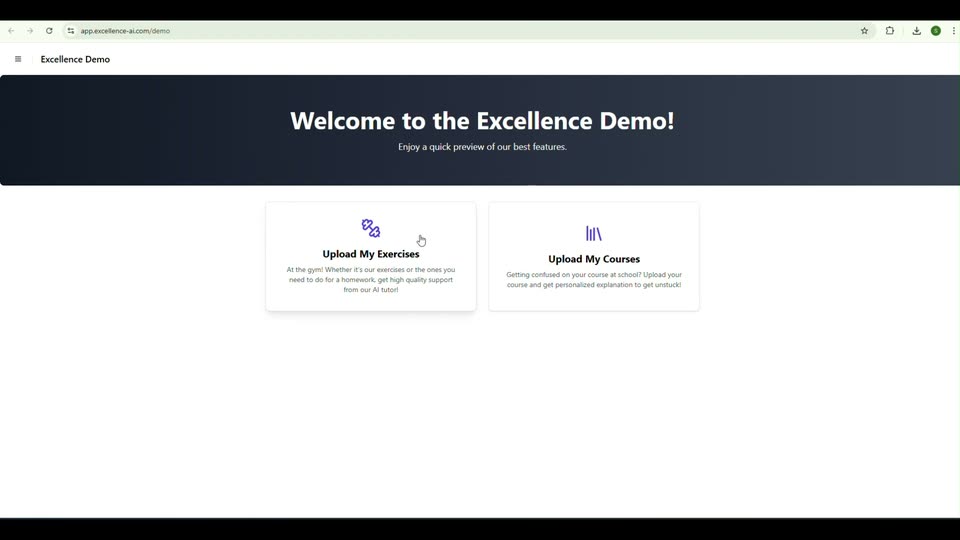
A full browser window displays a demo landing page with a dark welcome banner and two white feature cards. A cursor drifts from the right card to the left one, hovers over it, then the address bar text changes to a homework path.
Techniques: Cursor demo
Camera: Static
03 · Feature reveal · 0:18–0:33
A web app screen displays a math exercise with LaTeX formulas. The cursor hovers over a phone icon and a QR code card pops up with a 'Scan with mobile to upload' caption, then fades out. The cursor clicks the 'Solve this exercise' button top right, and the page transitions.
Techniques: Cursor demo
Camera: Static
04 · Feature reveal · 0:33–0:47
A homework app screen: math exercise on the left, AI chat on the right. The cursor selects a question line, an Explain button pops in and is clicked; the chat scrolls as the model's answer streams in, then a centered modal with three buttons appears over a dimmed screen.
Techniques: Cursor demo
Camera: Static
05 · Feature reveal · 0:47–0:57
A homework web app fills the frame, a math exercise on the left and a chat panel on the right. A cursor glides to the chat header and hovers over the microphone and camera icons, each popping a small tooltip. The view stays static and the pace is slow.
Techniques: Cursor demo
Camera: Static
06 · Outro · 0:57–1:01
A solid black field fills the entire frame and holds static for the full duration. No elements, text, or motion appear; the screen reads as a plain black background or a hold between scenes.
Camera: Static