
1:31
Explore
Decisional Knowledge Engine Teaser
Decisional AI · May 2025 · 0:38 · Code only · AI-annotated
- Length
- 0:38
- Scenes
- 7 · 5.5 s avg
- Product on screen
- 0:00
- Features shown
- 3
- Voiceover
- No
- Views
- 155 on YouTube
as of November 24, 2026
00:00:00 / 00:38:23
- Length
- 0:38
- Scenes
- 7 · 5.5 s avg
- Product on screen
- 0:00
- Features shown
- 3
- Voiceover
- No
- Views
- 155 on YouTube
as of November 24, 2026
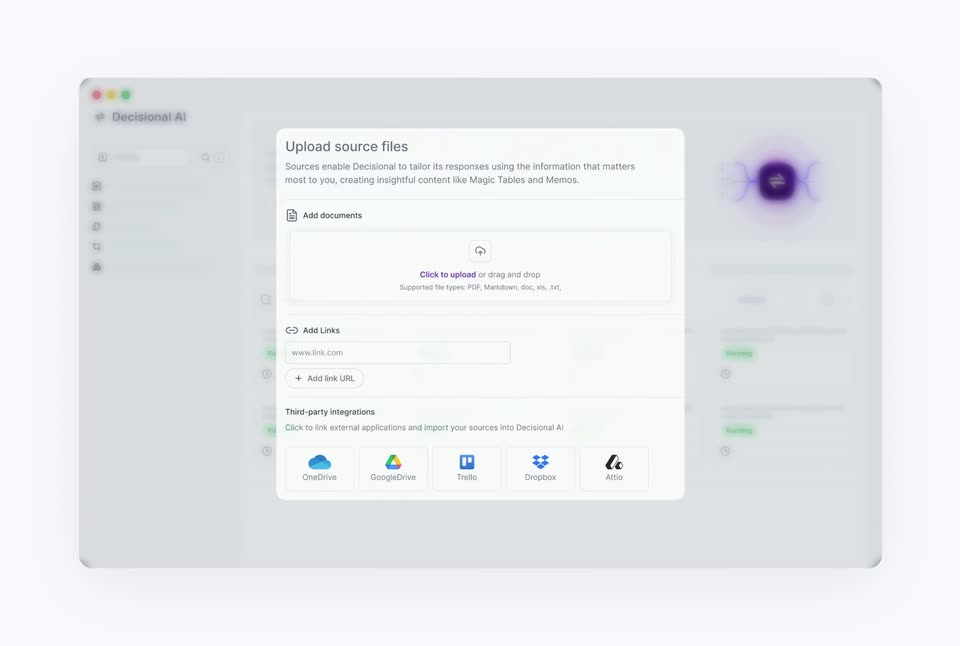
Decisional AI’s 0:38 launch film runs 7 scenes, about 5.5 s each. The product is on screen from the first frame and 3 features are revealed. There is no explicit call to action. The video is a single continuous UI tour inside one flat white app window on a light gray field, driven entirely by a cursor, and the purple swap icon splash bookends it as both intro and outro. Pacing is slow and deliberate, with crossfades, zooms and skeleton loaders carrying the viewer from the upload modal to memo generation and then to table insertion.
No filming indicatedEstimated needs: 5 capture groups — your screens or recordings
Is this your launch? to your site or press kit.
More like this

2:59

Alara Dental - Transforming Dental Supply Purchasing
Alara · B2B · Aug 2025
1:01

Excellence Learning Demo
Excellence Learning · Education · Feb 2025
Decisional Knowledge Engine Teaser, scene by scene
· 7 scenes as text
01 · Product intro · 0:00–0:02
A white browser window centers a purple hub icon linked by lines to small document icons, with a pill button below. A cursor glides down to the button, then the view cuts to a dashboard with a left sidebar and a grid of status cards.
Techniques: Cursor demo
Camera: Static
02 · Feature reveal · 0:02–0:03
A flat browser window of the Decisional AI dashboard sits centered on a light background. A white modal titled Upload source files fades and scales in at the center, dimming the grid of task cards and the purple network graphic behind it.
On-screen text: “8”
Camera: Static
03 · Feature reveal · 0:03–0:05
A white upload-source modal sits sharp over a blurred app window, then the modal fades to translucent as the background interface sharpens and a purple data-room folder with file icons pops in at the center.
Camera: Static
04 · Feature reveal · 0:05–0:17
A product window on a light background: the cursor types a memo prompt, clicks send, and the pane shows Diving Deep steps, a skeleton loader, then a generated memo with a bar chart and citation tooltip. The view zooms out to reveal a second window with the source PDF.
Techniques: Cursor demo, UI zoom
Camera: Static
05 · Feature reveal · 0:17–0:20
A product screen splits into a document viewer with a red citation box and an analysis report with a bar chart. A cursor clicks the close icon; the document fades out to reveal a Sources file list, while the right panel cross-fades into a Decisional AI chat.
Techniques: Cursor demo
Camera: Static
06 · Feature reveal · 0:20–0:36
A desktop app window sits centered on a light gray field, split into a sources list, a document editor and an AI chat panel. A cursor highlights a sentence, opens an Ask AI toolbar, then a suggested prompt fills the chat and the AI replies with a revenue table that scrolls into the document.
Techniques: Cursor demo
Camera: Static
07 · Outro · 0:36–0:38
A flat macOS-style window shows a three-pane app: a sources sidebar, a document with a bar chart and revenue table, and a Decisional AI chat panel. The panes clear to white, leaving a central purple swap icon with lines to small document icons and a pill button below.
Techniques: Cursor demo
Camera: Static