1:01
Explore
Make - Make's AI era is coming. Discover how soon, you’ll be able to transfo
Make · Jun 2023 · 0:31 · AI-annotated
- Length
- 0:31
- Scenes
- 8 · 3.9 s avg
- Product on screen
- 0:00
- Features shown
- 1
- Call to action
- 0:26 · 84%
- Voiceover
- Yes
00:00:00 / 00:31:00
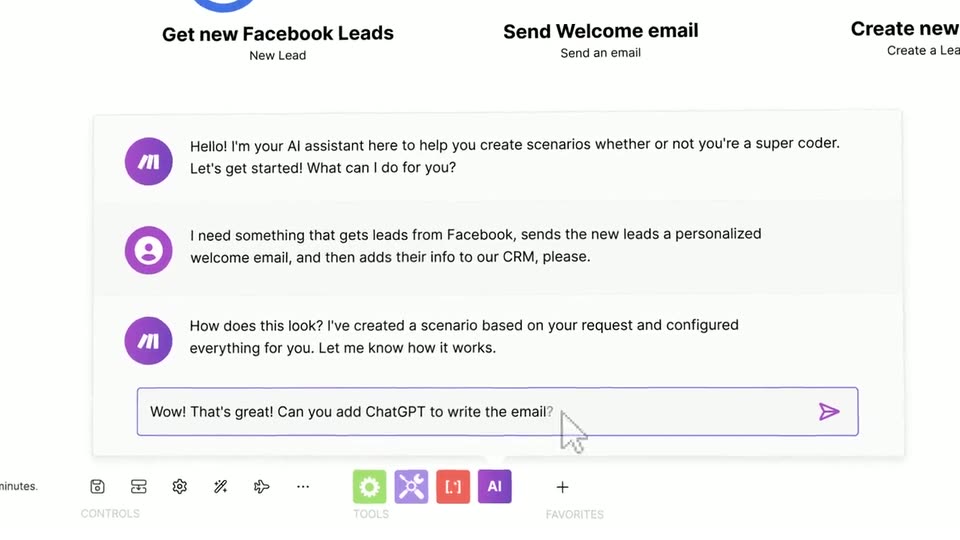
Make’s 0:31 launch film runs 8 scenes, about 3.9 s each. The product is on screen from the first frame and 1 feature is revealed. The call to action lands at 0:26 (84% in), over a voiceover. Bookended by the make logo on a pale field, the video holds one long central beat where a 3D-tilted app mockup and a typed chat prompt build the AI scenario. Signature moves are word-by-word headline builds with soft blur, perspective tilts on the UI, and blur-snap transitions between cards.
No filming indicatedEstimated needs: 1 capture group — your screens or recordings · 1 official logo — reused across the film · 1 3D passage — build or supply
Is this your launch? to your site or press kit.
More like this
0:50

Drafted - Introducing Drafted in Revit. Draw a footprint, add your room list,
Drafted · Consumer · Sep 2026
0:41

Instant - It’s here: Instant Analytics. Your complete analytics intelligence la
Instant Ai · Aug 2026
Make - Make's AI era is coming. Discover how soon, you’ll be able to transfo, scene by scene
· 8 scenes as text
01 · Product intro · 0:00–0:03
On a pale cream background, three slanted bars in a magenta-to-purple gradient scale up and shift left as the black wordmark make draws in letter by letter beside them. The small URL make.com sits static at the bottom center as the logo settles.
On-screen text: “make.com”
Techniques: Kinetic type
Camera: Static
02 · Product intro · 0:03–0:04
The make logo, three pink-to-purple diagonal bars beside the gray wordmark, sits centered on a pale pink field with make.com below. The whole lockup fades out to a blank background over the shot.
On-screen text: “make.com”
Camera: Static
03 · Other · 0:04–0:06
On a plain off-white background, the headline builds up word by word in bold dark navy sans-serif, centered in frame. The camera stays locked off as the line settles into place with a soft drop shadow.
On-screen text: “A new era is near!”
Techniques: Kinetic type
Camera: Static
04 · Demo · 0:06–0:07
A white interface mockup tilts in 3D perspective on a pale backdrop, showing a purple icon sidebar, a central purple plus button, and a bottom toolbar with a run control and tool chips. A locked headline sits over the layout while the mockup eases into place.
On-screen text: “A new era is near!”
Techniques: 3D mockup
Camera: Push in
05 · Feature reveal · 0:07–0:26
A cursor drives the AI assistant: it types a prompt into the chat, sends it, and the view zooms out to the full app, tilting in 3D as the scenario flow grows from two nodes to four.
Techniques: Cursor demo, UI zoom, 3D mockup
Camera: Pull out
06 · CTA · 0:26–0:26
On a plain light gray field, the bold dark headline builds word by word from left to right with a soft blur, then a smaller gray URL fades in below. A tiny legal disclaimer runs along the bottom edge.
On-screen text: “Join the waitlist”, “make.com/join-ai”
Techniques: Kinetic type
Camera: Static
07 · CTA · 0:26–0:29
A bold black headline and a monospace URL sit centered on a light gray field, then the composition blurs and snaps into the make wordmark with a purple gradient icon.
On-screen text: “Join the waitlist now!”, “make.com/join-ai”
Camera: Static
08 · Outro · 0:29–0:31
The Make logo, featuring three slanted purple bars and bold black text, animates into the center of a light gray background. A small disclaimer paragraph sits at the bottom edge.
On-screen text: “make”, “The content of this video is intended to showcase the capabilities of an AI assistant in Make. However, please note that the features and designs depicted in th”
Techniques: Kinetic type
Camera: Static