
0:48
Explore
00:00:00 / 02:40:10
- Length
- 2:40
- Scenes
- 17 · 9.4 s avg
- Product on screen
- 0:00
- Features shown
- 3
- Voiceover
- Yes
- Views
- 1.7K on X
as of November 23, 2026
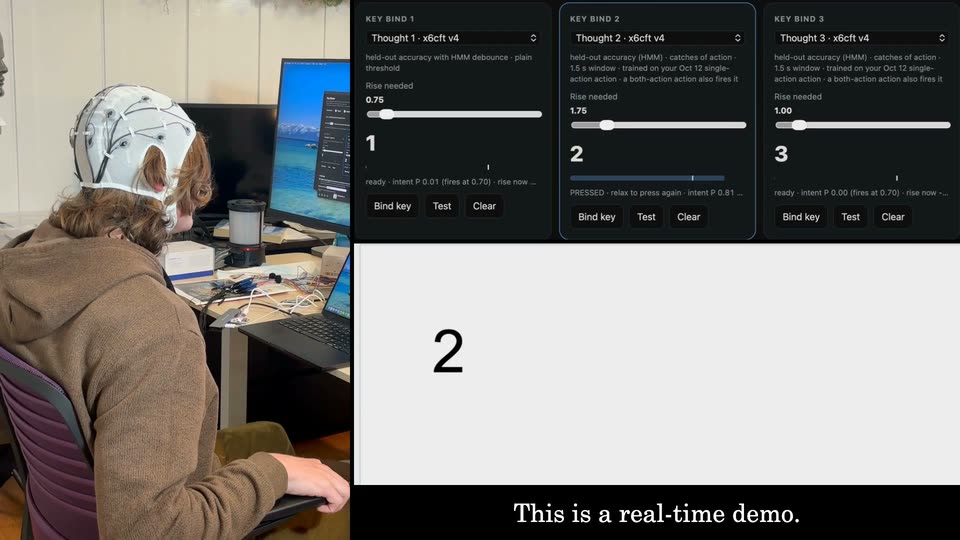
Dydema’s 2:40 launch film runs 17 scenes, about 9.4 s each. The product is on screen from the first frame and 3 features are revealed. There is no explicit call to action; a voiceover carries the film. A single behind-the-scenes take in the founders' lab that opens with handheld whip-pans and then settles into a locked-off split screen pairing live footage of Chris in the EEG cap with the UI his thoughts control. Pacing is conversational and unhurried, and the signature move is the dark agent prompt card floating over the live shot, translating his yes, rethink, and navigate thoughts into on-screen actions from chess to email.
Footage neededEstimated needs: 2 capture groups — your screens or recordings · 1 official logo — reused across the film · 9 filmed passages — shoot, supply or replace
Is this your launch? to your site or press kit.
More like this


Dydema - We've launched!, scene by scene
· 17 scenes as text
01 · Product intro · 0:00–0:08
A man in a brown hoodie and a white electrode cap sits at a cluttered desk, smiling at the camera in a bright lab. A mannequin head on a stand and monitors fill the background. He turns and waves his hand toward the lens as he talks.
On-screen text: “Hey y'all, we're Dydema and we're”, “building personal programmable”, “brain-computer interfaces.”, “So you can choose a thought and it can”, “become an input to any program.”
Camera: Pan
02 · Product intro · 0:08–0:09
A handheld camera whips through a white paneled room, blurring a man in a brown jacket, then snaps to a tight close-up of a blonde man leaning toward the lens. Two people pass by as the shot tracks them.
On-screen text: “become an input to any program.”, “I'm Julian, I'm the CEO.”
Camera: Pull out
03 · Product intro · 0:09–0:10
A close-up of a man's face fills the frame, a colleague in a white sensor cap blurred behind. It cuts to a medium shot of that colleague in a brown hoodie, standing in an office with a mannequin head and desk. White subtitles sit at the bottom.
On-screen text: “I'm Julian, I'm the CEO.”, “And I'm Chris, the CTO.”
Camera: Pan
04 · Product intro · 0:10–0:11
A young man in a white EEG cap and brown hoodie points at his chest and smiles, addressing the camera in a locked-off shot. A mannequin head on a stand and a monitor sit on a cluttered desk behind him. A white caption slides in at the bottom.
On-screen text: “And I'm Chris, the CTO.”
Camera: Static
05 · Feature reveal · 0:11–0:34
Locked-off split screen: left, a man in a white EEG cap sits at a desk; right, a dark key-bind panel over a white text field. He stays still as 2, 3, 1 type themselves in and the intent bars fill.
On-screen text: “And I'm Chris, the CTO.”, “Chris is wearing a 16-channel EEG cap that”, “picks up voltage changes on his scalp.”, “He's learned to imagine three”, “movements, and our model decodes”, “each one into a key press.”, “Let's start with two.”, “Give it some time to warm up.”, “There it is. Oh, no time needed.”, “Three. This is a real-time demo. Perfect. One. Perfect. Wonderful. Now let's go to something else.”
Techniques: Split screen
Camera: Static
06 · Feature reveal · 0:34–1:08
Split screen: the left half zooms from a desktop window to a full green chess board; the right half shows a man in a white EEG cap talking in a room. A dark panel above him types a move suggestion with three buttons. The board updates as moves are played.
On-screen text: “Now let's go to something else.”, “a numerical interface.”, “We were just playing around”, “with computer use earlier today.”, “Yeah. So let's play some chess.”, “Yeah.”, “Now we've hooked up a computer use agent.”, “It reads the screen and suggests”, “an action, up in that box.”, “Okay. Chris answers with the same three thoughts: yes, rethink, or navigate to another app. Yeah, I like that move. Hmm.”
Techniques: Split screen, UI zoom, Cursor demo
Camera: Push in
07 · Feature reveal · 1:08–1:37
Split screen: a green chess board on the left, a dark move-suggestion panel top right, and a person in a white EEG cap at a desk bottom right. The white knight slides to c3 while the panel swaps its buttons, and white serif subtitles caption the dialogue.
On-screen text: “Yeah, okay, I'll go for that.”, “The model waits until it's”, “choice can take a few seconds.”, “There it is. Nice.”, “You know, I did send you an email, though.”, “Do you think you could respond to that?”, “Yeah, I'll respond to your email.”, “Maybe navigate over to the email.”, “Yep. That's, there it is.”
Techniques: Split screen
Camera: Pull out
08 · Feature reveal · 1:37–1:41
A Gmail inbox on the left zooms in on the message list as a cursor hovers one row, while the right side pairs a dark agent prompt panel with a profile shot of a person wearing a white mesh headband. A bottom caption appears.
On-screen text: “And now, let's tell”
Techniques: Split screen, UI zoom, Cursor demo
Camera: Pull out
09 · Feature reveal · 1:41–1:53
Split screen: a Gmail inbox list on the left with a cursor over the launch video row, a dark agent prompt card top right, and live footage below of a person in a white BCI headset speaking; a dog's head pokes into frame mid-clip.
On-screen text: “And now, let's tell”, “the agent to find your email.”, “Yep. It's pretty important to respond”, “to your co-founder's emails, I think.”, “I'd agree. I'd agree.”
Techniques: Split screen
Camera: Static
10 · Feature reveal · 1:53–1:56
A split screen pairs a Gmail inbox on the left, with a cursor resting on a row, and an AI prompt card top right, against a live shot bottom right of a person in a white BCI headband turning their head as the camera pans.
Techniques: Split screen, Cursor demo
Camera: Static
11 · Feature reveal · 1:56–2:07
Split screen: left, a Gmail inbox types a from:julian search, filters the list and opens the launch email; right, a person in a white BCI cap sits at a desk under a dark card narrating the screen with Yes, Rethink, Navigate buttons; the live shot cuts from close-up to wide.
On-screen text: “There it is. Okay.”, “There's the email.”, “So what's it suggesting I do next?”
Techniques: Split screen, Cursor demo
Camera: Static
12 · Feature reveal · 2:07–2:15
A Gmail email fills the left half while a person in a white BCI head cap sits at a desk on the right. A status panel above updates with the BCI's next action, and serif subtitles caption the reply as the shot cuts to a side profile.
On-screen text: “Oh.”, “Yeah, are you excited?”, “Yeah.”, “Alright, let's see.”, “Nervous, but mostly”
Techniques: Split screen
Camera: Static
13 · Feature reveal · 2:15–2:25
Split screen: an email from Julian Weaver on the left, a man in a white mesh cap talking on the right beneath a dark suggestion panel. The suggested reply swaps to a drink invitation, the Rethink button turns into Stop, and a reply box appears.
On-screen text: “Nervous, but mostly excited on the long road.”, “Hmm.”, “That's better. I had to rethink that one.”, “I am perfectly down to grab”
Techniques: Split screen, Cursor demo
Camera: Static
14 · Feature reveal · 2:25–2:28
Split screen: an email client on the left types a reply word by word, while a man in an EEG cap is filmed in profile on the right. A dark instruction card sits above the video, and white subtitles run along a black bar at the bottom.
On-screen text: “a drink with you after we launch.”, “Yep,”
Techniques: Split screen
Camera: Static
15 · Feature reveal · 2:28–2:35
Split screen: left shows an email thread where a reply types out and sends; right stacks a dark voice-prompt box over live footage of a person in a wired headband at a desk. Subtitles caption the bottom bar.
On-screen text: “You're reading Julian's email asking if you're excited about launching Dydema.”, “Reply to Julian: 'Can't wait! Let's grab a drink to celebrate after'...”, “Yep,”, “Are you sure?”, “Clicking Send”, “there it is. All right.”, “Yeah. Let's send that.”, “Perfect. Perfect.”, “There it is. Ah, it's so cool.”
Techniques: Split screen
Camera: Static
16 · Feature reveal · 2:35–2:37
A person wearing a white EEG cap with visible wires sits at a desk with an open laptop, smiling and giving a thumbs-up. White paneled walls and a window fill the background. The camera drifts slightly as they gesture.
On-screen text: “There it is. Ah, it's so cool.”
Camera: Pull out
17 · Outro · 2:37–2:40
On a black field, the DYDEMA wordmark and triangular icon fade up from dim gray to bright white, with the URL DYDEMA.COM set below. The centered lockup then holds still.
On-screen text: “DYDEMA.COM”
Camera: Static