1:50

The New Descript: A Better Way to Create Video, From Start to Finish
Descript · Design · Nov 2022
Posthog · Nov 2026 · 0:48 · AI-annotated
Posthog’s 0:48 launch film runs 18 scenes, about 2.7 s each. The product is on screen from the first frame and 7 features are revealed. There is no explicit call to action; a voiceover carries the film. A Mario-style pixel gag introduces the product, then a single Stripe connection is walked step by step over UI screenshots, each step announced by a bottom caption with a shifting yellow highlight. The pacing is quick and even around 129 BPM, built on pixel cursor clicks, sliding panels, split wipes, and zoom-ins.
Is this your launch? to your site or press kit.
Descript · Design · Nov 2022
Anthropic · AI · Nov 2026
A pixel-art close-up of a blue brick world pulls back to reveal a white stage where a white pixel cursor clicks a left lever, sliding a blue bar with the PostHog logo into the center. A caption with a shifting yellow highlight sits along the bottom.
On-screen text: “Who needs a goofy little plumber”, “PostHog Sources”
Techniques: UI zoom, Cursor demo
Camera: Static
On a plain light background, a pixel-art hand cursor grabs the left joystick and drags it right, pulling the blue pipe and the right joystick along with it. The PostHog logo and label slide out, an elephant icon fades in at top left, and the bottom caption swaps from one phrase to the next.
On-screen text: “Who needs a goofy little plumber”, “in overalls”, “when you've got PostHog Sources.”
Camera: Static
A pixel-art blue pipe jitters across a white field, popping a black DATA label at its mouth. A blue elephant icon holds the left while the PostHog Sources logo and wordmark drift horizontally. A white outlined caption stays locked at the bottom.
On-screen text: “PostHog Sources”, “when you've got PostHog Sources.”, “DATA”
Camera: Static
Pixel-art pipe labeled PostHog Sources stretches between an elephant icon and a control box on white, a hand cursor flipping a red lever. The camera pans right, then pulls back to reveal the full chain ending in a blue hexagon, while bottom captions swap with the voiceover.
On-screen text: “when you've got PostHog Sources.”, “Making it easier than ever to”, “pipe”, “your data from anywhere to,”, “anywhere.”
Techniques: Cursor demo
Camera: Pan
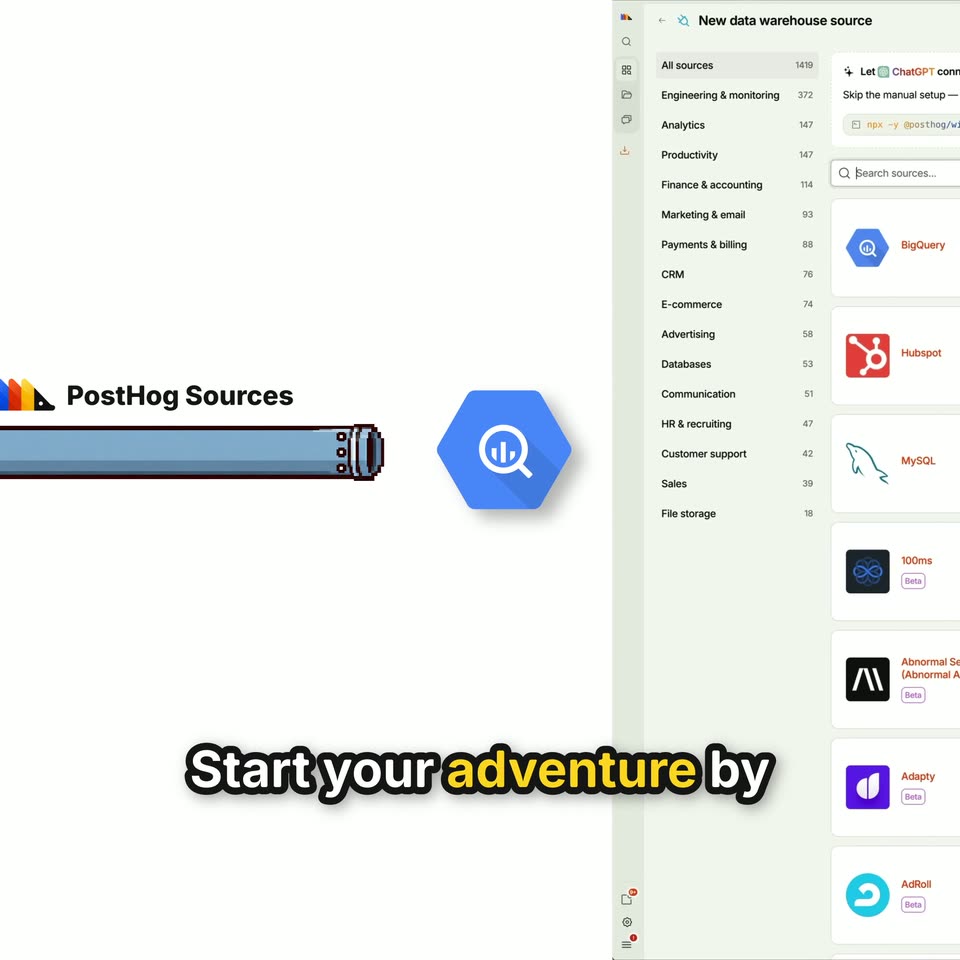
A flat cartoon pipeline, a blue elephant, a blue pipe labeled PostHog Sources and a blue search hexagon, slides left across a white field while the bold caption stays locked at the bottom. The slide reveals the product's data-warehouse screen, with its sidebar and source cards, on the right.
On-screen text: “Start your adventure by”, “anywhere.”
Camera: Pan
Two offset copies of the PostHog source browser slide together into one full-screen view. The frame zooms into the grid of integration cards as a pixelated cursor pops in on the right. Cartoon captions read 'Start your adventure by choosing from 1400 sources.' then 'Like Stripe!'
On-screen text: “Start your adventure by”, “choosing from 1400 sources.”, “Like Stripe!”
Techniques: UI zoom, Cursor demo
Camera: Push in
A grid of integration logos fills the screen as a pixel cursor moves across it and yellow sparkles pop in. A cartoon wizard in a blue starry hat pops in, waves, then shrinks to the left as a connect dialog appears.
On-screen text: “Like Stripe!”, “Then use PostHog's wizard”, “to auto-detect your databases”
Techniques: Cursor demo
Camera: Push in
A white UI card with a Claude connect prompt and terminal command sits on a light gray field. Below, a bold white caption with black outline reads 'to auto-detect your databases' as a yellow highlight jumps word to word and a yellow underline draws under the card's body copy.
On-screen text: “to auto-detect your databases”
Camera: Static
A white dashed-border card with the Cursor wizard prompt and an npx command sits on a cream field while a pixel-art cursor glides in from the right over the command line. The card shifts down as a second card stacks above it, and the bottom caption swaps from “and APIs.” to “Or connect using an API token.”
On-screen text: “and APIs.”, “Or connect using an API token”
Techniques: Kinetic type, Cursor demo
Camera: Static
A tight crop of a connection form shows a pixelated white cursor clicking the Authentication type dropdown, which expands to list two options. A bold outlined caption at the bottom swaps from a token line to an OAuth line.
On-screen text: “Or connect using an API token”, “or OAuth”
Techniques: Cursor demo
Camera: Static
Close-up of a settings form with an open authentication dropdown and a pixel cursor. A vertical split wipes in a second screen on the right showing a Stripe syncs table, while a caption sits at the bottom.
On-screen text: “or OAuth.”, “Next, choose schemas”
Techniques: Split screen
Camera: Pan
The PostHog Schemas table fills the frame; a pixelated cursor flips toggles on the Charge, Customer and Invoice rows. The view zooms into the sync-method column, where a badge changes from Webhook to Append only, then a destinations panel slides in from the right. Bottom captions swap phrase by phrase.
On-screen text: “Next, choose what schemas”, “you wanna sync,”, “like customers,”, “and invoices,”, “and customize the sync method”, “for each.”, “Finally, select the destinations”
Techniques: Kinetic type, Cursor demo, UI zoom
Camera: Pan
A pixelated cursor clicks the New destination button on the PostHog destinations page; a modal opens over the dimmed interface listing warehouse types, and the cursor moves down the list. Bold bottom captions track the voiceover.
On-screen text: “Finally, select the destination”, “you wanna pipe your data to.”, “Choose from PostHog Warehouse,”, “Postgres,”, “BigQuery, and more.”
Techniques: Cursor demo, Kinetic type
Camera: Pan
A white 'New destination' modal listing database types floats over a blurred dashboard, a pixel-art hand pointing at the BigQuery row. The card flips through stacked copies as the yellow caption scales up and a pixel-art robot head appears at the top.
On-screen text: “BigQuery, and more.”
Techniques: Cursor demo
Camera: Pull out
A pixel-art blue creature sits above a Stripe syncs table that fills with rows and scrolls upward. Bold caption text pops in phrase by phrase at the bottom, highlighting one keyword in yellow each time.
On-screen text: “Then track each schema's status,”, “and destinations.”, “We keep the copy up to date”, “and handle schema changes,”
Techniques: Kinetic type
Camera: Static
Over a blurred spreadsheet, pixel-art database icons sit at the top and left. Bold gray labels scale in at center in time with the voiceover, while a rounded caption at the bottom highlights each spoken word in yellow. A small product window scales up at the end.
On-screen text: “and handle schema changes,”, “SCHEMA CHANGES”, “SYNCS”, “incremental syncs, retries,”, “RETRIES”, “and rate limits.”, “RATE LIMITS”, “Query the synced data”, “in your warehouse,”
Techniques: Kinetic type
Camera: Static
The PostHog dashboard zooms into the question input as a query is typed, a pixel cursor clicks the send button, and the interface blurs. White outlined captions run along the bottom.
On-screen text: “in your warehouse,”, “if you're using PostHog Warehouse,”, “just ask PostHog AI.”
Techniques: UI zoom, Cursor demo
Camera: Pan
Over a blurred dashboard, a gray headline assembles word by word in the center while bold outlined captions swap in at the bottom. A small pixel drill hangs at the top as the PostHog logo appears.
On-screen text: “fully managed ELT tool”, “A fully managed ELT tool”, “inside PostHog.”, “You pick the destination,”, “we'll handle the plumbing.”
Techniques: Kinetic type
Camera: Static