0:56

Lottielab - Introducing Magic Animator beta 3.0✨ Prompt and edit animations in F
Lottielab · Jun 2026
Descript’s 0:52 launch film runs 30 scenes, about 1.8 s each. The product is on screen from the first frame and 2 features are revealed. There is no explicit call to action; a voiceover carries the film. Built as three feature beats, each opened by a bold white headline typed on a flat orange field and followed by fast cuts between UI close-ups and the presenter on a bright orange set. Signature moves are the blue highlight box stepping word by word across the transcript in sync with the voice, hard cuts to typed text cards, and the closing logo assembly.
Is this your launch? to your site or press kit.
Lottielab · Jun 2026
Fish Audio · Sep 2026
Films whose music sounds like this one, voice left out
CloudCruise · Modern electronic
Topaz Labs · Upbeat pop-funk and electronic dance music
Adobe · Latin Electronic / Latin House
A white Record dialog sits centered on a light gray field. A black cursor glides in from the right and lands on the Camera thumbnail, which gains a blue selection ring as its label darkens.
Techniques: Cursor demo
Camera: Static
A close-up of a recording panel with the Camera tab active. A black cursor glides down from the upper right and lands on the blue Record to script button, which darkens as it is pressed.
Techniques: Cursor demo
Camera: Static
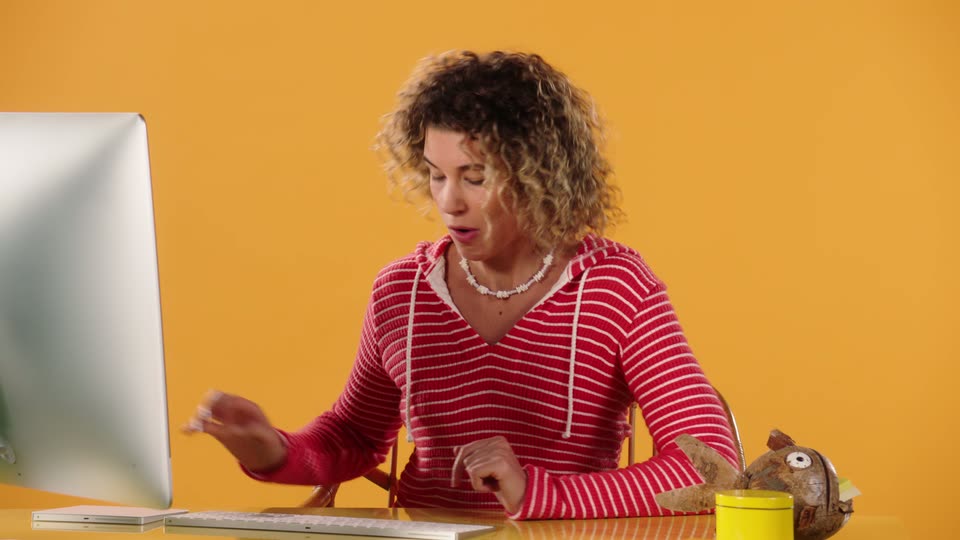
A woman sits at a yellow desk with a silver iMac against a plain orange backdrop. The shot begins dark and underexposed, then brightens to full color as she turns from the screen to face the camera and speaks. Static wide framing, subject on the right third.
Camera: Static
A document editor fills the frame in two panels: a transcript on the left where blue highlights jump to each spoken word as the text grows, and a video of a curly-haired woman on an orange backdrop on the right. The frame is locked off.
Techniques: Kinetic type
Camera: Static
A line of black text scrolls left across a white background while a blue rounded rectangle stays put and highlights the word passing through it, from 'but' to 'through' to 'soul.'
On-screen text: “through the waves, but also through your very soul.”
Techniques: Kinetic type
Camera: Static
Close-up of a white keyboard on a yellow desk, a manicured hand tapping the lower keys. A caption slides in over the static frame.
On-screen text: “through your very soul.”
Techniques: Kinetic type
Camera: Static
Over the shoulder of a person in a red striped hoodie, an iMac against an orange wall shows a video editor. A center preview plays the same woman speaking while a blue highlight box steps word by word through the left transcript panel in sync with her voice.
Camera: Static
A curly-haired woman in a red striped hoodie sits at a desk with a silver all-in-one computer against an orange wall, gesturing while she talks. The frame cuts to a black card showing the white title Edit Recordings.
On-screen text: “Edit Recordings”
Camera: Static
On a flat orange background, white bold sans-serif text reads 'Edit Recordings' on the top line. The second line types out 'Like You Edit Text' character by character, ending with a thin vertical cursor.
On-screen text: “Edit Recordings”, “Like You Edit Text”
Techniques: Kinetic type
Camera: Static
A white background holds a transcript layout: the blue name Willa sits left of two gray quote lines about surfing. The text fades in from faint to full opacity, with the final line settling slightly larger.
On-screen text: “Edit Recordings”, “Like You Edit Text”, “Willa”, “The thing I love about surfing is it never stops challenging you.”, “It's a journey through the waves but also through your very soul.”
Techniques: Kinetic type
Camera: Static
Two hands reach a closed white laptop on a yellow surface, then a hard cut lands on a white text card. The name Willa sits left in blue while a quote types out, a blue highlight box flashes around the last line, and a text cursor blinks.
On-screen text: “Willa”, “The thing I love about surfing is it never stops challenging you.”, “It's a journey through the waves but also through your very soul.”
Techniques: Kinetic type
Camera: Static
Extreme close-up of two fingers typing on a white laptop keyboard. A quote attributed to Willa appears over the shot, line by line, the final line scaling in.
On-screen text: “Willa”, “The thing I love about surfing”, “is it never stops challenging you.”, “It's a journey through the waves”, “but also through your very soul.”
Techniques: Kinetic type
Camera: Static
A plain text view on an off-white background. A blue name label sits left of a two-line quote, while a second paragraph below is wrapped in a light blue selection box with I-beam carets. Over the clip the greyed second line is removed and the highlight settles on the first line.
On-screen text: “Willa”, “The thing I love about surfing”, “is it never stops challenging you.”, “It's a journey through the waves”, “but also through your very soul.”
Camera: Static
A locked-off close-up of a hand typing on a white keyboard on a yellow surface, fingers striking keys with motion blur. Static quote captions and a speaker name sit on the frame.
On-screen text: “Willa”, “The thing I love about surfing”, “is it never stops challenging you.”, “It's a journey through the waves”
Camera: Static
On a white document view, a blue Willa label sits left of a sentence about surfing, with a gray suggestion in a light blue field below. The field's phrase slides into the sentence, the lines reflow, and the caret jumps forward.
Techniques: Kinetic type
Camera: Static
A hand types on a white keyboard resting on a yellow desk. The fingers press the spacebar and adjacent keys in a steady rhythm, captured in a tight close-up with a shallow depth of field.
Camera: Static
A static off-white card shows the name Willa in blue on the left and a three-line quote in black. A blue rounded highlight box glides across the quote, marking each word in sync with the voiceover.
On-screen text: “Willa”, “The thing I love about surfing”, “is it's a journey through the waves,”, “it never stops challenging you.”
Camera: Static
A curly-haired woman in a red striped sweater sits at a yellow desk with a silver iMac on a plain orange set. She faces the screen, then turns to the side and gestures with both hands while speaking.
On-screen text: “Willa”, “The thing I love about surfing”, “is it's a journey through the waves,”, “it never stops challenging you.”
Camera: Static
A warm orange gradient fills the frame. The white headline “Make It” holds at the left while the line “Even Better” fades in beneath it, forming a two-line title that then stays static.
On-screen text: “Make It”, “Even Better”
Techniques: Kinetic type
Camera: Static
A curly-haired woman in a red striped hoodie sits at a desk with a silver iMac and keyboard, shrugging and throwing her arms wide as she speaks against a flat orange wall. The words Make It and Even Better hold still on the frame.
On-screen text: “Make It”, “Even Better”
Camera: Static
A cursor taps a highlighted icon in the editor's top bar, and the view pushes in on the opening Media panel. A dimmed editor sits behind a left list of sources and a grid of surfing photos and clips.
Techniques: Cursor demo, UI zoom
Camera: Push in
A media library panel with a grid of surfing photos sits over the page. It clears, and four small clips fill the thumbnail slots beside the four lines of body text.
Camera: Static
A curly-haired woman holds a pouty expression against a flat orange backdrop, while a white settings card titled Green screen floats on the right with a green color dot and a Feather value. A small paintbrush icon rotates in the gap between them.
On-screen text: “Willa”, “The thing I love”, “about surfing is”, “it's a journey through the waves,”, “it never stops challenging you.”
Camera: Static
A curly-haired woman faces the camera on the left against a green backdrop, while a white settings panel with a dropdown, an orange color dot and a feather value sits on the right. A small pill-shaped toggle floats in the green area. The frame holds still.
Camera: Static
A white slider panel with rows for Black point, Saturation, Vibrance, Temp., Tint, Sharpness and Noise redux floats over a blurred landscape. A black arrow cursor drags the Tint slider right, its value jumping from 0 to 3, while the background shifts from green to blue.
Techniques: Cursor demo
Camera: Static
A blurred ocean with a distant surfer fills the locked-off frame. A tilted cyan banner with a blue inner panel and a selection box of white corner dots and a vertical cursor slides in, holding the title.
On-screen text: “RIPTIDE REPORT”
Camera: Static
A curly-haired person in a red striped hoodie sits at a yellow desk facing a silver iMac against an orange wall, smiling and gesturing at the screen. The shot is locked off as large text slides across the frame.
On-screen text: “RIPTIDE REPORT”
Techniques: Kinetic type
Camera: Static
The video editor window sits over a surfing backdrop. The left panel shows four caption lines with thumbnails; the right preview plays surf clips while the playhead moves along the timeline. The window slides left and shrinks, revealing footage of a woman in a red striped top holding a surfboard.
Techniques: Masking
Camera: Static
A curly-haired woman in a red striped hoodie sits at a desk on an orange set, talking and gesturing at a silver all-in-one computer. The shot cuts to a plain white field where a small blue leaf shape pops in near the center.
Camera: Static
On a white background, scattered blue fragments slide and rotate into a stacked-bar logo mark, then the wordmark descript is typed letter by letter behind a thin caret, and the lockup holds.
Techniques: Morph, Kinetic type
Camera: Static