0:48
Playground - Welcome to the new Playground Use AI to design logos, t-shirts, soci
Playground · Sep 2024
Cua’s 0:33 launch film runs 12 scenes, about 2.8 s each. The product shows up at 0:05 and 3 features are revealed. The call to action lands at 0:27 (81% in). The video opens on a one-line promise, then walks through three features in sequence, each pairing a 3D UI mockup with a typed caption, and closes on a single CTA card. Its signature moves are the ring of drifting keycaps framing every shot, slow camera pulls that reveal grids of screens, and a final grid shatter into cubes.
Is this your launch? to your site or press kit.
Films whose music sounds like this one, voice left out
Make · Lo-fi hip-hop
Cognition · Lo-fi hip-hop
Mistral AI · Lo-fi hip-hop, jazz
A ring of 3D keyboard keycaps drifts on a black starfield, mostly cream with one blue, one red and one dark-blue cap. Centered white text reads the first line, then a second line appears below it.
On-screen text: “We built the Space”, “we wanted our agents to use.”
Techniques: 3D mockup
Camera: Pull out
A ring of floating 3D keyboard keys orbits a black void. A cream tablet screen scales in at the center, showing an inbox list beside an invoice card, while the Teleport wordmark fades in below.
On-screen text: “We built the Space”, “we wanted our agents to use.”
Techniques: 3D mockup
Camera: Static
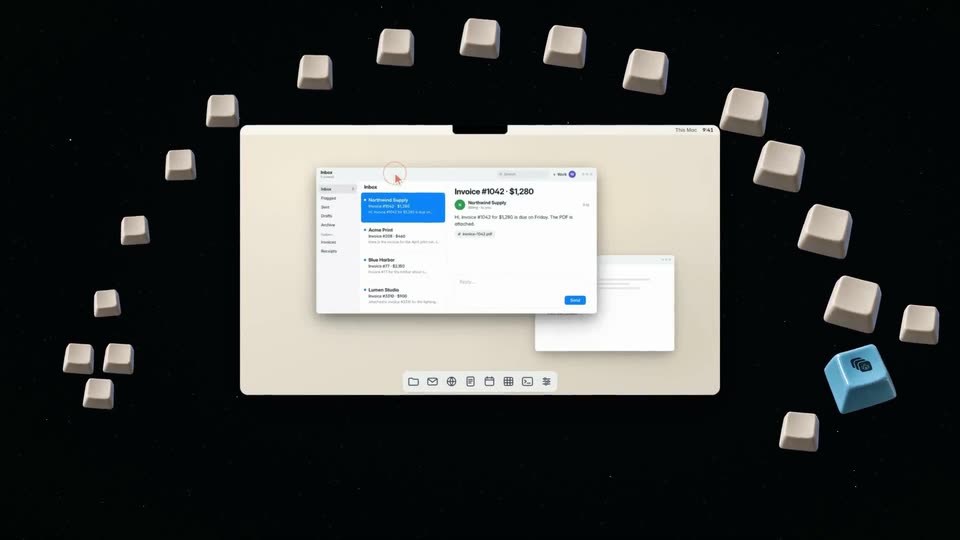
A 3D Mac desktop floats in a black starfield, ringed by floating keycaps. An email window with an invoice card collapses into a thumbnail at the top, then re-expands, while the 'Teleport any app' tagline holds below.
On-screen text: “Teleport any app”
Techniques: 3D mockup, Morph
Camera: Static
A macOS email window floats centered in black space, framed by a ring of small 3D keycaps that orbit around it. A blue cube icon and the tagline Teleport any app sit below the window. The window stays still while the cubes rotate.
On-screen text: “Teleport any app”
Techniques: 3D mockup
Camera: Static
A tilted browser window floats over a black starfield, flanked by 3D keyboard keys. Inside, a cursor picks seat 12A on the flight checkout page and the summary updates, then clicks Book flight as a spinner loads. White text types in below.
On-screen text: “Go multiplayer”, “Go multiplayer with your agents”
Techniques: 3D mockup, Cursor demo, Kinetic type
Camera: Static
A tilted browser window with a flight booking confirmation floats in a black starfield, ringed by scattered 3D keyboard keys in white, blue and brown that drift in space. A white tagline reads below the window.
On-screen text: “Go multiplayer with your agents”
Techniques: 3D mockup
Camera: Static
A 3D keyboard of cream keycaps frames a floating app window of computer thumbnails. A cursor clicks New, opens a dialog, selects Linux box and Create, spawning a Test runner tile. A white two-line caption fades in below.
On-screen text: “Turn spare computers”, “into infinite desktops”
Techniques: 3D mockup, Cursor demo
Camera: Static
A 3D mockup of a desktop app on a cream slab floats in a grid of keycaps over a black starfield. The keycaps drift and the app view resolves into a wall of document thumbnails while the headline holds still below.
On-screen text: “Turn spare computers”, “into infinite desktops”
Techniques: 3D mockup
Camera: Static
A grid of small screens on black tilts in 3D perspective around a central dark control panel. The camera rotates to a flat frontal view as a cursor moves through the panel. A white headline, 'Turn spare computers into infinite desktops,' fades out.
On-screen text: “Turn spare computers”, “into infinite desktops”
Techniques: 3D mockup, Cursor demo
Camera: Pull out
A wall of small white interface cards on a black void recedes as the camera pulls back, the central dark app mockup on a light base shrinking toward the middle.
Techniques: 3D mockup
Camera: Pull out
A flat grid of pale document cards on black holds a dark three-panel interface at center. The center drops into a black void and the grid shatters into 3D cubes tumbling outward toward the camera.
Techniques: 3D mockup
Camera: Static
3D keycaps in cream, blue, and rust drift around a black starfield. The tagline 'A free Space for every agent.' fades in at center, followed by the Cua Spaces logo, a white 'Download for Mac' pill, and spaces.cua.ai, then the frame fades to black.
On-screen text: “A free Space”, “for every agent.”, “Cua Spaces”, “Download for Mac”, “spaces.cua.ai”
Techniques: 3D mockup
Camera: Push in