0:33
Best SaaS Product Launch Ad Video | LangEase
LangEase · Jun 2025
NotebookLM · Mar 2026 · 0:33 · AI-annotated
NotebookLM’s 0:33 launch film runs 15 scenes, about 2.3 s each. The product shows up at 0:12 and 1 feature is revealed. The call to action lands at 0:28 (83% in), over a voiceover. The video is built as a from-to arc: flat whiteboard math doodles wipe away to reveal a glowing 3D wireframe landscape, which then resolves into the NotebookLM mark and URL. Pacing is steady at about seven cuts per minute, with slow camera pushes, a left-to-right panel wipe for the transformation, and gradient-tinted keywords held in a fixed bottom caption bar.
Is this your launch? to your site or press kit.
A tilted grid of pastel feature cards sits in 3D perspective on a white background. The camera pushes in toward the green Video Overview card as a glowing teal outline lights up around it, isolating it from the surrounding labels.
Techniques: 3D mockup, UI zoom
Camera: Push in
A static whiteboard illustration fills the frame: a black-and-white space thumbnail on the left, a sketched curve, an Einstein doodle and curly-brace symbols on the right. A lavender bar at the bottom fades in with the caption 'From visualizing your information...'.
On-screen text: “From visualizing your information...”
Camera: Static
A locked-off hand-drawn illustration on white: a dashed panel of arrows, gears and three small line graphs on the left; a large curved arrow, spirals and a magnifying glass around a parabola graph on the right. A bottom caption bar reads “From visualizing your information...” with “visualizing” in gradient.
On-screen text: “From visualizing your information...”
Camera: Static
A hand-drawn math sketch on a pale background redraws itself: gears and small line graphs on the left become a hatched triangle and a shaded region under a curve, while a parabola plot with tick marks stays on the right. A bottom caption bar updates from one line to another.
On-screen text: “From visualizing your information...”, “The Area Problem: How do we find the area of the shaded region?”
Techniques: Morph
Camera: Static
Locked-off frame of hand-drawn blue ink diagrams on off-white: hatched square and triangle, a curve with shaded area under f(x), a bar chart, a dashed 3D box. A caption highlights 'Area Problem' in yellow; a bottom banner reads 'From visualizing your information...' with a gradient word.
On-screen text: “The Area Problem: How do we find the area of the shaded region?”, “From visualizing your information...”
Camera: Static
A white panel of hand-drawn math sketches and the highlighted question slides left, opening a dark panel where multicolored contour lines ripple like a landscape map. A gray caption bar at the bottom swaps “From visualizing your information...” for “to”.
On-screen text: “The Area Problem: How do we find the area of the shaded region?”, “From visualizing your information...”, “to”
Techniques: Masking
Camera: Pan
A split screen shows a math diagram beside a colorful wireframe landscape. The left panel disappears to reveal the full landscape as the bottom caption completes.
On-screen text: “to immersing yourself in it.”
Techniques: Split screen, Kinetic type
Camera: Push in
A multicolored wireframe mesh of rolling hills undulates on a dark, misty background, the lines shifting like a topographic map. A black bar at the bottom holds the caption, with the word immersing tinted green.
On-screen text: “to immersing yourself in it.”
Camera: Push in
A dark 3D wireframe terrain of multicolored grid lines undulates like mountains, with mist drifting above. The camera glides over the peaks while a bottom caption reads “to immersing yourself in it.”, then swaps to “Introducing Cinematic Video Overviews.”
On-screen text: “to immersing yourself in it.”, “Introducing Cinematic Video Overviews.”
Techniques: Parallax
Camera: Push in
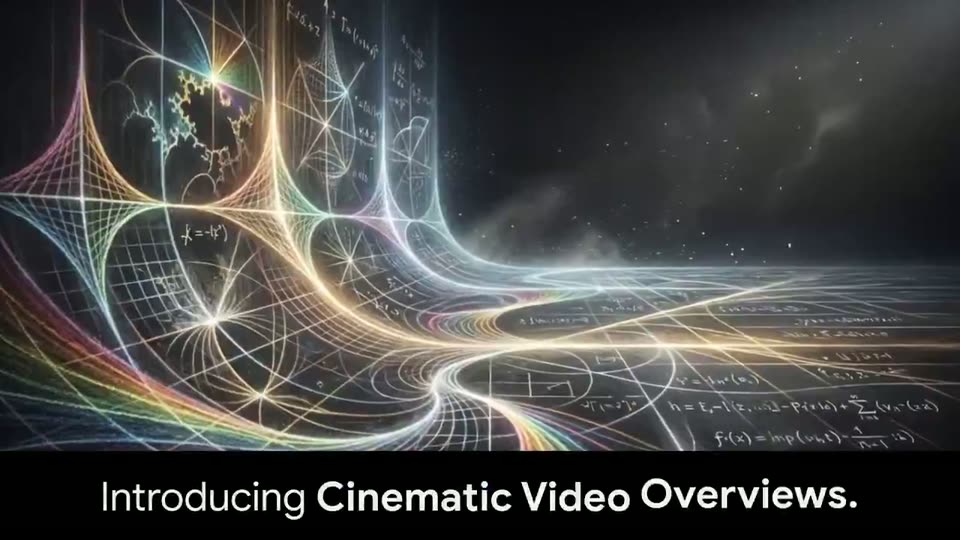
A slow forward drift through a dark 3D landscape of glowing rainbow wireframe curves and floating handwritten equations, with mist and star specks in the distance. A black band along the bottom holds the caption while the word “Cinematic” shifts from green to blue.
On-screen text: “Introducing Cinematic Video Overviews.”
Techniques: Parallax
Camera: Push in
A black gridded plane cracks apart in 3D, chunks and dust tumbling into the gap while a stream of particles rises from the chasm. A caption band at the bottom holds the first line, then swaps to the second.
On-screen text: “Introducing Cinematic Video Overviews.”, “Bring your research to life.”
Techniques: Particles
Camera: Static
A line chart plots mass ratio against speed, the blue curve climbing toward a dashed line marked Speed of Light (c). A gray 3D sphere drifts left to right, swelling as it nears the line, then the chart fades out, leaving only the tagline.
On-screen text: “Bring your research to life.”
Camera: Static
A glowing white dot slides along a blue damped-wave curve on a dark chalkboard graph, moving from the left trough to the flat right end. A purple dashed line fades in across the curve's midsection. A static caption sits on a black bar below.
On-screen text: “Bring your research to life.”
Camera: Static
A gray graph of a light blue damped curve with a white dot sits above a two-tone caption; the frame cuts to a white field with a soft blue-green gradient as a black arc logo draws in at center.
On-screen text: “Bring your research to life.”
Techniques: Masking
Camera: Static
The black NotebookLM arch mark sits centered on white, over a soft pastel gradient glow at the bottom, as the wordmark fades in from light gray to black. Below, the URL notebooklm.google fades in left to right with a blue tint, then settles to black and holds.
On-screen text: “NotebookLM”, “notebooklm.google”
Techniques: Kinetic type
Camera: Static