1:00

Ramp - 98% of companies don't have a procurement team. The ones that do are
Ramp · Finance · Apr 2026
Phantom · May 2023 · 0:48 · AI-annotated
Phantom’s 0:48 launch film runs 36 scenes, about 1.3 s each. The product shows up at 0:27 and 6 features are revealed. The call to action lands at 0:45 (94% in). The video is built as a rapid cut-down of word-by-word text cards on black or violet, each paired with a 3D phone, wallet or UI mockup that demos one feature at a time, with the product name held back until the middle. Its signature move is the centered lowercase sans headline that types or scales in while abstract 3D shapes and drifting discs orbit it, all cut to a fast 129 bpm pulse.
Is this your launch? to your site or press kit.
Ramp · Finance · Apr 2026
Google · AI · Nov 2010
On a black background, the word how sits in white lowercase sans. The words it and started then enter to the right, completing the phrase how it started.
On-screen text: “how”, “how it started”
Techniques: Kinetic type
Camera: Static
A MetaMask account-list window floats in 3D on a pale background as a second window tilts in beside it showing OpenSea collection cards, under a static caption reading how it started.
On-screen text: “how it started”
Techniques: 3D mockup
Camera: Static
Two MetaMask window mockups slide in from opposite edges onto a white background and settle side by side. The left panel lists accounts with checkboxes; the right panel shows a collection tree with thumbnail cards, each casting a soft drop shadow.
Techniques: Split screen
Camera: Static
Three MetaMask browser windows sit side by side on a white field. The right panel's gas-fee details sharpen from a blurred, doubled state into crisp text, while the left account list and middle collection tree hold still.
Techniques: Split screen
Camera: Static
Purple pill-shaped particles radiate from the center as white text “time to level up” builds word by word, two purple clock hands forming a V behind it. It cuts to a large serif “and”, then to the orange Switch pill, its fox icon and the word “switch” typing in.
On-screen text: “time to level up”, “and”, “switch”
Techniques: Kinetic type, Particles
Camera: Push in
A flat purple pill with a white smiley bubble logo morphs into a 3D purple device standing upright on black. The device rotates slowly while the words upgrade your appear in white on either side of it.
On-screen text: “switch”, “upgrade your”
Techniques: Morph, 3D mockup, Kinetic type
Camera: Static
A 3D phone mockup spins in the center of a black frame, its screen flipping from white to dark blue around a chat-bubble logo. The static text upgrade your sits left while wallet fades in on the right as the phone passes in front.
On-screen text: “upgrade your”, “wallet”
Techniques: 3D mockup
Camera: Static
A purple 3D wallet mockup with floating spheres, rings and a pixel cube spins inside a black circle on a violet background. The white headline slides in word by word across the center of the frame.
On-screen text: “a home for your NFTs”
Techniques: Kinetic type, 3D mockup
Camera: Static
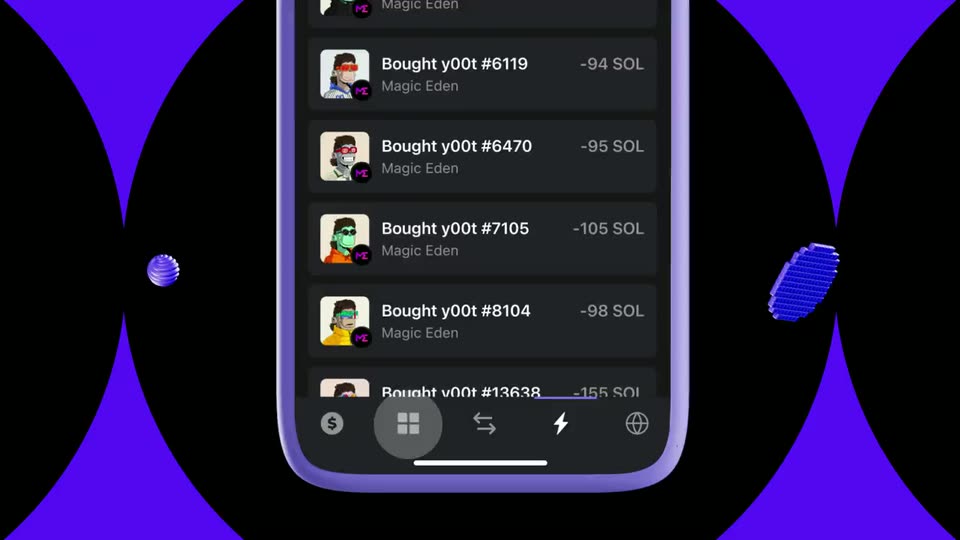
A purple phone mockup eases from a slanted close-up to upright as its screen switches from a SOL transaction list to a grid of NFT collectibles, while two blue 3D shapes drift at the edges.
On-screen text: “a home for your NFTs”
Techniques: 3D mockup
Camera: Pull out
A phone mockup on a purple field with black discs; a purple Search pill hovers left as the app's search field types. The screen then switches to the NFT detail page with a creature portrait and price, while 3D spheres and grid discs drift past at different depths.
On-screen text: “Search”
Techniques: Parallax
Camera: Pull out
A dark rounded rectangle holding a faint pixel-art figure sits on a violet field. The word powerful shows as a white outline, fills solid, then tools appears to its right with a thin outlined box trailing it.
On-screen text: “powerful tools”
Techniques: Kinetic type
Camera: Static
A dimmed phone and tablet show the yO0t NFT app, the phone displaying a green ape in sunglasses, behind the white headline “powerful tools”. The headline clears and a glowing purple “Pin it!” tag pops in at the phone's top right as the screens brighten.
On-screen text: “powerful tools”, “Pin it!”
Camera: Static
A purple phone mockup floats in 3D perspective over a dark tablet grid of cards. The phone screen dismisses a context menu to show a collectibles list, then a purple speech bubble with green text pops in at the left edge.
On-screen text: “Pin it!”, “Voilà!”
Techniques: 3D mockup
Camera: Push in
A dark Magic Eden listing panel sits on a purple field, showing the Okay Bear NFT and a 250 SOL price. The view advances to a confirmation state with royalties and a List Now button as a scaling headline reads on Magic Eden for 250 SOL.
On-screen text: “on Magic Eden for 250 SOL”
Techniques: Kinetic type
Camera: Static
A dark wallet card on a black field shows a Magic Eden listing form with a bear NFT and a spinning loader reading Creating listing. The form fades to a centered success state: a green check ring, the heading Listing created, and a View Transaction link.
Camera: Static
A green checkmark badge and a “Listing created!” confirmation panel scale in on a black background. The white headline “stop switching networks” then appears across the center, and the panel fades out, leaving the headline alone on black.
On-screen text: “stop switching networks”
Camera: Static
A locked-off close-up of the MetaMask window shows its network list scrolling upward, rows of names and colored dots sliding past the title bar, beneath the static caption stop switching networks.
On-screen text: “stop switching networks”
Camera: Pan
On a black background, the word one appears as a thin white outline, then fills solid and expands to one wallet as two blue striped 3D shapes drift at the left and right edges.
On-screen text: “one wallet”
Techniques: Kinetic type
Camera: Static
A white rounded bar expands across the top of a black frame as a row of circular app icons shifts and thins out. Below, three small 3D shapes, a striped sphere and two discs, rotate and drift at different depths.
On-screen text: “one wallet”
Techniques: Parallax
Camera: Pull out
On black, white lowercase text reads “for” then scales to “for everything” at center. Abstract 3D shapes, a coiled tube, a blue ellipse, a striped sphere and a pixelated sphere, drift and rotate around the words.
On-screen text: “for”, “for everything”
Techniques: Kinetic type
Camera: Static
A dark crypto wallet screen with an account sidebar; the balance and asset list blur as a white serif word scales in at the center, then dissolves as the interface sharpens again.
On-screen text: “for everything”
Techniques: Kinetic type
Camera: Static
A blurred dark wallet UI sits behind the word “to”, which is replaced by “Phantom” in white bold type, then the wordmark scales up to fill the frame as a white outline on a blue background.
On-screen text: “to”, “Phantom”
Techniques: Kinetic type
Camera: Push in
A 3D purple wallet card with two round buttons and a thin white arch line rotates against a solid purple background. Colorful app cards with rainbow, play and diamond icons fan out behind it. The Phantom wordmark stays fixed on screen.
On-screen text: “Phantom”
Techniques: 3D mockup
Camera: Pull out
A dark crypto wallet card on a violet field shows a purple 'Personalize' callout at the top. The left drawer then slides open, revealing account rows with pixel, flame and robot avatars as 'Emoji avatars' and 'NFT avatars' callouts pop in beside them.
On-screen text: “Personalize”, “Emoji avatars”, “NFT avatars”
Camera: Static
A dark three-row list on a purple field. A purple 'Reorganize' tooltip with a tail floats over the top. The 'Main' row, with a circular avatar, slides down to the middle and fills blue while the flame-icon 'Burner' row rises to the top.
Camera: Static
A black account list with purple side bars holds three rows. A purple bubble reading Reorganize covers the top row, then vanishes as the rows slide upward, the Vault entry scaling as it settles into place.
On-screen text: “Reorganize”
Camera: Static
A blue 3D safe sits on a round pedestal with a teal money bag and gold coin stacks, while coins and green bills float around it. A dark rounded panel fills the upper background on a violet field, and white text “stay secure” wipes in from the left.
On-screen text: “stay secure”
Techniques: 3D mockup, Masking
Camera: Static
A dark wallet approval screen zooms out from a close-up to the full card on a purple dotted background. Purple callout labels, Don't trust! and Details, pop in beside the red warning, and a 3D padlock drops in at the lower left.
On-screen text: “Don't trust!”, “Details”
Techniques: UI zoom
Camera: Pan
On a solid violet field, the white lowercase phrase more control stays centered while three thin black vertical lines run edge to edge. A black rounded pill on each line slides up and down like a fader, the middle one rising and the outer two dropping.
On-screen text: “more control”
Camera: Pull out
A large headline reading more control sits beside a tilted phone floating over a purple abstract background. The phone's app screen opens a context menu; a Hide it! callout appears, the list scrolls, the chosen card folds into a Hidden Collections tile, and a Voilà! callout pops in.
On-screen text: “more control”, “Hide it!”, “Voilà!”
Techniques: 3D mockup
Camera: Static
A dark wallet card floats on a purple field of overlapping circles. It opens as an activity feed with ghosted, overlapping labels, then scales up and crossfades into an account view with a left rail of avatars and a chain list.
Camera: Push in
A dark wallet panel sits over a purple abstract background. An open network list shows Solana, Ethereum and Polygon rows, and the Solana address swaps to a purple “Copied!” label with a checkmark. A left rail lists Main, Burner and Vault avatars.
Techniques: Morph
Camera: Static
A flat purple field carries centered white words, “buy” then “snap,” in bold lowercase. Translucent glass discs and rings tumble through the frame around the text, drifting at different depths.
On-screen text: “buy”, “snap”
Techniques: Kinetic type
Camera: Pull out
On a violet 3D backdrop, translucent cylinders and spheres drift past the frame. The white lowercase word toggle sits centered, then crossfades and scales into multichain as the floating shapes keep moving.
On-screen text: “toggle”, “multichain”
Techniques: Kinetic type
Camera: Pull out
A purple 3D wallet stuffed with colorful cards floats on a violet field while black dots radiate outward. The white caption a wallet you'll love rides over the wallet as the group scales down and slides right, giving way to the scaling word multichain.
On-screen text: “a wallet you'll love”, “multichain”
Techniques: 3D mockup, Parallax
Camera: Push in
A white lowercase wordmark phantom.app sits centered on a black field. A soft white blob covers the trailing letters, then clears and dissolves, leaving the lockup in a static hold.
On-screen text: “phantom.app”
Techniques: Masking
Camera: Static