2:12

Meet DJI Mic 2
DJI · Hardware · Jan 2024
Framer · Apr 2025 · 0:51 · Full motion · AI-annotated
Framer’s 0:51 launch film runs 17 scenes, about 3.0 s each. The product shows up at 0:39 and 5 features are revealed. The call to action lands at 0:46 (91% in). A beat-synced 3D product film: a neon line draws the device in a silent open, then short locked-off beauty shots each carry one captioned feature, before a name and price card, a pre-order card and a logo lockup close it out. The style is defined by a blue rim light on pure black, slow camera moves on hard cuts, and signature moves like the radial shortcut dial, scrolling key bands and a particle ring blooming around the Publish key.
Is this your launch? to your site or press kit.
DJI · Hardware · Jan 2024
Lucid Motors · Apr 2022
NVIDIA · Oct 2026
Films whose music sounds like this one, voice left out
Odyssey · Electronic, Cinematic, Orchestral
Slashy · Modern electronic dance music
Perplexity · Modern electronic, chillwave, lo-fi, and deep house
On black, a thin blue neon line forms a rounded square and glows, then the square resolves into the edge of a hardware device as its face, with two knobs, a pad grid and a wide button, fades in behind the border.
Camera: Static
A close-up, angled view of the corner of a black device with a grid of round buttons and a central stick, outlined by a thin blue light. The camera slowly tracks right, revealing more of the keypad against a pure black background.
Techniques: 3D mockup
Camera: Static
A 3D black control pad with circular keys and a blue Publish key sits at a low angle on a dark reflective surface, its rim glowing blue. The camera holds a locked-off frame while a large numeral scales in over the device.
On-screen text: “7”
Techniques: 3D mockup, Kinetic type
Camera: Static
A close-up 3D render of a dark control keypad with round brushed-metal keys, a joystick and a rotary knob, its edge traced by a thin blue LED line. The frame holds locked-off on the corner of the panel.
Techniques: 3D mockup
Camera: Static
A black square controller with a grid of round keys and a blue Publish key rests on a dark surface, ringed by a blue glow. The camera tilts from a flat front view to a three-quarter top angle, revealing the device's depth and a blue joystick on the left.
Techniques: 3D mockup
Camera: Static
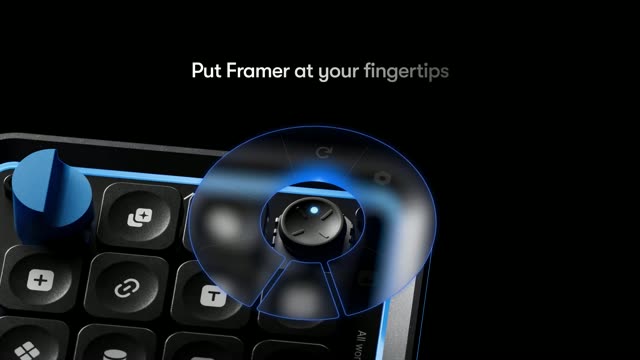
A 3D close-up of a black keyboard corner with round keycaps and a blue knob sits on black. A translucent blue radial dial with small icons fades in over the knob. The white headline fades in above.
On-screen text: “Put Framer at your fingertips”
Techniques: 3D mockup
Camera: Push in
A dark 3D keyboard sits at an angle, its center dial ringed by a glowing blue circle of shortcut icons. A beam of light sweeps around the ring while a white headline at the top crossfades from one line to another.
On-screen text: “Put Framer at your fingertips”, “With shortcuts that are a joy to use”
Techniques: 3D mockup, Light sweep
Camera: Push in
Two curved bands of 3D keys, black and blue, scroll in opposite directions on a black field, a white caption centered between them. The top band carries icon buttons and a blue Publish key; the bottom band mirrors it with a textured white key.
On-screen text: “Customize every action and button”
Techniques: 3D mockup
Camera: Pan
Two curved rows of 3D black button tiles, one blue Publish tile, slide along a band on black. A small white logo and app icons pop in at center, then the caption fades in as the view tightens and the rows flatten.
On-screen text: “Customize every action and button”, “To work with all your favorite apps”
Techniques: 3D mockup
Camera: Pan
A black keyboard with a blue card in its rear slot is rendered in 3D against a dark void. A blue light flares at the side port with tiny sparks, and the caption “Connect to any device” fades in below.
On-screen text: “Connect to any device”
Techniques: 3D mockup, Light sweep, Particles
Camera: Pull out
A dark circular device with a glowing blue ring and a few stacked modules sits centered on black, lit from below. The caption 'Connect to any device' fades in beneath it, holds, then fades out. The camera stays locked-off.
On-screen text: “Connect to any device”
Techniques: 3D mockup
Camera: Static
A black keypad with a button grid sits on a glowing blue oval disc on black, the disc widening as the caption fades in. It cuts to a 3D view of several floating keypads with blue edge lighting ringed around the dark frame.
On-screen text: “No wires needed”
Techniques: 3D mockup
Camera: Push in
Modular keyboard segments with blue edge lighting float in a dark void, rotating into focus around the frame edges. Centered text swaps from “Swap the key layout” to “Make it your own” as the modules reveal their keys.
On-screen text: “Swap the key layout”, “Make it your own”
Techniques: 3D mockup, Kinetic type
Camera: Pull out
A 3D grid of black icon keys recedes into a dark field, a glowing blue Publish key at the center. A ring of blue particles blooms around the key and expands into a wide circle as the key settles smaller in frame.
Techniques: 3D mockup, Particles
Camera: Static
A 3D render of a compact black control pad with a blue knob and glowing blue base sits in a black void as the shot slowly pushes in. The white title “Creator Micro 2” fades in above, then the gray line “Starting at $149” below, before fading to black.
On-screen text: “Creator Micro 2”, “Starting at $149”
Techniques: 3D mockup
Camera: Static
On a black background, the centered phrase Pre-order now fades in with a soft blue glow, then holds still. The frame is locked off and the text remains static.
On-screen text: “Pre-order now”
Camera: Static
A black end card holds the Framer and w+rk luder wordmarks joined by an × mark, centered and static. The lockup fades from dim gray to bright white, then a 'Pre-order now' caption sits as a static call-to-action.
On-screen text: “Pre-order now”
Camera: Static