
0:15
Explore
cardinal demo
Cardinal · Aug 2025 · 0:59 · Full motion · AI-annotated
- Length
- 0:59
- Scenes
- 28 · 2.1 s avg
- Product on screen
- 0:00
- Features shown
- 1
- Voiceover
- No
- Views
- 408 on YouTube
as of November 22, 2026
00:00:00 / 00:59:02
- Length
- 0:59
- Scenes
- 28 · 2.1 s avg
- Product on screen
- 0:00
- Features shown
- 1
- Voiceover
- No
- Views
- 408 on YouTube
as of November 22, 2026
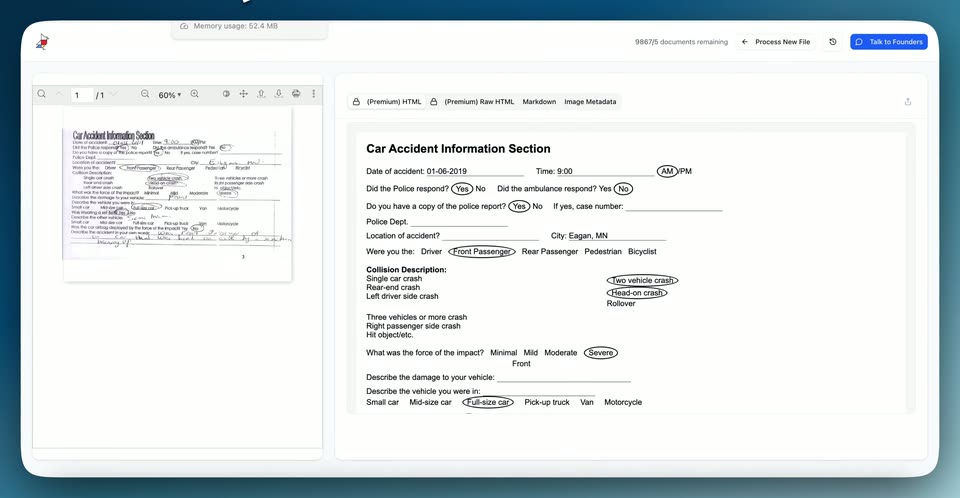
Cardinal’s 0:59 launch film runs 28 scenes, about 2.1 s each. The product is on screen from the first frame and 1 feature is revealed. There is no explicit call to action. A single locked-off screen recording of a two-pane converter that cycles through five scanned documents (accident form, tax return, hardware matrix, medical codes, retail receipt) while a cursor scrolls the panes and toggles the output tabs. Pacing is even and unhurried, and the signature moves are the extracted text settling line by line in the right pane and the scatter burst of fragments when the tool switches to a new document.
No filming indicatedEstimated needs: 6 capture groups — your screens or recordings
Is this your launch? to your site or press kit.
More like this


cardinal demo, scene by scene
· 28 scenes as text
01 · Demo · 0:00–0:03
A document processor splits the screen: a scanned car accident form sits on the left while its structured text version fills the right. The right panel text settles into place and a cursor glides down to the police department line.
Techniques: Split screen, Cursor demo
Camera: Static
02 · Demo · 0:03–0:04
A two-pane document viewer shows a scanned accident form on the left and its extracted text with circled answers on the right. A cursor hovers over the right pane as the text scrolls down a few lines.
Techniques: Cursor demo
Camera: Static
03 · Demo · 0:04–0:05
A two-pane document tool fills the frame, locked off: a scanned accident form on the left and its extracted text on the right, with circled field values. A mouse cursor hovers over the text. The top bar shows a counter and a blue button.
Camera: Static
04 · Demo · 0:05–0:06
A split-screen document viewer shows a scanned handwritten accident form on the left and extracted text with circled answers on the right. A cursor hovers over the right pane while the extracted text scrolls to earlier fields.
Techniques: Split screen
Camera: Static
05 · Demo · 0:06–0:07
A static two-pane interface holds a scanned car accident form on the left beside its extracted text on the right, where selected answers are circled; a mouse cursor rests on the right column.
Camera: Static
06 · Demo · 0:07–0:08
A white app window on a dark blue field shows a split document view: a scanned handwritten car-accident form on the left, a clean digital version with circled answers on the right. A mouse cursor drifts upward along the top edge.
Camera: Static
07 · Feature reveal · 0:08–0:09
A document conversion app shows a scanned accident form on the left and its extracted HTML on the right, with circled field values. The left panel switches to a balance sheet while an Analyzing Your Document dialog with a spinner and progress list appears over the right panel.
Techniques: Split screen
Camera: Static
08 · Feature reveal · 0:09–0:12
A static product interface shows a PDF document on the left and an analysis panel on the right, with a blue sparkle icon, a heading and a three-item progress list. A mouse cursor glides from the top bar down over the right panel.
Techniques: Cursor demo
Camera: Static
09 · Demo · 0:12–0:16
The app interface shows a tax form PDF on the left with a DO NOT FILE watermark and the converted output on the right. A cursor glides down and clicks the HTML tab, swapping the right panel from a markdown list to a table view.
Techniques: Cursor demo
Camera: Static
10 · Demo · 0:16–0:18
A locked-off product window on a blue field shows two panes: a tax-form PDF with a diagonal DO NOT FILE watermark on the left, and a data table on the right that scrolls downward past a hovering cursor.
Camera: Static
11 · Demo · 0:18–0:23
A split screen pairs a PDF tax form page, stamped with a diagonal DO NOT FILE watermark, against the same form as structured text under format tabs. A cursor hovers over the right panel as its text scrolls up.
Techniques: Split screen, Cursor demo
Camera: Static
12 · Demo · 0:23–0:24
A product screen shows a tax form PDF with a red DO NOT FILE stamp on the left and a data table on the right. A cursor hovers over a row as the table scrolls.
Techniques: Cursor demo, Split screen
Camera: Static
13 · Demo · 0:24–0:27
A white app window on blue shows a scanned tax form with a DO NOT FILE watermark beside its clean HTML table. A cursor moves from the table to the format tabs, then a burst of small black text lines about locks and sensors scatters across the right panel.
Techniques: Cursor demo
Camera: Static
14 · Demo · 0:27–0:30
A flat two-pane document tool on a blue backdrop. A cursor taps the HTML tab in the right pane, and a wide hardware-sets table fills the panel, while the left pane keeps a static PDF matrix.
Techniques: Cursor demo
Camera: Static
15 · Demo · 0:30–0:36
A locked-off view of a document app: the left pane holds a rotated scanned room schedule, the right pane the extracted hardware-sets table, a cursor hovers over a cell, then both panes swap to a medical ICD-10 code list.
Techniques: Cursor demo
Camera: Static
16 · Demo · 0:36–0:38
A document processing interface holds still: a scanned medical table on the left and a categorized diagnosis list on the right, while a cursor drifts into the left pane.
Techniques: Cursor demo
Camera: Static
17 · Demo · 0:38–0:45
A document app window on a blue background shows a scanned medical form on the left and a generated table of diagnoses with ICD10 codes on the right. A cursor moves over the table, then hovers the HTML and Markdown tabs as extra rows load.
Techniques: Cursor demo
Camera: Static
18 · Demo · 0:45–0:48
A two-pane interface shows a scanned medical table on the left and the extracted diagnosis list with ICD10 codes on the right. Both panes scroll vertically while a cursor moves across them, under a top toolbar with a document counter.
Techniques: Cursor demo
Camera: Static
19 · Demo · 0:48–0:49
A document-processing interface fills the frame. The left pane shows a blue-tinted scanned table with a cursor hovering over it, while the right pane lists extracted diagnosis and ICD10 codes in columns. A small pointer drifts along the top bar.
Techniques: Cursor demo
Camera: Static
20 · Demo · 0:49–0:50
A split-pane document converter shows a scanned LACOSTE receipt in the left pane and its extracted plain text in the right pane. The screen holds steady while a mouse cursor drifts into the upper area of the text panel.
Techniques: Cursor demo
Camera: Static
21 · Demo · 0:50–0:51
A document-processing window shows a scanned LACOSTE receipt on the left and extracted text on the right. A cursor hovers the HTML tab while the itemized price columns slide into the text panel, completing the layout.
Techniques: Cursor demo
Camera: Static
22 · Demo · 0:51–0:52
A flat application window shows a scanned LACOSTE receipt in the left pane and its extracted text in the right pane. A cursor hovers over the Premium HTML tab while the top bar displays the document count and action buttons.
Techniques: Cursor demo
Camera: Static
23 · Demo · 0:52–0:53
A document-processing interface shows a scanned LACOSTE receipt on the left and extracted invoice text on the right. The right pane scrolls upward while a black cursor hovers over the data. A top bar holds the document count and action buttons.
Techniques: Cursor demo
Camera: Static
24 · Demo · 0:53–0:54
A document-processing interface fills the frame: a scanned Lacoste receipt sits in the left pane under zoom controls, while the right pane lists extracted text under format tabs. The text scrolls upward past a hovering cursor as the top bar holds a document count and action buttons.
Techniques: Cursor demo
Camera: Static
25 · Demo · 0:54–0:55
A two-pane interface shows a scanned LACOSTE receipt on the left and extracted line-item text on the right. The right column scrolls upward beneath a hand cursor while the top bar holds a document count and action buttons.
Techniques: Cursor demo
Camera: Static
26 · Demo · 0:55–0:56
A document processing screen splits into a scanned receipt on the left and extracted text on the right, with a cursor resting on the line items. The frame stays locked as a single text line slides into position.
Techniques: Cursor demo
Camera: Static
27 · Demo · 0:56–0:58
A two-pane document viewer sits on a blue backdrop: a scanned Lacoste receipt on the left, a tabbed text panel on the right. A cursor hovers over the right panel as the text scrolls up, revealing the store address header above the item table.
Techniques: Cursor demo
Camera: Static
28 · Demo · 0:58–0:59
A locked-off view of a document processing interface: a scanned LACOSTE receipt sits in the left pane while the extracted text fills the right pane. A cursor drifts across the top bar.
Techniques: Cursor demo
Camera: Static